
Frigate Squirrel Detection on Raspberry Pi 5 with DEEPX NPU
Frigate squirrel detection on a Raspberry Pi 5 needs a model with a squirrel class; COCO-80 has none. A single-class squirrel model runs as a native Frigate detector on the Sixfab AI HAT+ for Raspberry Pi 5 (DEEPX DX-M1M). Frigate NVR's squirrel events reach a Pi 5 listener that publishes an MQTT sprinkler trigger; no valve is wired yet.
Part of the Raspberry Pi 5 AI projects series.
DEEPX support was merged into Frigate's dev branch on 2026-09-21 (PR #24336). It is not in a stable release yet; the latest stable release is v0.18.0 (2026-09-12). Sixfab develops and maintains DEEPX support in Frigate (Frigate's DEEPX NPU detector docs). The ghcr.io/blakeblackshear/frigate:af0ba19-standard-arm64 image, which the setup page pulls, is built from commit af0ba19 of Frigate's dev branch.
| Field | Value |
|---|---|
| What it does | Detects squirrels in Frigate and publishes an MQTT trigger to squirrel_sprinkler/trigger; no valve is wired |
| Use case | Garden and wildlife |
| Stack | Frigate NVR |
| On the DEEPX NPU | Object detection: a squirrel model compiled to .dxnn (single class Squirrel) |
| On the Pi 5 CPU | Rule logic and MQTT listeners: the MQTT sprinkler listener (publishes triggers and logs them) |
| Camera input | RTSP; the examples use the camera garden (use your own camera name) |
| NPU board | Sixfab AI HAT+ for Raspberry Pi 5 (DEEPX DX-M1M) |
| Difficulty | Intermediate |
| Frigate build | ghcr.io/blakeblackshear/frigate:af0ba19-standard-arm64, built from commit af0ba19 of Frigate's dev branch |
| Model license | AGPL-3.0 (Ultralytics YOLOv8m); two Roboflow datasets under CC BY 4.0. Details in the release notes at https://github.com/sixfab/sixfab-dx-frigate/releases/tag/squirrel-sprinkler-v1.0.0 |
| Tested on | Raspberry Pi 5 (8 GB) with the Sixfab AI HAT+ (DEEPX DX-M1M), Raspberry Pi OS Trixie |
| Status | Tested on Raspberry Pi 5 |
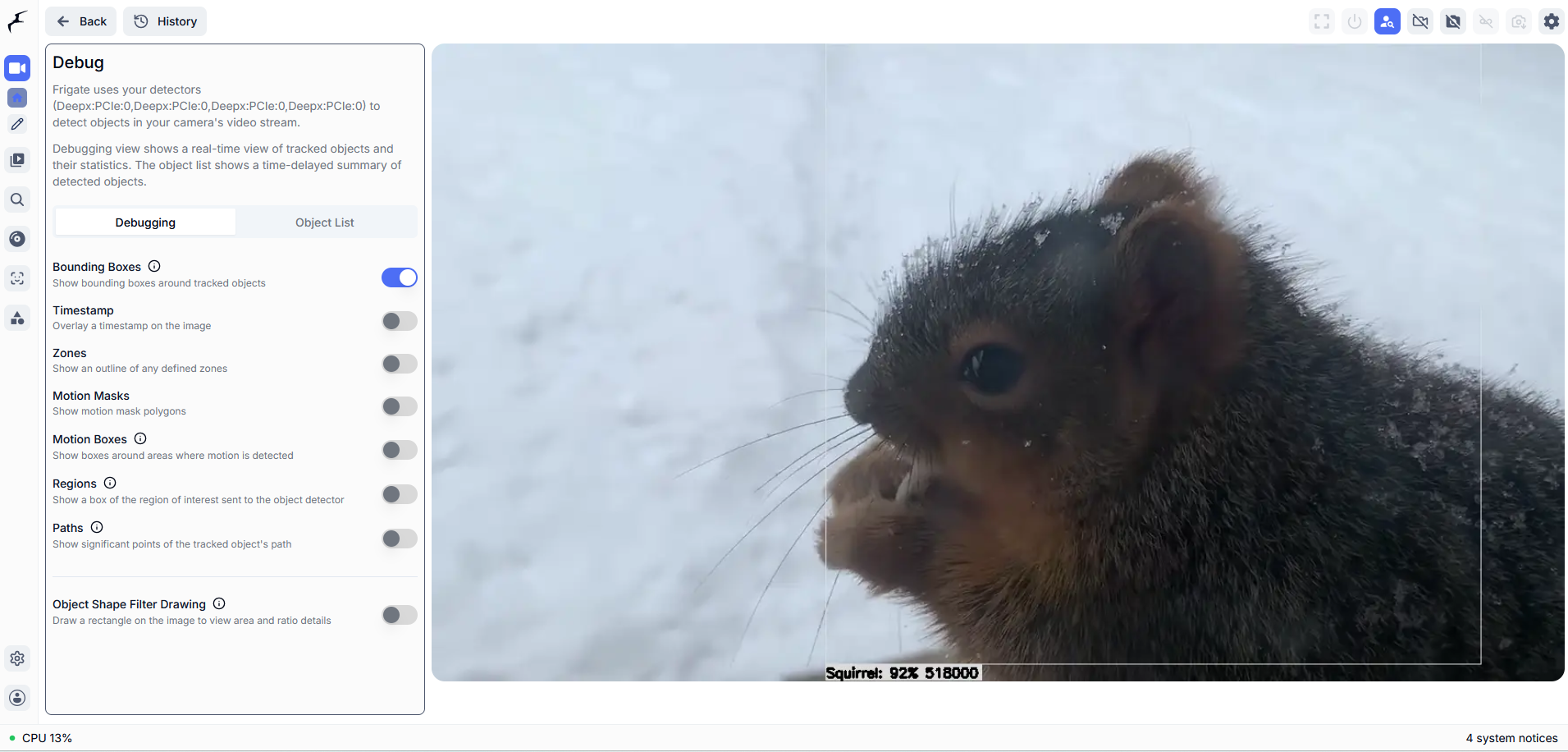
Frigate's debug view draws a box around the squirrel. The label under the box reads Squirrel: 92%, followed by a second number that Frigate's debug overlay adds. Switch on Bounding Boxes in the debug view to watch each detection as it happens and see the detector working before you touch the listener.
What you will build
This guide ends at the squirrel sprinkler trigger: the listener publishes each trigger as an MQTT message, and valve control is not built yet.
Terms used in this guide
- NPU: a neural processing unit, a chip built to run neural-network models. Here it is the DEEPX DX-M1M on the Sixfab AI HAT+.
- Native Frigate detector: Frigate talks to the NPU itself, with no separate app or bridge in between.
- User-level systemd service: a background service that runs under your own user account instead of root, so installing it needs no sudo.
- COCO-80: the 80-class label set the DEEPX Frigate examples use. It includes
personandbirdbut has no squirrel. - Label map: a text file that lists the class names a model can output, one per line.
.dxnn: DEEPX's compiled model format, the file the NPU runs.- DX-RT: the DEEPX runtime that Frigate uses to reach the NPU.
- RTSP: the streaming protocol most IP cameras use.
- MQTT: lightweight publish/subscribe messaging. A broker is the server that passes messages along, and a topic is the named channel a message goes to. Frigate publishes its events to the topic
frigate/events(see Frigate's MQTT docs). - Event: Frigate's record of one tracked object across many frames.
- Confidence score: Frigate's confidence for one detection, from 0 to 1. It is not accuracy.
What the squirrel sprinkler trigger does
This project turns a Frigate squirrel detection into an MQTT trigger for a sprinkler. Squirrels raiding a feeder or a vegetable bed are easy to spot and hard to stop without watching the yard all day, and a DIY squirrel sprinkler needs a trigger first. Here a squirrel-specific model runs on the DEEPX NPU, Frigate tracks each squirrel as an event, and a small listener on the Pi 5 checks each new event against its score and cooldown rules. The listener is where a sprinkler valve would connect.
You will run the squirrel detector inside Frigate, track squirrels on a camera called garden, and run the listener as a user-level systemd service. The other builds in the series are listed on the Raspberry Pi 5 AI projects hub.
How the trigger flows from camera to listener
A squirrel detection reaches the listener in six steps.
- An RTSP feed reaches Frigate as the camera
garden. - Frigate's DEEPX NPU detector runs the squirrel
.dxnnmodel on the NPU. - Frigate tracks each squirrel as an event with the label
Squirrel. - Frigate publishes the event to the MQTT broker on the topic
frigate/events. - The listener, a user-level systemd service on the Pi 5, receives it.
- The listener's trigger function publishes a JSON trigger to
squirrel_sprinkler/triggerand logs a line. A relay and valve would connect here later.

mosquitto_sub on the trigger topic prints one JSON message with the camera name, the score and a timestamp. This is the message a relay or valve would act on.
Sprinkler valve: not built yet
Valve control is not part of this build. The trigger function is where relay control will go, and the host (the Pi 5, another edge computer or a microcontroller) is undecided. This guide gives no wiring, voltages or part numbers because no valve has been tested. Once you add one, keep spray away from paths, doors and neighbors' property, because false positives on live outdoor footage are not measured. Check your local water-use rules before you automate a sprinkler.
Can Frigate detect squirrels?
Yes, Frigate can detect squirrels if its detector model has a squirrel class. The COCO-80 label map that the Boss Detector project uses has 80 lines and no squirrel entry, so a COCO-80 detector cannot report one. The model this project installs, squirrel-detector-model.dxnn, is a single-class squirrel detector, and its label map holds one line, Squirrel. Frigate's DEEPX NPU detector docs on the dev branch describe the .dxnn detector settings.
| Model | Label map lines | Squirrel class |
|---|---|---|
| COCO-80 detector (Boss Detector) | 80 | No |
squirrel-detector-model.dxnn (this project) | 1 | Yes, Squirrel |
How is Frigate squirrel detection different from a motion-activated sprinkler?
The squirrel build on this page acts on a Frigate detection from a squirrel-class model and adds an event record: each tracked squirrel is a Frigate event, and each event is published over MQTT, where the listener or any other MQTT client can act on it. The build has no false-positive data from live outdoor footage, and it does not spray. No motion-activated sprinkler for squirrels was tested for this guide, so this page makes no claim about how one performs.
Requirements
You need Frigate with the DEEPX detector and the DX-RT runtime running on your Raspberry Pi 5 before you start. Setup is covered once, on the Frigate setup page for the DEEPX NPU.
Work through these pages in order:
- Sixfab AI HAT+ Quickstart
- Frigate NVR on Raspberry Pi 5 with the DEEPX NPU
- Camera Feeds and MQTT for Frigate Projects
- Optional: DIY Raspberry Pi Bird Camera: Species ID in Frigate NVR, which can share the same Frigate instance
Hardware
| Item | Details |
|---|---|
| Raspberry Pi 5 | Host for Frigate and the listener |
| NPU | The Sixfab AI HAT+ (DEEPX DX-M1M) on the Pi 5. Tested on this board |
| Camera feed | Any RTSP camera or stream, rtsp://<stream-host>:8554/<stream-path> |
| MQTT broker | Mosquitto on <broker-host>, port 1883 |
| Relay and valve | Not part of this build |
Software
| Item | Details |
|---|---|
| Frigate with the DEEPX detector, DX-RT | Running, as set up on the Frigate setup page |
| MQTT broker | Set up as described in the MQTT broker and camera feed setup guide |
| Installer and listener | The project folder in https://github.com/sixfab/sixfab-dx-frigate |
| Model | squirrel-detector-model.dxnn, a ready-compiled model downloaded from the project's GitHub release |
| Tools | git, curl, sha256sum and ffprobe (from ffmpeg); mosquitto_sub for the Verify step |
| Python | python3 with venv; the installer adds paho-mqtt |
Install
The install adds the squirrel camera and model to your running Frigate and starts the listener. Run these steps on the Raspberry Pi 5.
Quick install
The install script sets up the detector, the camera and the listener.
git clone https://github.com/sixfab/sixfab-dx-frigate.git
cd sixfab-dx-frigate/apps/squirrel-sprinkler
./install.sh --rtsp-url <rtsp-url> --broker <broker-host>--rtsp-urlis the RTSP stream of your camera, written into thegardencamera in your Frigate config.--brokeris the MQTT broker host the listener connects to.- The installer asks for anything you leave out, and asks before it restarts Frigate. Add
--yesto skip that question.
The installer downloads the model file from the project's GitHub release and checks its SHA-256 before it installs it. It needs git, curl and sha256sum. It finds your Frigate container (frigate by default) and config directory itself; pass --container or --config-dir if yours differ.
Manual install
The manual route runs the same steps as the installer, one at a time.
-
Make sure Frigate is running with the DEEPX detector. The one
docker runcommand for Frigate is in the guide to set up Frigate with the DEEPX NPU; this page does not repeat it. Use the same<frigate-config-dir>and<frigate-media-dir>you set there. -
Clone the repository and open the project folder. The installer calls the merge script in the shared
toolkitfolder, so keep the whole clone.
git clone https://github.com/sixfab/sixfab-dx-frigate.git <repo-dir>
cd <repo-dir>/<project-path>- Download the model from the project's GitHub release and check it. Use the repository address without a trailing
.gitin the download URL.
curl -fL -o model/squirrel-detector-model.dxnn https://github.com/sixfab/sixfab-dx-frigate/releases/download/squirrel-sprinkler-v1.0.0/squirrel-detector-model.dxnn
awk '$1 !~ /^#/ && NF {print $3 "  " $2}' models.txt | sha256sum -c -
Expected output: model/squirrel-detector-model.dxnn: OK.
- Run the installer from the project folder with your values. The installer is safe to re-run. It reads the config directory from the Frigate container's
/configmount; setCONFIG_DIRorCONTAINERonly if yours differ.
RTSP_URL=<rtsp-url> BROKER=<broker-host> ./install.sh-
Answer
ywhen the installer asks to restart Frigate, or setASSUME_YES=1to skip the question. To restart Frigate yourself, rundocker restart frigate. -
Run this once. Linger lets a user-level systemd service start at boot without a login.
sudo loginctl enable-linger $USER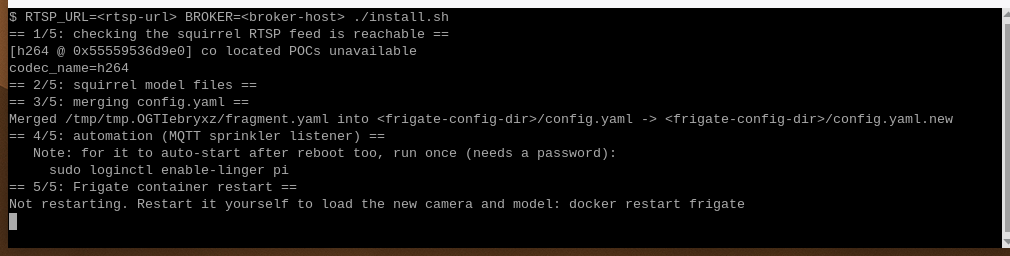
The installer prints one header per stage, from == 1/5: checking the squirrel RTSP feed is reachable == to == 5/5: Frigate container restart ==, and ends with Install complete.
What the installer changes
The installer runs five stages:
- Checks that your RTSP stream is reachable with
ffprobe, and stops if it is not. - Copies the model and label map into
model_cacheunder your Frigate config directory. - Backs up
config.yaml, then merges the project's camera and model into it, with your RTSP URL, without touching other cameras or global settings. - Installs the MQTT listener as a user-level systemd service, which needs no sudo. The installed copy of
sprinkler.pycarries your broker address, and the service file points at your home directory. - Asks, then restarts the Frigate container.
Detection settings
These are the camera and model settings the installer merges into your Frigate config.yaml. The installer replaces the RTSP path with your --rtsp-url:
models:
  - scene: outdoor
    model_type: yolo-generic
    width: 640
    height: 640
    path: /config/model_cache/squirrel-detector-model.dxnn
    labelmap_path: /config/model_cache/squirrel-only-labelmap.txt
    devices:
      - deepx:PCIe:0

cameras:
  garden:
    ffmpeg:
      inputs:
        - path: rtsp://<stream-host>:8554/<stream-path>
          roles:
            - detect
            - record
    detect:
      enabled: true
      width: 1280
      height: 720
      scene: outdoor
    objects:
      track:
        - Squirrel
      filters:
        Squirrel:
          min_score: 0.35
          threshold: 0.5
The scene: outdoor value ties the garden camera to this model, so another project's camera can keep its own model in the same Frigate instance.
The MQTT sprinkler listener
The listener decides which Frigate events become a sprinkler trigger. It runs as squirrel-sprinkler-automation.service, subscribes to frigate/events on the broker and applies these rules, defined at the top of automation/sprinkler.py:
| Setting | Value |
|---|---|
| Topic | frigate/events |
| Label filter | Squirrel |
| Event type | Only the first new event for each event ID |
| Minimum score | 0.6, read from top_score, falling back to score |
| Cooldown | 30 seconds per camera |
| Broker | BROKER and PORT constants (port 1883) |
The installer writes your <broker-host> into the BROKER constant of the installed copy of sprinkler.py. It installs that copy, with its own venv, under ~/sixfab-apps/squirrel-sprinkler, the folder the installer creates.
Verify
Two checks confirm the build: Frigate lists squirrel events for the garden camera, and the trigger topic receives a message. The browser reaches Frigate only through the authenticated port 8971, and API checks run inside the container.
docker exec frigate curl -s 'http://localhost:5000/api/events?camera=garden&limit=10'The response lists recent events for the garden camera as JSON. Detected squirrels appear with the label Squirrel.
mosquitto_sub -h <broker-host> -t squirrel_sprinkler/trigger -vEach accepted trigger publishes one JSON message, at most one per camera every 30 seconds. The values below are illustrative, not captured output:
squirrel_sprinkler/trigger {"camera": "garden", "score": 0.89, "timestamp": 1791267003.452578}If nothing arrives, check the service with systemctl --user status squirrel-sprinkler-automation.service -l. It should report active (running), and at start the listener logs Connected to broker (<broker-host>:1883), listening on frigate/events. Each trigger also writes a log line, SPRINKLER TRIGGER camera=garden score=<score> (simulated for now). Open https://<pi-ip>:8971 and select the garden camera to see the detections in Frigate. Use your own camera name if it differs.
What confidence scores does the squirrel model get in Frigate?
No confidence scores have been measured across a test set for the shipped squirrel model. The debug-view and mosquitto_sub screenshots on this page are single frames, not a measurement: the debug view shows one detection at 92%, and one trigger message carries a score of 0.89. The repository holds no log of confidence scores, false-positive rates, inference time or skipped frames for squirrel-detector-model.dxnn, so this guide gives no further figures. The thresholds you can tune are min_score and threshold for Squirrel in Detection settings, and the listener's own minimum score of 0.6.
Limitations
- No relay or valve is connected. The listener publishes and logs each trigger, and the valve host is undecided.
- Detection accuracy, false positives under real lighting, angles and backgrounds, inference time and skipped frames are not measured for the shipped model. Test with your own camera before you rely on it.
- No night, low-light or rain results exist.
- Training a custom model is not covered in this guide.
- The listener ignores events with a score below 0.6, even though the Frigate filter tracks squirrels from 0.35 up. Detections that score between those values may appear in Frigate without triggering.
- The installer places the listener in
~/sixfab-apps/squirrel-sprinkler; the folder name is fixed by the installer. To change the trigger rules, editautomation/sprinkler.pyin the repository and run./install.shagain. The installer overwrites the installed copy, so edits made directly to~/sixfab-apps/squirrel-sprinkler/sprinkler.pyare lost. - The listener starts after a reboot only after you run
sudo loginctl enable-linger $USERonce. - The listener connects to the broker on port 1883 without credentials or TLS, so any device that can publish to the broker could send it a fake
frigate/eventsmessage. - Frigate chooses the DX-RT version its DEEPX detector uses. The tested build pins DX-RT v3.4.0, and this page cannot change it.
- If the DX-RT daemon (the DEEPX runtime) restarts, restart the Frigate container too.
- Squirrel detection was set up with Frigate in Docker. Home Assistant OS and the Frigate add-on were not tested.
Privacy
A garden camera can record people. Aim the camera at your own garden, away from neighbors' windows and public sidewalks. The garden camera input carries the detect and record roles. If recording is enabled in your Frigate config, Frigate stores recordings under your media directory, <frigate-media-dir>, under its own retention settings. Detection runs locally on the Raspberry Pi 5. Frigate downloads the DX-RT Python bindings once at first start, and again when a release pins a new version, so the first start needs internet access.
Troubleshooting
Frigate reports too many false squirrels
Raise min_score and threshold for Squirrel in Detection settings. If that is not enough, train a custom model.
The listener does not start after a reboot
Run sudo loginctl enable-linger $USER once.
Detections stop after the DX-RT daemon restarts
Restart the Frigate container with docker restart frigate. The Frigate setup page's Troubleshooting section covers this failure.
The installer stops at "cannot read" the RTSP URL
Step 1 of the installer probes the RTSP URL you passed. Start your stream or correct the URL, then re-run the installer.
The installer says the Frigate container was not found
Start Frigate first, or pass --container with your container name (CONTAINER when running install.sh directly).
A squirrel appears in Frigate but nothing arrives on squirrel_sprinkler/trigger
squirrel_sprinkler/triggerThe listener needs a new event for the Squirrel label with a score of at least 0.6, and it waits 30 seconds between triggers per camera. Check the service with systemctl --user status squirrel-sprinkler-automation.service -l.
If none of these fixes works, ask in the Sixfab Community forum.
FAQ
Which object detection model has a squirrel class?
This project's model, squirrel-detector-model.dxnn, has one: it is a single-class squirrel model whose label map holds only Squirrel. COCO-80 has no squirrel entry, so Frigate can detect squirrels only with a model that has a squirrel class. The model's license and details are in the release notes at https://github.com/sixfab/sixfab-dx-frigate/releases/tag/squirrel-sprinkler-v1.0.0.
Does the squirrel sprinkler actually spray water?
Not yet. The listener receives Frigate's squirrel events over MQTT and publishes a trigger to squirrel_sprinkler/trigger when an event passes its score and cooldown rules. No relay or solenoid valve is connected.
How do I trigger a sprinkler from Frigate over MQTT?
Run a listener that subscribes to frigate/events and calls a trigger function when the label is Squirrel. In this project, the listener is a user-level systemd service with a 0.6 minimum score and a 30-second cooldown, and it only publishes and logs the trigger.
How do I make a sprinkler turn on only for squirrels, not people or pets?
Act only on Frigate events labeled Squirrel. This project's model has one class, Squirrel, and its listener filters on that label; no valve is wired yet, so the result is an MQTT trigger. False positives on live outdoor footage are not measured, so test with your own camera before you rely on it.
Where do I add relay or valve control to the squirrel sprinkler code?
Add relay or valve control in the trigger_sprinkler() function of automation/sprinkler.py in the repository, then re-run ./install.sh. The installed copy is ~/sixfab-apps/squirrel-sprinkler/sprinkler.py. The function currently only publishes a trigger to squirrel_sprinkler/trigger and logs a line. Its comment suggests driving a relay pin with GPIO or sending a request to a relay HAT's REST or MQTT interface.
How accurate is Frigate squirrel detection with this model?
Accuracy has not been measured for the shipped model. This guide has no confidence-score, false-positive or timing figures for it. Treat first results as a test, and tune min_score and threshold for your camera.
How do I stop false squirrel triggers in Frigate?
Raise min_score and threshold for Squirrel in the Frigate config first. The listener adds its own minimum score of 0.6. If that is not enough, train a custom model; this guide does not cover training.
Does squirrel detection work at night?
Not tested. This guide has no night, low-light or rain results.
Can squirrel detection share one Frigate instance and NPU with another project?
Yes, with a caveat. The installer merges its own camera and model into the existing config.yaml instead of overwriting it.
Next steps and related projects
- Raspberry Pi 5 AI projects (hub)
- Frigate NVR on Raspberry Pi 5 with the DEEPX NPU
- Camera Feeds and MQTT for Frigate Projects
- DIY Raspberry Pi Bird Camera: Species ID in Frigate NVR
- Frigate package detection with a custom model
- Sixfab AI HAT+ Quickstart and Sixfab AI HAT+ specifications
- Sixfab Model Zoo: pre-compiled
.dxnnmodels for the NPU - Compile your own model to
.dxnnand the DX-COM Configuration Reference - Check NPU load with dxtop (System Monitoring)
- Sixfab AI HAT+ product page
License and credits
- Frigate: Frigate NVR, the open-source NVR this project runs in.
- Models:
squirrel-detector-model.dxnnis built on Ultralytics YOLOv8m and is licensed under AGPL-3.0. It was trained on two datasets. Each model's details are in the release notes athttps://github.com/sixfab/sixfab-dx-frigate/releases/tag/squirrel-sprinkler-v1.0.0. - Code: the code is licensed under the MIT License.
Updated about 10 hours ago