
Physical Layout & I/O
Explore the hardware layout and I/O interfaces of the ALPON X4 edge computer. Understand ports, connectivity, and expansion options.
ALPON X4 physical layout & I/O
Pinouts, ports, indicators, and electrical characteristics for every externally accessible interface on the ALPON X4 industrial edge computer. Use this reference to wire the device, drive its GPIO from software, and plan field installations. Built on Raspberry Pi.
The ALPON X4 exposes 3 power inputs (USB-C PD, 9–30 V DC terminal, optional PoE+), 1× Gigabit Ethernet and 1× 100 Mbps Ethernet, 2× USB 2.0 (1 A shared), HDMI 2.0 for display up to 4Kp30, an RJ45 GPIO Add-on port (I²C / UART / SPI at 3.3 V logic), 4 LED indicators, 2 user buttons, and 2 DIP switches for watchdog and image-flash mode.
Device layout
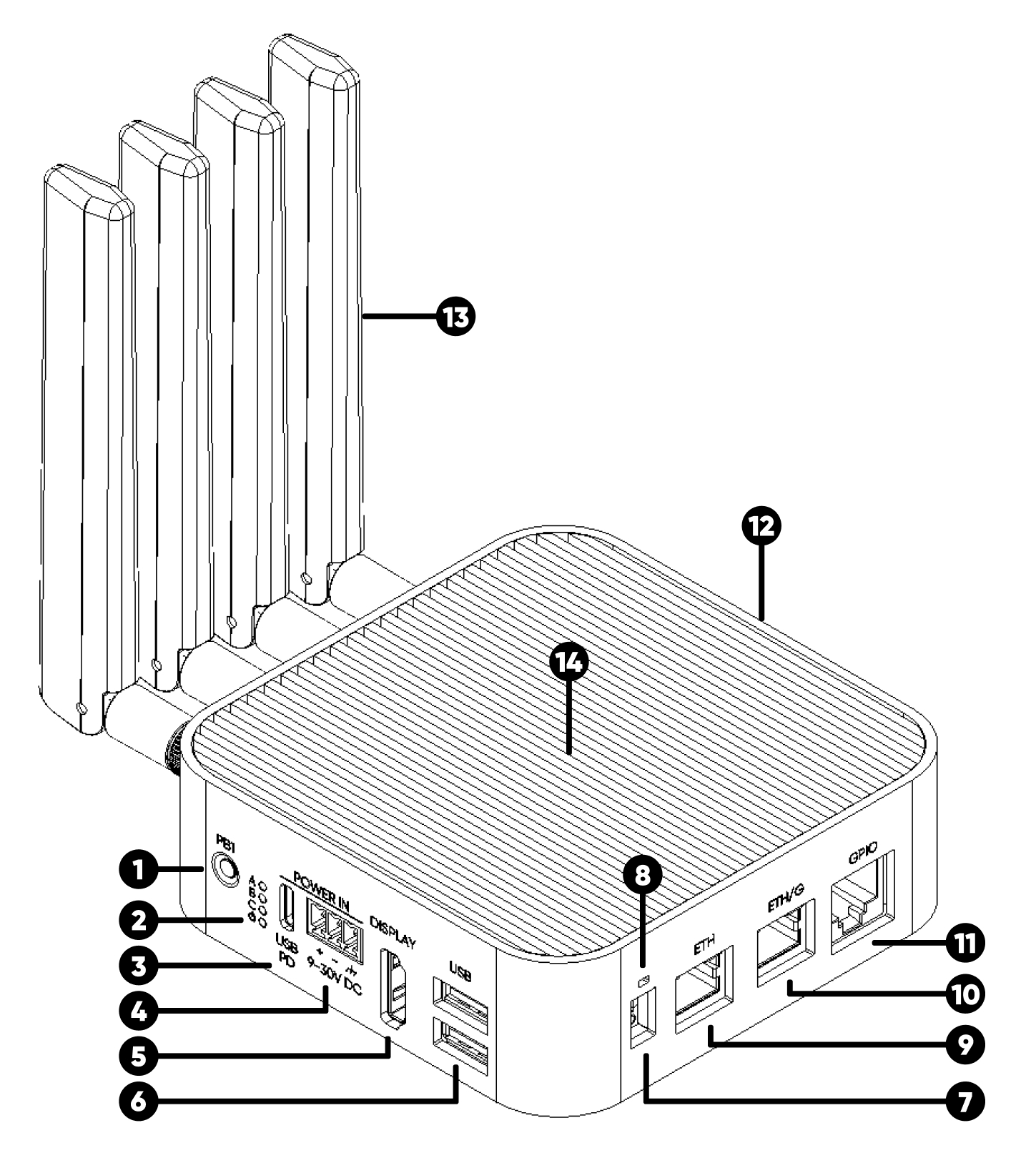
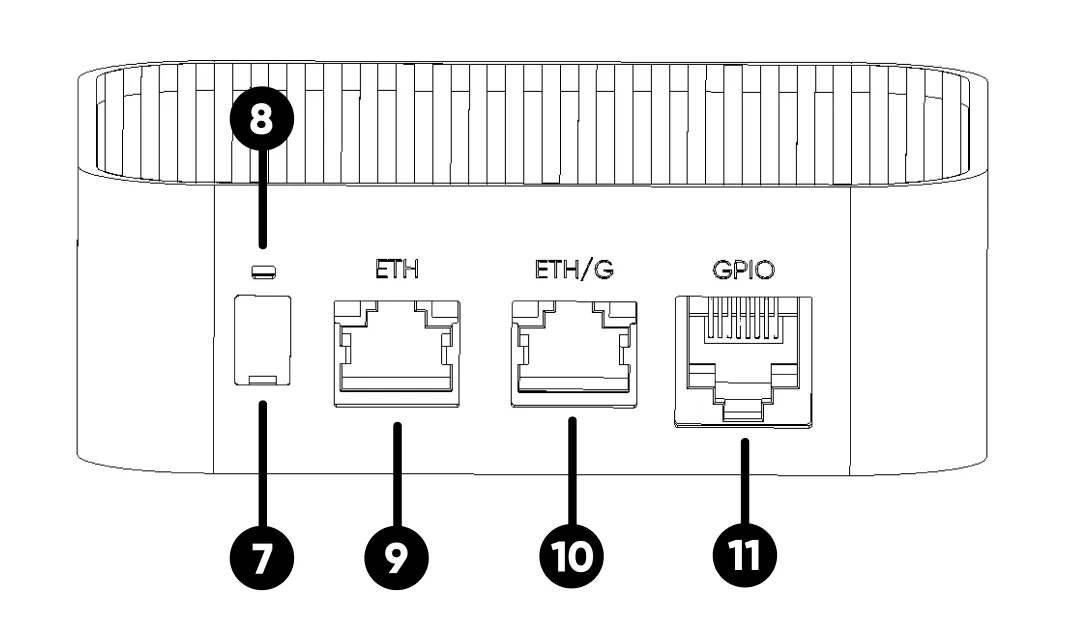
The ALPON X4 is housed in a fanless aluminum enclosure. All I/O is split between the front face (power, USB, display, indicators) and the rear face (Ethernet, GPIO, antennas, switches). Click any image to enlarge.
Front face
Rear face
Enclosure
Mechanical specifications
See Specifications — Mechanical & environmental for enclosure dimensions, weight, and environmental ratings. For the documented mounting holes, bracket kits, and installation steps, use Power & Mounting.
Keep the finned cooling surface unobstructed. For custom brackets or cabinet spacing, ask Sixfab support for verified mechanical guidance before fabrication.
Power input
Choose one power input: USB-C PD, the DC terminal, or optional PoE+ on ETH/G. This section identifies connectors and terminal polarity; see Power & Mounting for adapter requirements, consumption, and the PoE power budget.
Connect only one power input at a time, as required by the Safety & Compliance guidance. Disconnect the active source before changing inputs; do not use simultaneous inputs for failover.
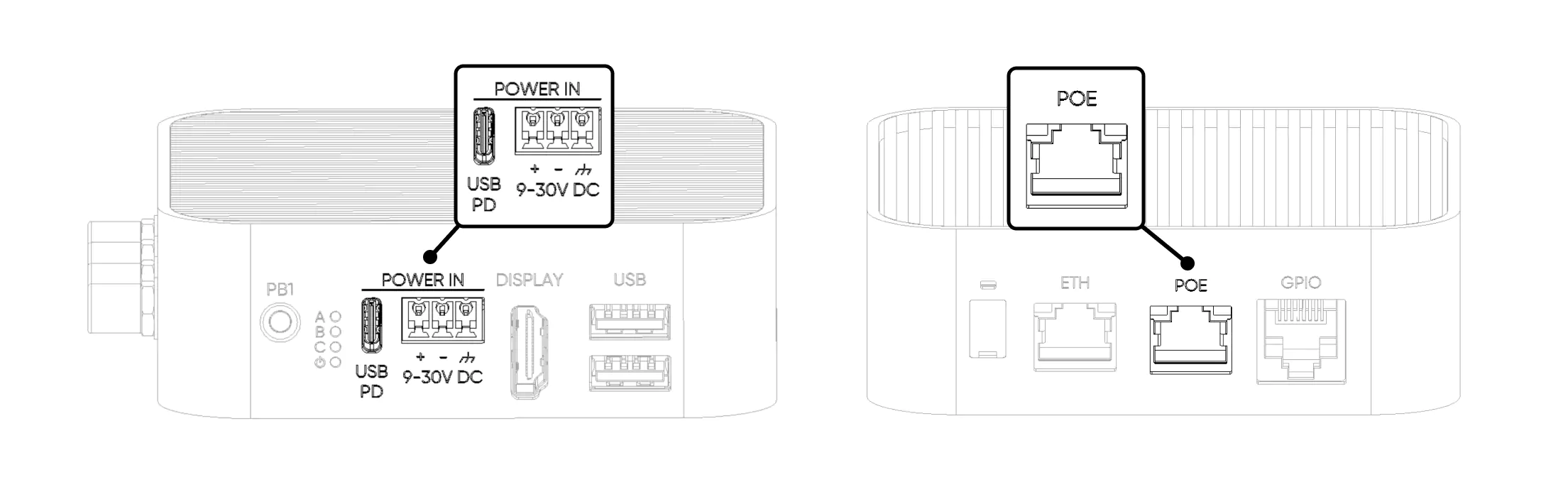
USB Type-C PD
Sink-only USB-PD port. Does not provide USB data or output power during normal operation. USB data is available only when SW2 is set to Burn (image flashing) mode.
Use the documented 15 V / 1.8 A (27 W) PD profile. See USB-C power requirements before selecting an adapter.
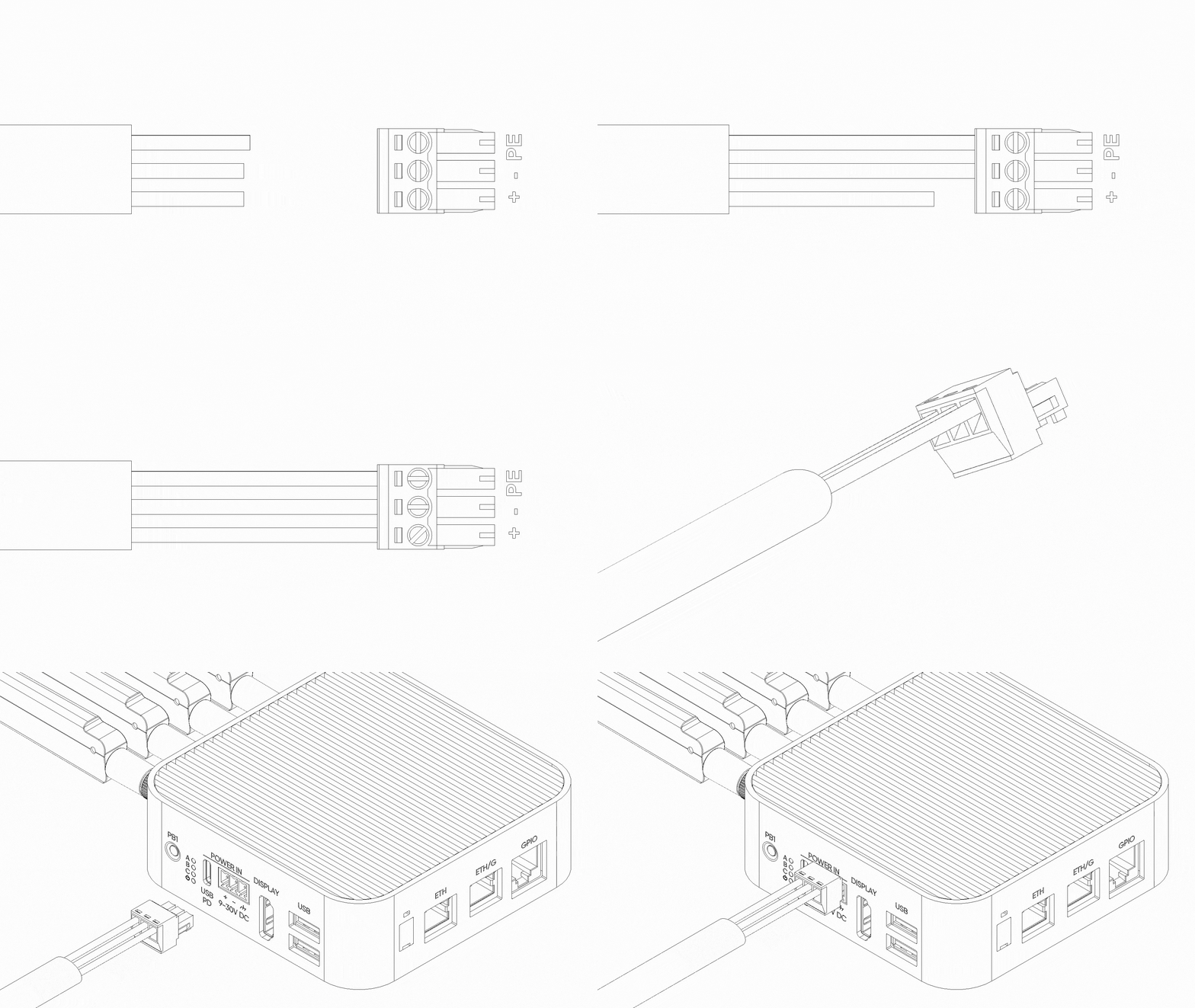
Screw terminal (9–30 V DC)
The 3-pin DC terminal accepts 9–30 V. Full peripheral functionality requires 12–30 V at the terminal; below 12 V, peripheral availability is restricted. Check polarity before connecting power.
Power over Ethernet (PoE+)
On PoE-variant SKUs, ETH/G carries both Gigabit Ethernet data and PoE+ power. The 100 Mbps ETH port is data-only. PoE+ delivers up to 25 W, below the 27 W simultaneous system peak: reduce peripheral load or use DC / USB-C PD instead. See PoE+ requirements and budgeting.
Restricted Mode
Below 12 V, the documented restricted state disables USB, the GPIO Add-on 5 V rail, HDMI, and the RGB LED. Use 12–30 V DC or the documented 15 V USB-C PD profile for full peripheral functionality. See Restricted Mode for low-voltage guidance; do not rely on a low-voltage USB source for boot or connectivity.
Ethernet ports
Two RJ45 Ethernet ports provide different link speeds. Use them for WAN + LAN routing or separate network segments; configure routing and isolation in software.
ETH/G 1 Gbps PoE+
Gigabit Ethernet data, plus PoE+ power input on PoE-variant SKUs.
ETH 100 Mbps
100 Mbps Fast Ethernet data port, no PoE.
PoE+ adds power to ETH/G; it does not replace Ethernet data. Confirm that your SKU includes PoE before selecting a power source. Controller-to-port routing is awaiting hardware confirmation; use the documented link speeds rather than assuming a native or USB-bridge path.
USB 2.0 ports
Two USB 2.0 high-speed ports. Devices connected here are recognized as directly attached to the Raspberry Pi CM4 USB controller. Both ports share a combined 1 A power budget.
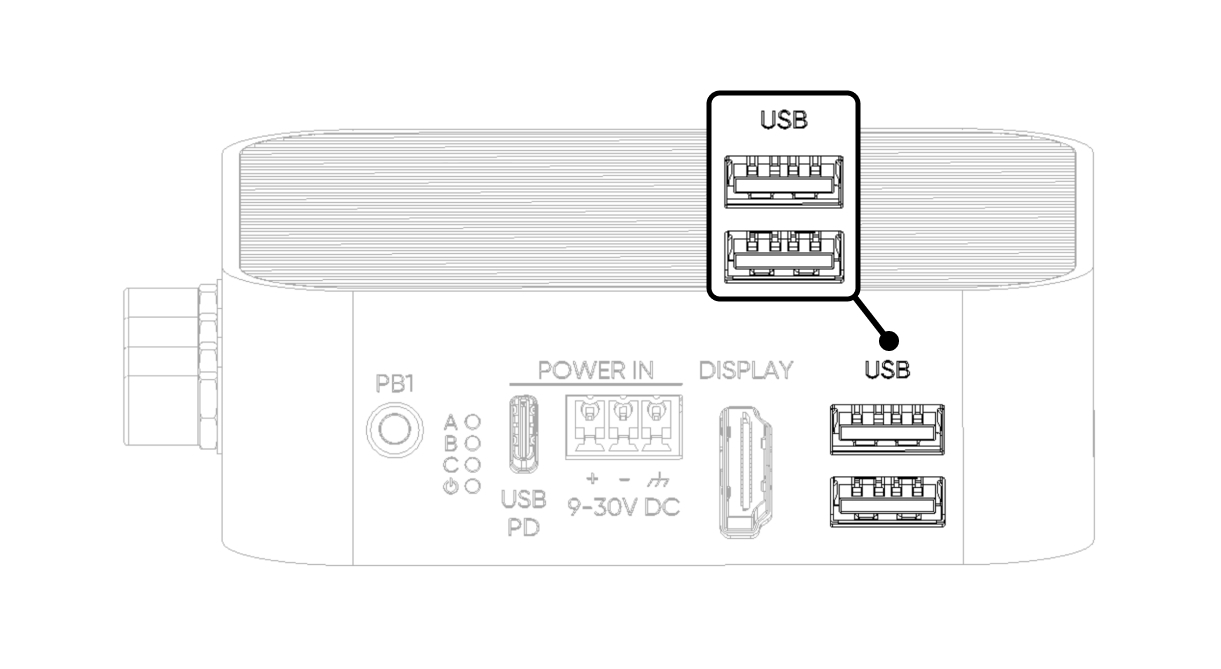
You can connect a single device drawing up to 1 A, or two devices with a combined draw of no more than 1 A. If this limit is exceeded, power to both ports cuts off and a full device reboot is required to restore.
Display (HDMI 2.0)
Single HDMI 2.0 port driven directly by the CM4. Connects to a standard monitor with an HDMI cable. Supports up to 4K @ 30 Hz.
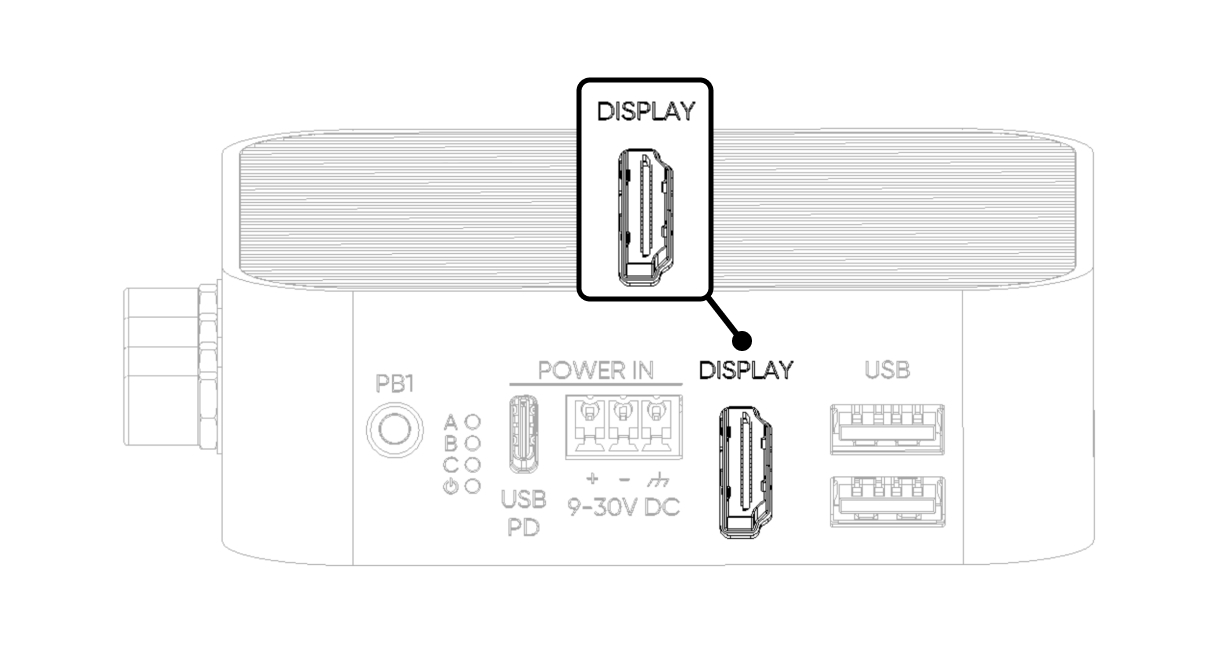
Display detection runs at boot. For first-time setup or headless-to-monitor transitions, plug in HDMI before powering the device.
GPIO Add-on port (RJ45)
The GPIO Add-on port exposes six configurable CM4 digital GPIO pins over an RJ45 connector, with I²C, UART, and SPI options for compatible ALPON Edge Add-on modules. Signals use 3.3 V logic. Analog input support is not verified; do not connect analog signals on the assumption that this port provides an ADC.
Although the connector is RJ45, this port is not Ethernet and not PoE-capable. Connecting it to a switch, router, or PoE injector will cause permanent hardware damage. Use only with compatible ALPON Add-on modules.
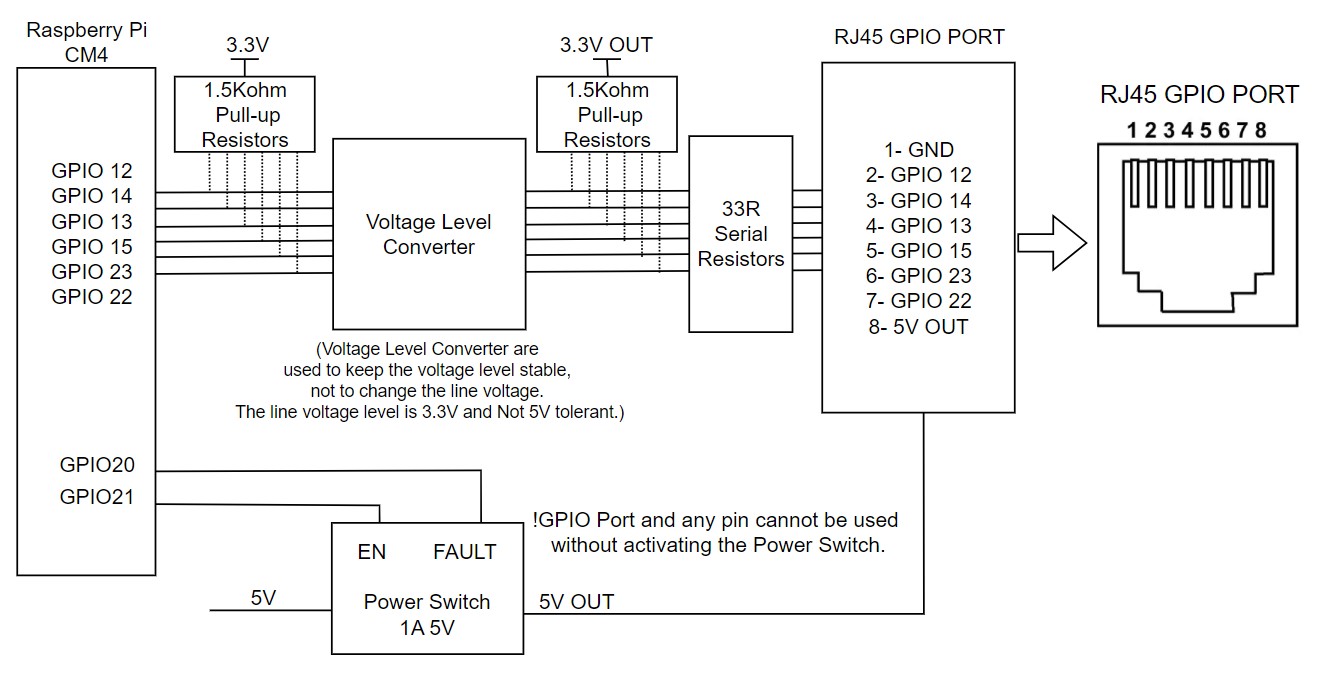
Pin assignment
GND · Ground
GPIO 12
GPIO 14
GPIO 13
GPIO 15
GPIO 23
GPIO 22
5V OUT · 5 V output, max 1 A. Gated by GPIO 21 power switch
GPIO numbers above identify the documented connector wiring, not an enabled bus configuration. For SoC alternate functions, consult section 2.5.1, Alternative function assignments, in the official Raspberry Pi CM4 datasheet. Confirm the X4 OS pinmux and compatible add-on configuration before enabling a bus; the SoC table alone does not establish X4 carrier support.
Electrical characteristics
GPIO 21 · must be HIGH before I/O
GPIO 20 · HIGH normally, LOW on fault
The six GPIO signal pins use 3.3 V logic and are not 5 V tolerant. Driving them above 3.3 V can damage the CM4. Pin 8 is a separate 5 V power output, not a GPIO signal.
Enabling the port from software
The 5 V supply and signal I/O are gated by an on-board power switch. Drive GPIO 21 HIGH to activate the port, then read GPIO 20 to confirm no fault is asserted.
ADDON_PWS_EN
GPIO 21 · Drive HIGH to activate the port. I/O is inactive while LOW.
ADDON_PWS_FAULT
GPIO 20 · Reads HIGH normally. Goes LOW on overcurrent or short-circuit events. Returns HIGH once the fault clears.
# 1. Enable the GPIO Add-on port power rail
pinctrl set 21 op dh      # drive GPIO 21 HIGH
pinctrl get 20            # read fault line, expect 1 (HIGH)
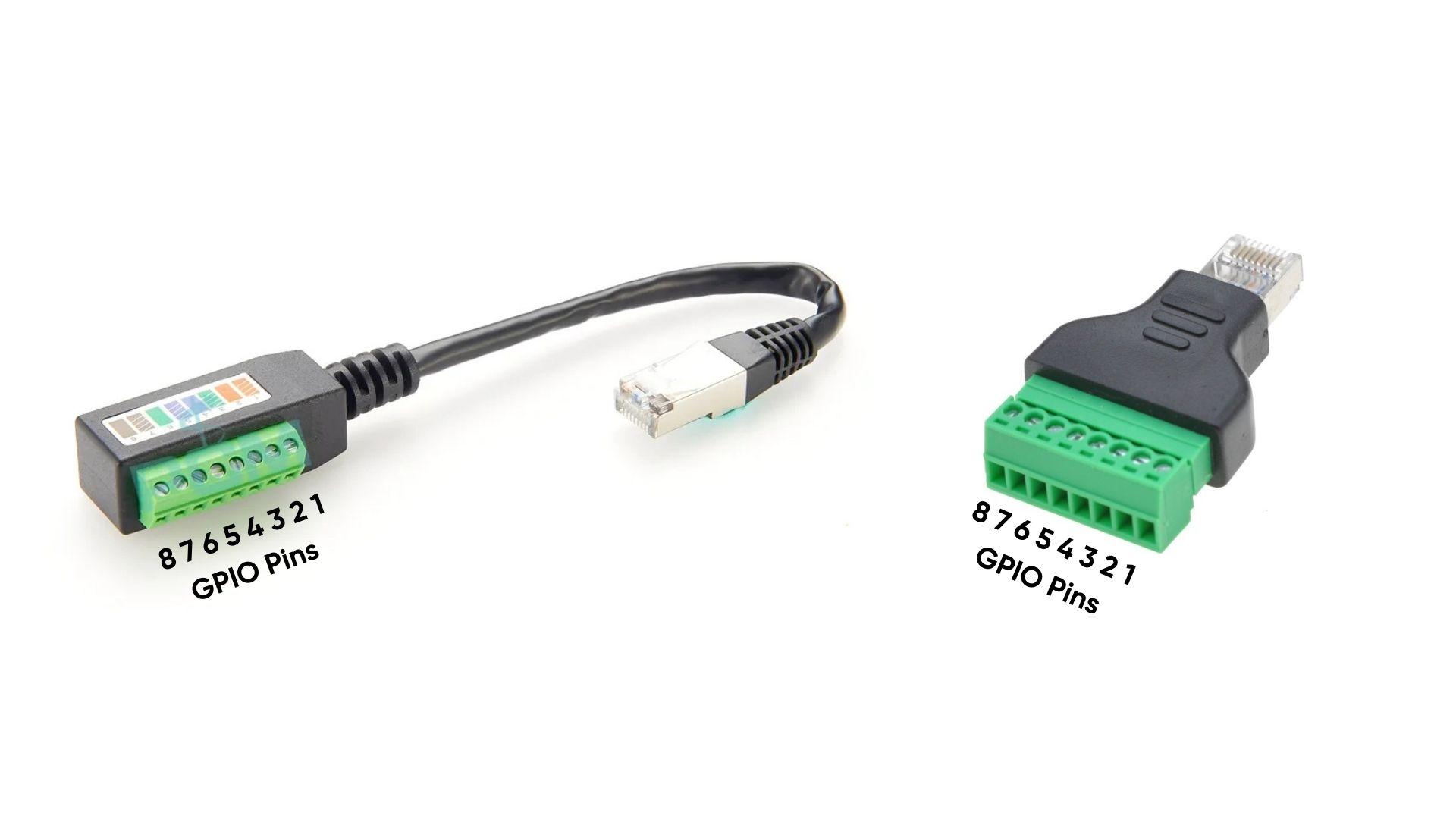
RJ45-to-terminal block adapter
When optional RJ45-to-terminal block adapters are attached, the GPIO port pins are mapped to screw-terminal positions for easy field wiring.
LED indicators
Four LEDs on the front face report system state. All LEDs are driven through the TCA6408A I²C I/O expander at address 0x20 on the I²C1 bus (SDA: GPIO 2, SCL: GPIO 3).
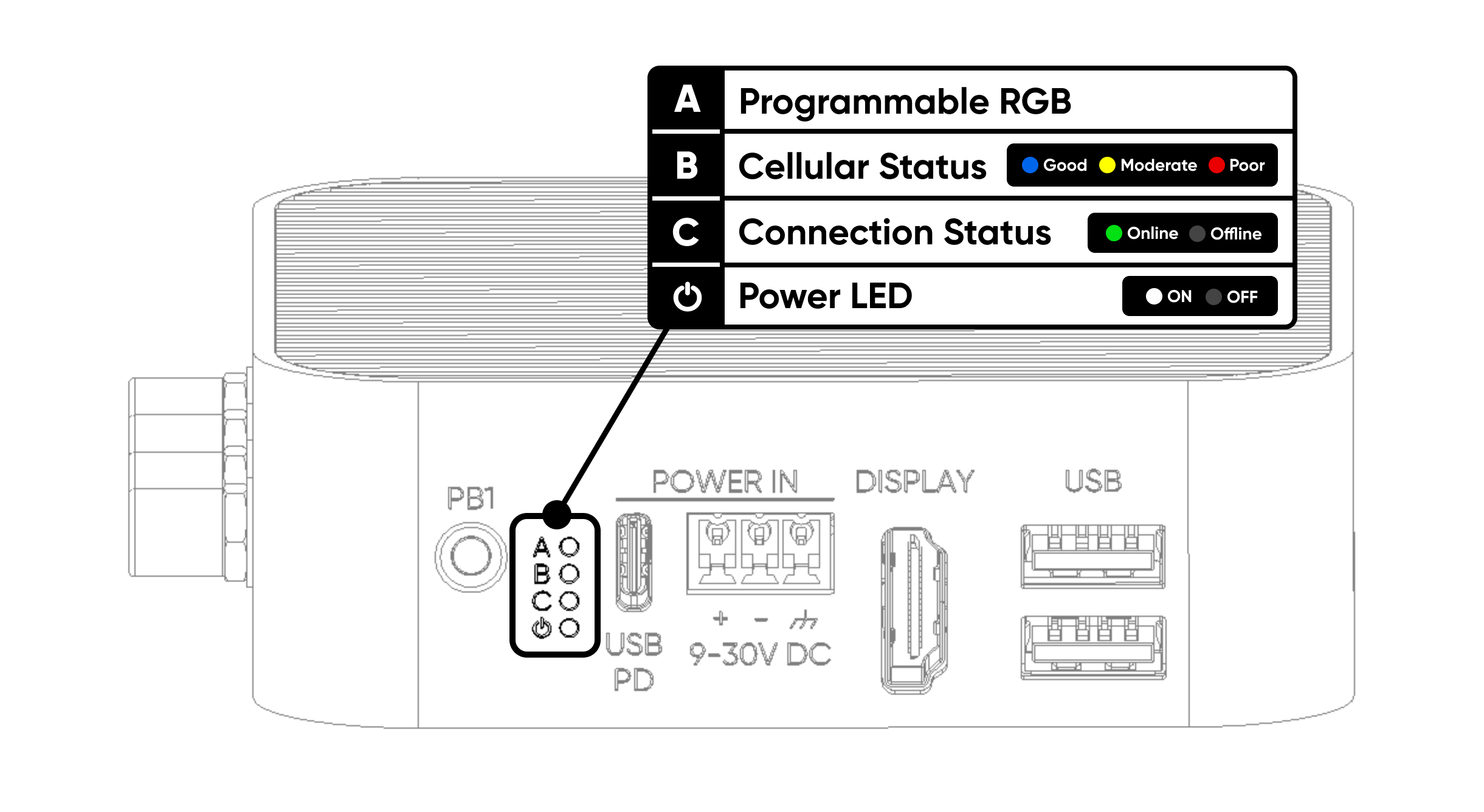
Freely programmable. Set color by writing the corresponding R/G/B expander pins to LOW.
Red: poor signal · Yellow: moderate · Blue: good connection.
Green when connected to ALPON Cloud at connect.sixfab.com; off when disconnected.
White indicates system power; it does not confirm boot completion or cloud connectivity.
The Programmable RGB LED is controlled through the TCA6408A I²C expander, not direct CM4 GPIO outputs. Expander pins P2 (Red), P3 (Green), and P4 (Blue) are active LOW. Preserve unrelated expander bits when changing color. A reference Python script is available as a GitHub Gist.
Push buttons
Two user-programmable buttons: PB1 on the front face and PB2 on the rear. Both lines are pulled HIGH by default and read LOW while pressed. Both can be assigned to different functions in software.
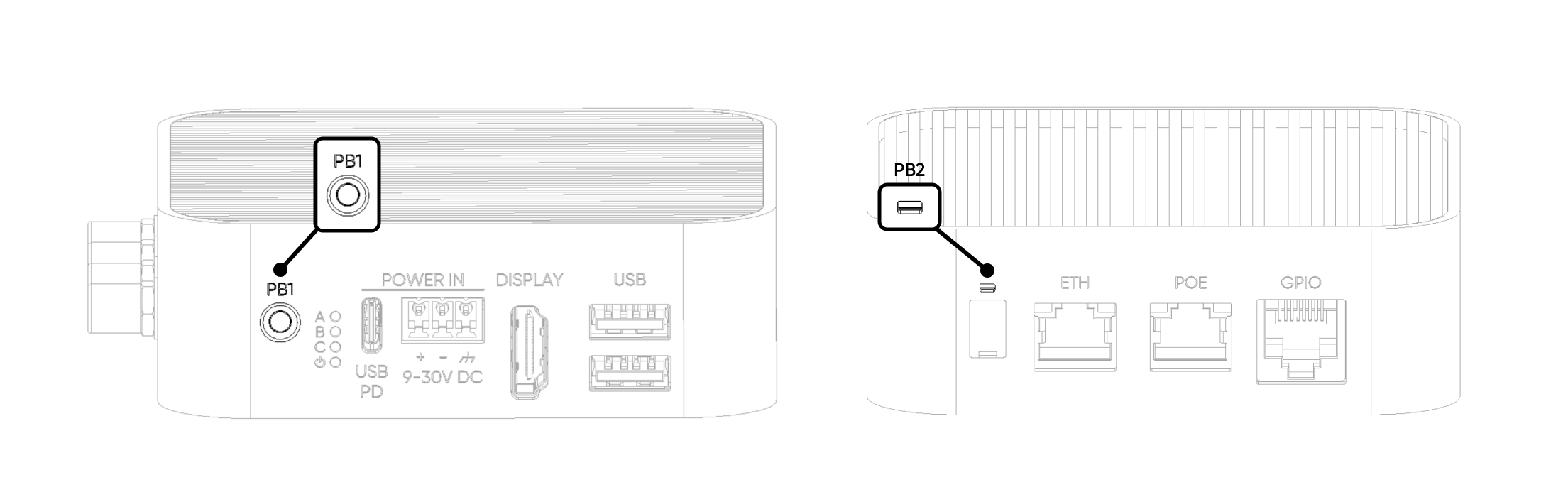
GPIO 5 · Pulled HIGH · LOW when pressed · user-defined action
GPIO 6 · Pulled HIGH · LOW when pressed · user-defined action
Watchdog & Boot/Burn switches
Two DIP switches sit under a silicone cap on the rear face. Both ship OFF by default and should remain OFF during normal operation. Use a pointed tool to lift the cap from its notch.
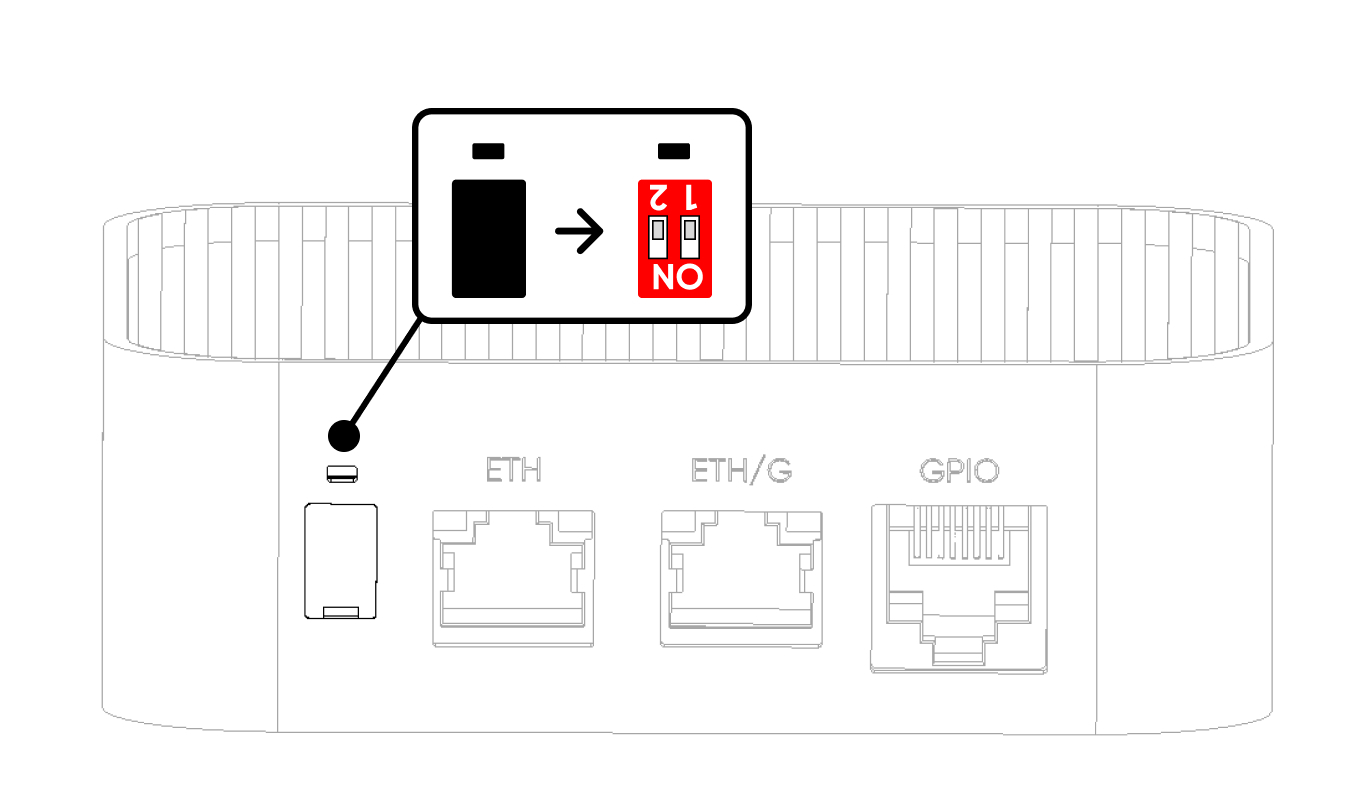
SW1 · Hardware watchdog
The hardware watchdog monitors its heartbeat independently of the OS. With SW1 OFF, a missing heartbeat causes a reset. Assign exactly one heartbeat owner: the system watchdog service or an application, never both. A second pulse source can mask a failed application. The watchdog is disabled with SW1 ON; configure the intended owner before enabling it.
SW2 · Boot / Burn mode
SW2 selects between normal operation (Boot) and CM4 image flashing over USB-C (Burn). In Burn mode, the USB-C port exposes the CM4 flashing interface to a host PC.
Power the device off before changing SW2. Restore SW2 to OFF (Boot) after support-guided flashing. SW1 OFF enables the watchdog, so verify its single heartbeat owner before restoring that setting.
If an image is damaged or needs reflashing, contact Sixfab support before attempting the flash. Trying to reflash the image without guidance may cause more issues.
Antenna connectors
Four antenna connectors carry the wireless interfaces: SMA for LTE and GNSS, RP-SMA for Wi-Fi/Bluetooth. Enclosure labels identify each port.
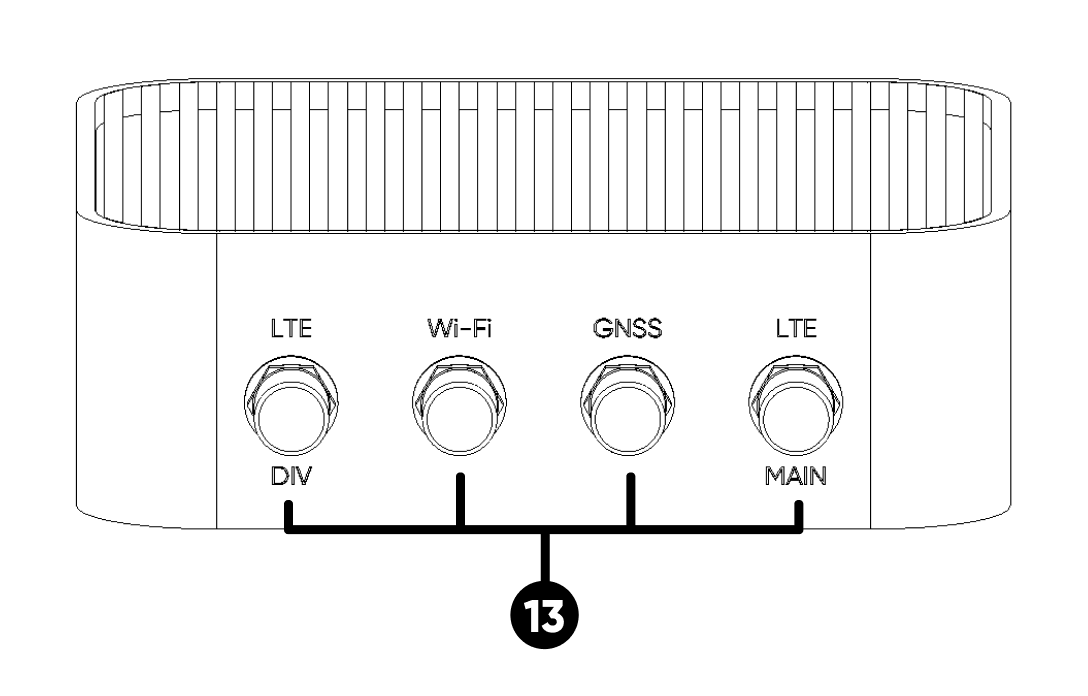
Use the supplied Wi-Fi antenna on the RP-SMA port marked W, and the matching SMA antennas on GNSS and LTE ports. SMA and RP-SMA are not interchangeable: check both threads and center contacts, and never force a connection.
Cellular & wireless specifications
LTE band list, Wi-Fi/Bluetooth, and GNSS specs.
Internal bus topology
How each external interface maps back to the CM4. Useful for diagnosing throughput limits and shared-rail behavior.
TCA6408A @ 0x20 · Expander-driven
GPIO 21 power switch
GPIO 5 (PB1), GPIO 6 (PB2) · Pulled HIGH, LOW when pressed
Updated 1 day ago