
Frigate NVR on Raspberry Pi 5 with the DEEPX NPU
Frigate NVR on a Raspberry Pi 5 can run object detection on the Sixfab AI HAT+ for Raspberry Pi 5 (DEEPX DX-M1M) through Frigate's DEEPX NPU detector. The NPU, a chip built for neural networks, runs a compiled YOLO model, here yolov8n-ppu-coco80.dxnn, instead of the CPU. This page sets up that stack once for every Frigate-based Raspberry Pi 5 AI project.
DEEPX support was merged into Frigate's dev branch on 2026-09-21 (PR #24336). It is not in a stable release yet; the latest stable release is v0.18.0 (2026-09-12).
Sixfab develops and maintains DEEPX support in Frigate (Frigate's DEEPX NPU detector docs).
The image
ghcr.io/blakeblackshear/frigate:af0ba19-standard-arm64on GitHub Container Registry is Frigate's own build from commit af0ba19 of the dev branch of the official Frigate repository, not a Sixfab-compiled image on Docker Hub. It is MIT licensed. When DEEPX support reaches a stable Frigate release, this page will move to it.
| Item | Value |
|---|---|
| Page type | Setup guide |
| Difficulty | Intermediate |
| Hardware | Raspberry Pi 5 with the Sixfab AI HAT+ (DEEPX DX-M1M) |
| Software | Frigate's dev-branch image ghcr.io/blakeblackshear/frigate:af0ba19-standard-arm64 (commit af0ba19, with DEEPX support), Docker Engine, DX-RT runtime |
| Model | yolov8n-ppu-coco80.dxnn, ready-compiled, 80 classes from its label map |
| Model license | AGPL-3.0 (Ultralytics YOLOv8n). Details in the release notes: https://github.com/sixfab/sixfab-dx-frigate/releases/tag/boss-detector-v1.0.0 |
| Camera | Any RTSP camera |
How does Frigate use the DEEPX NPU?
Frigate pulls frames from an RTSP camera (RTSP is the protocol most IP cameras use to stream video), hands them to a model running on the DEEPX NPU, and gets back labeled boxes: a person, a car, a bird. Frigate then tracks each object, records clips and publishes events over MQTT, a lightweight message protocol that other programs can subscribe to. Together, Frigate and the NPU turn a Raspberry Pi 5 into a network video recorder (NVR) that understands what it sees.
The pieces, end to end:
- Camera: any RTSP camera, or a test feed (see Camera Feeds and MQTT for Frigate Projects).
- Frigate in Docker: decodes the stream and asks the detector for results.
- DEEPX detector: sends frames to the NPU through the
/dev/dxrt0device node and the DX-RT socket. DX-RT is DEEPX's runtime, the software layer that talks to the NPU. - A
.dxnnmodel: DEEPX's compiled model format. This page uses a ready-compiled YOLO model, and the first project in this series, Boss Detector, uses the same file, so you need no compiling to detect people. - Web interface: live view, events and recordings at
https://<pi-ip>:8971.
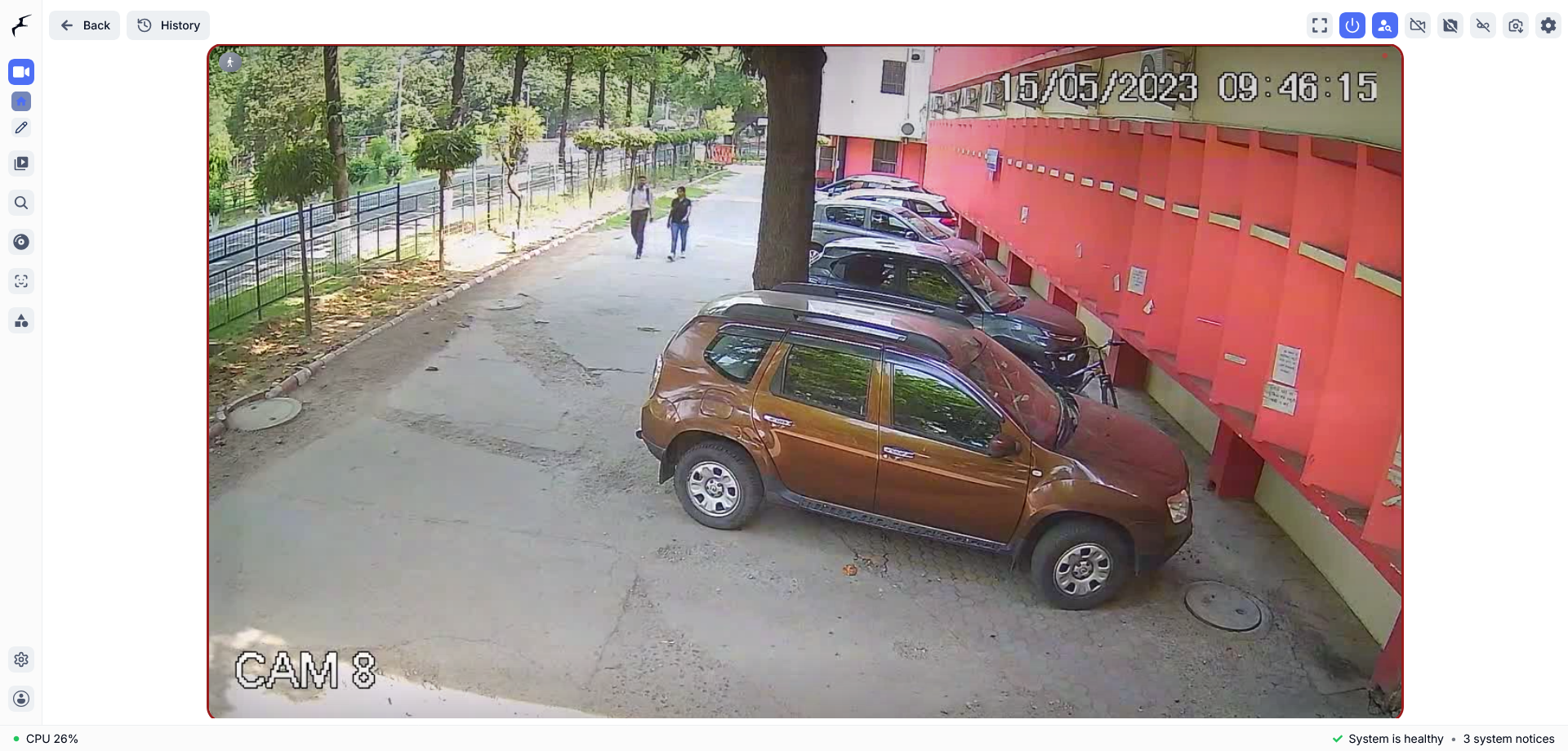
The Frigate Live view for one camera, with two people walking along a path. The bottom bar shows "System is healthy", so you can see the stack's state next to the picture.
One NPU can serve several cameras and models on a single Frigate instance. Can one DEEPX NPU run several cameras and models? covers how.
Requirements
You need a Raspberry Pi 5 with the Sixfab AI HAT+ and a working DX-RT runtime, an RTSP camera, Docker Engine and the project repository. The first table lists the hardware, the second the software. With them in place, this page turns the Pi 5 into a Raspberry Pi NVR with an NPU detector.
| Hardware | What to have |
|---|---|
| Raspberry Pi 5 with the Sixfab AI HAT+ (DEEPX DX-M1M) | Installed, with the DX-RT runtime working. ls /dev/dxrt* lists /dev/dxrt0. Finish the Sixfab AI HAT+ Quickstart first |
| Camera | Any RTSP camera, or the test feed from Camera Feeds and MQTT for Frigate Projects |
| Software | What to have |
|---|---|
| Docker Engine | On the Pi 5, with a user that has sudo |
| Network | Frigate downloads the DX-RT Python bindings into /config/.local the first time a DEEPX detector is configured, and again when a release pins a new version, so the first start needs internet access. |
| The project repository | The public repository is https://github.com/sixfab/sixfab-dx-frigate. <repo-dir> is where you clone it, and <project-path> is the Boss Detector project folder inside it. Step 2 uses them |
We tested this setup on 2026-10-05 on a Raspberry Pi 5 (8 GB) with the Sixfab AI HAT+ (DEEPX DX-M1M), running Raspberry Pi OS Trixie 64-bit. The DEEPX stack was RT driver v2.6.0, PCIe driver v2.5.0, DX-RT v3.4.2 and v3.4.0, firmware v2.7.4. Frigate ran from the ghcr.io/blakeblackshear/frigate:af0ba19-standard-arm64 image, and the model came from the DEEPX Model Zoo.
Install
Run everything on the Raspberry Pi 5.
1. Create the folders. <frigate-config-dir> holds Frigate's configuration and models. <frigate-media-dir> holds recordings. Pick any two paths.
# Run on the Raspberry Pi 5
mkdir -p <frigate-config-dir>/model_cache <frigate-media-dir>
2. Get the model. yolov8n-ppu-coco80.dxnn is a ready-compiled .dxnn model from the DEEPX Model Zoo that detects the 80 classes of COCO-80, listed in Frigate's built-in label map /labelmap/coco-80.txt. Person is class 0. The label map is the text file that lists the class names in the model's output order. The model's license and details are in the release notes (see License and credits). The command checks the download against its SHA-256 hash.
# Run on the Raspberry Pi 5
git clone https://github.com/sixfab/sixfab-dx-frigate <repo-dir>
curl -L -o <frigate-config-dir>/model_cache/yolov8n-ppu-coco80.dxnn \
  https://github.com/sixfab/sixfab-dx-frigate/releases/download/boss-detector-v1.0.0/yolov8n-ppu-coco80.dxnn
echo "15493c7716478484e05c57d9afa07328d77c07b75e8ebec4260db7c76d3d7e66  <frigate-config-dir>/model_cache/yolov8n-ppu-coco80.dxnn" | sha256sum -c -
Expected output of the check: <frigate-config-dir>/model_cache/yolov8n-ppu-coco80.dxnn: OK.
3. Write the Frigate config. Save this as <frigate-config-dir>/config.yaml. Use your own camera name.
mqtt:
  enabled: false

models:
  - scene: indoor_thermal
    model_type: yolo-generic
    width: 640
    height: 640
    path: /config/model_cache/yolov8n-ppu-coco80.dxnn
    labelmap_path: /labelmap/coco-80.txt
    devices:
      - deepx:PCIe:0

cameras:
  <camera-name>:
    ffmpeg:
      inputs:
        - path: <rtsp-url>
          roles:
            - detect
            - record
    detect:
      enabled: true
      width: 1280
      height: 720
      scene: indoor_thermal
    objects:
      track:
        - person
      filters:
        person:
          min_score: 0.6
          threshold: 0.7
    record:
      enabled: true
This table explains the fields that matter.
| Field | What it does |
|---|---|
devices: deepx:PCIe:0 | Runs this model on the DEEPX NPU |
model_type: yolo-generic | Reads the model as a YOLO-style detector |
width, height | The compiled model's input size (640x640), not the camera's detect size |
labelmap_path | The class names, in the model's output order. This label map puts person first |
mqtt: enabled: false | Frigate starts with MQTT off here. Camera Feeds and MQTT for Frigate Projects turns it on when you add a broker |
record role and record: enabled: true | Frigate records this camera to <frigate-media-dir> |
scene | A label that ties a camera to a model. Frigate accepts all, indoor, outdoor, indoor_thermal and outdoor_thermal. It is only a label, so no thermal camera is involved |
4. Start Frigate. Run Frigate in Docker with one command. It uses host networking so DX-RT's abstract IPC socket reaches the container, and passes in the NPU device node. This matches the toolkit/install-frigate.sh installer in the sixfab-dx-frigate repository, and every other Sixfab Frigate page links here for this command.
# Run on the Raspberry Pi 5
docker run -d \
  --name frigate \
  --restart unless-stopped \
  --network host \
  -e DXRT_DYNAMIC_IPC_ENDPOINT=@dxrt_dynamic_ipc.sock \
  --device /dev/dxrt0:/dev/dxrt0 \
  --shm-size=256m \
  -v <frigate-config-dir>:/config \
  -v <frigate-media-dir>:/media/frigate \
  ghcr.io/blakeblackshear/frigate:af0ba19-standard-arm64
Host networking puts every Frigate port directly on the Pi 5's network interfaces, including port 5000, which Frigate treats as unauthenticated, admin-level access (see Frigate's authentication documentation). There is no -p flag to leave it unpublished here, so firewall port 5000 or keep the Pi off an untrusted network. Run API checks from the Pi itself instead of exposing the port, for example with docker exec.
5. Open the web interface. Browse to https://<pi-ip>:8971. The first visit shows a browser warning because Frigate uses a self-signed certificate (see Frigate's TLS documentation). Read the admin password from docker logs frigate, then set your own.
After you change config.yaml later, apply it with docker restart frigate.
Verify
These five checks confirm that the NPU is visible, Frigate is running and the NPU detector is answering. Run the first four on the Raspberry Pi 5. dxrt-cli is DEEPX's command-line tool for the NPU.
# Run on the Raspberry Pi 5
ls /dev/dxrt*
dxrt-cli -s
docker ps --filter name=frigate
docker exec frigate curl -s http://localhost:5000/api/stats | jq '.detectors'| # | Check | What you should see |
|---|---|---|
| 1 | ls /dev/dxrt* | /dev/dxrt0 is listed |
| 2 | dxrt-cli -s | A DEEPX device is listed, for example Device 0: M1M, Accelerator type |
| 3 | docker ps --filter name=frigate | The frigate container is running |
| 4 | docker exec frigate curl -s ... | jq '.detectors' | A deepx:PCIe:0 entry with inference_speed. Frigate reports it in milliseconds. The jq filter is optional; without it you get the full JSON |
| 5 | The camera in the web interface | Bounding boxes appear when a person is in view |
Expected output from checks 1, 2 and 4, shortened to the lines that matter (the dxrt-cli -s output also prints firmware, board and temperature lines):
/dev/dxrt0
DXRT v3.4.2+d803450
 * Device 0: M1M, Accelerator type
{
  "deepx:PCIe:0": {
    "inference_speed": 18.48,
We ran this setup with DX-RT v3.4.0 and v3.4.2; the output above is from v3.4.2.
Run API checks through docker exec, as above. Host networking already puts port 5000 on your network, so firewall it instead of relying on Docker to keep it off.
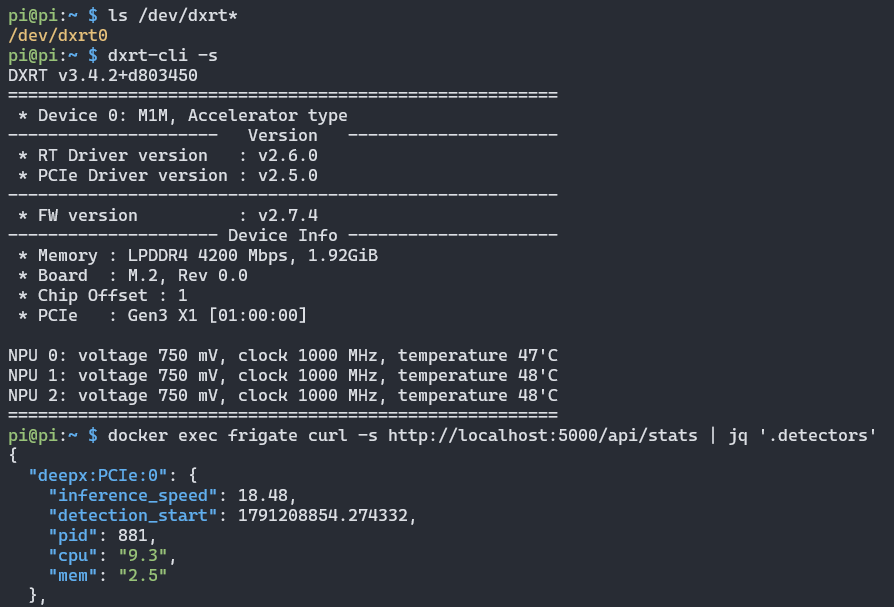
Checks 1, 2 and 4 in one terminal. /dev/dxrt0 exists, dxrt-cli -s reports the DEEPX device, and Frigate's stats list the deepx:PCIe:0 detector with an inference_speed of 18.48.
Can one DEEPX NPU run several cameras and models?
Yes. One Frigate instance on a single NPU served several projects in testing, each with its own camera and model.
- Each model declares a
scene, and each camera picks one underdetect. That is how a camera finds its model. - To add a second project, put its
models:entry and its camera in the sameconfig.yaml. The Sixfab project installers merge their entries for you, and a model with the samepathis replaced instead of duplicated. - Frigate lists each detector under
detectorsin/api/stats, so you can watch the NPU detector's inference time while a second project runs. To see the NPU's own load, check NPU load withdxtop.
How fast is Frigate object detection on the DEEPX NPU on a Raspberry Pi 5?
This page publishes no benchmark: no inference time was recorded with its model, frame rate and load. Read your own from the detectors object in /api/stats, which reports inference time in milliseconds.
For NPU benchmarks on the Raspberry Pi 5, see Sixfab's Raspberry Pi 5 AI HAT benchmark.
Limitations
- We ran this setup with
docker run. We did not test Home Assistant OS or the Frigate add-on. - If the DX-RT daemon (
dxrtd, run by thedxrt.serviceunit, the background service that owns the NPU) restarts, restart the Frigate container too. - Port 5000 has no authentication, and host networking puts it on the Pi 5's network interfaces directly, with no Docker
-pflag to leave it unpublished. Firewall it or keep the Pi off an untrusted network. - This model detects only the 80 classes in its label map. For other objects, use a different
.dxnnmodel (see the FAQ). - Frigate chooses the DX-RT version its DEEPX detector uses. The tested build pins DX-RT v3.4.0, and this page cannot change it.
Privacy
Cameras record people. Frigate writes recordings and clips to <frigate-media-dir>, the folder you mounted in step 4, so anyone who can log in on port 8971 or read that folder can watch them. Check the rules for recording people where you live, and read Camera Feeds and MQTT for Frigate Projects and each project's Privacy section before you point a camera at people.
Troubleshooting
/dev/dxrt0 is missing
/dev/dxrt0 is missingThe device node does not exist, so the NPU is not visible to the host. Check that the Sixfab AI HAT+ is plugged in and that the DX-RT driver loaded. Then recheck the steps in the Sixfab AI HAT+ Quickstart and the Sixfab AI HAT+ Troubleshooting page.
Detections stop after the DX-RT daemon restarts
When the DX-RT daemon (dxrtd, run by the dxrt.service unit) restarts, Frigate's detections stop until you restart the Frigate container with docker restart frigate.
The camera shows no image
Check the feed from the Pi 5 with ffprobe <rtsp-url>. If your feed comes from a stream host, check its feed service on that host: systemctl status <feed-service-name>.
MQTT does not connect
On the broker host (the machine that runs the MQTT server, Mosquitto in this series), run systemctl status mosquitto. See Camera Feeds and MQTT for Frigate Projects.
Invalid .dxnn file format for an unsupported model
Invalid .dxnn file format for an unsupported modelIn testing, DX-RT returned Invalid .dxnn file format when the model was not supported. Use a .dxnn model that DX-RT supports, such as yolov8n-ppu-coco80.dxnn, and check the download against its SHA-256 hash (Install step 2).
FAQ
How do I set up Frigate on a Raspberry Pi 5 with a DEEPX NPU?
Copy yolov8n-ppu-coco80.dxnn and its label map into <frigate-config-dir>/model_cache and add the step 3 config: a models: entry on deepx:PCIe:0 and a camera that tracks person. Start Frigate in Docker with the NPU device passed in. Person is class 0 in the label map, so you compile nothing. Boss Detector then acts on each person event.
Can two Frigate projects share one DEEPX NPU?
Yes. Merge the second project into the shared config.yaml: add its models: entry and its camera, give the model its own scene, and set that scene under the camera's detect. Then watch each detector's inference time under detectors in /api/stats.
Do I need to restart Frigate when the DX-RT daemon restarts?
Yes. Run docker restart frigate after dxrtd restarts, or detections stop.
Why does the config set scene: indoor_thermal on a normal camera?
scene: indoor_thermal on a normal camera?The config uses indoor_thermal as an unused scene slot, so this model does not collide with other projects' models. No thermal camera is involved. scene is a label that ties a camera to a model, and Frigate accepts five values.
Can I run my own YOLO model with Frigate's DEEPX NPU detector?
Yes, once DEEPX's DX-COM compiler turns it into a .dxnn file. Porch Pirate runs a custom five-class model (package, person, car, truck, motorcycle). The Deployment Workflow page covers compiling.
Should I use Frigate port 8971 or port 5000?
Use port 8971. Port 8971 requires login, while Frigate treats port 5000 as unauthenticated, admin-level access, and host networking exposes it on the Pi 5 directly. Run API checks inside the container with docker exec frigate curl.
Next: pick a project
- Raspberry Pi 5 AI Projects with the DEEPX NPU: the hub for every project.
- Camera Feeds and MQTT for Frigate Projects: set up your camera feed and broker.
- Raspberry Pi 5 Person Detection with Frigate: Boss Detector: run a Python action on each person event.
- Raspberry Pi Face Recognition Camera with Frigate: the face recognition project.
- Porch Pirate: Frigate Package Detection on Raspberry Pi 5: a custom five-class model.
- DIY Raspberry Pi Bird Camera: Species ID in Frigate NVR: bird species identification at a feeder.
- Frigate Squirrel Detection on Raspberry Pi 5 with DEEPX NPU: squirrel detection with an MQTT trigger.
- Sixfab Model Zoo: pre-compiled
.dxnnmodels. - Supported Models Catalog: models supported on DEEPX NPUs.
- Deployment Workflow: compile your own model to
.dxnn. - System Monitoring: check NPU load with
dxtop. - Frigate's DEEPX NPU detector docs: Frigate's own configuration reference for the DEEPX detector, on its dev branch.
- Sixfab AI HAT+ for Raspberry Pi 5: the board this page was tested on.
License and credits
The code and each model file have their own licenses. Every model's license and details are listed in the release notes at https://github.com/sixfab/sixfab-dx-frigate/releases/tag/boss-detector-v1.0.0. yolov8n-ppu-coco80.dxnn is derived from Ultralytics YOLOv8n and is licensed under AGPL-3.0. The ghcr.io/blakeblackshear/frigate:af0ba19-standard-arm64 image is MIT licensed and built from commit af0ba19 of the dev branch of the official Frigate repository. The code is licensed under the MIT License. Frigate and DEEPX tools belong to their respective authors.
Updated about 10 hours ago