
RTSP Camera Feeds and MQTT for Frigate Projects
MQTT on a Raspberry Pi carries Frigate NVR events to your scripts, and RTSP carries the camera video. This guide connects an RTSP camera or looped test feed and a Mosquitto broker to one Frigate instance on a Raspberry Pi 5. Boss Detector, Porch Pirate and the squirrel, bird and face recognition projects then add cameras, and some add listeners.
| Field | Value |
|---|---|
| What it does | Connects an RTSP camera or test feed and an MQTT broker to Frigate, then adds each project's camera and listener |
| Stack | Frigate NVR, Mosquitto, MediaMTX, FFmpeg, Python listeners |
| Camera input | RTSP |
| Difficulty | Intermediate |
| Tested on | Raspberry Pi 5 (8 GB, Raspberry Pi OS Trixie 64-bit) with the Sixfab AI HAT+ for Raspberry Pi 5 (DEEPX DX-M1M) |
| Last tested | 2026-10-05 |
DEEPX support was merged into Frigate's dev branch on 2026-09-21 (PR #24336). It is not in a stable release yet; the latest stable release is v0.18.0 (2026-09-12).
Sixfab develops and maintains DEEPX support in Frigate (Frigate's DEEPX NPU detector docs).
Use the image
ghcr.io/blakeblackshear/frigate:af0ba19-standard-arm64from GitHub Container Registry, Frigate's own build from commit af0ba19 of the dev branch of the official Frigate repository, not a Sixfab-compiled image on Docker Hub. It is MIT licensed.
This page assumes Frigate already runs on your Raspberry Pi 5 with Frigate's DEEPX NPU detector. The DEEPX NPU (neural processing unit) is the chip on the Sixfab AI HAT+ that runs the detection model. If Frigate is not running yet, start with Frigate NVR on Raspberry Pi 5 with the DEEPX NPU, which holds the one docker run command for Frigate. Every Frigate project in the Raspberry Pi 5 AI projects hub builds on both setup pages.
How do Frigate projects use RTSP and MQTT on a Raspberry Pi?
Frigate reads video from an RTSP stream and publishes what it detects over MQTT, so every Frigate project here uses the same two inputs: a camera stream to watch and a message bus to report on. You build them once and reuse them for every project.
Four terms carry the page:
- RTSP (Real Time Streaming Protocol) is how a camera or video server streams video over the network, at an address such as
rtsp://<stream-host>:8554/<stream-path>. - MQTT is a publish and subscribe messaging protocol. Frigate MQTT messages carry its events to your scripts.
- A broker, such as Mosquitto, is the server that passes each message to the programs subscribed to it.
- A topic is a message's address on the broker, such as
frigate/events.
Frigate reads an RTSP stream like any other camera. With a real camera, you point Frigate at its address. Without one, you can still test a full detection pipeline. A systemd service (a background program run by systemd, the Linux service manager) on a second computer uses FFmpeg to play a recorded video in a loop. It publishes the video as an RTSP stream through MediaMTX, the RTSP server in this setup. Whenever a tracked object appears, changes or ends, Frigate publishes a JSON message to the frigate/events topic on a Mosquitto broker. Small Python listener services subscribe to that topic and act on the events they care about.
In the tested setup, the test-feed pieces ran on a second machine:
Stream host (any RTSP source)                Raspberry Pi 5 (Sixfab AI HAT+)
+------------------------------------+       +-----------------------------------+
| looped video -> FFmpeg (systemd)   |       | Frigate NVR                       |
| MediaMTX RTSP server, port 8554    |------>|   cameras read rtsp://...:8554/.. |
| Mosquitto broker, port 1883        |<----->|   publishes frigate/events        |
|                                    |       | Listener services (Python)        |
+------------------------------------+       +-----------------------------------+
The same flow, step by step:
- On the stream host, an FFmpeg feed service publishes the looped video to MediaMTX, which serves it over RTSP on port 8554.
- Frigate on the Raspberry Pi 5 reads the RTSP stream, and the DEEPX NPU runs the detection model.
- Frigate publishes each change to a tracked object to
frigate/eventson the Mosquitto broker, port 1883. - Listener services on the Raspberry Pi 5 subscribe to that topic and publish their own alerts.
Each project adds only its own pieces: a camera, sometimes a model, and sometimes a listener. A config fragment is one project's camera, plus its model or zone, as a small YAML file. A merge script folds each fragment into one shared config.yaml instead of keeping one file per project.
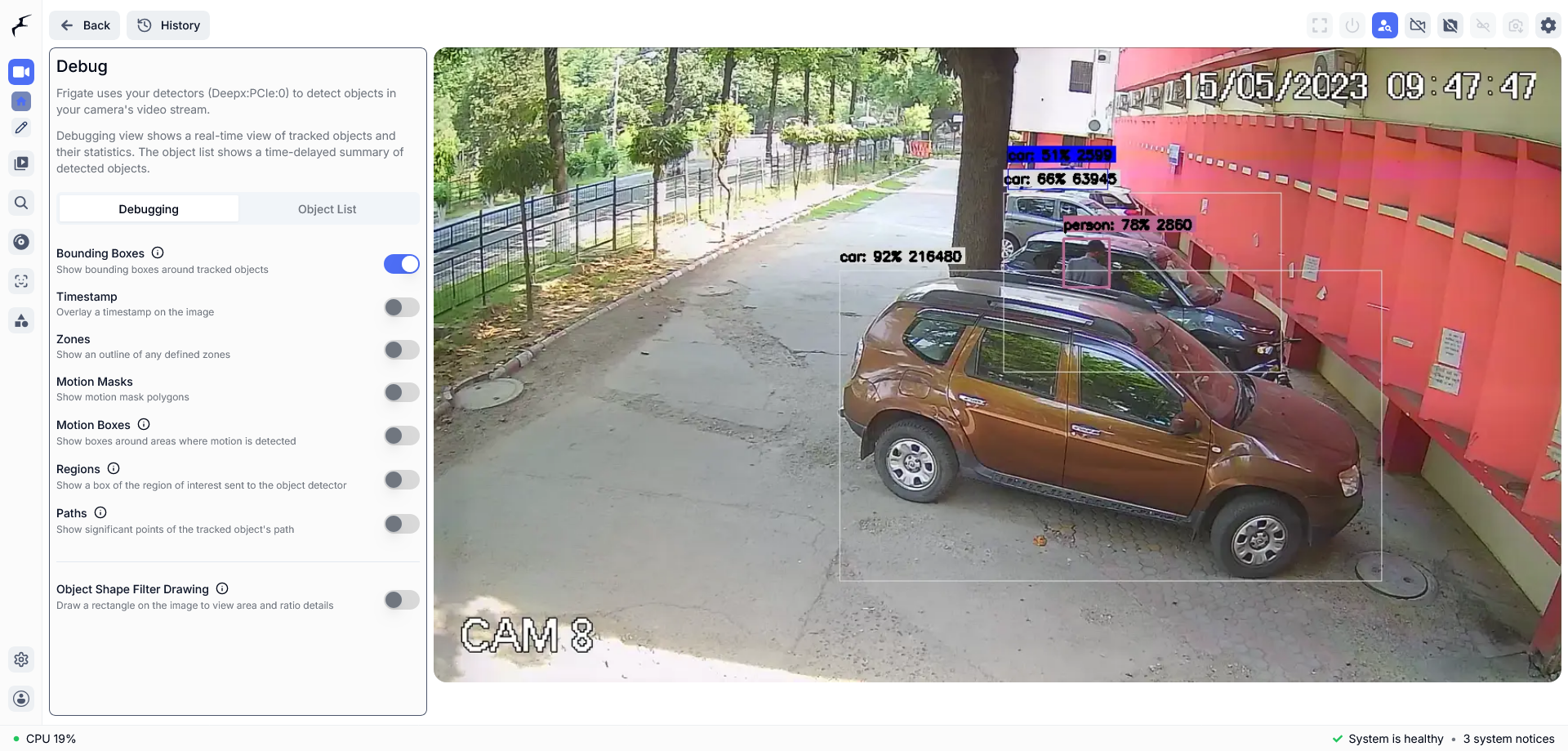
Frigate's Debug view draws a labeled box and a confidence score on each object the DEEPX detector finds, here cars and a person. Boxes like these mean the stream and the detector both work.
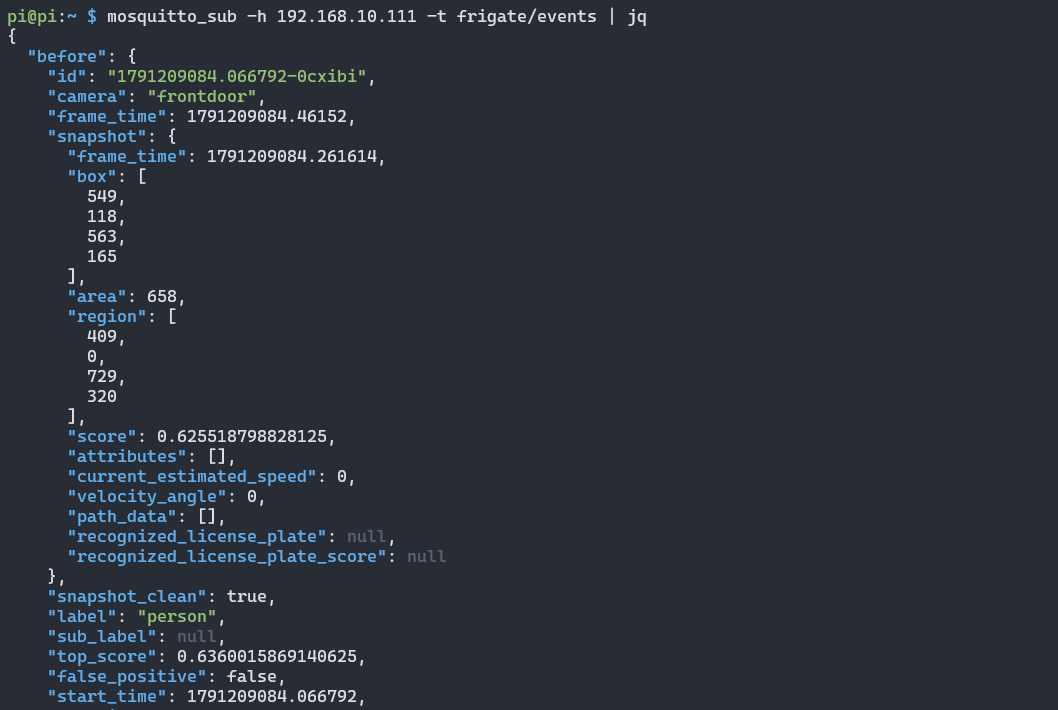
One Frigate event printed through jq. The JSON names the camera, the object label and its score, which are the fields your listener scripts read.
To print events the same way, pipe the subscription through jq: mosquitto_sub -h <broker-host> -t frigate/events | jq. Leave out -v here, because -v adds the topic name in front of each message and jq then cannot read it.
Requirements
You need a Raspberry Pi 5 that runs Frigate, one RTSP camera or test video, and a second always-on computer for the test feed and the broker.
| Item | What to use | Tested setup |
|---|---|---|
| Raspberry Pi 5 with the Sixfab AI HAT+ (DEEPX DX-M1M), running Frigate | Finish the Sixfab AI HAT+ Quickstart, then set up Frigate with the Frigate setup page | Tested on the Sixfab AI HAT+ (DEEPX DX-M1M) |
| Camera input | An RTSP camera or stream, at <rtsp-url> | A live IP camera over RTSP |
| Stream host (only for test feeds) | An always-on computer on your network that runs the feed services | A second computer on the same network |
| Broker host | An always-on computer on your network that runs Mosquitto | The same second computer, port 1883 |
In Sixfab's tests, an ALPON X4 Edge Computer served the RTSP feeds and ran Mosquitto. The Raspberry Pi 5 ran Frigate and the listeners. Hosting the feeds or the broker on the Raspberry Pi 5 itself was not tested. The merge script comes from the project repository: run git clone https://github.com/sixfab/sixfab-dx-frigate, then work from <repo-dir>. The feed units come from each project's GitHub release.
Software: mosquitto, mosquitto-clients, FFmpeg, MediaMTX and Python 3 with venv support.
| Component | Tested version | Note |
|---|---|---|
| RTSP server | MediaMTX v1.21.1, linux arm64 build | The archive ships with the project releases |
| Mosquitto and its clients | Installed from the OS package repository | Version not recorded |
| FFmpeg | Installed at /usr/bin/ffmpeg | Version not recorded |
| Listener MQTT library | paho-mqtt, installed with pip into a virtual environment | Version not recorded |
Install
Install in this order: broker and RTSP server, camera input, the MQTT block in Frigate, each project's camera, then each project's listener.
Set up a Mosquitto MQTT broker and RTSP server
Install Mosquitto and MediaMTX on one always-on computer to get an MQTT broker on port 1883 and an RTSP server on port 8554. Run on <stream-host>, which in this setup is also <broker-host>. Install MediaMTX after the Mosquitto steps below.
sudo apt-get update -qq && sudo apt-get install -y -qq mosquitto mosquitto-clientsThe tested broker config listens on port 1883 on every interface and accepts anonymous clients:
listener 1883 0.0.0.0
allow_anonymous true
Save these two lines as local.conf, copy the file to /etc/mosquitto/conf.d/, then enable and restart Mosquitto:
sudo mkdir -p /etc/mosquitto/conf.d
sudo cp local.conf /etc/mosquitto/conf.d/local.conf
sudo systemctl enable --now mosquitto
sudo systemctl restart mosquitto
The Mosquitto broker in this setup has no password. Keep it on a trusted local network, and read Who can see your camera streams and MQTT messages? first.
MediaMTX listens for RTSP on port 8554 (rtspAddress: :8554 in mediamtx.yml). Install the MediaMTX binary (v1.21.1, linux arm64 in the tested setup) and its mediamtx.yml, then run it as a mediamtx systemd service and enable it.
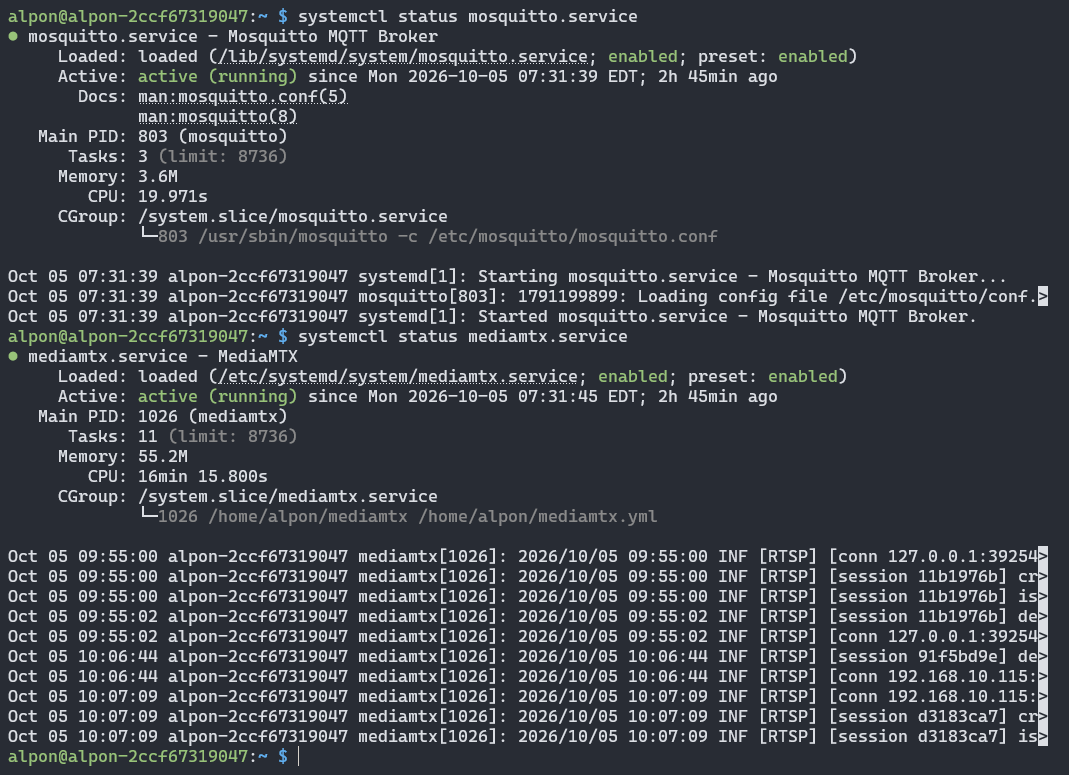
Both services report active (running) and enabled. The mediamtx log lines in the screenshot show RTSP sessions opening, so the feed server is already taking connections.
Use your own IP camera
An IP camera that streams RTSP can serve as a Frigate camera input. The projects were tested with a live IP camera over RTSP. Many IP cameras need a user name and password in the RTSP address. Frigate itself accepts them there, but a camera with credentials was not tested here. Take its RTSP address from the camera's manual and use it as <rtsp-url> in the camera's ffmpeg input. Test the address on the Raspberry Pi 5 with Verify check 1 before you edit the config. If it passes, skip the next step, the looped RTSP test stream.
No camera yet? Serve a looped RTSP test stream
A looped video served over RTSP replaces a camera for testing. Run on <stream-host>. Each feed is a systemd unit that runs FFmpeg and publishes to a MediaMTX path. This is the bird feed's command:
/usr/bin/ffmpeg -nostdin -re -stream_loop -1 -i <video-file> \
    -c:v libx264 -preset veryfast -tune zerolatency -pix_fmt yuv420p -g 50 \
    -c:a aac -f rtsp -rtsp_transport tcp rtsp://127.0.0.1:8554/bird
-re reads the file at its native frame rate and -stream_loop -1 repeats it without end. The unit uses Requires=mediamtx.service, Restart=on-failure and RestartSec=5, and it runs as the user named in its User= line. Change the user, the file path and the stream path to match your host, then install and enable it:
sudo cp <feed-service-name>.service /etc/systemd/system/<feed-service-name>.service
sudo systemctl daemon-reload
sudo systemctl enable --now <feed-service-name>.service
The project releases ship three feed units: bird-rtsp-feed (path bird), porch-rtsp-feed (path porch) and squirrel-rtsp-feed (path squirrel). The squirrel unit copies the video stream with -c:v copy instead of re-encoding it.
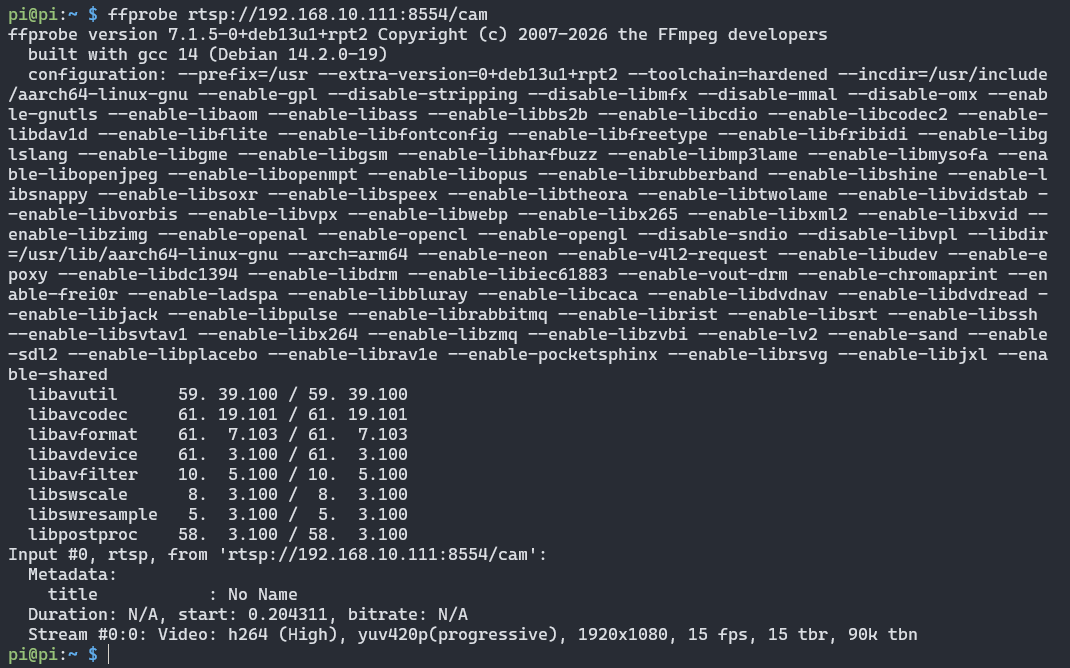
ffprobe reaches the RTSP address from the Raspberry Pi 5 and reports an H.264 video stream at 1920x1080 and 15 fps. If you get this output, Frigate can read the same address.
Restream a USB webcam over RTSP
A USB webcam can feed Frigate if FFmpeg restreams it to rtsp://<stream-host>:8554/<stream-path>. The face recognition project used a Logitech C270 this way on a separate host. The repository has no unit for it, so this page gives no webcam command. Use the looped-video unit above as a model and point FFmpeg at your own camera.
Connect Frigate to the MQTT broker
The Frigate MQTT config is one mqtt block in <frigate-config-dir>/config.yaml, added once for all projects. Run on the Raspberry Pi 5. The deployed config used these keys:
mqtt:
  enabled: true
  host: <broker-host>
  port: 1883
  topic_prefix: frigate
Add a project's camera to the shared config
Merge the project's config/fragment.yaml into config.yaml with toolkit/merge_config.py. Run on the Raspberry Pi 5. Every project ships a fragment with its camera and, for projects with their own model, a models entry. The project's install.sh backs up config.yaml and runs the same merge:
cp <frigate-config-dir>/config.yaml <frigate-config-dir>/config.yaml.bak-$(date +%Y%m%d%H%M%S)
python3 <repo-dir>/toolkit/merge_config.py <frigate-config-dir>/config.yaml <repo-dir>/<project-path>/config/fragment.yaml <frigate-config-dir>/config.yaml.new
mv <frigate-config-dir>/config.yaml.new <frigate-config-dir>/config.yaml
The merge rules are:
- Top-level settings from the fragment win, and nested dictionaries merge recursively.
modelsentries match bypath. The same path replaces the entry; a new path is appended, so a rerun does not add duplicates.camerasmerge key by key. A camera with the same name is replaced, and other cameras stay untouched.
The merge script rewrites config.yaml with a YAML library, which drops any comments in the file. Keep your own notes elsewhere.
Restart Frigate after the merge with docker restart frigate, then confirm a live image in the Frigate UI at https://<pi-ip>:8971.
Run a Python MQTT listener as a user-level systemd service
A user-level systemd service is a background service that runs under your own account instead of root. Run on the Raspberry Pi 5. Each listener is a Python script that subscribes to Frigate's MQTT messages. Every listener keeps the broker address in a BROKER constant at the top of its script. The project's install.sh reads BROKER=<broker-host> from the environment and writes it into the installed copy of the script. The Boss Detector and squirrel installers ask for the broker address when BROKER is unset, while the Porch Pirate installer defaults to 127.0.0.1, which reaches no broker in the tested layout. Run it with BROKER=<broker-host> too. The installer also creates a virtual environment, installs paho-mqtt, and installs the unit under ~/.config/systemd/user/. The Boss Detector, Porch Pirate and squirrel installers also run the two commands below. If you install a unit by hand, run them yourself:
systemctl --user daemon-reload
systemctl --user enable --now <listener-service-name>.service
To start the service at boot without a login, run this once. It asks for your password:
sudo loginctl enable-linger $USERVerify
Six checks confirm the feed, the broker, Frigate and a listener. Run each on the host named in the table. Open Frigate in a browser only at https://<pi-ip>:8971, the authenticated port, because Frigate treats port 5000 as unauthenticated, admin-level access.
| # | Check | Run on | Command | Expected |
|---|---|---|---|---|
| 1 | Feed reachable | Raspberry Pi 5 | ffprobe <rtsp-url> | Stream details for the feed |
| 2 | Broker running | <broker-host> | systemctl status mosquitto | active (running) |
| 3 | Feed service running | <stream-host> | systemctl status <feed-service-name> | active (running) |
| 4 | Frigate stats | Raspberry Pi 5 | docker exec frigate curl -s http://localhost:5000/api/stats | A JSON stats response from Frigate |
| 5 | Frigate events | Any computer that reaches the broker | mosquitto_sub -h <broker-host> -t frigate/events -v | One JSON message each time Frigate tracks an object |
| 6 | Listener alerts | Any computer that reaches the broker | mosquitto_sub -h <broker-host> -t <alert-topic> -v, with the topic from the table below | One JSON message each time the project's listener fires |
To watch a listener's own output, subscribe to its topic. Each listener publishes its alert as JSON:
| Project | Topic | Fields |
|---|---|---|
| Boss Detector | boss_detector/alert | camera, score, timestamp |
| Squirrel sprinkler | squirrel_sprinkler/trigger | camera, score, timestamp |
| Porch Pirate | porch_pirate/theft_alert | camera, box_id, suspect_person_id, dropped_by, dropped_score, timestamp |
mosquitto_sub -h <broker-host> -t porch_pirate/theft_alert -vIf nothing arrives, check the listener service in Troubleshooting.

A Porch Pirate theft alert on its MQTT topic. The message carries the camera, the package ID, the suspect's track ID, the track IDs of people seen dropping it, a score and a timestamp.
Which Frigate MQTT topics should a project listen to?
Most Frigate projects here subscribe to frigate/events, where Frigate publishes one JSON message for each change to a tracked object (Frigate MQTT docs). The Boss Detector, squirrel and Porch Pirate listeners read these fields:
| Field | Used for |
|---|---|
type | new, update or end. Boss Detector acts on new and update, the squirrel listener acts on the first new, and Porch Pirate also watches end |
after.label | The object class, such as person |
after.camera | The Frigate camera name |
after.id | The tracked object ID, used by the squirrel and Porch Pirate listeners to follow one object |
after.top_score or after.score | The detection score, compared with a minimum |
Boss Detector and the squirrel listener add a per-camera cooldown, so a repeat sighting within the cooldown window does not fire again. Boss Detector's cooldown is five seconds.
The bird camera needs no listener. Frigate publishes one topic per species, frigate/birdfeeder/<species>, and frigate/birdfeeder/all counts every bird in view.
Each listener also publishes its own alert. Boss Detector publishes a JSON message with the camera, the score and a timestamp to boss_detector/alert, and the squirrel listener publishes the same fields to squirrel_sprinkler/trigger. Porch Pirate publishes only for a suspected theft: when an unrelated person appears before a package disappears, porch_watch.py publishes a JSON message to porch_pirate/theft_alert with the camera, the package ID, the suspect's track ID, the track IDs of the people seen dropping it, the score and a timestamp.
What does each project add to the shared Frigate config?
Each project's install adds its own pieces, such as a camera, a model or a zone, to one shared config.yaml and does not replace the file. All the projects also share one Frigate container, one broker and one NPU (the DEEPX DX-M1M on the Sixfab AI HAT+ in the tested setup). A .dxnn file is a model compiled for the DEEPX NPU, and COCO-80 is the standard set of 80 COCO object classes that many pretrained YOLO models detect.
| Project | What its fragment adds |
|---|---|
| Boss Detector | A camera on the porch feed and the yolov8n-ppu-coco80.dxnn model in the indoor_thermal scene |
| Porch Pirate | The porchpirate camera, the people-and-cardboxes.dxnn model in the indoor scene and a zone polygon |
| Squirrel detection | The garden camera and the squirrel-detector-model.dxnn model in the outdoor scene |
| Face recognition | The frontdoor camera, a models entry in the all scene and face recognition settings. Upstream Frigate lists AVX support as a requirement for face recognition, but it ran effectively on the Raspberry Pi 5 |
| Bird camera species ID | The birdfeeder camera and the nabirds-new-model.dxnn model (555 species classes) in the outdoor_thermal scene |
- Porch Pirate's listener does not filter by camera. If face recognition and Porch Pirate share one Frigate, both fragments define a zone named
frontdoor_zone, so a person at the face camera can trigger a false theft alert. Rename one zone. Boss Detector's listener also alerts for people on every camera. - Frigate's
scenesetting takes one of five values:all,indoor,outdoor,indoor_thermalandoutdoor_thermal. Boss Detector usesindoor_thermalwithout a thermal camera, because it only needs an unused slot. - The Frigate setup page explains how one DEEPX NPU runs several cameras and models.
- One RTSP feed can serve more than one Frigate camera. Boss Detector's camera and Porch Pirate's camera are both configured for the
porchpath. We did not record running both at the same time.
Who can see your camera streams and MQTT messages?
Any device on your network that can reach the feed host or the broker can read your streams and messages. Neither service in this setup asks for credentials.
- The Mosquitto config in this setup has
allow_anonymous true, and the listeners connect without a username or password. - MediaMTX's default config allows the user
any, with no password and no IP limit, to publish, read and play back every path. - Frigate's own MQTT topics, including its command topics, are on the same anonymous broker, so anyone who can reach it can also publish to them.
- Neither the feed server nor the broker uses TLS here. Keep both services on a trusted local network and do not forward ports 1883 or 8554 to the internet.
Limitations
This setup was tested on two computers with no authentication, and its Boss Detector and squirrel listeners publish placeholder alerts only.
- The tested setup ran the feeds and the broker on a second computer. A Raspberry Pi 5 as stream or broker host is untested.
- The Mosquitto broker has no password and no TLS.
- A looped recording tests the pipeline, not detection on a live scene.
- The listeners store the broker address in the script, so they lose the broker if DHCP gives the broker host a new IP address.
- The Boss Detector and squirrel listeners publish a placeholder alert to MQTT and write a log line. The real action, such as a sound or a sprinkler valve, is not wired in.
- The feed units in the releases use a fixed user name and fixed home-directory paths from the test hosts. Edit them for your hosts.
- Home Assistant is not tested with these projects.
- Frigate chooses the DX-RT version its DEEPX detector uses. The tested build pins DX-RT v3.4.0, and this page cannot change it.
Privacy
These cameras can record people, so treat the video and the messages as personal data. Point cameras only at property you control, and tell people who enter the view that they are recorded. The network exposure of the feeds and the broker is covered in Who can see your camera streams and MQTT messages?.
Troubleshooting
Each entry names a symptom and the command that locates the cause.
The camera shows no image in Frigate
Check the feed first, because Frigate shows no image when it cannot read the stream. Run ffprobe <rtsp-url> on the Raspberry Pi 5. If it fails, run systemctl status <feed-service-name> on <stream-host>.
MQTT does not connect
The Mosquitto broker is the first thing to check when MQTT does not connect. Run systemctl status mosquitto on <broker-host>. A listener that cannot connect logs MQTT connection error, rc=<code>.
No alert arrives on a listener's topic
The listener service may have stopped, so check that it runs. It should report active (running), and at start it logs Connected to broker (<broker-host>:1883), listening on frigate/events:
systemctl --user status <listener-service-name> --no-pager -n 30Then confirm that Frigate itself publishes with mosquitto_sub -h <broker-host> -t frigate/events -v, and that a person, squirrel or package is actually on camera.
A listener cannot find the broker
The listener may hold a stale broker address. Check the BROKER constant in the installed copy of the listener script. The repository scripts carry the comment "can change via DHCP, verify first". Re-run the project's install.sh with BROKER=<broker-host> to write the current address, or edit the constant and restart the service.
The listener stops after logout or reboot
User-level services stop at logout unless linger is on. Run sudo loginctl enable-linger $USER once.
Frigate stops accepting the config after a merge
The install scripts save a copy before each merge as config.yaml.bak-<timestamp>. Restore the latest backup and restart Frigate with docker restart frigate. Frigate reports a bad config as Config Validation Errors.
Detections stop after the DX-RT daemon restarts
Run docker restart frigate after dxrtd, the DX-RT (DEEPX runtime) daemon, restarts. The dxrt.service unit runs the daemon, so systemctl status dxrt.service shows when it restarted.
FAQ
Can I test Frigate without a real IP camera?
Yes. Loop a recorded video over RTSP and point a Frigate camera at that stream, as you would with a real camera. The repository's test feeds work this way, with FFmpeg looping a video as a systemd service on a second computer. A looped clip tests the pipeline, not detection on a live scene.
Can the RTSP feed and the MQTT broker run on the Raspberry Pi 5 itself?
Running the RTSP feed and the MQTT broker on the Raspberry Pi 5 is not tested. In the tested setup, the RTSP feeds and Mosquitto ran on a separate computer, and the Raspberry Pi 5 ran Frigate and the listeners. The setup scripts in the repository are written for that two-machine layout.
Does Frigate send one MQTT message per detected object?
No. Frigate publishes one JSON message on frigate/events for each change to a tracked object, with a type of new, update or end. The squirrel listener acts only on the first new message, and Boss Detector adds a per-camera cooldown, so one object does not fire an action on every update.
Does the Mosquitto broker for these Frigate projects have a password?
No. The tested Mosquitto config sets allow_anonymous true, and the Frigate project listeners connect without credentials. Use the broker on a trusted local network only. A password setup was not tested.
Can two Frigate projects use the same camera feed?
Yes. Each project adds its own Frigate camera, and two cameras can read the same RTSP address. In the tested setup, Boss Detector's camera and Porch Pirate's camera were both configured for the porch feed.
How do I add another project's camera to an existing Frigate config without overwriting it?
Merge the project's config/fragment.yaml into config.yaml with toolkit/merge_config.py. The merge script keeps your other cameras and any setting the fragment does not name, and it replaces a camera or model entry that has the same name or path.
Next: pick a project
Pick a project from the AI projects hub. For the simplest listener, start with Frigate person detection in Boss Detector, which publishes an alert when it sees a person, at most once every five seconds per camera. Frigate package detection in Porch Pirate adds zone and sequence logic to its listener. The other Frigate projects are the Raspberry Pi face recognition camera, the DIY Raspberry Pi bird camera and Frigate squirrel detection. If Frigate is not running yet, first set up Frigate with the DEEPX NPU. The hardware used here is the Sixfab AI HAT+ for Raspberry Pi 5.
License and credits
This page uses Frigate NVR, Eclipse Mosquitto, MediaMTX, FFmpeg and paho-mqtt. Each is third-party software under its own license, so check it before you redistribute it. Loop only a test video you hold the rights to.
Updated about 10 hours ago