
Porch Pirate: Frigate Package Detection on Raspberry Pi 5
Frigate package detection needs a model with a package class, which COCO-80 models lack. Porch Pirate runs a custom 5-class model, people-and-cardboxes.dxnn, on the NPU of the Sixfab AI HAT+ for Raspberry Pi 5 (DEEPX DX-M1M) and a Python listener on the CPU. The listener publishes an MQTT alert when a package disappears after someone new entered the porch zone.
Part of Raspberry Pi 5 AI projects.
| Field | Value |
|---|---|
| What it does | Detects packages on a porch camera and publishes an MQTT message when a package disappears after someone new was seen |
| Use case; Stack | Home security; Frigate NVR |
| NPU board | Sixfab AI HAT+ for Raspberry Pi 5 (DEEPX DX-M1M) |
| On the DEEPX NPU | Object detection: custom 5-class model, people-and-cardboxes.dxnn, a ready-compiled .dxnn file |
| On the Pi 5 CPU | Rule logic and MQTT listeners: porch_watch.py, reading Frigate's frigate/events topic |
| Camera input | RTSP |
| Frigate build | ghcr.io/blakeblackshear/frigate:af0ba19-standard-arm64, built from commit af0ba19 of Frigate's dev branch (see Limitations) |
| Difficulty | Advanced |
| Model license | AGPL-3.0, details in the release notes at https://github.com/sixfab/sixfab-dx-frigate/releases/tag/porch-pirate-v1.0.0 |
| Tested on | Raspberry Pi 5 (8 GB) with the Sixfab AI HAT+ (DEEPX DX-M1M), Raspberry Pi OS Trixie 64-bit, RT driver v2.6.0, PCIe driver v2.5.0, DX-RT v3.4.2 and v3.4.0, firmware v2.7.4, ghcr.io/blakeblackshear/frigate:af0ba19-standard-arm64, live IP camera over RTSP |
| Last tested | 2026-10-05 |
What you will build
Porch Pirate publishes an MQTT message when a package disappears after someone new entered the porch zone. It does not prevent theft and is not a security product. "Porch pirate" is US slang for someone who steals delivered packages.
Porch Pirate has three parts: a 5-class model, a porch zone and a listener that publishes the alert.
| Part | File | Job |
|---|---|---|
| Model | model/people-and-cardboxes/people-and-cardboxes.dxnn, labelmap.txt | Detects package, person, car, truck and motorcycle on the NPU |
| Zone and camera | config/fragment.yaml (porchpirate camera, model, frontdoor_zone) | Limits the rule to the porch deck |
| Listener | automation/porch_watch.py, run by porch-pirate-automation.service | Reads frigate/events and publishes the theft alert |
Picture a delivery: a package lands on your porch, a few minutes later it is gone, and you were not the one who picked it up. Porch Pirate is built to notice that moment and publish an MQTT message about it.
Porch Pirate is a maker project, and two of its parts do the work. The first is a custom object detection model that Frigate NVR runs on the DEEPX NPU. Unlike COCO-80 models, which have no package class, this model has a package class, so Frigate can track a box on your porch as an object. The second is a small Python listener, porch_watch.py, that runs on the Raspberry Pi 5 and watches Frigate's event stream.
The rule starts when a package first appears: the listener notes who is standing in your porch zone at that moment. Those people are the presumed droppers: a courier, or you. If someone else steps into the zone while the package is still there, the listener flags them as a secondary person. If the package then disappears and a secondary person was flagged, the listener logs a warning and publishes a JSON alert to the MQTT topic porch_pirate/theft_alert. If nobody else showed up, the package is logged as removed and nothing is published.
Theft is not something a detector sees. It is a rule on Frigate's tracked-object events, and the rule cannot tell a resident, a returning courier and a thief apart.
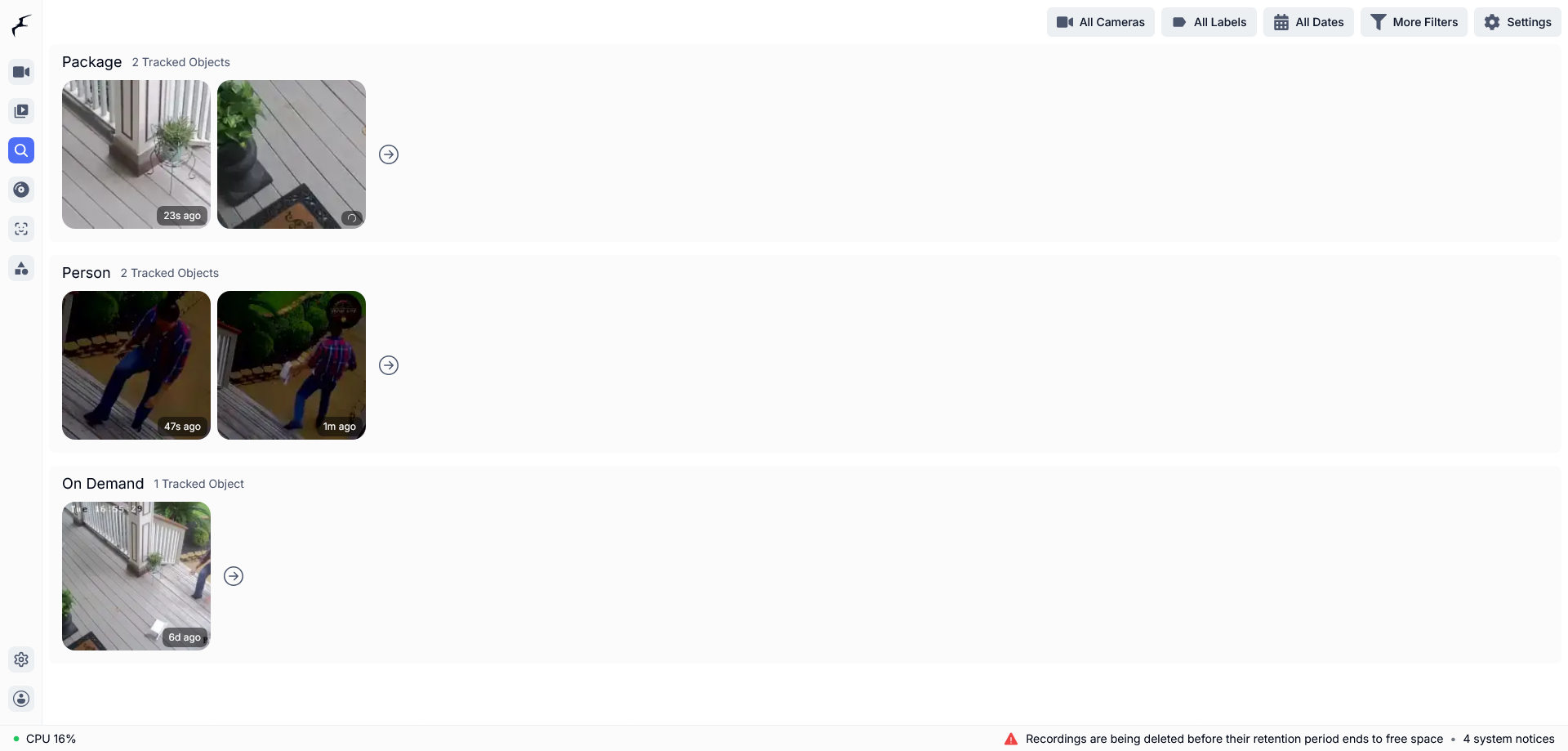
Explore lists each package and each person as its own tracked object, the same objects Frigate reports on frigate/events.
What you see when it works
You see three things. In Frigate, the porchpirate camera shows boxes around packages and people. In the listener's log, each step of the rule leaves one line. And on MQTT, a theft scenario produces a message on porch_pirate/theft_alert.
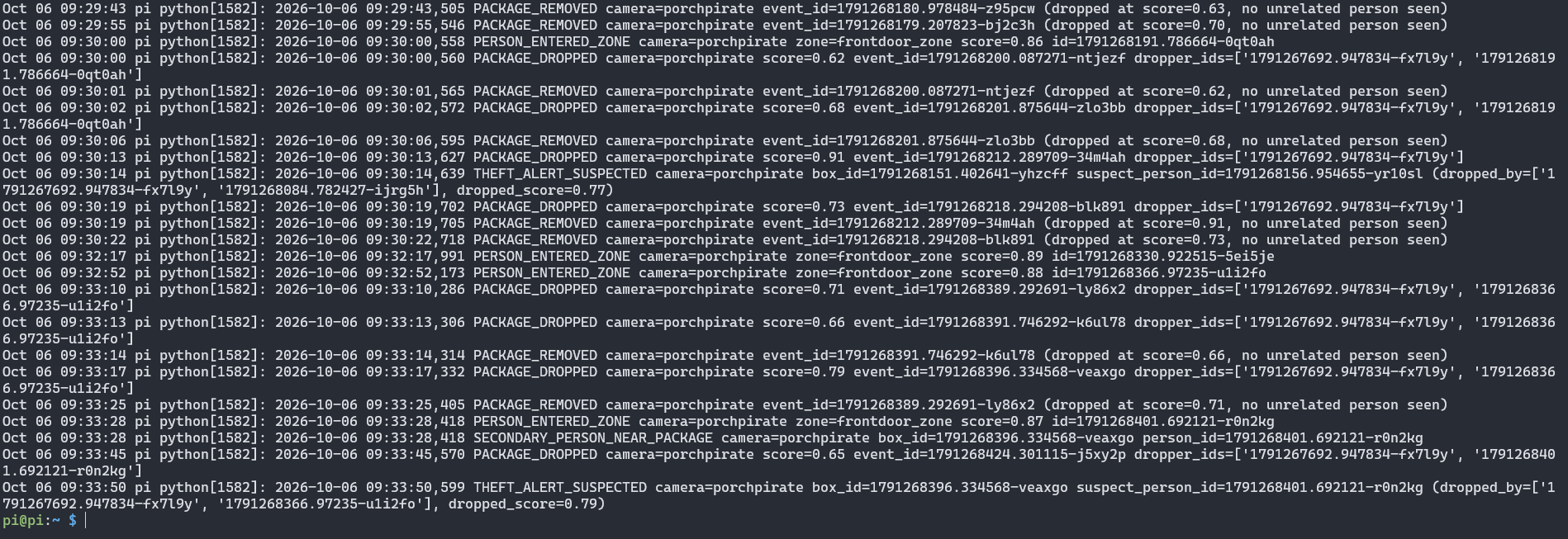
The listener log shows the theft sequence: PACKAGE_DROPPED, SECONDARY_PERSON_NEAR_PACKAGE, then THEFT_ALERT_SUSPECTED. A package that ends with no new person logs PACKAGE_REMOVED.

Each alert arrives on porch_pirate/theft_alert as one JSON line with the camera, package ID, suspect ID, dropper IDs, score and timestamp.
Terms used on this page
These are the terms the rest of the page relies on, each in one sentence.
| Term | Meaning |
|---|---|
| NPU | Neural processing unit, a chip that runs neural-network inference so the CPU does not have to |
| Frigate NVR | An open-source network video recorder that runs object detection and publishes events over MQTT |
| MQTT, broker, topic | MQTT is a lightweight publish/subscribe protocol; a broker such as Mosquitto passes messages between programs, and each message goes to a named topic |
| RTSP | The protocol IP cameras use to stream live video |
| COCO-80 | A common set of 80 object classes that many pretrained detectors use; it has no package class |
.dxnn | DEEPX's compiled model format; the model on this page is a ready-compiled .dxnn file |
| Label map | A text file that lists the class names in the order the model outputs them |
| Zone | A polygon on the camera image; Frigate reports which zones each tracked object is in |
| Track ID | The ID Frigate gives an object while it stays in view; a person who leaves and returns gets a new one |
Which models can detect packages in Frigate?
Frigate detects packages without Frigate+ only if its model has a package class; Frigate+ is Frigate's paid model service. Two models matter here:
| Model | Package label | Classes | Theft logic |
|---|---|---|---|
yolov8n-ppu-coco80.dxnn, a COCO-80 reference model | No | 80 | No |
people-and-cardboxes.dxnn, this project's custom model | Yes (package, class 0) | 5 | Provided by porch_watch.py, not by the model |
Frigate+ is not required for this setup. The model runs on the DEEPX NPU and the rule runs on the Pi 5 CPU.
How does Porch Pirate detect a missing package?
Porch Pirate detects a missing package with a rule on top of Frigate's object tracking. Frigate tracks packages and people and reports whether each is in frontdoor_zone, and porch_watch.py publishes an alert when a package's event ends after someone new entered the zone. The data flows in five steps:
- An RTSP stream of the porch reaches Frigate on the Raspberry Pi 5.
- Frigate sends frames to the DEEPX NPU, which runs the 5-class model.
- Frigate tracks each package and person and records whether it is inside
frontdoor_zone. - Frigate publishes tracked-object events to
frigate/events. porch_watch.pyreads those events and, when the rule matches, publishes an alert toporch_pirate/theft_alert.
The 5-class package detection model
Porch Pirate's package detection model, people-and-cardboxes.dxnn, detects five classes, in this order: package, person, car, truck, motorcycle. It takes a 640×640 input, was trained on a custom dataset balanced with COCO person images, was compiled with DX-COM as a PPU model, and ships as a ready-compiled .dxnn file, so you do not compile anything to use it. The install downloads it from the project's GitHub release into model/people-and-cardboxes/, next to labelmap.txt. Each model's license and details are in the release notes at https://github.com/sixfab/sixfab-dx-frigate/releases/tag/porch-pirate-v1.0.0. To compile your own model to .dxnn, see the Sixfab Deployment Workflow and the DX-COM Configuration Reference, and for ready-made models see the Sixfab Model Zoo.
How do Frigate zones limit the porch rule?
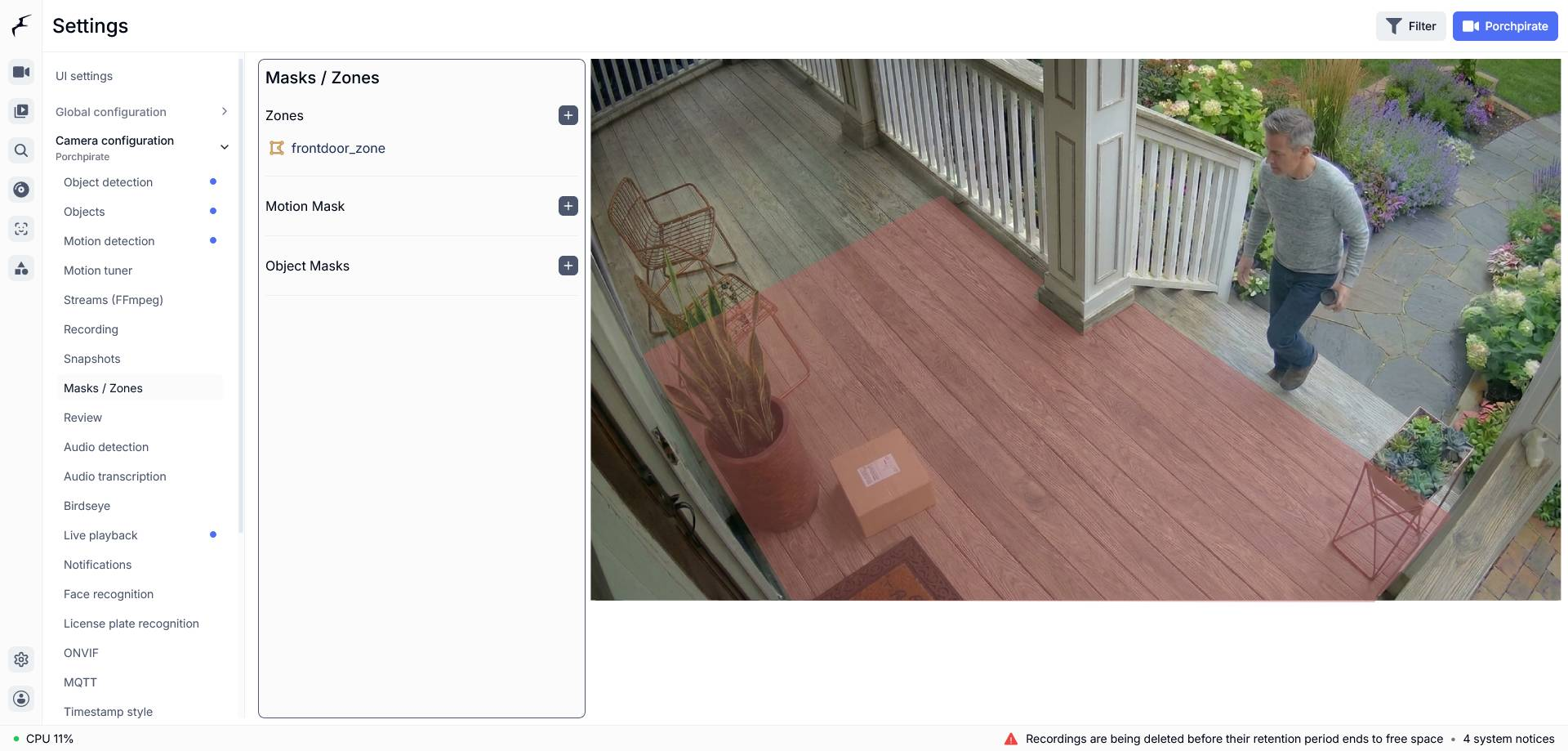
Frigate zones limit the porch rule to the porch deck: porch_watch.py only counts people inside the zone named frontdoor_zone, but it tracks every package event on the camera, whichever zone the package is in. A Frigate zone is a polygon on the camera image, and Frigate reports which zones each tracked object is in. The shipped polygon follows the porch deck of the project's reference frame: door frame, railing, pillar, deck corner, bottom edge. It will not fit your camera, so draw your own and keep the name frontdoor_zone. The coordinates in the fragment are x,y pairs between 0 and 1.
porch_watch.py does not filter by camera name. If another project on the same Frigate, such as face recognition, defines a zone also named frontdoor_zone, a person at that camera can trigger a false theft alert. Rename one of the two zones before you run both.
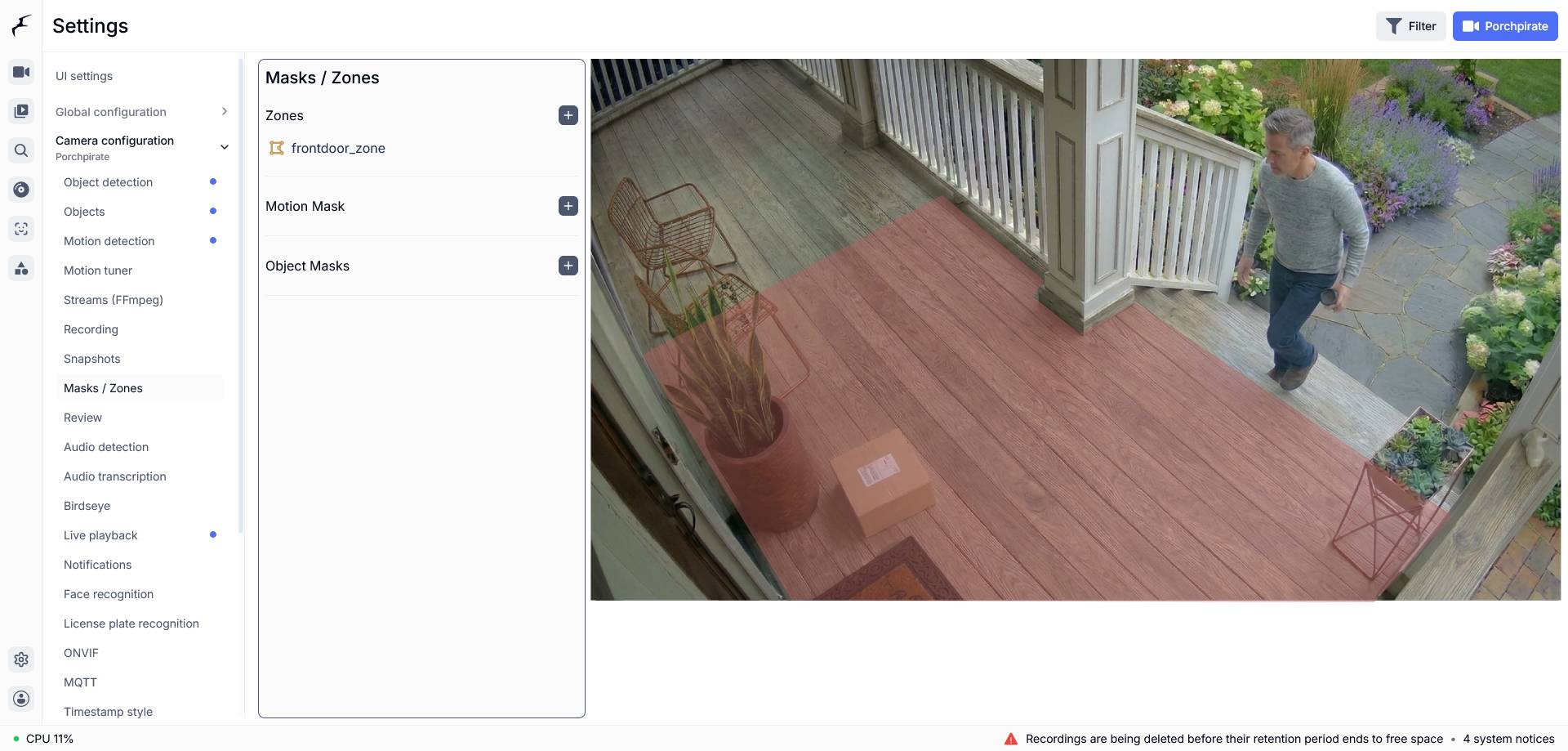
Frigate's Masks / Zones page for the Porchpirate camera outlines frontdoor_zone over the porch deck. Your own zone must keep this name.
How does the alert decide a package may be stolen?
The alert fires when a package's tracked-object event ends after someone new entered the zone, meaning a person who was not in the zone when the package appeared. porch_watch.py applies four steps:
| Step | What porch_watch.py does |
|---|---|
| 1 | Subscribes to frigate/events and reads the event type, ID, label, camera and current zones |
| 2 | When a new package event appears, takes a snapshot of every person in the zone at that moment as that package's dropper set. The set does not change, and it stays until the package event ends |
| 3 | While the package is active, flags the first person in the zone who is not in the dropper set as the secondary person |
| 4 | When the package event ends, publishes the alert if a secondary person was flagged; otherwise logs PACKAGE_REMOVED |
Two caveats follow from this design. A "different person" is a different Frigate track ID, and Frigate assigns a new track ID when the same person leaves and re-enters the frame. The rule also reacts to Frigate ending the package event and does not check why it ended.
MQTT topics
Porch Pirate uses two MQTT topics, one that Frigate publishes and one that the listener publishes. Frigate's own MQTT topics are documented upstream.
| Topic | Published by | Read by | Payload |
|---|---|---|---|
frigate/events | Frigate | porch_watch.py | Tracked-object events |
porch_pirate/theft_alert | porch_watch.py | Any subscriber | JSON, published with QoS 1 |
The alert payload is JSON with these fields. The example below is schematic, not a captured alert:
{"camera": "<camera-name>", "box_id": "<package-event-id>", "suspect_person_id": "<person-event-id>", "dropped_by": ["<person-event-id>"], "dropped_score": 0.0, "timestamp": 0.0}The listener also writes THEFT_ALERT_SUSPECTED to its log at warning level when it publishes the alert. The message is not retained. timestamp is Unix time in seconds, and dropped_score is the package's detection score when it first appeared.
Requirements
You need a Raspberry Pi 5 that runs Frigate with the DEEPX NPU detector. Mount the board with the Sixfab AI HAT+ Quickstart, then set up Frigate with the DEEPX NPU; that page holds the one Frigate docker run command, so this page does not repeat it. Then follow camera feeds and MQTT for Frigate projects, because Frigate must publish MQTT events to the same broker the listener uses.
DEEPX support was merged into Frigate's dev branch on 2026-09-21 (PR #24336). It is not in a stable release yet; the latest stable release is v0.18.0 (2026-09-12). Sixfab develops and maintains DEEPX support in Frigate (Frigate's DEEPX NPU detector docs). The ghcr.io/blakeblackshear/frigate:af0ba19-standard-arm64 image, which the setup page pulls, is built from commit af0ba19 of Frigate's dev branch.
| Item | Notes |
|---|---|
| Raspberry Pi 5 | Runs Frigate and the listener |
| Sixfab AI HAT+ for Raspberry Pi 5 (DEEPX DX-M1M) | Already set up with Frigate's DEEPX detector. This project was tested on this board |
| RTSP source | Any RTSP camera or stream at <rtsp-url> |
| MQTT broker | Any broker on port 1883 that accepts connections without credentials, such as Mosquitto. The listener sends no credentials |
| Python | Python 3 with venv; install.sh creates a virtual environment and installs paho-mqtt |
| Other tools | git, curl, sha256sum, Docker, ffprobe, mosquitto_sub, systemd user services |
Install
Before you install, finish the Frigate DEEPX setup and the camera feed and MQTT steps listed under Requirements. Then clone the repository and run the install script on the Raspberry Pi 5 that runs Frigate, or follow the manual steps.
Quick install
Run this on the Raspberry Pi 5 that runs Frigate:
git clone https://github.com/sixfab/sixfab-dx-frigate.git
cd sixfab-dx-frigate/apps/porch-pirate
./install.sh --rtsp-url <rtsp-url> --broker <broker-host>--rtsp-urlis the RTSP address of your porch camera.--brokeris the host of your MQTT broker. If you leave it out, the listener uses127.0.0.1, which reaches no broker when the broker runs on another computer, as in the tested layout, so always pass--broker <broker-host>. The option sets only the listener's broker. It does not change Frigate's ownmqtt.hostsetting, so point that at the broker in yourconfig.yamltoo.
The installer asks for anything it needs and does not have. The installer downloads the model file from the project's GitHub release and checks its SHA-256 before it installs it. It needs git, curl and sha256sum.
The script finds your Frigate config directory from the container's /config mount, asks before it restarts Frigate, and switches the porchpirate camera on after the restart. Add --yes to skip the question. Add --container <name> or --config-dir <dir> if your container is not named frigate or you want to set the config directory yourself.
After the install, edit the frontdoor_zone polygon in <frigate-config-dir>/config.yaml to match your own porch. The installed zone traces the project's reference footage, not your camera.
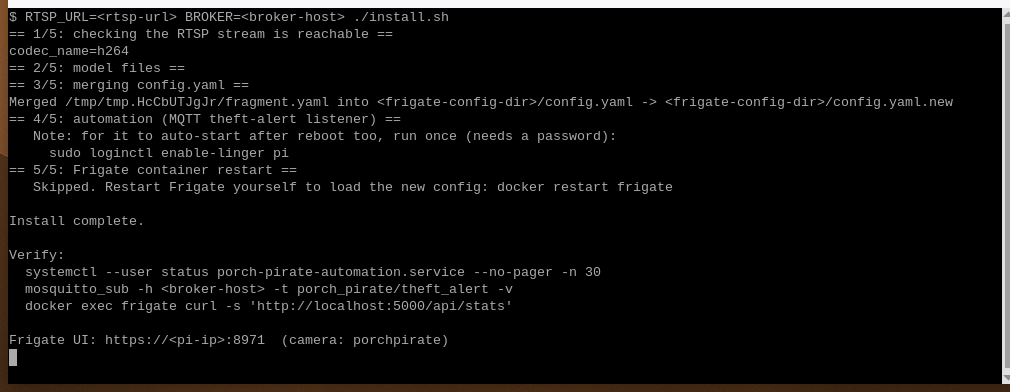
The quick install prints its five stages and ends with Install complete.
To keep the listener running after logout and reboot, run once:
sudo loginctl enable-linger $USERThen sign in at https://<pi-ip>:8971 and confirm that the porchpirate camera shows a live image.
Manual install
Use these steps if you want to run the installer from a clone of the repository.
-
Start your RTSP feed and MQTT broker, and turn on MQTT in Frigate with host
<broker-host>. -
Clone the repository and open the project folder:
git clone https://github.com/sixfab/sixfab-dx-frigate.git <repo-dir>
cd <repo-dir>/<project-path>
Download the model from the project's GitHub release into the project folder and check it. Use the repository address without a trailing
.gitin the download URL.mkdir -p model/people-and-cardboxes curl -fL -o model/people-and-cardboxes/people-and-cardboxes.dxnn https://github.com/sixfab/sixfab-dx-frigate/releases/download/porch-pirate-v1.0.0/people-and-cardboxes.dxnn awk '$1 !~ /^#/ && NF {print $3 " " $2}' models.txt | sha256sum -c -Expected output:
model/people-and-cardboxes/people-and-cardboxes.dxnn: OK. -
Draw your own porch zone, named
frontdoor_zone, inconfig/fragment.yaml. -
Run the installer with your values:
RTSP_URL=<rtsp-url> BROKER=<broker-host> ./install.shThe script runs five stages: it checks the RTSP stream with
ffprobe, copies the model and label map into the Frigate config directory, merges your stream into a copy offragment.yamland that into the liveconfig.yaml(after saving a timestamped.bakcopy), installs the listener and its service, and restarts the Frigate container after asking. It leaves the files in the repository unchanged.CONTAINER,CONFIG_DIRandASSUME_YES=1work as environment variables too. -
To keep the listener running after logout and reboot, run once:
sudo loginctl enable-linger $USER -
Sign in at
https://<pi-ip>:8971and confirm that theporchpiratecamera shows a live image. Use your own camera name if you changed it.
The fragment adds this camera and model:
models:
  - scene: indoor
    model_type: yolo-generic
    width: 640
    height: 640
    path: /config/model_cache/people-and-cardboxes.dxnn
    labelmap_path: /config/model_cache/people-and-cardboxes-labelmap.txt
    devices:
      - deepx:PCIe:0

cameras:
  porchpirate:
    ffmpeg:
      inputs:
        - path: <rtsp-url>
          roles:
            - detect
            - record
    detect:
      enabled: true
      width: 1280
      height: 720
    objects:
      track:
        - person
        - package
      filters:
        person:
          min_score: 0.4
          threshold: 0.5
        package:
          min_score: 0.4
          threshold: 0.5
    motion:
      threshold: 15
      contour_area: 8
    zones:
      frontdoor_zone:
        coordinates: 0.0343,0.4439,0.3371,0.2119,0.5066,0.5039,0.5539,0.4557,0.8724,0.8514,0.7992,0.9948,0.2052,0.9948
        objects:
          - person
          - package
To run this camera next to other projects' cameras and models on one NPU, see Can one DEEPX NPU run several cameras and models? on the setup page.
Verify
Three commands confirm that the listener runs, the broker receives alerts and Frigate answers. Run them on the Raspberry Pi 5:
systemctl --user status porch-pirate-automation.service --no-pager -n 30
mosquitto_sub -h <broker-host> -t porch_pirate/theft_alert -v
docker exec frigate curl -s http://localhost:5000/api/stats
The first command should report the unit as active (running). The second stays quiet until an alert fires. The third returns Frigate's stats as JSON. Reach the Frigate web interface only through https://<pi-ip>:8971.
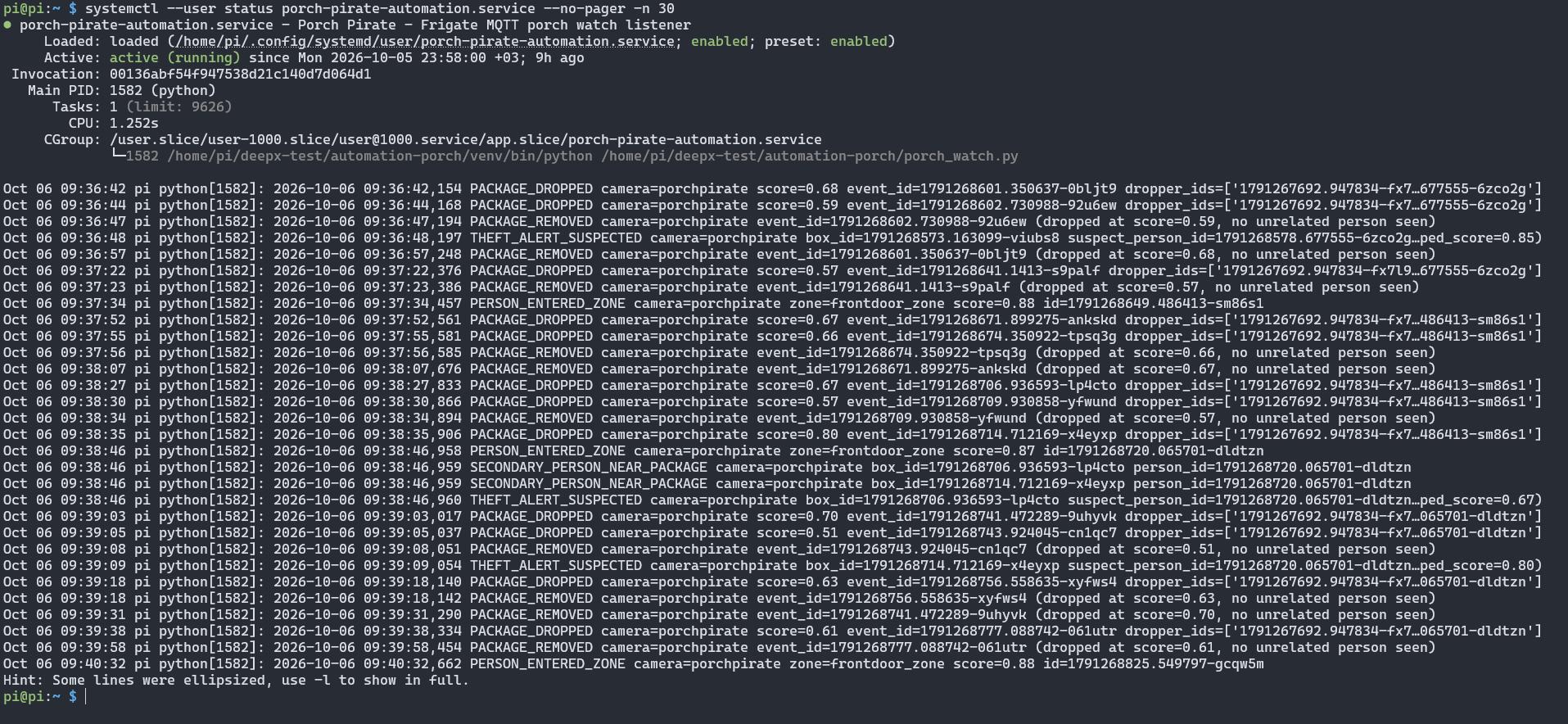
systemctl reports the listener as active (running), followed by its latest log lines.
Read the listener's log with journalctl --user -u porch-pirate-automation.service -n 50 --no-pager. The listener writes one line per step, so you can follow the rule:
| Log line | Meaning |
|---|---|
PERSON_ENTERED_ZONE | A person entered frontdoor_zone |
PACKAGE_DROPPED | A package was seen for the first time; the log lists the dropper IDs |
SECONDARY_PERSON_NEAR_PACKAGE | A person outside the dropper set entered the zone while the package was active |
THEFT_ALERT_SUSPECTED | The package event ended after a secondary person was seen; the alert was published |
PACKAGE_REMOVED | The package event ended and no unrelated person was seen |
A theft scenario logs PACKAGE_DROPPED, then SECONDARY_PERSON_NEAR_PACKAGE, then THEFT_ALERT_SUSPECTED. The person who dropped the package, picking it back up while still in the frame, logs PACKAGE_REMOVED and publishes nothing. A dropper who leaves the frame and comes back gets a new track ID, so the alert fires.
How fast is Frigate package detection and alerting on a Raspberry Pi 5?
No measured inference time or alert delay is published for this model yet, so this page states no figures. To measure your own setup, read the detector stats with the third Verify command and compare the time you remove a package with the time the message reaches porch_pirate/theft_alert. The Frigate System page also charts detector inference speed, and System Monitoring shows how to check NPU load with dxtop. Add a timestamp to your test runs so you can report the delay.
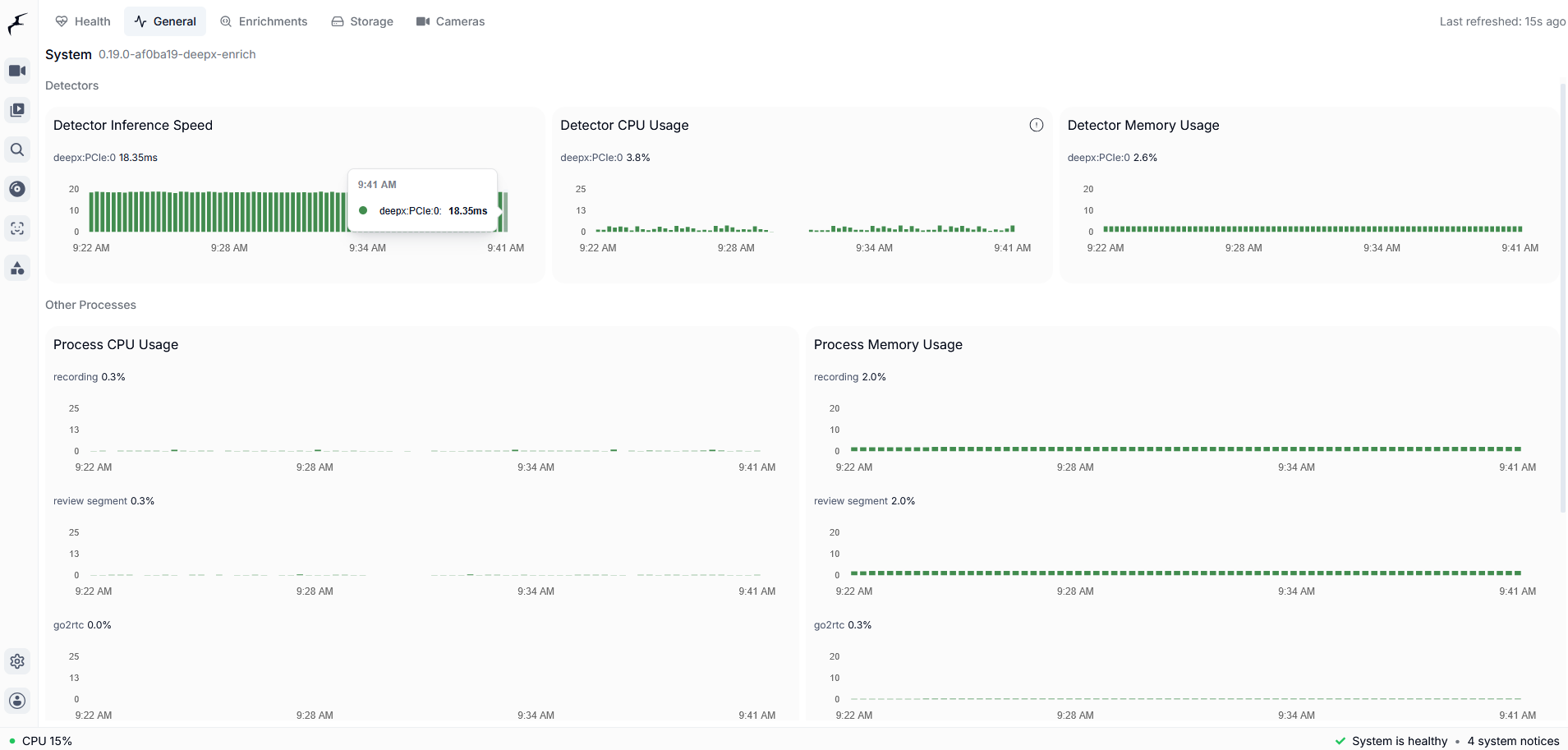
Frigate's System page lists the deepx:PCIe:0 detector with charts for inference speed, CPU and memory, so you can confirm the NPU does the detection.
Limitations
- DEEPX support is not in a stable Frigate release yet. DEEPX support was merged into Frigate's dev branch on 2026-09-21 (PR #24336). It is not in a stable release yet; the latest stable release is v0.18.0 (2026-09-12). Sixfab develops and maintains DEEPX support in Frigate (Frigate's DEEPX NPU detector docs). The
ghcr.io/blakeblackshear/frigate:af0ba19-standard-arm64image is built from commit af0ba19 of Frigate's dev branch. - No re-identification. Anyone who leaves and re-enters the frame gets a new track ID, so "different person" means "different track ID". A real identity check would need a
face_recognitionsub_labelcomparison, which this project does not use. - No resident, courier or thief distinction. The rule does not check who picks the package up. It alerts whenever someone other than the dropper entered the zone first.
- It flags; it does not prevent. The listener publishes an MQTT message and logs. Nothing else is wired.
- The rule reacts to the end of the package event. It does not check why Frigate ended the event, so a package track that Frigate loses while the package is still there counts as removed.
- One flagged person per package. The listener records the first secondary person only.
- State lives in memory. Restarting the listener clears active packages.
- No broker security. The listener connects to port 1883 without credentials.
- No false-alarm rate. No false-alarm rate has been measured.
- One camera and one zone. The fragment defines one camera and one zone. The listener does not filter by camera, so another project's zone named
frontdoor_zoneon the same Frigate can trigger false alerts. - Frigate chooses the DX-RT version its DEEPX detector uses. The tested build pins DX-RT v3.4.0, and this page cannot change it.
- Restart after a runtime restart. If the DX-RT daemon (the DEEPX runtime) restarts, restart the Frigate container too.
- Porch Pirate was set up with Frigate in Docker. Home Assistant OS and the Frigate add-on were not tested.
Privacy
The camera records people, so set it up with their privacy in mind.
- Aim the camera at your porch, not the street, and check local rules on recording public areas.
- Delivery workers and visitors will be recorded. Set recording and snapshot retention deliberately.
- Detection runs on the NPU. The listener connects only to the MQTT broker you configure and contacts nothing else. Frigate itself downloads the DX-RT Python bindings once at first start, and again when a release pins a new version.
- Never add traps, sprays or anything that could hurt someone, and never confront anyone.
Troubleshooting
No message on porch_pirate/theft_alert
Check the listener log with journalctl --user -u porch-pirate-automation.service -n 50 --no-pager. Confirm that mosquitto_sub -h <broker-host> -t frigate/events -v shows events; if it does not, revisit the Frigate MQTT setup. Then confirm that BROKER in porch_watch.py points at the same broker.
The listener logs nothing about people or packages
The listener filters by zone name and label only. Check that the zone is named frontdoor_zone and that Frigate tracks person and package.
The listener stops after logout or reboot
Run sudo loginctl enable-linger $USER.
install.sh stops with "cannot read" the RTSP URL
The installer runs ffprobe against the RTSP URL you gave it and exits with ERROR: cannot read <rtsp-url> - is the stream running and reachable from this Pi? if it cannot read the stream. Confirm the feed is running and the URL is reachable from the Pi 5.
The installer says the container was not found
The installer looks for a Docker container named frigate. Pass --container <name> to the quick install, or set CONTAINER=<name> for the manual install.
The installer skipped the Frigate restart
Run docker restart frigate yourself, or rerun the installer with --yes. The new camera and model load only after the restart.
The service does not start
The installer places the listener and its virtual environment in ~/sixfab-apps/porch-pirate and points the unit file at your user and home directory. Check it with systemctl --user status porch-pirate-automation.service --no-pager -n 30, and confirm ~/sixfab-apps/porch-pirate/porch_watch.py exists.
An alert fires when I collect my own package
An alert on your own pickup is expected under the rule when you were not in the porch zone when the package appeared. See Limitations.
FAQ
Can Frigate detect packages without a paid subscription?
Yes, if its model has a package class. Porch Pirate runs a custom 5-class .dxnn model on the DEEPX NPU and does not use Frigate+.
Can Frigate tell when a package is taken from my porch?
Not on its own, because theft is a rule on top of detection. In Porch Pirate, porch_watch.py reads frigate/events and publishes an alert when a package event ends after someone new was seen in the zone.
How does a Frigate package theft alert tell a delivery from a theft?
The alert cannot tell a delivery from a theft. Whoever is in the porch zone when the package appears is the dropper. If any other track ID enters the zone before the package event ends, the alert is published when that event ends, whether the track ID belongs to a resident, a courier or a thief.
Can Frigate recognize the same person when they come back into view?
Not by tracking alone. A person who leaves and re-enters the frame gets a new track ID, so the rule can count them as someone new. Porch Pirate does not use face recognition.
Will collecting my own package trigger an alert?
Not if you were in the porch zone when the package appeared and stay in the frame until you pick it up. If you leave the frame and come back, Frigate gives you a new track ID, you count as a secondary person, and the alert fires.
What hardware do I need for Frigate package detection on a Raspberry Pi 5?
A Raspberry Pi 5, the Sixfab AI HAT+ (DEEPX DX-M1M), a porch-facing RTSP camera and an MQTT broker. Porch Pirate was tested on the Sixfab AI HAT+.
Does Frigate package detection on a Raspberry Pi 5 need a cloud service?
No. Detection runs on the NPU, and porch_watch.py connects only to the MQTT broker you configure. Frigate downloads the DX-RT Python bindings once on first start.
Can a Raspberry Pi package detector replace a security system?
No. Porch Pirate publishes a message when a package event ends after a second track ID was seen. It has no measured false-alarm rate.
Can a Raspberry Pi stop package theft?
A Raspberry Pi cannot stop package theft. Porch Pirate publishes an MQTT message you can route to another system. Never add traps, sprays or anything that could hurt someone.
Next steps and related projects
- Raspberry Pi 5 AI Projects with the DEEPX NPU
- Frigate NVR on Raspberry Pi 5 with the DEEPX NPU
- Camera Feeds and MQTT for Frigate Projects
- Raspberry Pi 5 Person Detection with Frigate: Boss Detector
- Raspberry Pi Face Recognition Camera with Frigate
- Using ALPON as a Security Camera
- Cellular connectivity on the Sixfab Edge AI Expansion Board
- Sixfab AI HAT+ for Raspberry Pi 5
License and credits
The code and each model file have their own licenses. people-and-cardboxes.dxnn is licensed under AGPL-3.0. The license of every model, with its other details, is listed in the release notes at https://github.com/sixfab/sixfab-dx-frigate/releases/tag/porch-pirate-v1.0.0. The code is licensed under the MIT License.
Updated about 10 hours ago