
Raspberry Pi 5 AI People Counter and Heatmap (DEEPX NPU)
This AI people counter runs YOLOX-S person detection on a Sixfab AI HAT+ for Raspberry Pi 5 (DEEPX DX-M1M). Detection runs on the NPU (neural processing unit); tracking, entry and exit counting, and live and total foot-traffic heatmaps run on the Pi's CPU. Testing on the Pi 5's own display used a recorded street clip, not a store entrance.
Part of the Raspberry Pi 5 AI projects series.
| Field | Value |
|---|---|
| What it does | Counts people entering and leaving and draws live and total foot-traffic heatmaps on the Pi's display |
| Use case; stack | Retail analytics; Python pipeline (dx_engine) |
| On the DEEPX NPU | Object detection: YOLOX-S person detection, yolox-s_640x640_ppu.dxnn |
| On the Pi 5 CPU | Tracking and counting; heatmaps; image preparation, box decoding and filtering |
| Camera input | Video file or RTSP URL (RTSP is the streaming protocol most IP cameras use; a run with an RTSP camera is not documented) |
| Display | A monitor on the Pi's desktop session |
| NPU board | Sixfab AI HAT+ (DEEPX DX-M1M) |
| Difficulty | Intermediate |
| Model license | Apache-2.0 (YOLOX, from the DEEPX Model Zoo). Details in the release notes at https://github.com/sixfab/sixfab-dx-examples/releases/tag/retail-analytics-v1.0.0 |
| Last tested | Tested on 2026-09-29 · Raspberry Pi 5 (8 GB) · Raspberry Pi OS Trixie · Sixfab AI HAT+ (DEEPX DX-M1M) · dx_engine 3.4.2 for Python 3.13 · run on the Pi's own screen |
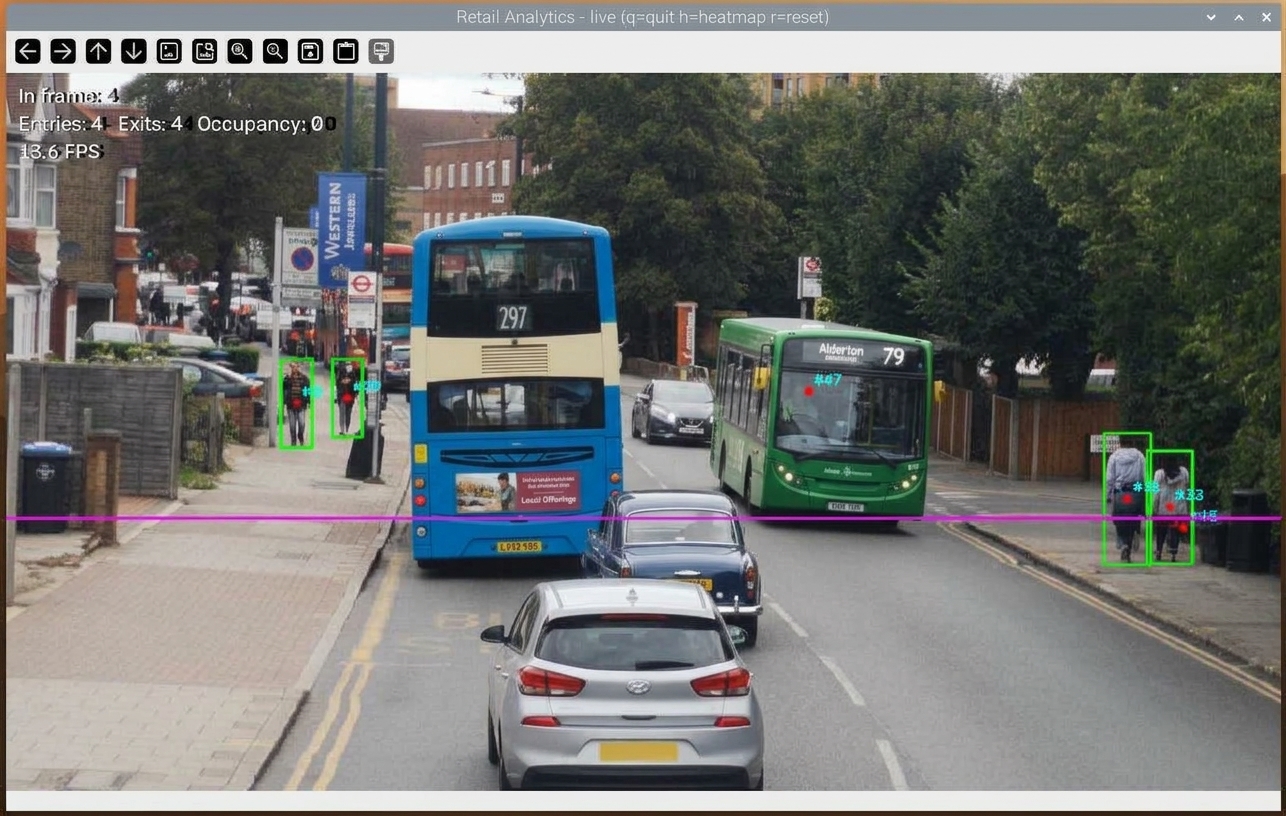
The live window on the Pi's desktop: green boxes and track numbers on each person, the magenta counting line, and the counters in the top left corner.
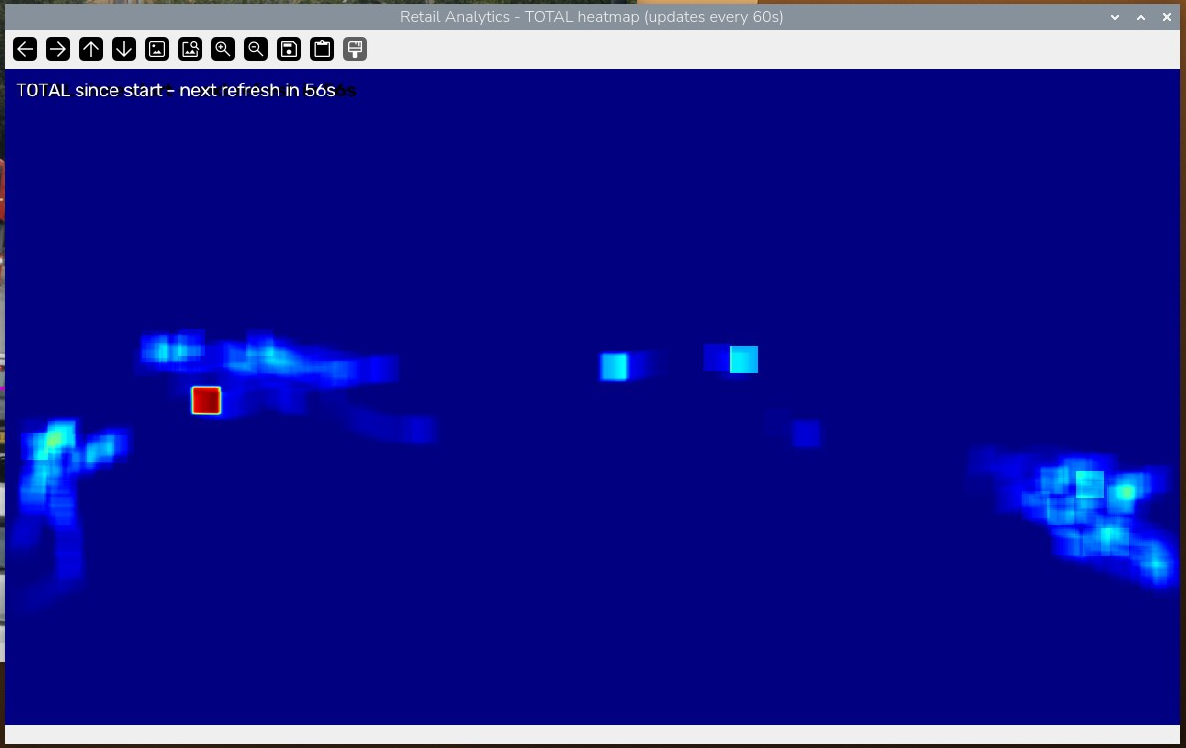
The second window, TOTAL heatmap, shows where people have walked since the app started.
What you will build
You will build a DIY people counter that watches a video and answers three questions: how many people are in view right now, how many have walked in and out, and where in the frame people spend their time. The people counter runs as a standalone Python app on your Raspberry Pi 5, with person detection on the NPU (a chip built to run neural networks) and everything else on the Pi's CPU. See the other DEEPX NPU projects for the Raspberry Pi 5 in this section.
Foot-traffic counts and heatmaps show how busy an entrance is and which part of the floor people walk through, which is the data a retail people counter for a small shop entrance would collect. The people counter produces both from one camera view, and the app's source calls no cloud service. The app does not use Frigate NVR, so it needs only the NPU runtime and the Python packages that install.sh installs. It was tested on a street clip, not a store entrance.
What you see on screen
The app opens two windows on the Pi's desktop. The first shows the video with a green box around every detected person, a track number (#1, #2, ...) at each person's center, a magenta counting line, and a text overlay with the people in frame, entries, exits, occupancy and the current frames-per-second reading.
People in this street clip carry green boxes and track numbers, and the overlay shows In frame, Entries, Exits, Occupancy and FPS. The magenta line is where entries and exits are counted.
The second window shows the total heatmap: where people walked since the app started, with no fading. It redraws once every 60 seconds and counts down to the next refresh. When you press q, the app saves this image as total_heatmap_final.png.
The TOTAL window keeps every position since the app started. Bright patches mark where people walked, and the label counts down to the next 60-second redraw.
Entries and exits come from line crossings: a person moving down across the line adds an entry, a person moving up adds an exit, and occupancy is entries minus exits. The details are under Bidirectional counting.
How does the AI people counter work?
AI people counting works in four stages: detect people in each frame, track them from frame to frame, count the tracks that cross a line, and add their positions to a heatmap. Detection runs on the DEEPX NPU. Everything else runs on the Raspberry Pi 5 CPU.
- Detect (NPU). The app shrinks each frame to a 1280-pixel-wide working frame, pads it to the model's square input, and sends it to
yolox-s_640x640_ppu.dxnn(.dxnnis the DEEPX compiled model format) throughdx_engine, the DEEPX runtime's Python package. - Decode and filter (CPU). The app decodes the model's output records, keeps only the person class (class 0) with a score above 0.45, and uses OpenCV non-maximum suppression (removing overlapping boxes) at 0.45.
- Track and count (CPU). A centroid tracker links each existing track to the nearest unmatched box center. The counter checks whether a track's center crossed the counting line.
- Heatmap (CPU). Each tracked person adds heat at their position to a live heatmap and a total heatmap.
Detection is the only stage that needs the NPU. Detection, tracking and counting are separate ideas: detection finds people in one frame, tracking follows them across frames, and counting checks line crossings.
What is the YOLOX-S PPU model?
The people counter's model, yolox-s_640x640_ppu.dxnn, is a ready-compiled YOLOX-S model in the DEEPX .dxnn format. The app uses only its person class. The model's details and license are in the project's GitHub release notes (see License and credits).
PPU stands for Post-Processing Unit (see PPU type 1 in the DX-COM reference). A PPU model returns its detections as fixed-size records instead of a raw tensor. Each record in this pipeline is 32 bytes: box values in bytes 0–16, grid position in bytes 16–20, a float32 score in bytes 20–24 and a uint32 class label in bytes 24–28. YOLOX has a multi-scale head with strides of 8, 16 and 32, and its box values are offsets from a grid cell plus a log-scale size, so the app decodes them with the grid position and stride of each record.
Bidirectional counting: how entries and exits are counted
The entry and exit counter uses one horizontal line at 62% of the frame height. A track that moves down across the line adds one entry. A track that moves up across the line adds one exit. Occupancy on screen is entries minus exits. The app does this people counting with OpenCV and plain Python, with no extra counting library.
Each track is counted once. The tracker matches a detection to a track when their centers are less than 90 pixels apart in the working frame, and it can drop a track that has gone unmatched for more than 15 frames. A person whose track was dropped and who then reappears gets a new track and can be counted again.
The line position, the matching distance and the track age limit are constants at the top of watch_retail_local.py (LINE_Y_FRAC, TRACK_MAX_DIST, TRACK_MAX_AGE).
Retail heat mapping: live vs total heatmap
The live heatmap shows recent activity and fades, while the total heatmap keeps every position since the app started.
| Heatmap | Behavior | How you see it |
|---|---|---|
| Live | Fades by a factor of 0.98 every frame, so it shows recent activity | Press h to overlay it on the video |
| Total | Never fades and r does not reset it | Separate window, redrawn every 60 seconds; saved as total_heatmap_final.png when you quit |
Both heatmaps add one unit of heat to a 30 by 30 pixel square around each tracked person's center on every frame, and both are drawn with the JET color map. The live overlay starts off because its dark base color dims the plain video.
Requirements
You need a Raspberry Pi 5 with a Sixfab AI HAT+ for Raspberry Pi 5 (DEEPX DX-M1M) that already runs with its DEEPX runtime (DX-RT, the driver and tools that talk to the NPU), a monitor, and a video file or an RTSP camera. If the board is not set up yet, start with the Sixfab AI HAT+ Quickstart. You do not need Frigate for this project.
Hardware
| Part | Why |
|---|---|
| Raspberry Pi 5 with the Sixfab AI HAT+ (DEEPX DX-M1M) | Runs the pipeline; the NPU runs YOLOX-S |
| Monitor attached to the Pi | The app draws its windows on the Pi's own screen with DISPLAY=:0 |
| A video file, or an IP camera that streams RTSP | The app's input. Written as <video-file> or <rtsp-url> below |
Software
| Item | Detail |
|---|---|
| OS | Raspberry Pi OS with the labwc desktop session |
| DEEPX runtime | The shared sixfab-dx Python environment at /opt/sixfab-dx/venv (installed by the sixfab-dx apt package), which already provides dx_engine; install.sh only adds opencv-python and numpy to it, and stops with an error if that environment is missing |
| Python packages | opencv-python and numpy, which install.sh installs into a virtual environment (an isolated Python environment) |
| Model | yolox-s_640x640_ppu.dxnn, a ready-compiled DEEPX Model Zoo file on the project's GitHub release; install.sh copies it from the project folder |
| Tools | git, curl and sha256sum |
Install
Run every step on the Raspberry Pi 5 itself, not from another machine. install.sh has to run on the Pi.
Quick install
Clone the repository on the Pi and run the project installer.
git clone https://github.com/sixfab/sixfab-dx-examples.git
cd sixfab-dx-examples/python_examples/retail-analytics
./install.sh --rtsp-url <rtsp-url>
The installer downloads the model file from the project's GitHub release and checks its SHA-256 before it installs it. It needs git, curl and sha256sum. --rtsp-url is optional: the installer only prints it in the final run command, so you can leave it out and pass a video file when you start the app.
Then go to step 3 below to start the app.
Manual install
1. Get the code and the model. Clone the repository and open the project folder:
git clone https://github.com/sixfab/sixfab-dx-examples.git <repo-dir>
cd <repo-dir>/<project-path>
Download the model from the project's GitHub release and check it. Use the repository address without a trailing .git in the download URL.
mkdir -p model
curl -fL -o model/yolox-s_640x640_ppu.dxnn https://github.com/sixfab/sixfab-dx-examples/releases/download/retail-analytics-v1.0.0/yolox-s_640x640_ppu.dxnn
awk '$1 !~ /^#/ && NF {print $3 "  " $2}' models.txt | sha256sum -c -
Expected output: model/yolox-s_640x640_ppu.dxnn: OK.
2. Run the install script. It copies the model and the app into ~/retail-analytics, adds opencv-python and numpy to the shared sixfab-dx virtual environment (it does not install dx_engine itself, only reuses the copy the sixfab-dx package already put there), and runs a check.
./install.shThe script prints three step headings, then Install complete. and the command to start the app. Expected output, with the release tag, the OpenCV version and the dxrt-cli -s lines on your board:
== 1/3: model and files (release retail-analytics-v1.0.0) ==
== 2/3: Python environment (shared sixfab-dx venv) ==
== 3/3: verification ==
dx_engine + cv2 OK, cv2 <version>
...
Install complete.
3. Start the people counter from the Pi's desktop. Open a terminal on the desktop session, not an SSH session.
Run on a video file
Pass the path of a video file to run_on_pi.sh to run the counter on that clip.
bash ~/retail-analytics/run_on_pi.sh <video-file>Run on an RTSP camera
An IP camera that streams RTSP is the intended people counting camera: pass its stream address to run_on_pi.sh.
bash ~/retail-analytics/run_on_pi.sh <rtsp-url>If the RTSP address contains a password, it is saved in your shell history when you type it. Use a camera account with limited rights.
run_on_pi.sh sets DISPLAY to :0 if it is not already set and passes your argument to the app. The app opens the argument with OpenCV, so a file path or an RTSP URL should both work as input. Create a test RTSP feed with Camera Feeds and MQTT for Frigate Projects.
Keyboard controls
Three keys control the app while a window has focus: q, h and r.
| Key | Action |
|---|---|
q | Quit and save total_heatmap_final.png |
h | Toggle the live heatmap overlay |
r | Reset the entry and exit counters and the live heatmap. The total heatmap keeps its data |
Verify
Confirm four things after you install and start the app.
- The install script printed
dx_engine + cv2 OK, cv2followed by your OpenCV version, then the first lines ofdxrt-cli -s. - The terminal printed
Model loaded (inputfollowed by the model's input size andKeys: q=quit h=heatmap r=reset. - Two windows opened on the Pi's screen:
Retail Analytics - live (q=quit h=heatmap r=reset)andRetail Analytics - TOTAL heatmap (updates every 60s). - The overlay in the live window shows
In frame,Entries,ExitsandOccupancyvalues and a frames-per-second reading, and pressinghtoggles the heatmap tint.
Press q. The terminal prints a final line in this form, then the path of the saved image:
Closed. Final: entries=<n> exits=<n> occupancy=<n>
Total heatmap saved: <path>/total_heatmap_final.png
The image is saved in the folder that holds watch_retail_local.py, which is ~/retail-analytics.
What frame rate does the people counter reach on the DEEPX NPU?
No frame rate is published for this project; the live window prints its own frames-per-second reading, so you can read the rate for your board, input and resolution directly. The reading counts completed passes through the whole pipeline, once per second. Board-level figures, not measured with this app, are in the Sixfab AI HAT+ benchmark results.
Two changes keep the per-frame cost down:
- The app shrinks each frame to a working width of 1280 pixels before it draws or builds heatmaps. The 4K (3840x2160) street clip used for testing has nine times the pixels of a 1280x720 frame, and after the shrink, the heatmap, drawing and display work touch nine times fewer pixels. No speedup was measured for this page.
- The decode step filters score, class and grid position for all detection records in one NumPy operation instead of a Python loop. The PPU returns up to 750 records per frame.
Limitations
- Display. The app needs a monitor and an active desktop session. It is a desktop app that you start by hand, not a headless service. Headless use is not documented.
- Outputs. The app shows counts on screen and writes
total_heatmap_final.pngwhen you quit. It does not publish counts over MQTT (a lightweight messaging protocol that home-automation setups use), export them to a file, or keep them after a restart. - Inputs. The app reads one input per run. Multi-camera use is not documented.
- Re-entry. A person whose track the tracker drops (after more than 15 unmatched frames) can be counted again under a new track.
- Line geometry. The counting line is a horizontal line at 62% of the frame height, and only the vertical direction of a track's movement matters. People who walk mostly horizontally across the frame may not be counted.
- Tested scene. The recorded test run used a street clip, not a store entrance. No accuracy figure is published for this app.
- RTSP. No test with an RTSP camera is documented, and no store-entrance camera test either. Test your camera on a short run first.
- Tested hardware. The app was run on the Sixfab AI HAT+ (DEEPX DX-M1M) only.
- Tracker. The tracker is a simple nearest-centroid tracker with no appearance matching, so crossing paths in a crowd can swap track numbers.
Privacy
The people counter does not store video. The app keeps frames in memory, and the only file it writes is total_heatmap_final.png on exit. That image is the color-mapped heatmap alone; the code does not draw a video frame into it.
The app's source imports only os, sys, time, OpenCV, NumPy and dx_engine, and contains no code that sends counts or images to another host. If you use an RTSP camera, the video crosses your local network from the camera to the Pi.
The app detects people but does not identify them, and it does not recognize faces. Sixfab makes no GDPR or other compliance claim for this project. Check your local rules on recording or analyzing customers before you point a camera at a shop floor.
Troubleshooting
For board-level problems, such as the NPU not showing up, see Sixfab AI HAT+ Troubleshooting. The entries below cover the people counter app.
install.sh prints "ERROR: Python environment not found at /opt/sixfab-dx/venv"
install.sh prints "ERROR: Python environment not found at /opt/sixfab-dx/venv"install.sh does not install dx_engine itself; it only adds opencv-python and numpy to the shared sixfab-dx virtual environment, so that environment has to exist first. Install the sixfab-dx apt package (see the repo root README of sixfab-dx-examples) and run ./install.sh again, or pass VENV_DIR=<path> to point at your own environment that already has dx_engine installed.
The dx_engine import fails
dx_engine import failsStep == 3/3: verification == runs dx_engine + cv2 OK and fails with a plain Python ImportError if dx_engine is missing from the venv. Run ./install.sh again after reinstalling the sixfab-dx package; the script is safe to re-run, but it only reuses that package's dx_engine, it does not install or pin a version of its own.
The window does not open
The app needs an active desktop session (labwc). Start it from a terminal on the Pi's desktop and check that a session exists:
loginctl list-sessionsQFontDatabase: Cannot find font directory warning
QFontDatabase: Cannot find font directory warningThe message reads QFontDatabase: Cannot find font directory .../cv2/qt/fonts. OpenCV's bundled Qt backend cannot find system fonts. It is harmless: it affects only the window title and Qt frame, not the text the app draws on the video.
FAQ
How do I build a people counter with a Raspberry Pi 5 and a camera?
Set up the Sixfab AI HAT+ (DEEPX DX-M1M) on the Raspberry Pi 5 first. Then run the people counter's install.sh on the Pi and start run_on_pi.sh with a video file or your camera's RTSP URL, from a terminal on the Pi's desktop with a monitor attached.
What hardware do I need for a DIY people counter?
You need a Raspberry Pi 5, a Sixfab AI HAT+ for Raspberry Pi 5 (DEEPX DX-M1M), a monitor, and a video file or an IP camera that streams RTSP. The app was run on this board only.
Can I use my existing IP camera with the people counter?
Probably, if it streams RTSP: pass its stream address to run_on_pi.sh. The app opens it with OpenCV, so any stream OpenCV can open should work. No camera model or codec has been tested, so try a short run first.
Does the people counter send video or counts to the cloud?
No. The people counter runs on the Raspberry Pi 5, its source has no code that sends counts or images to another host, and it writes one file, total_heatmap_final.png, when you quit. An RTSP camera's video crosses your local network to reach the Pi.
What is the difference between the live heatmap and the total heatmap?
The live heatmap is an overlay on the video that fades by 0.98 each frame, and h toggles it. The total heatmap never fades, appears in its own window refreshed every 60 seconds, and is saved as total_heatmap_final.png when you press q. r resets the counters and live heatmap only.
What kind of sensor can I use to count people?
You can use a camera, an infrared beam or a thermal sensor. A camera detects people in video, as in this project. An infrared beam counts each time something breaks the beam at a doorway, and a thermal sensor detects body heat. Cameras give you positions for heatmaps; a beam counts crossings only.
How do I run a DEEPX Model Zoo .dxnn model on a Raspberry Pi 5?
Load the file with InferenceEngine from dx_engine, the DEEPX runtime's Python package, and call engine.run on each frame. This project does that with yolox-s_640x640_ppu.dxnn; watch_retail_local.py is a working example.
What license does the model have?
The model is YOLOX from the DEEPX Model Zoo, licensed under Apache-2.0. Its details are in the release notes at https://github.com/sixfab/sixfab-dx-examples/releases/tag/retail-analytics-v1.0.0. The code is licensed under the MIT License.
Can the people counter run headless, without a monitor?
No, plan on a monitor and a desktop session. The app opens OpenCV windows on the Pi's desktop and was run with DISPLAY=:0, and headless operation is not documented.
Next steps and related projects
- Raspberry Pi 5 AI Projects with the DEEPX NPU: the hub for every project in this section.
- Frigate NVR on Raspberry Pi 5 with the DEEPX NPU: the setup page for the Frigate-based projects.
- Camera Feeds and MQTT for Frigate Projects: create a test RTSP feed.
- Sixfab AI HAT+ Quickstart: set up the board on the Raspberry Pi 5.
- Sixfab Model Zoo: more ready-compiled
.dxnnmodels for the DEEPX NPU. - System Monitoring: check the DEEPX NPU's load while an app runs.
- Raspberry Pi 5 Person Detection with Frigate: Boss Detector: person detection with an MQTT listener.
- Porch Pirate: Frigate Package Detection on Raspberry Pi 5: package detection with Frigate.
- Raspberry Pi 5 pose estimation with YOLOv8: another Python pipeline on the DEEPX NPU.
- Sixfab AI HAT+ product page: the board this project ran on.
License and credits
The model is YOLOX from the DEEPX Model Zoo, licensed under Apache-2.0. Its details are in the GitHub release notes of the project's release: https://github.com/sixfab/sixfab-dx-examples/releases/tag/retail-analytics-v1.0.0. The code is licensed under the MIT License.
Credits: the app runs on the DEEPX DX-RT runtime and its dx_engine Python package, and uses OpenCV and NumPy.
Updated about 10 hours ago