
Raspberry Pi 5 Pose Estimation with YOLOv8 on a DEEPX NPU
Raspberry Pi 5 pose estimation with YOLOv8n-pose drives a Pilates rep counter, fall detection and a Fruit Ninja-style pose game. On the Sixfab AI HAT+ for Raspberry Pi 5 (DEEPX DX-M1M), the NPU runs inference; the Pi 5 CPU decodes 17 keypoints per person and runs tracking and app logic. A headless benchmark ran about 32 FPS on 1080p video.
The three pose apps are part of the Raspberry Pi 5 AI projects series for the DEEPX NPU. An NPU (neural processing unit) is a processor built to run neural networks, so the Pi CPU does not have to. This project does not use Frigate NVR, RTSP or MQTT. The apps read the USB camera or a video file directly. Fall detection is a demo, not a medical or emergency alert device.
| Field | Value |
|---|---|
| What it does | Three apps on one YOLOv8n-pose engine: rep counter, fall detection, pose game |
| Use case | Health and fitness |
| Stack | Python pipeline (dx_engine, DEEPX's Python package for running models on the NPU) |
| NPU board | Sixfab AI HAT+ (DEEPX DX-M1M) |
| On the DEEPX NPU | Pose estimation: YOLOv8n-pose (yolov8n-pose.dxnn, a model compiled to DEEPX's .dxnn format) |
| On the Pi 5 CPU | Capture, decode, NMS, tracking, app logic, drawing |
| Camera input | USB webcam or video file (the Raspberry Pi 5 test used video files) |
| Difficulty | Intermediate |
| Model license | AGPL-3.0 (stock Ultralytics YOLOv8n-pose), trained on COCO. Details in the release notes at https://github.com/sixfab/sixfab-dx-examples/releases/tag/pose-estimation-v1.0.0 |
| Last tested | Tested on 2026-10-06 · Raspberry Pi 5 (8 GB) Model B Rev 1.1 · Sixfab AI HAT+ (DEEPX DX-M1M) · Raspberry Pi OS Trixie (Debian GNU/Linux 13), kernel 6.18.50+rpt-rpi-2712 · RT driver v2.6.0, PCIe driver v2.5.0, DX-RT v3.4.2, firmware v2.7.4 · Python 3.13.5 · yolov8n-pose.dxnn · video files, no live camera |
| Status | Tested on Raspberry Pi 5: run and measured with video files on the Sixfab AI HAT+ (DEEPX DX-M1M), 2026-10-06. A USB camera on the Pi 5 was not tested, no staged fall trials are recorded, and there is no accuracy claim. |
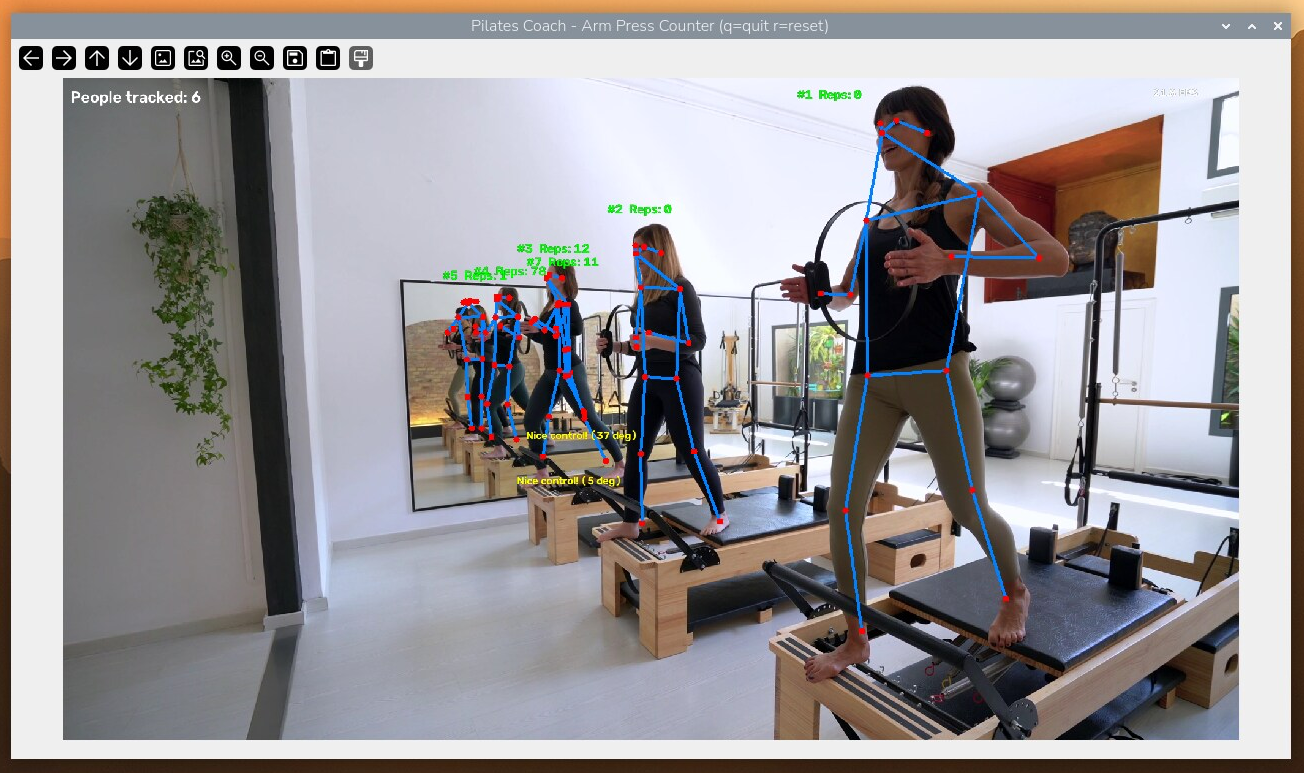
The rep counter draws a skeleton and a #<id> Reps: <n> label for each person it tracks, and shows the number of people tracked at top left. The yellow feedback line shows the elbow angle at the last rep.
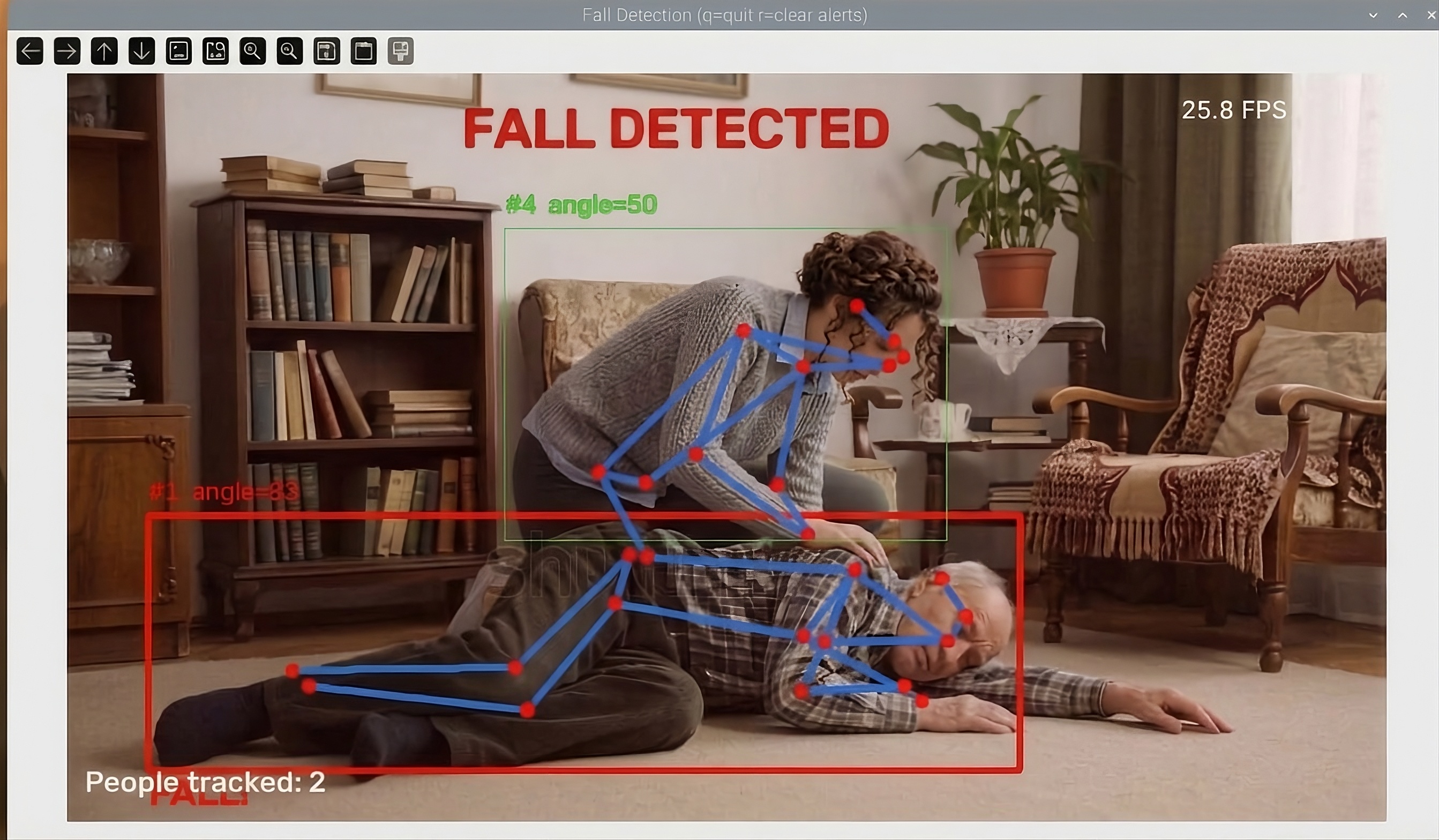
When the fall rule triggers, that person's box turns red, a FALL! label appears and a FALL DETECTED banner tints the frame. The second person keeps a green box.
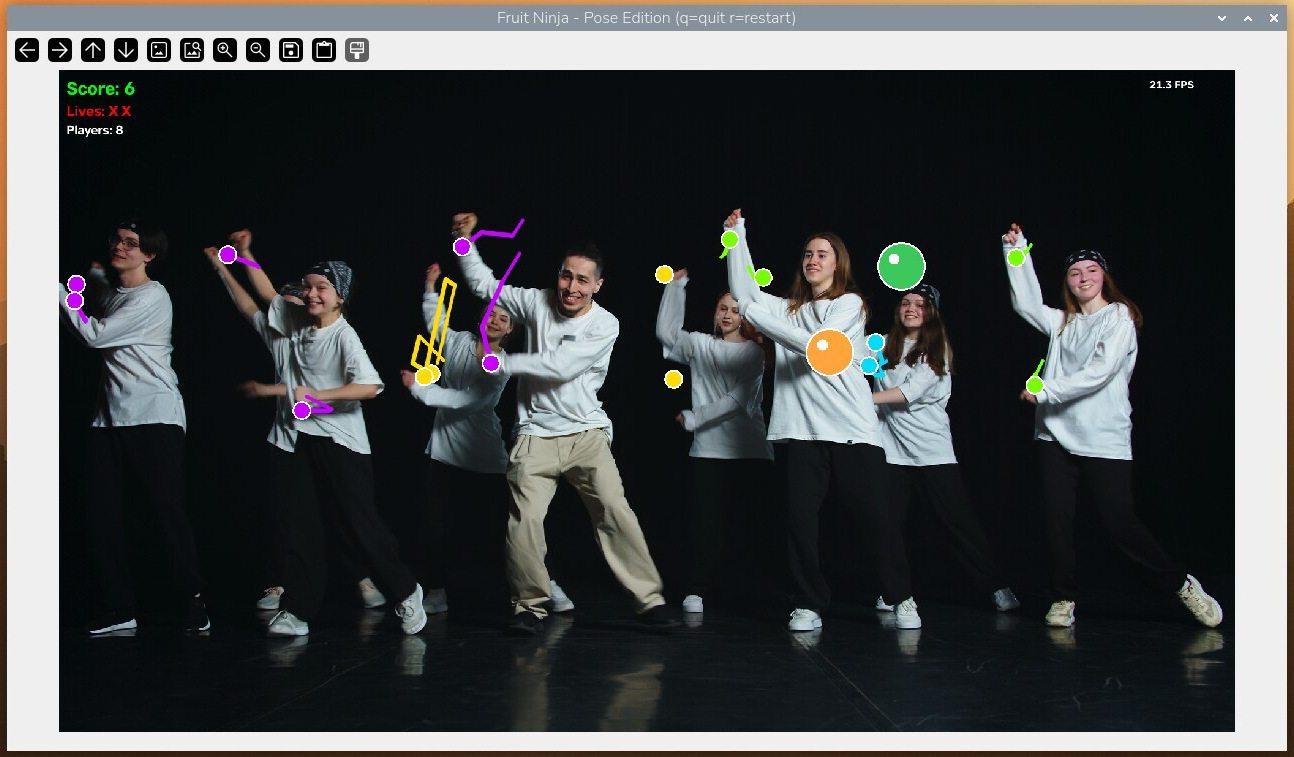
Each player's wrists get a circle and a short trail in a color assigned by person ID, so everyone in frame can slice at once. Score, Lives and Players sit at top left.
What you will build
You will run three OpenCV-window apps that share one pose engine. Each reads a USB webcam (or a video file), finds every person in frame, and draws its output on screen. None of them uses Frigate, RTSP or MQTT, and none of them sends output anywhere except the screen and the terminal.
What do the three pose apps do?
Each app asks one question about the body joints that the shared pose engine finds in every frame: how far is the elbow bent, how fast did the hips drop, where is the wrist? Human pose estimation means finding the body joints of each person in an image. The engine does that hard part once per frame, with the model on the NPU and the rest on the Pi 5 CPU, and each app adds its own rule on top.
- Pilates rep counter. Step in front of the camera and press your arms out and pull them in. The app measures your elbow angle, counts a rep each time the arms go from extended to bent and back, and tells you whether the bend was deep enough. Each person in frame gets a separate counter above their own box.
- Fall detection. The app watches each person's torso angle and how fast their hips drop. It flags a likely fall only when the torso turns mostly horizontal within 2 seconds of a fast drop, so sitting down on purpose is designed to pass. Alerts show on screen and in the terminal. How does Raspberry Pi fall detection with YOLOv8 pose work? has the thresholds.
- Fruit Ninja-style pose game. Your wrists are the blades. Fruit launches from the bottom of the frame, and you slice it by swiping a hand through it. Three misses end the round. Everyone in frame plays at once.
The Pilates counter was tried with several people: the sample class clip from the project's GitHub release, on a Raspberry Pi 5, where the window showed 5 tracked people with a counter each. Rep counts were not checked against a hand count. Fall detection was tried with a two-person sample clip.
| App | Body signal | Rule | Multi-person design | Command |
|---|---|---|---|---|
| Pilates rep counter | Elbow angle, averaged across both arms when visible | EXTENDED, BENT, EXTENDED is one rep | A counter above each person's box | python fitness_coach.py |
| Fall detection | Torso angle from vertical plus a fast hip drop in the last 2 s | Torso above 70° within 2 s of a fast drop: red "FALL DETECTED" for 5 s | Own history and alert state per person | python fall_detection.py |
| Fruit Ninja-style pose game | Both wrists as blades | +1 per slice; 3 misses end it | Color-coded blades per person | python fruit_ninja_pose.py |
How does Raspberry Pi 5 pose estimation work on the DEEPX NPU?
The YOLOv8 pose estimation engine runs the model on the DEEPX NPU and everything else on the Raspberry Pi 5 CPU. The engine loads yolov8n-pose.dxnn (a model compiled to DEEPX's .dxnn format) through dx_engine (DEEPX's Python package for the NPU), runs inference on the NPU, then decodes the result and returns one Pose per detected person, each with a bounding box, a confidence and 17 keypoints.
The shared engine lives in pose_engine.py, and all three apps import it. The same repository's cpp_examples/pose_estimation folder has a separate pose demo built for other models.
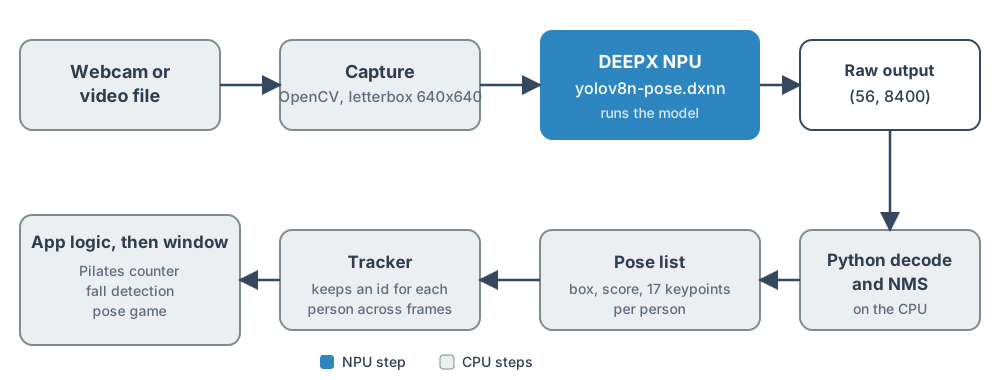
The model step runs on the DEEPX NPU; every other step runs on the Raspberry Pi 5 CPU.
- A USB webcam or a video file supplies the frames.
- OpenCV captures each frame on the Pi 5 CPU.
yolov8n-pose.dxnnruns on the DEEPX NPU and returns the raw (56, 8400) output.- Python decodes the output and runs NMS on the CPU.
- The engine returns a list of poses, one per detected person, each with a box, a confidence and 17 keypoints.
- The tracker keeps an ID for each person across frames.
- The app logic (rep counter, fall detection or pose game) applies its rule and draws the window.
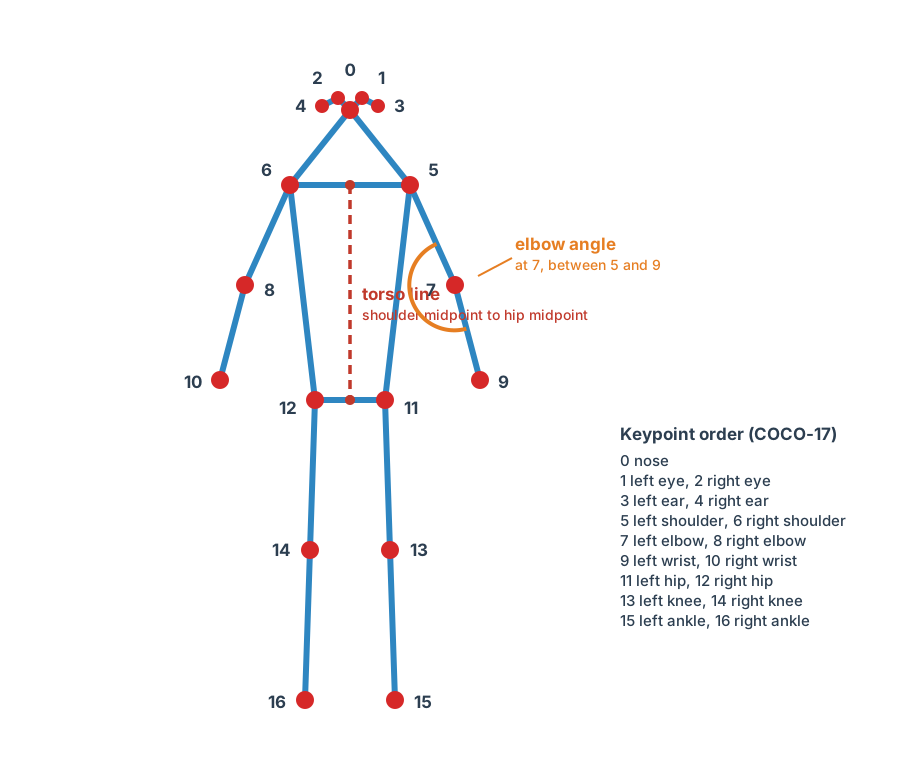
Keypoints are numbered in COCO order, 0 (nose) to 16 (right ankle). The elbow angle uses shoulder, elbow and wrist; the torso line runs from the shoulder midpoint to the hip midpoint.
What is in the raw (56, 8400) YOLOv8 pose output?
The compiled YOLOv8n-pose model returns one undecoded row of 56 values for each of 8,400 anchors, the candidate detections the model scores in every frame. Nothing is decoded on the NPU: this model has no post-processing unit (PPU), the on-NPU step that decodes the boxes and removes duplicates with non-maximum suppression (NMS). The Python code therefore decodes the output and runs non-maximum suppression (NMS), the step that removes duplicate boxes for the same person. Related reference: DX-COM PPU settings.
| Values per anchor | Meaning |
|---|---|
| 4 | Box: center x, center y, width, height |
| 1 | Confidence |
| 51 (17 × 3) | Keypoints: x, y, visibility, for each of 17 COCO keypoints |
The decode steps in PoseEngine.infer:
- Convert the BGR frame to RGB and letterbox it to the model's square input, padding with value 114.
- Run the model and reshape the output to
(56, 8400), then transpose it so each row is one anchor. - Keep anchors with confidence above 0.4.
- Convert boxes from center format to corner format and run
cv2.dnn.NMSBoxeswith an NMS threshold of 0.45. - Map boxes and keypoints back through the letterbox scale and padding to original frame coordinates.
- Drop weak duplicate poses, as described below the list.
A keypoint counts as visible only when its visibility value is above 0.5.
NMS can keep a second, weaker copy of one person, most often when someone is lying down and the box is wide and flat. The engine therefore drops any pose whose confidence is below 0.6 and whose box lies at least 70% inside a stronger pose's box. A confident second person is kept.
How are people tracked across frames?
A nearest-centroid tracker does the pose tracking: it gives each detected person a stable ID. update_pose_tracks() compares every track with every detection, sorts the pairs by the distance between bounding-box centers, and assigns pairs from the closest up. It accepts a pair only if the centers are under 150 pixels apart (the fall detection app passes 0.3 of the frame width instead, because a falling body's box center jumps far). A detection that no track claims starts a new track with a new ID. Every track that gets no detection ages by one frame, and tracks older than 40 frames are dropped.
Each track carries a free-form .data dictionary. Each app keeps its own per-person state there: rep counts, fall history and alert time, or blade trails. The apps draw only tracks that matched a detection on the current frame.
There is no re-identification. A person who moves farther than the match distance between frames starts a new track. The 40-frame lifetime matters when two people overlap: the model can return one merged skeleton for a few frames, and each person's track needs to survive that gap to get its own detection back.
Which parts run on the NPU and which on the CPU?
Only inference runs on the NPU. The CPU handles the rest.
| Step | Runs on |
|---|---|
Model inference (yolov8n-pose.dxnn) | DEEPX NPU |
Camera or file capture (open_source(), read_looping()) | Pi 5 CPU |
| Letterbox, decode, NMS | Pi 5 CPU |
| Tracking and app logic | Pi 5 CPU |
| Drawing and the OpenCV window | Pi 5 CPU |
How do you run YOLOv8n-pose on a DEEPX NPU in your own Python app?
To run YOLOv8n-pose on the DEEPX NPU from your own Python code, create a PoseEngine (it loads yolov8n-pose.dxnn through dx_engine), open a source, call engine.infer(frame) for a list of poses, read keypoints by COCO index, and call angle() on three points. This excerpt from fitness_coach.py shows the pattern (the full app adds drawing, rep logic and the q key):
import sys

import cv2

from pose_engine import (
    FpsCounter, PoseEngine, angle, draw_text, open_source, read_looping,
    update_pose_tracks, L_SHOULDER, L_ELBOW, L_WRIST, R_SHOULDER, R_ELBOW, R_WRIST,
)

SOURCE = sys.argv[1] if len(sys.argv) > 1 else "0"

engine = PoseEngine()
cap, is_camera = open_source(SOURCE)

tracks = []

while True:
    ok, frame = read_looping(cap, is_camera)
    if not ok:
        break
    if is_camera:
        frame = cv2.flip(frame, 1)

    poses = engine.infer(frame)
    tracks = update_pose_tracks(tracks, poses)

    for t in tracks:
        if t.age > 0:
            continue  # not matched this frame, don't draw/update stale data
        pose = t.pose
        engine.draw_skeleton(frame, pose)

        left = angle(pose.kp(L_SHOULDER), pose.kp(L_ELBOW), pose.kp(L_WRIST))
        right = angle(pose.kp(R_SHOULDER), pose.kp(R_ELBOW), pose.kp(R_WRIST))
pose.kp(index) returns (x, y) in original frame coordinates, or None when the keypoint is not confidently visible. angle(a, b, c) returns the angle at point b in degrees, or None if any point is missing.
The keypoint constants in pose_engine.py follow COCO order. COCO is the public dataset whose 17-keypoint body layout YOLOv8 pose uses:
| Index | Keypoints | Used by |
|---|---|---|
| 0–4 | Nose; left and right eye; left and right ear | Skeleton drawing only |
| 5–6 | Left and right shoulder | Pilates elbow angle; fall torso line |
| 7–8 | Left and right elbow | Pilates elbow angle |
| 9–10 | Left and right wrist | Pilates elbow angle; game blades |
| 11–12 | Left and right hip | Fall torso line and hip drop |
| 13–16 | Left and right knee; left and right ankle | Skeleton drawing only |
How do the Pilates rep counter and the pose game work?
The rep counter counts elbow bend-and-extend cycles for each person, and the pose game turns each person's wrists into blades.
How does the Pilates rep counter count reps?
The Pilates rep counter tracks the elbow angle (shoulder, elbow, wrist), averaged across both arms when both are visible, and counts one rep each time the arms go from extended to bent and back to extended. Each detected person gets their own counter, drawn above their own bounding box.
| State | Entered when | What happens |
|---|---|---|
| EXTENDED | Start state; elbow angle back above 150 degrees | Waits for a bend |
| BENT | Elbow angle below 110 degrees | Records the smallest angle reached |
| EXTENDED again | Angle back above 150 degrees | +1 rep; feedback appears for 2.5 seconds |
The smallest angle reached while bent sets the feedback. At 100 degrees or lower, the app shows "Nice control!" with the angle. Above 100 degrees, it shows "Pull in further" with the angle. Press r to reset all rep counters.
Why does the Pilates rep counter count arm presses, not squats?
The Pilates rep counter counts arm presses because most Pilates work, such as the ring press, chest press and arm circles, is driven by controlled arm extension and flexion rather than leg movement. A squat counter built on the hip-knee-ankle angle never fired on a Pilates reformer class video, which showed a static wide-lunge stance with the repeated motion in the arms.
How does the Fruit Ninja-style pose game work?
Both wrists act as blades: swipe through a fruit with either wrist to slice it for +1 point. Each wrist shows a solid colored circle at its current position, plus a short glowing trail while it moves. Fruit launches from the bottom of the frame and arcs up and down under gravity. Let 3 fruits fall past the bottom uncut and the game ends. Press r after game over to play again.
Every person detected in the frame gets their own pair of blades, in a color assigned by person ID, so more than one player can slice at once. The colors come from a list of four, so a fifth player reuses a color. Leave clear space around each player.
How does Raspberry Pi fall detection with YOLOv8 pose work?
Raspberry Pi fall detection with YOLOv8 pose flags a likely fall when a person's torso turns mostly horizontal within 2 seconds of a fast hip drop. Every frame, the pose model finds each person's shoulders and hips. The app draws a line from the middle of the shoulders to the middle of the hips and measures how far that line leans from vertical. It also tracks how quickly the hips moved down over the last 0.6 seconds. The rule assumes that a person who falls drops fast and then lies with the line near horizontal. When both happen, the app tints the screen red, boxes that person in red and prints a line in the terminal.
Fall detection on this page is a demo, not a medical or emergency alert device. The app shows an alert on screen and prints a line in the terminal. It sends nothing anywhere.
How does fall detection tell a fall from sitting down?
The fall rule combines the torso angle from vertical with how fast the hips dropped, and flags a fall only when the torso is mostly horizontal within 2 seconds of a fast drop. The rule assumes a fall is fast and sitting down is slow, so it is designed not to flag a slow sit-down.
| Signal | Measured from | Treated as normal | Fall pattern |
|---|---|---|---|
| Torso angle from vertical | Line from the shoulder midpoint to the hip midpoint | Upright, about 0° | Above 70°; lying flat is about 90° |
| Fast hip drop | Hip-midpoint drop over the last 0.6 s, as a fraction of the frame height per second | A slow drop, as when sitting | Above 0.55 frame heights per second |
| Rule | A fast drop in the last 2 seconds, and the torso above 70° | Either missing: no alert | Red "FALL DETECTED" for 5 s, then one alert per fall until the person is upright again (below 40°), or until r |
The thresholds are constants in fall_detection.py (FALL_ANGLE_DEG = 70.0, FALL_SPEED_FRAC_PER_SEC = 0.55, FALL_DROP_MEMORY_SEC = 2.0, REARM_ANGLE_DEG = 40.0). The speed is a fraction of the frame height, so it does not change with the camera's resolution, but it still depends on how far the person is from the camera. At a 720p frame height, 0.55 frame heights per second is about 400 pixels per second. For a video file, the app takes time from the video's own clock (frame number divided by frame rate). For a camera, it uses the wall clock.
The signals use four of the 17 keypoints from the pose model: left and right shoulder (indices 5 and 6) and left and right hip (11 and 12). The app averages each pair when both sides are visible, and uses the one side if only one is.
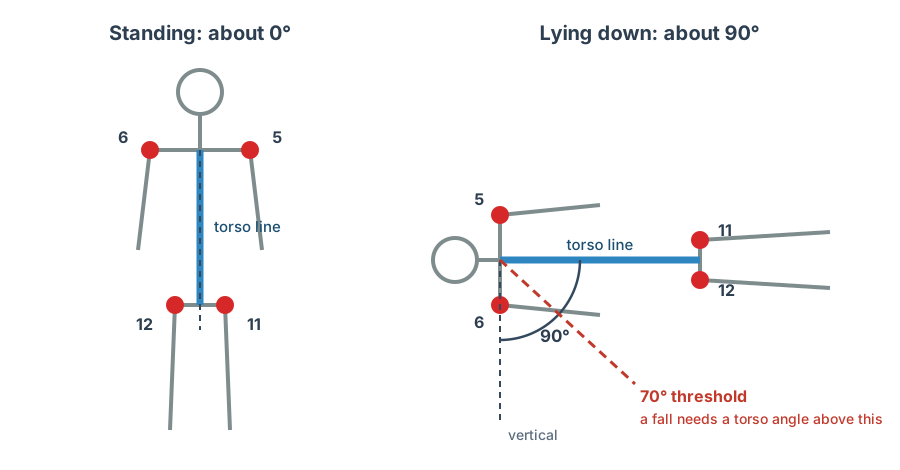
Keypoints 5, 6, 11 and 12 set the torso line. Upright is about 0° from vertical, lying flat is about 90°, and the fall rule's threshold is 70°.
Why does the fall rule remember a fast drop for 2 seconds?
The fall rule remembers a fast hip drop for 2 seconds because a person often drops fast while the torso is still upright, and only turns horizontal after the drop has ended. In the sample clip the hips fell quickly first and the torso reached horizontal afterward, so a rule that needed both at the same moment never fired. Within that 2-second window, the app flags a fall if the torso goes above 70°. Deliberate sitting or crouching is designed to pass because it is slow and does not turn the torso that far. The trade-off is that a slow collapse or slide passes through too.
How does fall detection watch several people in one room?
Fall detection is designed to watch several people: each tracked person has their own hip-height history and alert state, kept in the person's track. The tracker described above gives each detected person an ID, and the on-screen label shows #<id> with the current torso angle. One person's alert does not set another person's alert. A track survives up to 40 frames without a matching detection, so IDs stay with the same person when two people overlap for a moment.
No multi-person fall trial is recorded, so how many people it handles in practice is not known. The only overlap examined was one caregiver and one person on the floor in a single sample clip, where the app flagged the person on the floor and not the caregiver.
Requirements
You need a Raspberry Pi 5 with the Sixfab AI HAT+ (DEEPX DX-M1M), a USB webcam or a video file, and a desktop session. This page assumes the NPU and its runtime are already set up, with dx_engine importable in your Python environment; the Sixfab AI HAT+ Quickstart covers that. The apps do not need Frigate.
| Item | Notes |
|---|---|
| Raspberry Pi 5 | Host computer |
| Sixfab AI HAT+ (DEEPX DX-M1M) | The Sixfab AI HAT+ product page lists the board, with the DEEPX DX-M1M. The Raspberry Pi 5 test used this board |
| USB webcam or a video file | A webcam is opened by camera index (0 by default). A video file path also works, and the video loops. The Raspberry Pi 5 test used video files |
| Display | The apps open an OpenCV window, so run them in a desktop session on the Pi 5 |
git, curl, sha256sum | Used by the quick install |
opencv-python, numpy | Installed by the installer, or with pip in the manual steps |
yolov8n-pose.dxnn | Ready-compiled model, downloaded from the project's GitHub release into model/. Its license and details are in the release notes at https://github.com/sixfab/sixfab-dx-examples/releases/tag/pose-estimation-v1.0.0 |
Install
Quick install
Clone the repository and run the installer on the Raspberry Pi 5, in a desktop session:
git clone https://github.com/sixfab/sixfab-dx-examples.git
cd sixfab-dx-examples/python_examples/pose-estimation
./install.sh
The installer downloads the model file from the project's GitHub release and checks its SHA-256 before it installs it. It needs git, curl and sha256sum. The installer copies the apps to ~/pose-estimation, sets up a Python environment with dx_engine, OpenCV and NumPy (or reuses one), and checks that all three import. To reuse a Python environment that already has them, set VENV_DIR to it. The quick install does not download the demo clips, which are in the project's GitHub release, or copy benchmark.py, which stays in the repository's project folder. When it finishes, run an app from ~/pose-estimation with the Python that has dx_engine, for example cd ~/pose-estimation && DISPLAY=:0 <venv-path>/bin/python fitness_coach.py <video-file-or-camera-index>; the installer prints the exact commands.
Manual install
The manual install clones the repository, downloads the model, installs two Python packages and runs an app. Run every command on the Raspberry Pi 5.
-
Get the code and open the project folder.
Run on: Raspberry Pi 5
git clone https://github.com/sixfab/sixfab-dx-examples <repo-dir> cd <repo-dir>/<project-path> -
Download
yolov8n-pose.dxnnfrom the project's GitHub releasepose-estimation-v1.0.0and check it.Run on: Raspberry Pi 5
mkdir -p model
curl -fL -o model/yolov8n-pose.dxnn https://github.com/sixfab/sixfab-dx-examples/releases/download/pose-estimation-v1.0.0/yolov8n-pose.dxnn
awk '$1 !~ /^#/ && NF {print $3 "  " $2}' models.txt | sha256sum -c -
Expected output:
model/yolov8n-pose.dxnn: OK. -
Install the two extra Python packages in the environment that has
dx_engine.Run on: Raspberry Pi 5
pip install opencv-python numpy -
Run an app from the USB webcam. Camera index 0 is the default.
Run on: Raspberry Pi 5
python fitness_coach.py
python fall_detection.py
python fruit_ninja_pose.py
How do you point an app at another camera or a video file?
Pass a camera index for a second camera, or a video file path instead of a camera. A video file loops. The project's GitHub release has two sample clips for trying the apps: pilates.mp4 for the rep counter and fall.mp4 for fall detection. Download them into a demo/ folder in the project folder.
python fitness_coach.py 1
python fitness_coach.py demo/pilates.mp4
python fall_detection.py demo/fall.mp4
On the Pi 5 desktop, each window can open larger than the screen. Drag it by the title bar.
All three windows share two keys:
| Key | Action |
|---|---|
q | Quit |
r | Reset rep counters, clear fall alerts, or restart the game after game over |
Only one app can use a camera at a time. Press q in one app before you start another.
Verify
Before you start an app, run dxrt-cli -s, the DEEPX runtime's status command. On the test unit it listed Device 0: M1M.
Each app prints a ready line in the terminal and opens a window with the camera image (mirrored for a webcam), skeleton overlays and an FPS readout in the top-right corner.
| App | Terminal line | What the window shows |
|---|---|---|
fitness_coach.py | Pilates Coach ready. Make sure shoulders, elbows and wrists are visible - works for multiple people at once. | A #<id> Reps: <n> label above each person, and "People tracked" |
fall_detection.py | Fall Detection ready. Works for multiple people at once. | A green box per person with a #<id> angle=<deg> label, and "People tracked". When an alert fires, that person's box turns red with a FALL! label, and a FALL DETECTED banner appears |
fruit_ninja_pose.py | Fruit Ninja (pose edition) ready. Everyone in frame can slice - multiplayer! | Score, Lives and Players, with fruit launching from the bottom |
Step into the frame. With no person detected, the window shows "No pose detected - step into frame". The Pilates counter also prints a line for each rep, such as Person #4 - REP 1: Nice control! (67 deg).
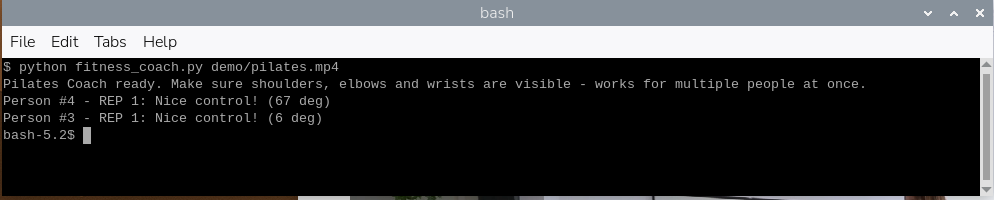
The app prints its ready line at start. Then it prints one line per counted rep with the person ID, the feedback and the smallest elbow angle reached.
How do you check fall detection?
Stand, sit down slowly and crouch in front of the camera; the rule is designed not to flag these. With fall_detection.py running, the terminal prints Fall Detection ready. Works for multiple people at once. and the window is titled "Fall Detection (q=quit r=clear alerts)". If an alert appears, note the angle on the label and see Troubleshooting.
To see an alert, use a staged fall onto a crash mat by a consenting adult, or a fall video file such as demo/fall.mp4. When the torso goes above 70° within 2 seconds of a fast drop, the window gets a red tint with "FALL DETECTED" at the top, the person's box turns red with a "FALL!" label, and the terminal prints a line like this:
Person #<id>: FALL DETECTED (angle=<deg> deg, speed=<x> frame heights/s)The angle is the torso angle at the moment the alert fires. The speed is the hip drop speed in that frame, which can be low because the app remembers the fast drop for 2 seconds. Each person gets one alert per fall. A new alert for the same person needs them to stand upright again. Press r to clear the alerts and re-arm everyone.

The terminal prints the ready line at start, then one FALL DETECTED line per alert with the torso angle and the hip drop speed.
What FPS does YOLOv8n-pose reach on a Raspberry Pi 5 with a DEEPX NPU?
YOLOv8n-pose on the Sixfab AI HAT+ (DEEPX DX-M1M) reached about 32 frames per second on a 1080p clip and 36 to 38 frames per second on an 898×506 clip, measured on a Raspberry Pi 5 from video files with no window. Each figure covers reading, inference and tracking.
| Clip | Resolution, source rate | Poses per frame (mean, max) | infer() per frame, mean | infer() p95 | Read + infer + tracking, mean | Full loop |
|---|---|---|---|---|---|---|
demo/pilates.mp4 | 1920×1080, 25 fps | 3.90, 5 | 27.3 to 27.4 ms | 28.1 to 28.3 ms | 31.0 to 31.2 ms | 32.1 to 32.3 FPS |
demo/fall.mp4 | 898×506, 50 fps | 1.00, 2 | 25.4 to 26.5 ms | 26.9 to 27.0 ms | 26.6 to 27.8 ms | 36.0 to 37.6 FPS |
Each cell is the range over three runs. infer() is PoseEngine.infer(): preprocessing, the NPU run, decoding the raw output and NMS. p95 is the 95th-percentile time per frame. The full loop adds reading the frame and updating the tracker.
Environment. Raspberry Pi 5 Model B Rev 1.1 (4 cores), Debian GNU/Linux 13 (trixie), kernel 6.18.50+rpt-rpi-2712, Python 3.13.5. Sixfab AI HAT+ (DEEPX DX-M1M), DX-RT v3.4.2+d803450, RT driver v2.6.0, PCIe driver v2.5.0, firmware v2.7.4. The load average was about 0.0, and nothing else used the NPU.
Method. benchmark.py reads 30 warm-up frames, then times 300 frames per clip with time.perf_counter, looping the clip if it is shorter. It runs headless: no window, no drawing and no camera capture. It was run three times per clip. The FPS counter in the app windows also counts drawing and display, which the benchmark leaves out, so the two readings differ.
Not measured. The NPU time on its own (infer() includes preprocessing and NMS on the CPU), a live USB camera on the Pi 5, a CPU-only baseline, power, temperature and more than three runs. Accuracy of rep counts and fall alerts is not measured.
For a board-level benchmark, see the Sixfab AI HAT+ benchmark on Raspberry Pi 5.
How do you run the pose benchmark yourself?
Run the benchmark from the repository's project folder, with nothing else using the NPU:
python benchmark.py demo/pilates.mp4 demo/fall.mp4benchmark.py prints one block per clip: the source resolution and frame rate, the infer() mean, median and p95, the full-loop mean and FPS, and the poses per frame.
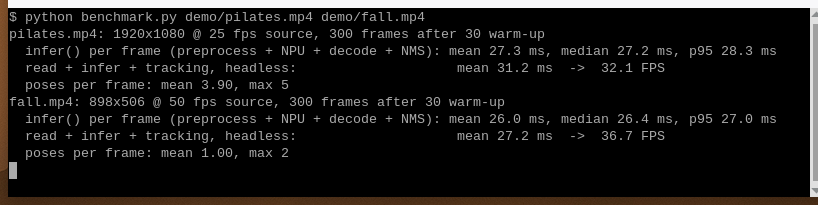
benchmark.py prints one block per clip: the infer() times, the read + infer + tracking time with FPS, and the poses per frame.
How many staged falls does fall detection flag, and how many false alarms?
No staged-trial results exist yet, so this page makes no accuracy claim. The fall thresholds were set while working with one sample clip (two people, 14 seconds) and have not been checked against other falls, sit-downs or crouches. On that clip, on a Raspberry Pi 5, the app flagged the person who fell once per loop and did not flag the caregiver.
Limitations
- Results apply only to the tested setup in the Environment line above: a Raspberry Pi 5 Model B Rev 1.1 with the Sixfab AI HAT+ (DEEPX DX-M1M), Debian 13 (trixie), DX-RT v3.4.2 and the listed kernel, driver, firmware and Python versions, with a load average of about 0.0 and nothing else on the NPU. The benchmark used video files only, headless, three runs per clip. A USB camera on the Pi 5 was not tested.
- Frigate has no pose estimation support, so this project is a Python pipeline.
- Use one app per camera. A USB webcam or a video file is documented.
- The rep counter reads the elbow angle only. It does not count squats or leg work, and its feedback is one angle check, not coaching or injury advice. It counts any elbow bend-and-extend cycle, so other arm movement can add reps.
- Fall detection is not a medical or emergency alert device. Do not rely on it for anyone's safety.
- The fall alert is on screen, plus one line in the terminal. It stays for 5 seconds, or until you press
r. Each person raises one alert per fall and must stand upright again (below 40°) to raise another. - Fall detection can miss a slow collapse or slide, because the rule needs a fast hip drop (above 0.55 frame heights per second over 0.6 seconds).
- Fall detection cannot flag a person whose shoulders or hips are not visible to the camera, because the rule needs both. That includes a person hidden by furniture or outside the frame.
- Fall detection can miss a fall that leaves the torso at 70° or less from vertical, such as a fall toward or away from the camera.
- The fall speed is relative to the frame height, so a person far from the camera moves fewer frame heights per second than the same fall close up.
- Tracking is nearest-centroid with no re-identification. When two people overlap heavily, YOLOv8n-pose can return one merged skeleton for a few frames (about 0.3 seconds in the sample clip). The tracker keeps IDs stable across it, but the merged skeleton's joints belong to two people, and its torso angle has no meaning.
- No accuracy data exists for rep counts, fall detection or the game. The fall thresholds were set on one sample clip, and no staged fall trials are recorded.
- All thresholds are constants in the scripts, not command-line options.
Privacy
The three scripts process each frame in memory and show the result on screen. They do not write video or images to disk, and they do not import a networking library. The Pilates counter and fall detection also print lines to the terminal. Fall detection sends no notification.
Get consent from everyone who appears in frame. Use your own footage. Stage falls only onto a crash mat with consenting adults, or use a video file instead.
Troubleshooting
The wrong camera opens
Pass the camera index: python fitness_coach.py 1.
Could not open USB camera at index 0
The app cannot open that camera. Check that the webcam is connected, that the index is right, and that no other app holds it. Only one app can use a camera at a time, so press q in the running app first.
Could not open video source
The path you passed is not a camera index and not a readable video file. Check the path.
dxrt-cli -s does not list the NPU
dxrt-cli -s does not list the NPUdxrt-cli -s is the DEEPX runtime's status command, and it should list the NPU. If it does not, check the NPU from the runtime side first, then see Sixfab AI HAT+ Troubleshooting.
No window appears
The apps draw with cv2.imshow, which needs a display. Run them from a terminal in the Pi 5 desktop session.
The window is larger than my screen
The apps ask for a 1280×720 OpenCV window, and on the Pi 5 desktop it can extend past the screen edge. Drag the window by its title bar, or resize it from a corner.
The fall alert stays on screen
The fall alert stays on screen by design. The alert holds for 5 seconds, and the person cannot raise another alert until they stand upright again, so it does not repeat while they are still on the ground. Press r to clear it sooner.
No alert on a staged fall
Check that the person's shoulders and hips are visible to the camera, and that the fall is fast enough. The hips must drop faster than 0.55 frame heights per second over 0.6 seconds, and the torso must then go above 70° from vertical within 2 seconds.
A second fall alert does not appear for the same person
Each person raises one alert per fall. The person has to stand upright again (torso below 40°) before the app can flag another fall for them. Press r to re-arm everyone.
The skeleton jumps between two people
When two people overlap heavily, the model can return one merged skeleton for a few frames. The IDs return to the right people afterward. Wait a moment, or give the people more space in frame.
The video restarts at the end
Video files loop by design, so the video restarts at the end.
FAQ
Can a Raspberry Pi 5 run YOLOv8 pose estimation in real time?
In a headless benchmark, yes for 25 fps video, not for 50 fps. On a Raspberry Pi 5 with the Sixfab AI HAT+ (DEEPX DX-M1M), the loop ran about 32 FPS on a 25 fps clip and 36 to 38 FPS on a 50 fps clip. App windows draw too, so they read lower. No USB camera was tested.
How do you count exercise reps with pose estimation?
Pose estimation counts reps by tracking a joint angle and counting each full bend-and-extend cycle. The Pilates counter measures the elbow angle from shoulder to elbow to wrist, averaged across both arms when both are visible. Going from EXTENDED (above 150 degrees) to BENT (below 110 degrees) and back to EXTENDED counts one rep.
How many people can the pose apps track at once?
No limit has been measured. A nearest-centroid tracker gives each detected person their own ID and state, including their own fall alert. On a Pi 5 with the sample class clip, the window showed 5 tracked people. No multi-person fall trial is recorded.
Can I run the pose apps on a video file instead of a webcam?
Yes. Pass a video file path instead of a camera index, and the video plays in a loop. The project's GitHub release has two sample clips. The Raspberry Pi 5 test used video files.
How do you decode the raw YOLOv8 pose output (56, 8400)?
Each of the 8,400 anchors holds a box, a confidence and 17 COCO keypoints. PoseEngine filters by confidence, runs NMS in Python and maps the results back to frame coordinates, because this model has no on-NPU post-processing.
Do the pose apps need an internet or cloud connection?
The scripts contain no networking code. Inference runs on the NPU, and the apps read a local USB camera or a video file. These scripts save and upload nothing.
Can I run two pose apps at the same time?
Not on the same camera. Only one app can open a camera at a time, so press q in the running app before you start another.
Does this DEEPX pose code work with the Raspberry Pi AI HAT+?
No. The apps load a .dxnn model, DEEPX's compiled format, through dx_engine, so they need a DEEPX NPU, such as the one on the Sixfab AI HAT+ (DEEPX DX-M1M). The Raspberry Pi AI HAT+ is a different product with a different NPU.
Can a camera detect a fall without a wearable?
This demo flags a likely fall from camera keypoints alone, with no wearable: it combines the torso angle from vertical with how fast the hips dropped. It flags a fall when the torso goes above 70° within 2 seconds of a drop faster than 0.55 frame heights per second. Sitting down slowly is designed not to meet both.
Can Raspberry Pi fall detection send an alert to my phone?
No. The fall script has no notification code. It draws a red "FALL DETECTED" alert on screen for 5 seconds, or until you press r, and prints a line in the terminal.
Is Raspberry Pi fall detection a medical or eldercare alert device?
No. It is a demo of pose-based fall logic and must not be relied on for anyone's safety. No staged-trial results exist for it yet.
What kinds of falls can the fall detection demo miss?
Fall detection can miss a slow collapse or slide to the floor, because the rule needs a fast hip drop. It also misses a fall that leaves the torso at 70° or less from vertical, and a fall where the shoulders or hips are hidden from the camera.
Next steps and related projects
- All Sixfab AI projects for the DEEPX NPU: the full project list.
- Set up the Sixfab AI HAT+: the Quickstart for the NPU board.
- Pre-compiled models in the Sixfab Model Zoo: ready-made
.dxnnmodels for the DEEPX NPU. - System Monitoring: check NPU load while an app runs.
- Compile your own pose model to
.dxnn: the DEEPX deployment workflow. - Frigate NVR on Raspberry Pi 5 with the DEEPX NPU: the Frigate route, for projects that use RTSP cameras.
- Camera Feeds and MQTT for Frigate Projects: the camera and broker setup for the Frigate projects.
- AI people counter on Raspberry Pi 5: another Python pipeline on the DEEPX NPU.
- Frigate person detection with an MQTT listener: the Frigate route for person detection.
- Sixfab AI HAT+ product details: the board this page was tested on.
- sixfab-dx-examples on GitHub: model-level demos, including pose.
License and credits
- The code and each model file have their own licenses. The code is licensed under the MIT License. Each model's license is listed with its details in the release notes at
https://github.com/sixfab/sixfab-dx-examples/releases/tag/pose-estimation-v1.0.0. - Keypoints use the COCO keypoint format. Keypoint order follows the Ultralytics pose docs.
- "Fruit Ninja" is a third-party game name. This project's game is Fruit Ninja-style, not affiliated with it.
Updated about 10 hours ago