
DIY Raspberry Pi Bird Camera: Species ID in Frigate NVR
A DIY bird feeder camera on a Raspberry Pi 5 can name each bird species in Frigate NVR. One NABirds YOLO model on the Sixfab AI HAT+ for Raspberry Pi 5 (DEEPX DX-M1M) finds each bird and gives it a species label from 555 North American classes. Sixfab tested the setup on a looped video, not a live outdoor camera.
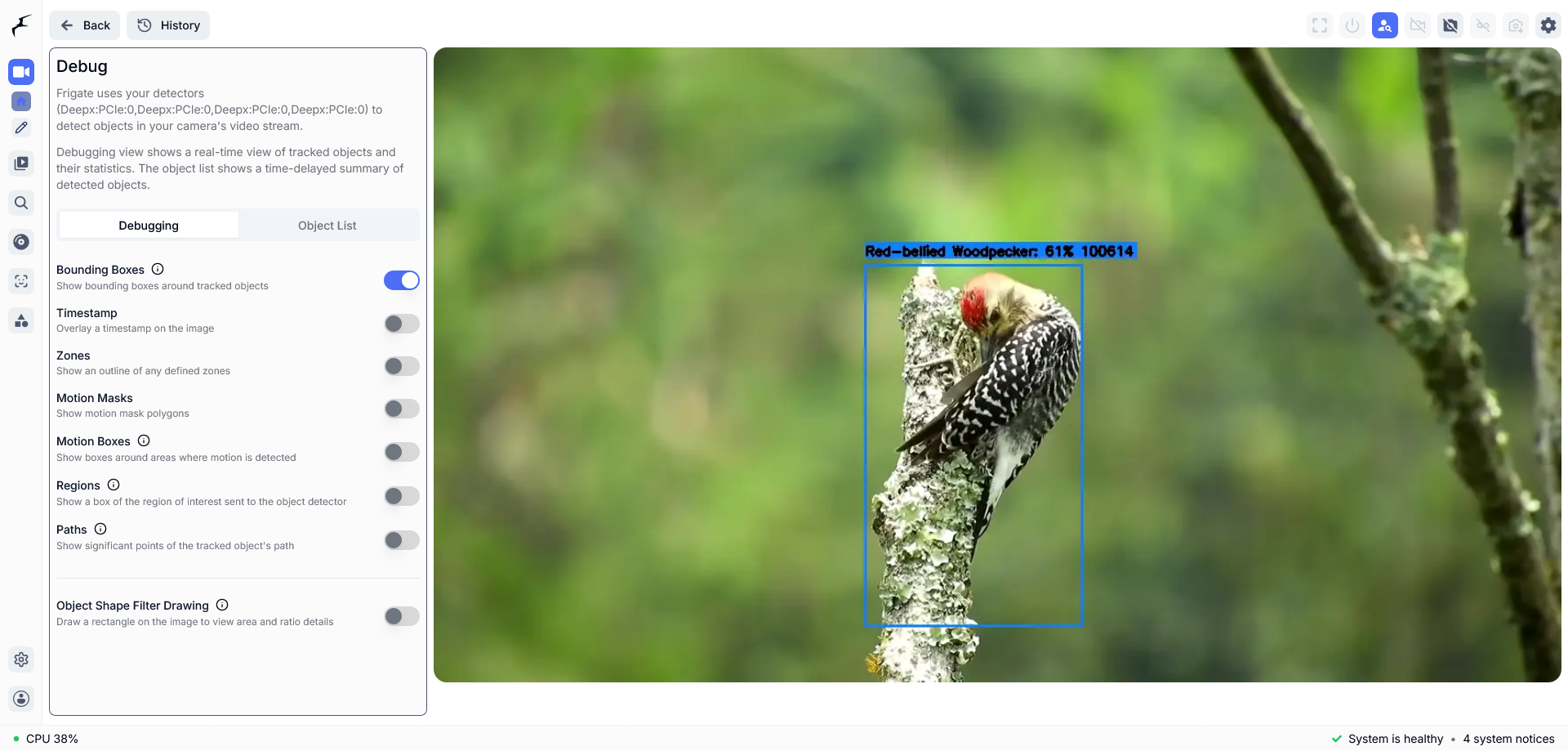
Frigate shows a species name on the bird's box, here Red-bellied Woodpecker.
| Field | Value |
|---|---|
| What it does | Names bird species at a feeder camera and publishes one MQTT topic per species label |
| Use case; Stack | Garden and wildlife; Frigate NVR |
| NPU board | Sixfab AI HAT+ for Raspberry Pi 5 (DEEPX DX-M1M) |
| On the DEEPX NPU | Object detection: one NABirds YOLO model, nabirds-new-model.dxnn (640x640 input, 555 classes: bird species and their age, sex or plumage variants) |
| On the Pi 5 CPU | Frigate video decoding, tracking and the MQTT topics, one per species |
| Camera input | RTSP, tested with a bird video looped as an RTSP stream |
| Difficulty | Intermediate |
| Frigate build | ghcr.io/blakeblackshear/frigate:af0ba19-standard-arm64, built from commit af0ba19 of Frigate's dev branch |
| Model license | AGPL-3.0 (Ultralytics YOLOv8 base); the NABirds data has a non-commercial restriction. Details in the release notes at https://github.com/sixfab/sixfab-dx-frigate/releases/tag/bird-species-id-v1.0.0 |
| Tested on | 2026-10-06, Raspberry Pi 5 (8 GB) with the Sixfab AI HAT+ (DEEPX DX-M1M), Raspberry Pi OS Trixie, DX-RT v3.4.2 and v3.4.0 |
| Result | 114.3 ms per frame for the model alone, in one run of 250 frames; the camera detects at 3 fps. No accuracy figure was measured |
| Status | Tested on Raspberry Pi 5 |
Part of Raspberry Pi 5 AI projects.
DEEPX support was merged into Frigate's dev branch on 2026-09-21 (PR #24336). It is not in a stable release yet; the latest stable release is v0.18.0 (2026-09-12). Sixfab develops and maintains DEEPX support in Frigate (Frigate's DEEPX NPU detector docs). The ghcr.io/blakeblackshear/frigate:af0ba19-standard-arm64 image, which the setup page pulls, is built from commit af0ba19 of Frigate's dev branch.
Tested on 2026-10-06: Raspberry Pi 5 (8 GB) · Raspberry Pi OS Trixie · Sixfab AI HAT+ (DEEPX DX-M1M) · DX-RT v3.4.2 and v3.4.0 · nabirds-new-model.dxnn · a recorded bird video looped over RTSP · MQTT broker on a separate host.
What you will build
You will build a Raspberry Pi bird camera that turns a feeder camera into a species identifier. Frigate NVR (network video recorder software) reads the camera stream, the NPU (neural processing unit, the AI chip on the Sixfab AI HAT+) runs one detector model on each frame, and every detected bird carries its species name as the object label, such as "Red-bellied Woodpecker".
The camera feed arrives over RTSP (real-time streaming protocol, the usual way a network camera sends video). Frigate publishes one MQTT topic per species label. MQTT is a lightweight messaging protocol, a broker is the server that passes messages between programs, and a topic is a named channel on it, such as frigate/birdfeeder/Red-bellied Woodpecker.
You can read the results in two places: MQTT topics on your broker, and Frigate's web interface at https://<pi-ip>:8971, where the box on the bird carries the species label. Not done in this test: a live outdoor camera, an accuracy test against labeled species, a run on the stable Frigate image, and Home Assistant output.
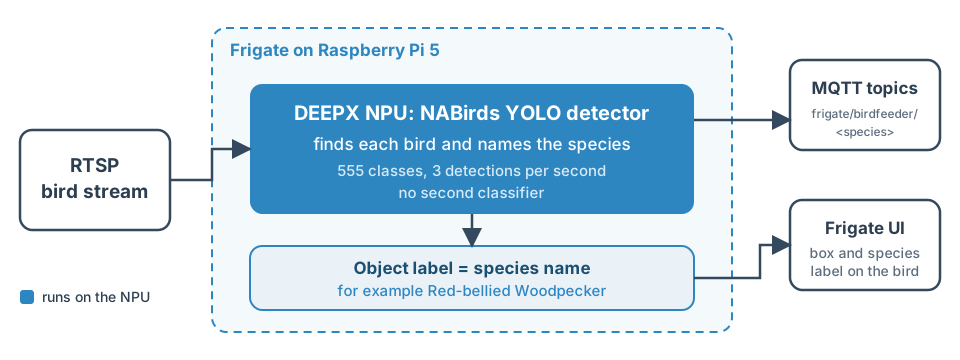
One detector on the NPU names the species, and Frigate publishes it.
A DIY bird feeder camera with no subscription
This build needs no subscription: detection runs in a container on your Raspberry Pi 5, on your own network, and Frigate is open-source software. Frigate sends events to your MQTT broker, so keep that broker on a network you control.
How does Frigate NVR identify bird species with one NABirds model?
In this project, Frigate names bird species with one YOLO detector model on the NPU: each of its 555 classes is a North American bird species or a variant of one, so the detection label is the species name. YOLO is a family of object detectors that read a frame once and return boxes with class labels. NABirds is the North American bird class list the model's names come from.
- The camera stream reaches Frigate over RTSP.
- Frigate prepares each frame for the model's 640x640 input and sends it to the NPU.
- The model returns boxes and class scores. Frigate's DEEPX detector decoded the raw output, shaped (1, 559, 8400), with
model_type: yolo-generic. - The class name becomes the object label, and Frigate publishes the MQTT topics.
How do you read the species labels in Frigate?
Each species label in Frigate is one line of the labelmap, the file that lists the model's class names, one per line, in the model's class order. The project ships it as nabirds-labelmap.txt with 555 unique names. Many are variants of one species: 288 carry a variant in parentheses, such as an age, sex or plumage, and each variant is its own class.
Two edits were made to the original names. A / became - in 86 names, because / separates the levels of an MQTT topic. Three doubled spaces were collapsed. For example, the part of a name written Female/juvenile becomes Female-juvenile in the topic.
Why the camera detects at 3 fps
The camera block sets detect.fps: 3 because the model needs about 114 ms per frame on the Raspberry Pi 5. By itself that would allow about 8.7 fps, but Frigate skipped frames with the camera at 5 fps, and what limits Frigate was not measured. See How fast is bird species detection on the Raspberry Pi 5 NPU, in milliseconds per frame?
What label does a bird outside the 555 classes get?
A bird outside the 555 classes gets the closest class the model knows. The model only knows its 555 North American classes, so the label is the nearest match, not a statement that the bird is that species.
Sixfab's test video shows this. The video holds tropical birds, and the model called green parrotlets "Tennessee Warbler". For that reason the test video cannot show whether a label is right, and Sixfab measured no accuracy figure. Confidence also depends on the scene: the top class score per frame averaged 0.56 on a section with a yellow bird, which the model labeled Yellow Warbler at 0.89, and 0.13 on other sections of the same video.
Which camera should you use at the bird feeder?
For a DIY bird feeder camera, use any RTSP camera that Frigate can read. Sixfab did not test a live camera, a mounting position or an enclosure for this page. The test used a bird video served over RTSP, with detection at 1280x720.
To connect a camera feed and an MQTT broker, follow the camera feed and MQTT setup for Frigate.
Requirements
You need a Raspberry Pi 5 with the Sixfab AI HAT+, Frigate already running with the DEEPX detector, an RTSP camera or stream, and an MQTT broker to run the Verify step.
| Hardware | Detail |
|---|---|
| Raspberry Pi 5 | Runs Frigate and the install script |
| Sixfab AI HAT+ for Raspberry Pi 5 (DEEPX DX-M1M) | NPU board. The test used this variant. See the Sixfab AI HAT+ specifications |
| RTSP camera or stream | Any RTSP source. The test used a bird video served over RTSP |
| MQTT broker | Any broker, such as Mosquitto, for the Verify step |
| Software | Detail |
|---|---|
| Frigate with the DEEPX detector | Already running, as set up in Frigate NVR on Raspberry Pi 5 with the DEEPX NPU |
| Quick install tools | git, curl and sha256sum |
| Tools the install script calls | Docker, python3 with PyYAML, and ffprobe (part of ffmpeg) |
| Verify tool | mosquitto_sub (from the Mosquitto clients) |
| Model files | nabirds-new-model.dxnn, from the project's GitHub release; nabirds-labelmap.txt, in the project's model folder |
Before you start, finish these pages in order: the Sixfab AI HAT+ Quickstart, then set up Frigate with the DEEPX NPU, then add an RTSP camera and MQTT broker.
Install
Install with the install script or follow the manual steps. Both put the model and labelmap in Frigate's model cache, merge the model entry and the camera into your Frigate config.yaml and restart Frigate.
Quick install
Run this on the Raspberry Pi 5. Frigate must already be running.
git clone https://github.com/sixfab/sixfab-dx-frigate.git
cd sixfab-dx-frigate/apps/bird-species-id
./install.sh --rtsp-url <rtsp-url>--rtsp-urlis the RTSP address of your bird camera. The installer asks for it if you leave it out.--broker <broker-host>is optional. It only puts your broker address into the Verify command the installer prints.--containerand--config-dirare optional. The defaults are a container namedfrigate, with its config folder read from the container's/configmount.--yesskips the question before the Frigate restart.
The installer downloads the model file from the project's GitHub release and checks its SHA-256 before it installs it. It needs git, curl and sha256sum. The install.sh script runs four stages: it checks the stream with ffprobe, copies the model and labelmap, merges the config after saving a backup, and asks before it restarts Frigate. The merge writes all 555 species into objects.track.
Manual install
Six steps cover Frigate, the stream, the files, the model entry, the species list and the restart.
-
Start Frigate. If you have not started it yet, follow the Frigate NVR setup page. Its
docker runcommand is the only Frigate start command this project needs. -
Have an RTSP stream ready. Any RTSP camera or stream works. You will put its address,
<rtsp-url>, in the camera block in step 4, in place of the examplertsp://<stream-host>:8554/<stream-path>. To test without a camera, see how to loop a recorded video as an RTSP test feed. -
Get the project folder and the model file. Run on the Raspberry Pi 5. Clone the repository and open the project folder:
git clone https://github.com/sixfab/sixfab-dx-frigate.git <repo-dir>
cd <repo-dir>/<project-path>
Download the model from the project's GitHub release and check it. Use the repository address without a trailing
.gitin the download URL.mkdir -p model/nabirds-new curl -fL -o model/nabirds-new/nabirds-new-model.dxnn https://github.com/sixfab/sixfab-dx-frigate/releases/download/bird-species-id-v1.0.0/nabirds-new-model.dxnn awk '$1 !~ /^#/ && NF {print $3 " " $2}' models.txt | sha256sum -c -Expected output:
model/nabirds-new/nabirds-new-model.dxnn: OK. Then place the model and the labelmap, still from the project folder:mkdir -p <frigate-config-dir>/model_cache cp model/nabirds-new/nabirds-new-model.dxnn <frigate-config-dir>/model_cache/ cp model/nabirds-labelmap.txt <frigate-config-dir>/model_cache/ -
Add the model entry and the camera. Merge this short example into your Frigate
config.yaml. Use your own camera name. Theobjectsblock here is a two-species example; step 5 replaces it.models: - scene: outdoor_thermal devices: - deepx:PCIe:0 path: /config/model_cache/nabirds-new-model.dxnn labelmap_path: /config/model_cache/nabirds-labelmap.txt width: 640 height: 640 input_tensor: nhwc input_pixel_format: rgb input_dtype: int model_type: yolo-generic cameras: birdfeeder: ffmpeg: inputs: - path: rtsp://<stream-host>:8554/<stream-path> roles: - detect - record detect: enabled: true width: 1280 height: 720 fps: 3 scene: outdoor_thermal objects: track: - Yellow Warbler - Red-bellied Woodpecker filters: Yellow Warbler: min_score: 0.3 threshold: 0.4 Red-bellied Woodpecker: min_score: 0.3 threshold: 0.4 record: enabled: falsesceneis a label that ties a camera to a model, and Frigate accepts five values:all,indoor,outdoor,indoor_thermalandoutdoor_thermal. This project usesoutdoor_thermalas an unused slot, so the entry does not need a thermal camera and does not share a model with another project. -
Write the full species list. Frigate reports only the objects in
objects.track, so the camera needs all 555 names. This snippet reads the labelmap and writes the same track list and filters thatinstall.shwrites. It needs PyYAML. Run it from the project folder:python3 - model/nabirds-labelmap.txt > species.yaml <<'PY' import sys, yaml names = [n for n in open(sys.argv[1], encoding="utf-8").read().splitlines() if n] objects = {"track": names, "filters": {n: {"min_score": 0.3, "threshold": 0.4} for n in names}} print(yaml.safe_dump({"objects": objects}, sort_keys=False, allow_unicode=True)) PYReplace the
objects:block of your camera inconfig.yamlwith the contents ofspecies.yaml, indented to sit under the camera. The file is about 2,200 lines long. -
Restart Frigate on the Raspberry Pi 5:
docker restart frigate
Verify
Three checks confirm that species topics reach MQTT, that Frigate is up and that the box carries a species name. Start with MQTT.
-
Species topics appear on the broker. Subscribe to the camera's topics. Replace
birdfeederif you named the camera differently.mosquitto_sub -h <broker-host> -t "frigate/birdfeeder/+" -vExpected, from Sixfab's test with the looped video:
frigate/birdfeeder/Cattle Egret 0
frigate/birdfeeder/all 2
frigate/birdfeeder/Golden-fronted Woodpecker 0
frigate/birdfeeder/all 1
frigate/birdfeeder/Golden-fronted Woodpecker 1
frigate/birdfeeder/all 2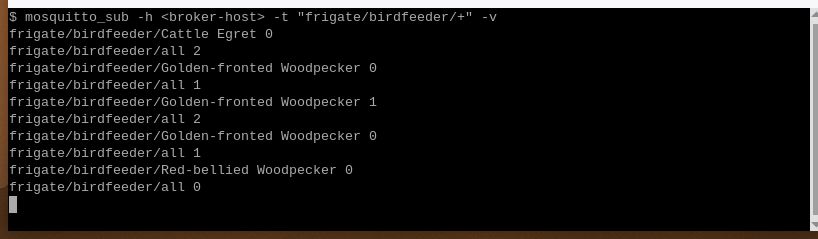
Output from Sixfab's test. The broker address is hidden as
<broker-host>.Read each line as topic, then payload. The payload is the number of birds of that species in view right now, so
Golden-fronted Woodpecker 1means one and0means none.frigate/birdfeeder/allcounts all birds together. In the test, species such as Cattle Egret, Golden-fronted Woodpecker and Red-bellied Woodpecker appeared. The test video is not a North American bird set, so do not read these names as correct identifications. -
Frigate answers. The installer uses this call to confirm that Frigate is up:
docker exec frigate curl -s http://localhost:5000/api/statsFrigate answers with its stats as JSON. The command runs inside the container rather than over the network: Frigate runs with host networking, so port 5000 is already reachable on the Pi 5, with no Docker
-pflag to withhold it. -
The box carries a species label. Open
https://<pi-ip>:8971, choose thebirdfeedercamera and open the Debug view. In Sixfab's test the Frigate UI showed a Yellow Warbler label while the looped video played.
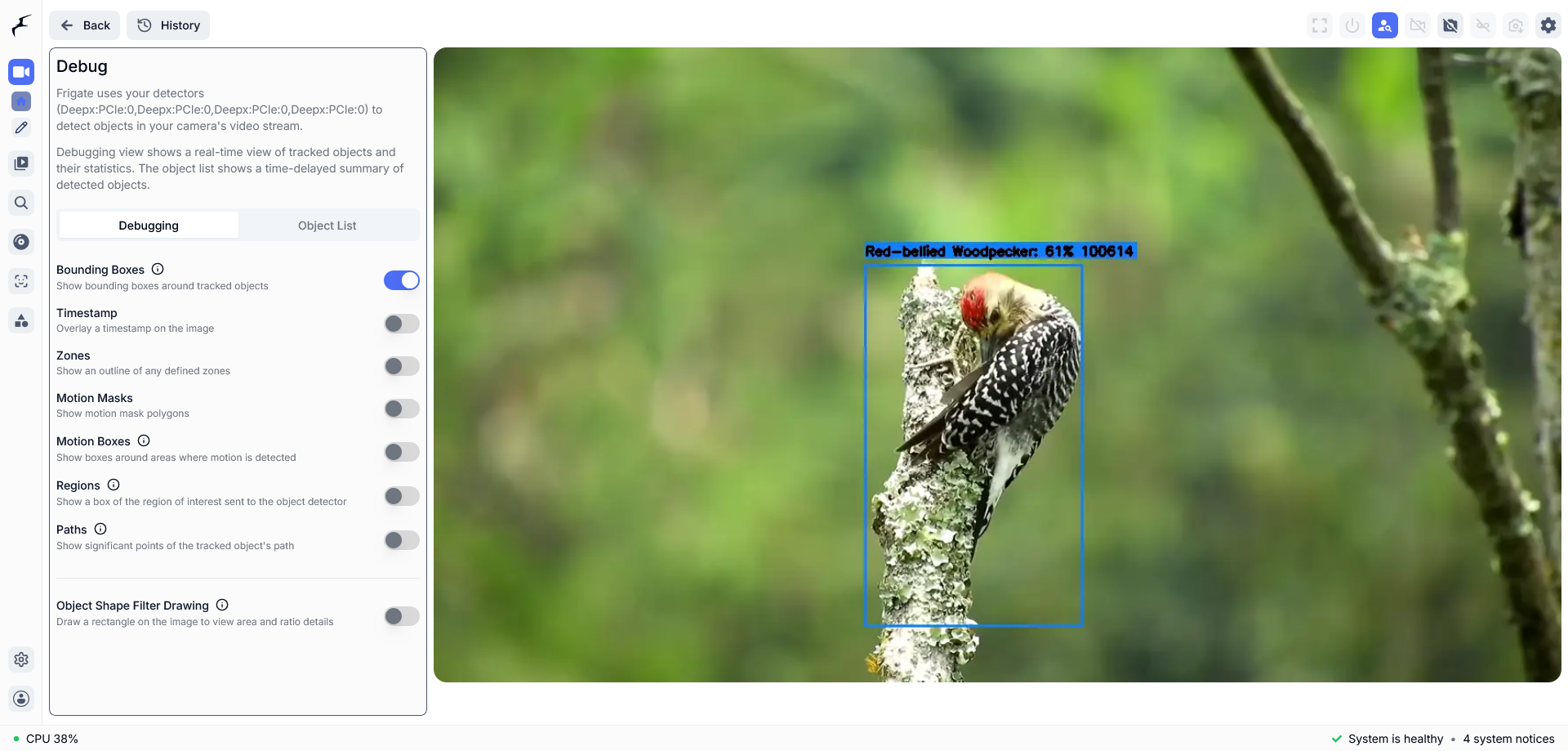
The Debug view with the Bounding Boxes switch on draws a box around the bird.
How fast is bird species detection on the Raspberry Pi 5 NPU, in milliseconds per frame?
On a Raspberry Pi 5 with the Sixfab AI HAT+ (DEEPX DX-M1M), the NABirds model took 114.3 ms per frame in one run of 250 frames, timed as the model alone. That is one reading with this method, not a benchmark, and it says nothing about accuracy.
| Metric | Value | How it was measured |
|---|---|---|
engine.run time per frame | 114.3 ms mean | 250 frames, one run. Nothing else on the NPU, Frigate's cameras off, DX-RT v3.4.2 |
| Model input and output | 640x640 in, raw 559x8400 out | The model's shapes |
| Frigate at a 5 fps camera | Frigate skipped frames | Frigate stats, same Pi 5; the skipped share was not recorded |
| Top class score per frame | 0.56 average on a section with a yellow bird; 0.13 on other sections | The looped test video |
| Accuracy, power, CPU load | Not measured | — |
How it was measured. engine.run is the call in DX-RT, the DEEPX runtime, that runs the model once. The mean covers 250 frames of the looped test video with Frigate's cameras switched off, so the number is the model alone, not Frigate end to end. The score row shows that confidence depends on the scene. It is a score, not a correctness rate.
For accelerator comparisons, see the Sixfab benchmark blog, Raspberry Pi 5 NPU benchmark.
Limitations
The results on this page come from one test setup, so these limits apply:
- Species labels come from the model's 555 classes. A bird outside them gets the closest label, and no accuracy figure was measured.
- The test video shows tropical birds, not a North American set, so it cannot show whether a label is right.
- The decode of the model's raw output was tested on the
ghcr.io/blakeblackshear/frigate:af0ba19-standard-arm64image. It was not run onghcr.io/blakeblackshear/frigate:stable. - 114.3 ms is one run of 250 frames. Frigate skipped frames at a 5 fps camera, so the camera detects at 3 fps.
- Confidence depends on the scene: the top score averaged 0.56 on one section of the video and 0.13 on others.
- Of the 555 classes, 288 are variants in parentheses, so one species can appear under several labels.
- Not tested: a live outdoor camera, other cameras, Home Assistant output.
- Frigate chooses the DX-RT version its DEEPX detector uses. The tested build pins DX-RT v3.4.0, and this page cannot change it.
- If the DX-RT daemon (the DEEPX runtime) restarts, restart the Frigate container too.
- The bird camera was set up with Frigate in Docker. Home Assistant OS and the Frigate add-on were not tested.
Privacy
An outdoor camera can record people, so aim the camera at the feeder. The camera can also record neighboring property, and local recording rules apply.
Detection runs on the Raspberry Pi 5. Frigate sends events, including species names, to your MQTT broker, so keep the broker on a network you control. The example camera block turns recording off. Frigate downloads the DX-RT Python bindings once at first start, and again when a release pins a new version, so the first start needs internet access. Frigate can also publish snapshot images over MQTT if you turn that on. Sixfab did not audit the outbound network connections.
Troubleshooting
No species topics appear on MQTT
Frigate publishes a species topic only while the birdfeeder camera is on and a bird is in view. Check the stream, then watch the all topic:
ffprobe rtsp://<stream-host>:8554/<stream-path>
mosquitto_sub -h <broker-host> -t "frigate/birdfeeder/+" -v
If ffprobe cannot read the stream, fix the feed first. If the stream works and frigate/birdfeeder/all stays at 0, no bird is in view.
Frigate skips frames
If Frigate skips frames, the camera detects faster than the model can run. In the test, Frigate skipped frames with a 5 fps camera. Keep detect.fps: 3 in the camera block, then restart Frigate:
docker restart frigateA species never appears although the model should know it
The names in objects.track must match the labelmap line for line. A name typed by hand can differ in small ways: the labelmap holds Swainson's Hawk (Dark morph ), with a space before the closing parenthesis. Generate the list with the snippet in Manual install step 5, or copy the lines from nabirds-labelmap.txt.
A bird gets a label that does not fit
The model only knows 555 North American classes. A bird outside them gets the closest class, as the tropical birds in the test video did. See What label does a bird outside the 555 classes get?
ERROR: cannot find a Frigate container named 'frigate' with a /config mount
The installer could not find your container. Pass its name with --container <name>, or the config folder with --config-dir <dir>.
ERROR: cannot read the RTSP URL
The installer checks the stream with ffprobe before it changes anything. Check the address and that the stream is running, then run the installer again.
For NPU and driver problems, see Sixfab AI HAT+ Troubleshooting.
FAQ
Can Frigate NVR identify bird species on a Raspberry Pi 5?
Yes, in Sixfab's test. One NABirds model on the Sixfab AI HAT+ (DEEPX DX-M1M) labeled each tracked bird with a species name, and Frigate published a topic per species. The test used a looped video on the ghcr.io/blakeblackshear/frigate:af0ba19-standard-arm64 image, not the stable image, and no accuracy was measured.
Do I need a separate bird species classifier in Frigate?
No. The detector's class label is the species name, so nothing runs after it. If your config still has Frigate's built-in bird classification or a custom classification enabled, install.sh switches them off.
How many bird species can the NABirds model identify?
The model has 555 classes, not 555 distinct species: 288 of the 555 names are variants of a species, such as an age, sex or plumage in parentheses, so one species can appear under several labels. The model only knows North American birds, so other birds get the closest class.
How accurate is bird species identification with this Frigate model?
Sixfab has not measured accuracy. The test video shows tropical birds and the model knows only North American classes, so the test cannot show whether a label is right. The top confidence score per frame averaged 0.56 on one section and 0.13 on others; a score is not an accuracy rate.
Does the bird species model run on the NPU or the Raspberry Pi 5 CPU?
On the NPU. The detector model, nabirds-new-model.dxnn, runs on the DEEPX DX-M1M on the Sixfab AI HAT+, and its class name becomes the object label in Frigate. Frigate then publishes one MQTT topic per species label.
What does the number after a Frigate species MQTT topic mean?
The number is the count of birds of that species in view right now. frigate/birdfeeder/Red-bellied Woodpecker 1 means one such bird, and 0 means none. frigate/birdfeeder/all counts all birds together.
Is there a no-subscription alternative to a smart bird feeder camera?
Yes. This project runs species detection on your own Raspberry Pi 5 with Frigate NVR, which is open-source software. Frigate sends events to your MQTT broker, so keep that broker on a network you control.
Can I test Frigate bird species detection without a live camera?
Yes. Sixfab tested with a bird video served as an RTSP stream. Camera Feeds and MQTT for Frigate Projects shows how to set up a looped test feed. The test did not cover a live outdoor camera.
Next steps and related projects
- Raspberry Pi 5 AI projects
- Frigate NVR on Raspberry Pi 5 with the DEEPX NPU
- Camera Feeds and MQTT for Frigate Projects
- Frigate Squirrel Detection on Raspberry Pi 5 with DEEPX NPU, which also runs one detector model in Frigate
- Raspberry Pi 5 Person Detection with Frigate: Boss Detector
- Sixfab Model Zoo, for pre-compiled
.dxnnmodels - Supported Models Catalog, for models supported on DEEPX NPUs
- Compile your own model to
.dxnn, with the DX-COM Configuration Reference - System Monitoring, to check NPU load
- Sixfab AI HAT+ for Raspberry Pi 5 product page
License and credits
The code is licensed under the MIT License. nabirds-new-model.dxnn is built on an Ultralytics YOLOv8 base and is licensed under AGPL-3.0. It was trained on NABirds data, which carries a non-commercial restriction. The model's details are in the release notes at https://github.com/sixfab/sixfab-dx-frigate/releases/tag/bird-species-id-v1.0.0.
Credits: Frigate NVR and NABirds.
Updated about 10 hours ago