
Safety & Compliance
Follow safety guidelines and compliance standards for operating the ALPON X5 AI edge computer. Ensure reliable and secure industrial usage.
Operate the ALPON X5 AI safely and within spec
Handling, power, thermal, antenna, port, and regulatory rules for the ALPON X5 AI industrial edge AI computer. Review every section before powering, mounting, or deploying the device in the field. Intelligented by DEEPX. Built on Raspberry Pi.
The ALPON X5 AI is a fanless industrial edge AI computer rated for −20 to +60 °C ambient and IP40, powered by one of three inputs: 12 to 24 V DC, USB-C PD at 15 V (27 W minimum), or PoE+ on ETHERNET 0. Regulatory certifications (CE, FCC, IC, UKCA, RoHS, WEEE, REACH) are currently in progress and will be confirmed in this document once issued. Never connect Ethernet or PoE to the ADDON (GPIO) port; doing so causes permanent hardware damage. Built on Raspberry Pi.
The ADDON (GPIO) port uses an RJ45 socket but exposes 3.3 V GPIO, SPI, UART, and I²C signals. Connecting an Ethernet cable or a PoE source will cause permanent hardware damage. Use the port only with Sixfab add-on modules.
Safety reference at a glance
Key environmental and electrical limits for safe operation. The full envelope and unit conventions follow Cornerstone §15 and the Technical Information File.
ETHERNET 0 onlyGeneral handling
Universal rules that apply to every installation, regardless of power source or mounting orientation.
The aluminum enclosure acts as a heatsink and may reach high temperatures during sustained AI inference. Avoid touching the top cooling surface during extended operation or immediately after shutdown.
The device is rated IP40. Keep it away from liquids, condensation, and flammable materials. Direct outdoor exposure requires a separate protective enclosure.
Apply standard ESD precautions (wrist strap, grounded mat) when opening the enclosure, swapping the NVMe SSD, or handling the AI Accelerator M.2 module.
The ALPON X5 AI contains no user-serviceable parts beyond the NVMe SSD and the DEEPX DX-M1 M.2 module. Opening the enclosure for any other purpose voids the warranty.
Do not insert metal or conductive objects into ports, vents, or connectors. Avoid impact damage to the housing and SMA antenna connectors.
Power safety
Three independent inputs (DC terminal block, USB-C PD, PoE+). The device automatically draws from the highest-voltage source; there is no software-configurable priority.
How do I power the ALPON X5 AI safely?
ETHERNET 0 only.
Power source selection
All three inputs may be connected simultaneously. The device automatically draws from the input with the highest voltage; there is no software-configurable priority.
For SSD imaging, power the device through the DC terminal block. Powering by USB-C alone is insufficient — the SSD will not enumerate in the imager tool.
Use a USB-C PD adapter that delivers 15 V at ≥1.8 A (27 W); a 12 V profile at ≥2.25 A is also accepted. A 45 W (15 V / 3.0 A) adapter is recommended for full performance under sustained AI load.
PoE+ is available only on variants that include the built-in PoE module. The module cannot be added in the field. Use a PoE+ (IEEE 802.3at) Class 4 injector or switch supplying 37 to 57 V; legacy PoE (802.3af) cannot deliver enough power for AI workloads.
Power is sourced only through ETHERNET 0. ETHERNET 1 is a USB-bridged interface and cannot deliver power to the system.
Restricted mode
If any power input supplies less than 12 V (for example, a 5 V USB-C source), the ALPON X5 AI automatically enters restricted mode. High-power peripherals are disabled to keep the base system operational and prevent brownouts.
The DEEPX DX-M1 NPU sits on the disabled PCIe bus, so model inference cannot run while the device is in restricted mode. Restore a 12–24 V source on the DC terminal, a 15 V USB-C PD source, or a PoE+ source to bring AI back online.
Thermal safety & mounting
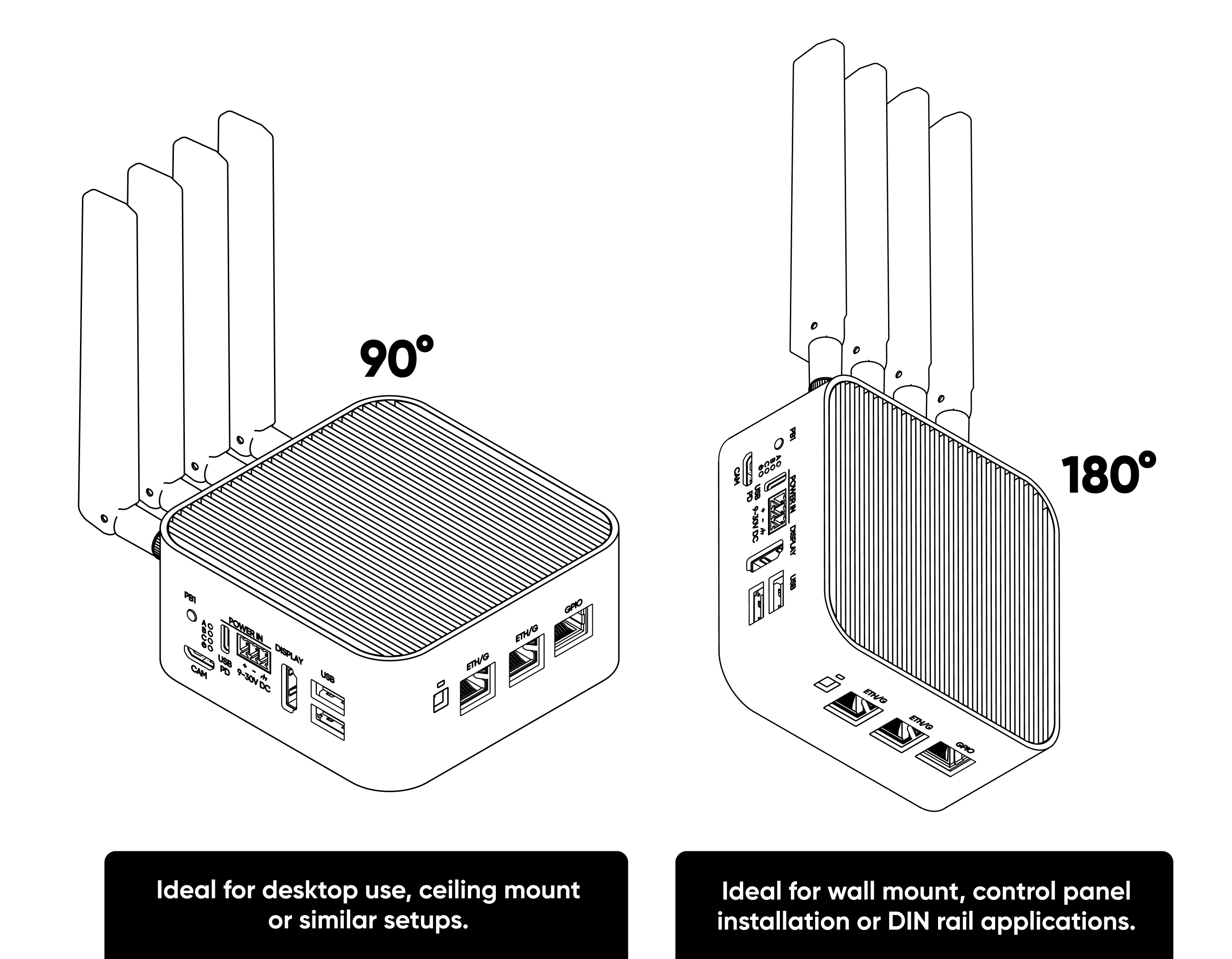
The fanless aluminum top is the primary heatsink. Mounting orientation directly affects sustained AI throughput.
Recommended mounting orientations
Environmental clearances
Keep the device away from direct heat sources (ovens, motors, boilers) and steam. Radiant heat reduces ambient headroom against the +60 °C operating limit.
When enclosing the ALPON X5 AI in a cabinet, provide at least 25 mm of clearance around the cooling surface and verify cabinet ventilation is adequate for the combined heat load.
Antenna & RF safety
Four SMA ports for LTE Main, LTE Diversity, Wi-Fi/Bluetooth, and GNSS/GPS. Connector genders differ by port — match the antenna gender to the port when ordering replacements.
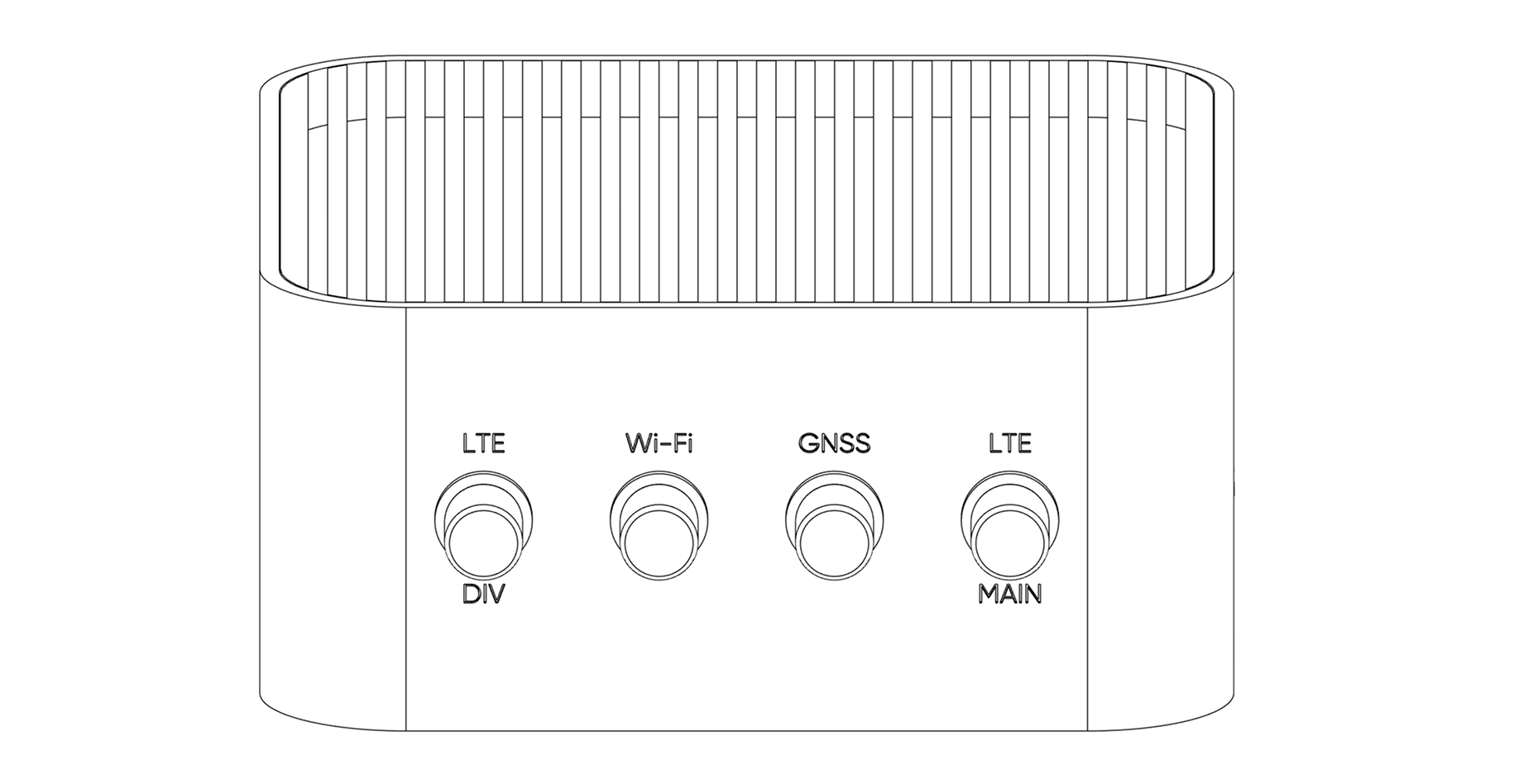
Antenna specification
The Wi-Fi port uses an RP-SMA male connector, while the GNSS and LTE ports use female SMA connectors. Match the antenna gender to the port before ordering to avoid adapter chains and impedance mismatches.
Installation & handling
Never install, remove, or service antennas while the device is powered on. Disconnect every power source first to prevent electric shock and RF transmitter damage.
Hand-tighten SMA connectors firmly without over-torquing. For field installations use a 6 mm SMA torque wrench at 0.5 to 0.7 N·m.
Inspect connectors for corrosion, debris, or damage before each reattachment. Replace compromised connectors rather than forcing a fit.
Placement & signal quality
Do not swap antennas between ports. LTE, Wi-Fi, and GNSS ports are tuned for different frequency bands; mismatched antennas degrade link quality and may overload the RF front-end.
Keep antennas clear of metal surfaces, reinforced concrete, and other sources of electromagnetic interference such as microwave ovens, cordless phones, and large motors.
The GNSS antenna must be placed in an open area with the top facing the sky. Obstructed or ground-level placement degrades time-to-first-fix and position accuracy.
Port & connector safety
Several ALPON X5 AI ports share physical form factors with unrelated standards. Read the port-specific rules before cabling.
ADDON (GPIO) port: not an Ethernet port
The ADDON port uses an RJ45 jack but exposes 3.3 V GPIO, SPI, UART, and I²C signals. It can deliver up to 5 V at 1 A to attached modules and has overcurrent protection that triggers on GPIO 20. It is not wired for Ethernet or PoE.
Connecting an Ethernet cable or a PoE source to the ADDON port can permanently damage the device. The GPIO lines run at 3.3 V logic; PoE voltage (up to 57 V) destroys the signal pins and the level shifter. Use the ADDON port only with Sixfab add-on modules.
Port function reference
USB port overcurrent behavior
The two USB 3.0 ports share a 1800 mA combined current limit through a single AP22653 power switch. If combined draw exceeds this limit, the hardware trips thermal protection and cuts power to both ports.
Power restores automatically when the fault is cleared (problematic device removed or short resolved). No reboot or command is required.
When attaching high-draw USB peripherals (SSDs, cellular dongles, external hubs), budget current across both ports together, not per port.
Watchdog & Boot/Burn switches
Two DIP switches sit under a silicone cap on the rear face — no need to open the enclosure: SW1 (watchdog: OFF = enabled, ON = disabled) and SW2 (Boot/Burn selector).
SW1 (Watchdog). The hardware watchdog can only be disabled physically via SW1 (OFF = watchdog enabled, default; ON = watchdog disabled); there is no software command to disable it. When enabled (SW1 OFF), the host must strobe GPIO 16 within a 5-minute window or the device hard-resets.
SW2 (Boot/Burn). Set SW2 to ON only for image flashing via Raspberry Pi Imager. Return to OFF before resuming normal boot, and power-cycle the device after toggling.
Disconnect every power source before changing the SW2 (Boot/Burn) position. Toggling SW2 under power leaves the bootloader in an undefined state.
Regulatory compliance & certifications
Regulatory certifications for the ALPON X5 AI are currently in progress. The device is being tested and submitted for the certification marks required to ship in the European Union, the United States, Canada, and the United Kingdom. This page will be updated as each certification is issued.
The certifications listed below are the targeted regulatory marks for the ALPON X5 AI. Test campaigns are under way at accredited labs but no certificate of conformity has been issued yet. Do not rely on these as final compliance evidence; for procurement, RFP, or pre-production deployment decisions, request the current status letter from Sixfab and wait for the official Declaration of Conformity (DoC) once available.
Targeted certifications
Test standards under evaluation
The ALPON X5 AI is being evaluated against the following standards as part of the in-progress certification campaign. Listing a standard here means testing is planned or under way, not that a pass result has been published.
Need the current certification status, target completion dates, or interim test evidence for procurement decisions? Reference the device model and serial number from the label on the enclosure when contacting Sixfab.
Request status updateFCC Class B notice (target)
Once FCC certification is issued, this equipment is expected to comply with the limits for a Class B digital device, pursuant to Part 15 of the FCC Rules. These limits are designed to provide reasonable protection against harmful interference in a residential installation. Final certification will subject operation to the following two conditions:
- This device may not cause harmful interference.
- This device must accept any interference received, including interference that may cause undesired operation.
Once certifications are issued, changes or modifications not expressly approved by Sixfab can void the user's authority to operate the equipment under FCC and IC rules. Treat unmodified, factory-supplied hardware as the only configuration covered by the future Declaration of Conformity.
Environmental & end-of-life
RoHS, WEEE, and REACH conformity is targeted and still in progress. Follow these rules at end-of-life.
Do not dispose of the device in unsorted household waste. Return it through an authorized WEEE collection point, a local electronics recycler, or back to Sixfab for responsible processing.
The ALPON X5 AI contains no user-replaceable battery. The RTC is backed by a small lithium cell accessible only through authorized service.
Before disposal or return, erase sensitive data from the NVMe SSD and any connected add-on storage. Retain the original packaging for return shipping.
Warranty
The ALPON X5 AI ships with a 2-year limited warranty against manufacturing defects. The warranty does not cover damage caused by:
- Power input outside the rated envelope (below 12 V, above 24 V, or non-compliant PoE injectors).
- Connecting Ethernet or PoE cables to the ADDON (GPIO) port.
- Unauthorized modification of firmware, enclosure, or internal modules.
- Operation outside the rated environmental envelope (−20 to +60 °C, 95% non-condensing humidity, IP40).
- Physical damage from impact, liquid ingress, or electrostatic discharge.
Submit warranty claims with the device serial number, purchase date, and a description of the fault.
Contact SixfabUpdated 1 day ago