
Raspberry Pi Face Recognition Camera with Frigate
This Raspberry Pi face recognition project names enrolled people with Frigate NVR on a Raspberry Pi 5. The Sixfab AI HAT+ for Raspberry Pi 5 (DEEPX DX-M1M) runs YOLOv8n person detection; Frigate face recognition runs on the CPU. Enroll 1 to 5 clear, front-facing photos per person, and Frigate adds the name to matching person events as a sub_label.
Part of the Raspberry Pi 5 AI projects series.
DEEPX support was merged into Frigate's dev branch on 2026-09-21 (PR #24336). It is not in a stable release yet; the latest stable release is v0.18.0 (2026-09-12). Sixfab develops and maintains DEEPX support in Frigate (Frigate's DEEPX NPU detector docs). The ghcr.io/blakeblackshear/frigate:af0ba19-standard-arm64 image, which the setup page pulls, is built from commit af0ba19 of Frigate's dev branch.
| Field | Value |
|---|---|
| What it does | Adds an enrolled person's name to Frigate person events |
| Use case; stack | Home security; Frigate NVR |
| On the DEEPX NPU | Object detection: YOLOv8n (COCO-80), the ready-compiled model yolov8-n_640x640_ppu.dxnn, used for person detection |
| On the Pi 5 CPU | Face recognition: Frigate's built-in ArcFace model (model_size: large, device: CPU) |
| Camera input | RTSP, a network video stream (a Logitech C270 USB webcam restreamed by a camera host) |
| NPU board | Sixfab AI HAT+ (DEEPX DX-M1M) |
| Frigate build | ghcr.io/blakeblackshear/frigate:af0ba19-standard-arm64, built from commit af0ba19 of Frigate's dev branch |
| Model license | AGPL-3.0 (Ultralytics YOLOv8n). Details in the release notes at https://github.com/sixfab/sixfab-dx-frigate/releases/tag/smart-doorbell-v1.0.0 |
| Difficulty | Intermediate |
| Last tested | 2026-09-29, with a real face on real hardware |
| Tested on | Raspberry Pi 5 (8 GB) with the Sixfab AI HAT+ (DEEPX DX-M1M), Raspberry Pi OS Trixie |
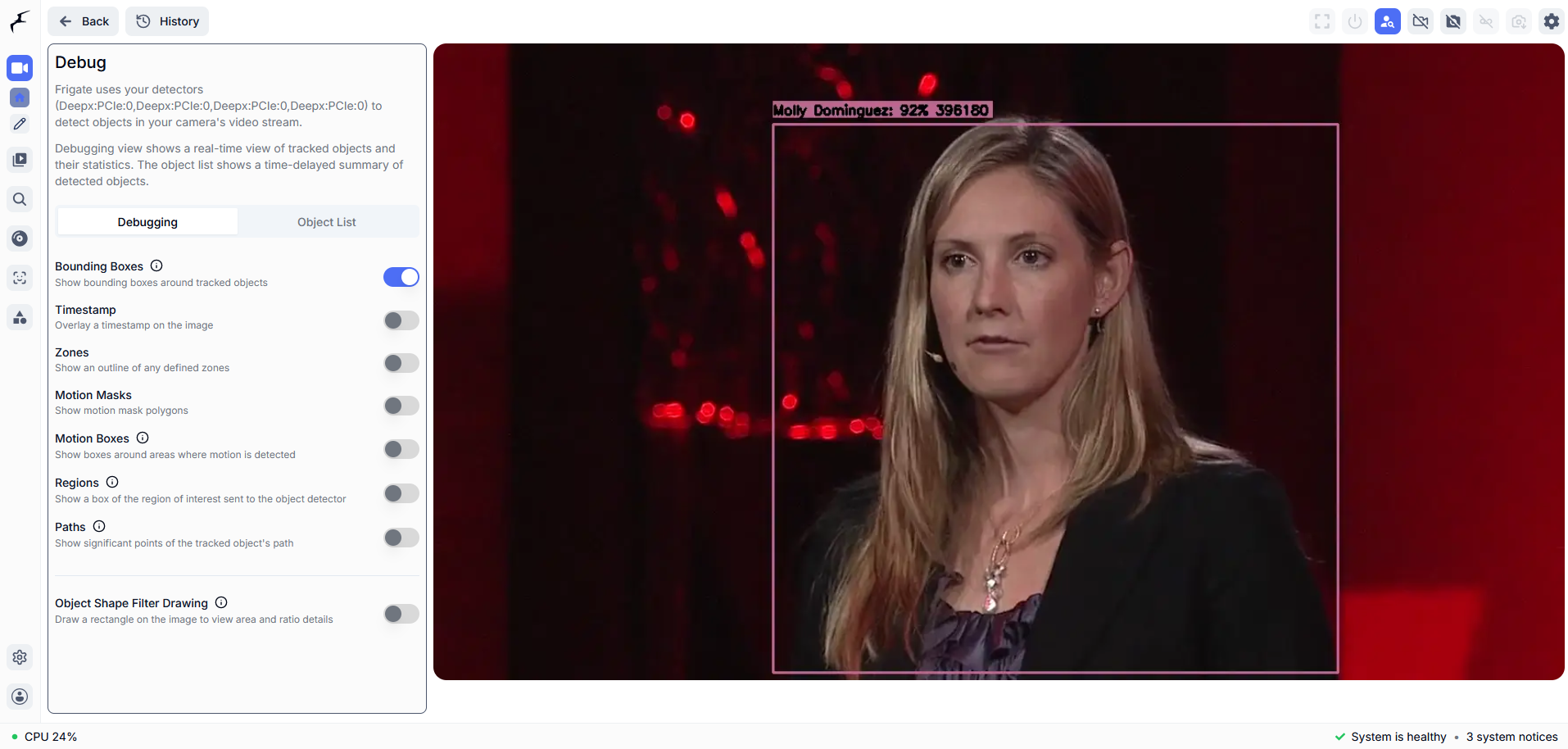
Frigate's Debug view draws a box around the person and labels it with the enrolled name and a match score. This is the result you are building toward.
What you will build
You will build a camera that names who is at the door in Frigate's person events. Frigate is an NVR (network video recorder): software that records camera streams and detects objects in them. A USB webcam, restreamed by a camera host as an RTSP stream (a network video feed), feeds Frigate on a Raspberry Pi 5. The NPU (neural processing unit, a chip built to run AI models) finds each person in the frame. Frigate then looks for a face inside the person box and compares it with the faces you enrolled. When it finds a match, it adds the name to the person event as a sub_label, the extra name field Frigate stores on an event.
Each chip does the job that suits it. The NPU runs person detection. The Pi 5 CPU runs face recognition on the person Frigate has found. In testing, person detection ran at 4 to 8 detection_fps on the frontdoor camera, and face recognition took about 600 to 800 ms per inference on the Arm CPU. Both numbers came from a Pi 5 shared with other cameras and models.
Mount the camera at your door and it works as a DIY video doorbell view that names people in events. It does not ring or send alerts.
You manage faces in Frigate's own Face Library. Upload a photo, give it a name, and refine it later with real recognition attempts that Frigate captures. There is no separate app to run.
This project covers recognition inside Frigate. It does not cover a doorbell button, a chime, an intercom, a phone notification or a door lock. For face detection without identity, see an OpenCV face-detection camera with phone alerts on ALPON: that guide detects that a face is present; this one recognizes who it is.
Can a Raspberry Pi 5 run Frigate face recognition?
Yes, in the tested setup: the DEEPX NPU on the Sixfab AI HAT+ runs person detection, and Frigate face recognition runs on the Pi 5 Arm CPU. Face recognition used Frigate's ArcFace model with model_size: large and device: CPU. Upstream Frigate lists AVX support as a requirement for face recognition, but it ran effectively on the Raspberry Pi 5. Frigate calls the extra work it does after object detection, such as face recognition, an enrichment.
| Point | In this project |
|---|---|
| Person detection | NPU on the Sixfab AI HAT+ (DEEPX DX-M1M), yolov8-n_640x640_ppu.dxnn |
| Face recognition | Frigate's built-in ArcFace, model_size: large, on the Pi 5 CPU |
| Why not the NPU | Frigate's hardware-accelerated enrichments do not list DEEPX support, so face recognition runs on the CPU |
How does Frigate face recognition work?
Frigate face recognition works in two stages: Frigate first detects a person, then finds the face inside the person box and compares it with the faces in your Face Library. Frigate must detect a person before it recognizes a face.
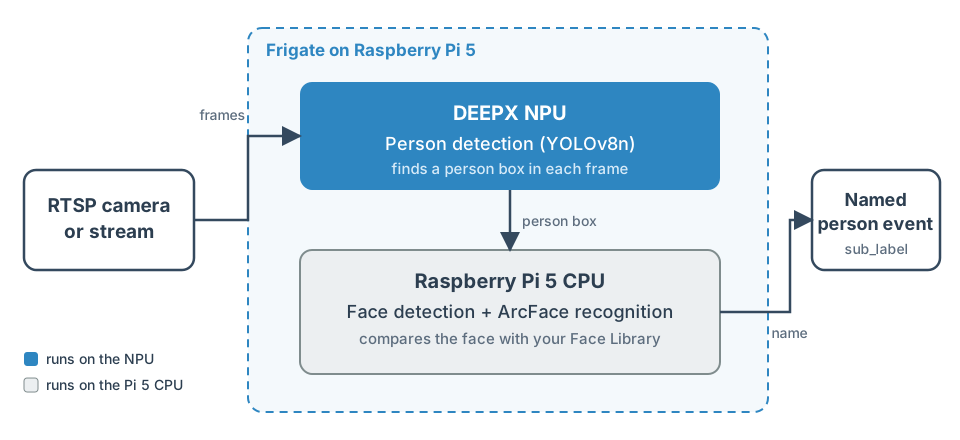
The DEEPX NPU finds a person box in each frame. The Pi 5 CPU detects and recognizes the face, and Frigate adds the name to the person event as a sub_label.
The flow in this project:
- An RTSP camera or stream feeds Frigate. The test used a Logitech C270 USB webcam published as RTSP.
- Frigate on the Raspberry Pi 5 reads the stream at
<rtsp-url>. - Frigate's DEEPX NPU detector runs the compiled model
yolov8-n_640x640_ppu.dxnnand findspersonobjects. - Inside each person box, Frigate finds the face on the CPU, because the detection model has no
faceclass. Faces undermin_area(750 px) are skipped. - The ArcFace model, which turns a face into numbers Frigate can compare, matches the face against your Face Library on the CPU.
- Frigate combines results across frames, then adds the name as a
sub_label.
Requirements
You need a Raspberry Pi 5, the Sixfab AI HAT+ (DEEPX DX-M1M), an RTSP camera or stream, and Frigate with the DEEPX detector already running. Complete the Sixfab AI HAT+ Quickstart, the Frigate setup page and Camera Feeds and MQTT for Frigate Projects in that order.
Hardware
| Part | Used | Note |
|---|---|---|
| Raspberry Pi 5 | Yes | Hosts Frigate |
| Sixfab AI HAT+ for Raspberry Pi 5 (DEEPX DX-M1M) | Yes | Runs person detection through the DEEPX detector; see the Sixfab AI HAT+ specifications |
| Camera | An RTSP camera or stream | The test used a Logitech C270 USB webcam as one camera, named frontdoor; keep that name, because the installer turns the camera on by it |
Software
| Component | Version or source |
|---|---|
| Frigate with the DEEPX detector, and DX-RT (DEEPX's runtime software for the NPU) | Already running; see Frigate setup on Raspberry Pi 5 |
| Tools | git, curl, sha256sum, docker, python3 and ffprobe (from ffmpeg) |
| Detection model | yolov8-n_640x640_ppu.dxnn, a ready-compiled .dxnn file (the format the NPU loads) that detects the 80 classes in the label map, including person; downloaded from the project's GitHub release, whose release notes (https://github.com/sixfab/sixfab-dx-frigate/releases/tag/smart-doorbell-v1.0.0) list the model's license and details |
| Label map | coco80-labelmap.txt, a text file that lists the 80 class names the model detects; copied to <frigate-config-dir>/model_cache/ by the installer |
| Face recognition | Frigate's built-in ArcFace, model_size: large |
You also need a working RTSP feed; the RTSP camera feed setup for Frigate shows how to publish one.
Install
This page assumes Frigate with the DEEPX detector already runs on your Raspberry Pi 5. If it does not, set up Frigate with the DEEPX NPU first.
Quick install
The install script sets up the project on a Raspberry Pi 5 that already runs Frigate with the DEEPX detector. Run this on the Raspberry Pi 5:
git clone https://github.com/sixfab/sixfab-dx-frigate.git
cd sixfab-dx-frigate/apps/smart-doorbell
./install.sh --rtsp-url <rtsp-url>--rtsp-urlis the RTSP address of your camera. The installer asks for it if you leave it out.--containeris the Frigate container name. The default isfrigate.--config-diris Frigate's config directory. The installer reads it from the container's/configmount if you leave it out.--yesskips the question before the Frigate restart.
The installer downloads the model file from the project's GitHub release and checks its SHA-256 before it installs it. It needs git, curl and sha256sum.
Manual install
The steps below do the same work by hand.
1. Connect an RTSP camera feed
Publish your camera as rtsp://<stream-host>:8554/<stream-path>. The test used a Logitech C270 USB webcam that FFmpeg restreamed from a separate host. The repository has no unit for it, and the Camera Feeds and MQTT page gives no webcam command. This project uses the feed but does not create it. The installer checks the feed with ffprobe and stops with an error if it cannot read it.
2. Get the code
Clone the repository and open the project folder:
git clone https://github.com/sixfab/sixfab-dx-frigate.git <repo-dir>
cd <repo-dir>/<project-path>
3. Download the model
Download the model from the project's GitHub release and check its SHA-256 checksum. Use the repository address without a trailing .git in the download URL.
curl -fL -o model/yolov8-n_640x640_ppu.dxnn https://github.com/sixfab/sixfab-dx-frigate/releases/download/smart-doorbell-v1.0.0/yolov8-n_640x640_ppu.dxnn
awk '$1 !~ /^#/ && NF {print $3 "  " $2}' models.txt | sha256sum -c -
Expected output: model/yolov8-n_640x640_ppu.dxnn: OK.
The release notes also list the model's license and details.
4. Run the installer on the Raspberry Pi 5
RTSP_URL=<rtsp-url> ./install.shThe installer copies the model and label map into <frigate-config-dir>/model_cache, backs up config.yaml, merges this project's config into it, asks before it restarts the Frigate container, waits 20 seconds and turns the frontdoor camera on. It adds this project's camera, one model entry and the face_recognition settings, and leaves other cameras and models alone. On success it prints Install complete.; if you decline the restart, it prints Restart Frigate yourself instead.
The installer expects a container named frigate and reads the config directory from its /config mount. To use other values, set CONTAINER and CONFIG_DIR before you run it, or set ASSUME_YES=1 to skip the restart question. Its last step calls Frigate's API from inside the container with docker exec, rather than over the network: Frigate runs with host networking, so port 5000 is already reachable on the Pi 5 and there is no Docker -p flag to withhold.
5. Check the configuration
The installer merges this configuration. Replace the RTSP path with your own feed. Keep the camera name frontdoor, because the installer turns that camera on by name.
face_recognition:
  enabled: true
  model_size: large
  device: CPU

models:
  - scene: all
    devices:
      - deepx:PCIe:0
    path: /config/model_cache/yolov8-n_640x640_ppu.dxnn
    labelmap_path: /config/model_cache/coco80-labelmap.txt
    width: 640
    height: 640
    input_tensor: nhwc
    input_pixel_format: rgb
    input_dtype: int
    model_type: yolo-generic

cameras:
  frontdoor:
    ffmpeg:
      inputs:
        - path: rtsp://<stream-host>:8554/<stream-path>
          roles:
            - detect
            - record
    detect:
      enabled: true
      width: 1280
      height: 720
      scene: all
    objects:
      track:
        - person
      filters:
        person:
          min_score: 0.5
          threshold: 0.6
    motion:
      threshold: 15
      contour_area: 8
    face_recognition:
      enabled: true
    zones:
      frontdoor_zone:
        coordinates: 0.1,0.9,0.9,0.9,0.9,0.1,0.1,0.1
        objects:
          - person
If you run this project on the same Frigate as Porch Pirate, both define a zone named frontdoor_zone, and Porch Pirate's listener does not filter by camera, so a person at this camera can trigger a false theft alert. Rename one zone.
6. Add faces to the Face Library
Frigate names only the people in its Face Library, so add each person you want recognized.
- Open
https://<pi-ip>:8971/facesas an admin user. The menu link shows only in desktop browsers, for admins, with face recognition on. - Upload 1 to 5 clear, front-facing photos per person with Add Face. The test started with one photo.
- Use color photos. Frigate's face models are trained on color images.
- As Frigate captures real recognition attempts, they appear under Recent Recognitions. Refine the library with them.
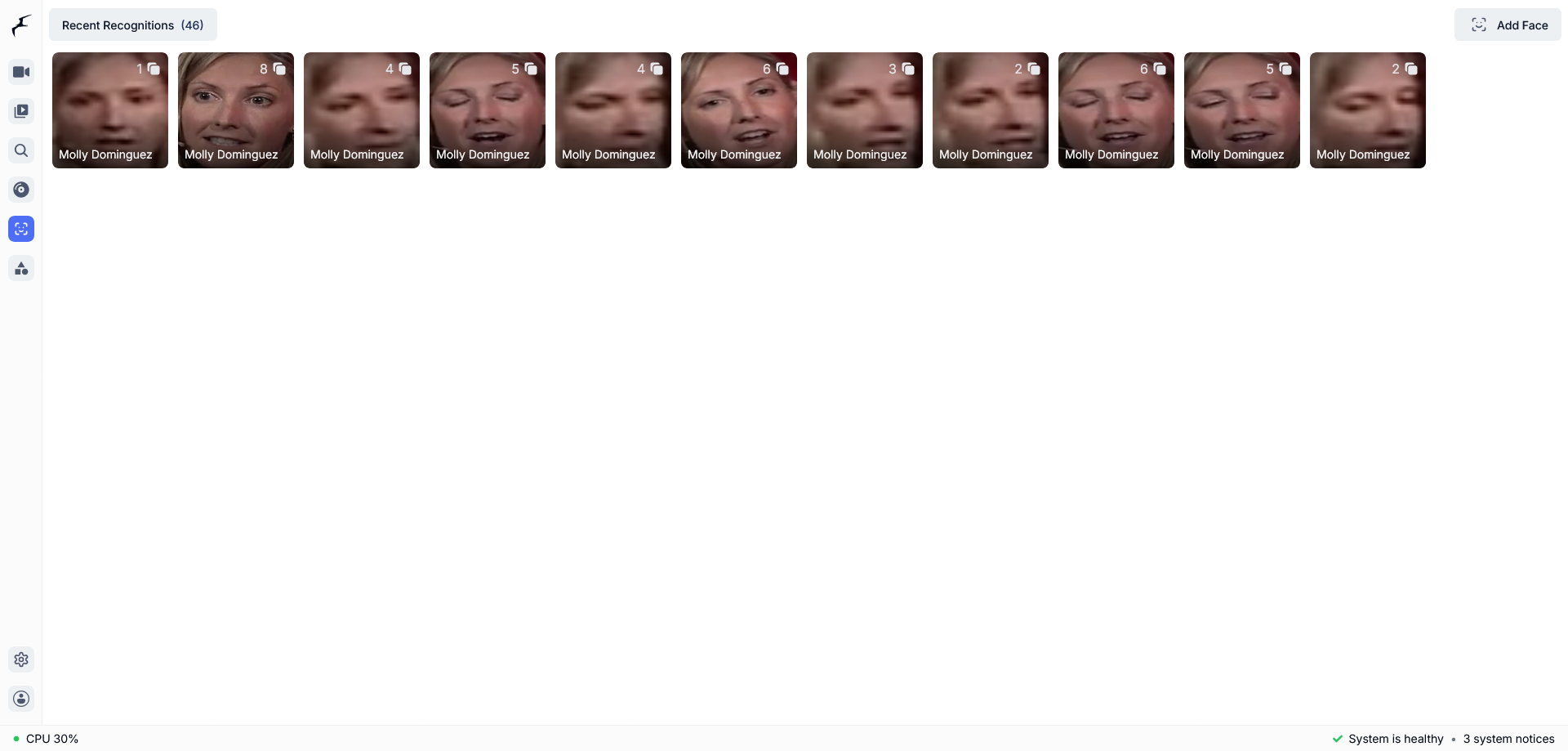
The Face Library lists Recent Recognitions, each tagged with the enrolled name. Use Add Face at the top right to enroll a person.
Use port 8971 only. Frigate treats port 5000 as unauthenticated, admin-level access; see Frigate's authentication documentation.
Verify
The project works when a person event carries the enrolled name. Run every check on the Raspberry Pi 5.
- Walk into the camera view and confirm a
personevent athttps://<pi-ip>:8971. - Query the stats from inside the container with the Frigate HTTP API:
docker exec frigate curl -s http://localhost:5000/api/statsExpected output: a JSON document that includes cameras.frontdoor.detection_fps and embeddings.face_recognition_speed.
- While someone moves in view, look for
cameras.frontdoor.detection_fpsabove 0 and a nonzeroembeddings.face_recognition_speed. Adetection_fpsof 0 on a still scene is normal. - After you enroll a face, confirm the name appears as a
sub_labelon the person event.
How fast are person detection and face recognition on the Raspberry Pi 5?
Face recognition on the Pi 5 CPU took about 600 to 800 ms per inference, and the frontdoor camera ran at 4 to 8 detection_fps. Both figures were read from Frigate's live stats on the tested setup, a Raspberry Pi 5 with a Sixfab AI HAT+ (DEEPX DX-M1M), last tested on 2026-09-29, with other cameras and models sharing the same Pi 5 and the same NPU. The number of samples and the run time were not recorded.
| Metric | Value | Method |
|---|---|---|
embeddings.face_recognition_speed | About 600 to 800 ms per inference, Arm CPU | Frigate /api/stats, varies with load from other cameras and models |
frontdoor detection_fps | 4 to 8 fps | Frigate /api/stats, depends on what else runs on the shared NPU |
| Detect resolution | 1280 x 720 | Camera config |
The tester accepted this speed for naming people in events; that is a judgment, not a benchmark. This page has no accuracy figures yet: enrolled people, distance, lighting and false matches are not measured.
Limitations
Face recognition runs on the CPU, not the NPU, and the project has several other limits.
- Only person detection uses the NPU. Frigate's enrichments do not list DEEPX support, so face recognition runs on the CPU. Moving it to the NPU would need changes to Frigate itself, which this project does not include.
- No accuracy figures yet: enrolled people, distance, lighting and false matches were not measured.
- Only one camera was tested.
- Only one NPU board was tested: the Sixfab AI HAT+ (DEEPX DX-M1M).
- This project does not cover a doorbell button, chime, intercom, phone notification or MQTT messages.
- Frigate does not run face recognition on the recording stream. Infrared (grayscale) faces are more easily confused with other people, so train on color photos first.
- The Face Library menu link shows only in desktop browsers, for admin users. On a phone or tablet, open
https://<pi-ip>:8971/facesdirectly. - The installer expects a Frigate container named
frigateunless you setCONTAINER. - Frigate chooses the DX-RT version its DEEPX detector uses. The tested build pins DX-RT v3.4.0, and this page cannot change it.
- If the DX-RT daemon (the DEEPX runtime) restarts, restart the Frigate container too.
- Face recognition was set up with Frigate in Docker. Home Assistant OS and the Frigate add-on were not tested.
Privacy
This face recognition project stores face data, and Frigate can record video, so treat it as biometric data.
- Many jurisdictions treat face data as biometric data. Enroll only people who agreed, and check your local rules first.
- The camera config assigns the
recordrole, but this project's fragment does not turn recording on, so Frigate records video only if you enable recording in your own config. Frigate also saves up to 200 face images (save_attempts) for training. Frigate stores recordings and face images on your own Raspberry Pi 5; delete them when a person asks. - To delete the face database and start over, follow Frigate's face recognition documentation and the FAQs it links.
Troubleshooting
Each symptom below lists its cause and the fix.
The camera image is rotated
In testing, the cause was the physical mounting of the USB webcam, not a config setting. Rotate the camera or its cable orientation.
The camera shows detection_fps: 0
detection_fps: 0Frigate detects only where it sees motion, so 0 on a still scene is normal. In testing, restarting the upstream feed to force fresh motion cleared it.
No recognition results, but face_recognition_speed is nonzero
face_recognition_speed is nonzeroIn testing, the cause was an empty Face Library: nobody had been enrolled. Enroll a face as shown in Install step 6, "Add faces to the Face Library". Frigate also skips faces under min_area.
Why is the Frigate Face Library missing from the menu on my phone?
The Face Library link is hidden on phones by design. Frigate shows the link only when the browser counts as desktop, the user is an admin and face recognition is enabled. Open https://<pi-ip>:8971/faces directly.
No face attempts appear in the Face Library
Turn on debug logging for face recognition, restart Frigate and read its log. Add this to <frigate-config-dir>/config.yaml, then run docker restart frigate and docker logs frigate:
logger:
  logs:
    frigate.data_processing.real_time.face: debug
If no face messages appear, also add frigate.embeddings.maintainer: debug. Attempts that Frigate keeps show under Recent Recognitions.
Scores pass the threshold but no name is added
Frigate decides across frames, weighted by face area. Check min_faces and recognition_threshold. Frigate's face recognition documentation lists these defaults (checked 2026-10-02); this project's installer changes none of them:
| Setting | Default | Controls |
|---|---|---|
min_area | 750 px | Smallest face Frigate tries to recognize |
detection_threshold | 0.7 | Face detection confidence before recognition |
unknown_score | 0.8 | At or below this, the face is unknown |
recognition_threshold | 0.9 | Confidence needed for a sub_label |
min_faces | 1 | Recognitions before the sub_label applies |
save_attempts | 200 | Face images saved for training |
Still stuck? Ask in the Sixfab Community.
FAQ
Can a Raspberry Pi 5 run Frigate face recognition without a GPU?
Yes, in the tested setup. The Sixfab AI HAT+ (DEEPX DX-M1M) runs person detection, and the Pi 5 Arm CPU runs Frigate's ArcFace model (model_size: large, device: CPU) for Raspberry Pi facial recognition. Face recognition took about 600 to 800 ms per inference on a Pi 5 shared with other cameras and models.
Does Frigate face recognition run on the DEEPX NPU?
No. Frigate's DEEPX detector runs object detection only, and Frigate's enrichments do not list DEEPX support. In this project the NPU runs person detection with yolov8-n_640x640_ppu.dxnn, and face recognition runs on the CPU.
Which Frigate face model does this project use, small or large?
This project uses large, which is ArcFace, with device: CPU. Frigate's docs describe small as a FaceNet model that runs on the CPU and say large needs a GPU or NPU. In the tested setup, large ran on the Pi 5 CPU at about 600 to 800 ms per inference.
How do I add faces to the Frigate Face Library?
Open https://<pi-ip>:8971/faces as an admin user. Upload 1 to 5 clear, front-facing photos of each person with Add Face. Then refine the library with real recognition attempts that Frigate captures.
How many photos do I need per person in Frigate?
Start with 1 to 5 clear, front-facing photos that show only the person's face, as Frigate's docs recommend. Add variety slowly, because blurry or poor photos make results worse.
Can Frigate run face recognition on recorded video?
No. Frigate's docs say face recognition does not run on the recording stream. It runs on live frames while the person is in view.
Does Frigate face recognition work at night with an IR camera?
With limits. Frigate's face models are trained on color images, so infrared (grayscale) faces are more easily confused with other people. Build the library from color photos first.
Do I need a Frigate+ subscription for face recognition?
No. Frigate's 0.16 release notes say Frigate+ is not required for face recognition. With a standard detection model, Frigate finds faces with a small CPU model.
What license does the detection model use?
The detection model is derived from Ultralytics YOLOv8n and is licensed under AGPL-3.0. The face models come from Frigate itself, which downloads them on first use; their license is set by the upstream project. Each model's details are in the release notes of the project's GitHub release: https://github.com/sixfab/sixfab-dx-frigate/releases/tag/smart-doorbell-v1.0.0.
Can this project unlock a door?
Not as documented. This project names enrolled people in Frigate events. It does not cover controlling a door lock.
Next steps and related projects
- All DEEPX NPU projects for the Raspberry Pi 5
- Frigate NVR on Raspberry Pi 5 with the DEEPX NPU
- RTSP camera and MQTT broker setup: publish a USB webcam as an RTSP stream
- Raspberry Pi 5 Person Detection with Frigate: Boss Detector
- Porch Pirate: Frigate Package Detection on Raspberry Pi 5
- Sixfab AI HAT+ for Raspberry Pi 5 product page
- Sixfab Model Zoo, supported DEEPX models and check NPU load with dxtop
- Frigate face recognition documentation
License and credits
- The detection model is derived from Ultralytics YOLOv8n and is licensed under AGPL-3.0. Each model's details are in the release notes:
https://github.com/sixfab/sixfab-dx-frigate/releases/tag/smart-doorbell-v1.0.0. - The code is licensed under the MIT License.
- Credits: Ultralytics for YOLOv8n and DEEPX for the compiled
.dxnnbuild. - Frigate NVR and its face recognition are the Frigate project's work. The DEEPX detector is described in Frigate's object detector documentation.
Updated about 10 hours ago