
Specifications
This hardware reference covers the technical specifications of the AI HAT+ for Raspberry Pi 5, including DEEPX NPU architecture, PCIe Gen3 x1 interface, power design, and board-level specifications for building reliable edge AI systems.
Sixfab AI HAT+ specifications
Electrical, mechanical, thermal, and software specifications for the Sixfab AI HAT+ on Raspberry Pi 5. Use it as the canonical reference when designing enclosures, sizing power supplies, or validating compatibility. Intelligented by DEEPX. Built on Raspberry Pi.
The Sixfab AI HAT+ for Raspberry Pi 5 is a HAT+ specification compliant accelerator with a DEEPX DX-M1M (25 TOPS at INT8) or DX-M1ML (13 TOPS at INT8) NPU on a 65 × 56.5 mm board. It connects to the Raspberry Pi 5 over PCIe Gen 3 x1 through a 16-pin FFC cable, draws 3 W (DX-M1M) under sustained inference, and runs on 5 V DC delivered through the 40-pin GPIO header.
Quick reference
Headline figures at a glance. Scan this block first; full per-category detail follows below.
Technical specifications
Per-category breakdown of the AI HAT+ electrical, mechanical, and software specifications. Figures apply to both options unless otherwise noted.
RunAsync in dxrt
dxrt-runtime
libcamera, picamera2
Options
Both options share the identical PCB; only the NPU chip installed at the factory differs. Driver, runtime, and SDK are identical, so applications run on either option without code changes.
The driver detects the installed chip automatically at boot. The practical differences are NPU memory capacity, which bounds maximum model size, and peak inference throughput. NPU memory is exclusive to the accelerator; the Raspberry Pi 5 CPU cannot directly read or write it.
Methodology: YOLOv8n at 640×640 with Post-Processing Unit support, measured on Raspberry Pi 5 (8 GB), dxrt-runtime over PCIe Gen 3 x1.
Connectors
Two onboard interfaces plus an internal HAT+ ID EEPROM. The 40-pin GPIO header and the 16-pin FFC link are both required for operation.
Mates with the Raspberry Pi 5's male GPIO header. All pins not consumed by the AI HAT+ pass through and remain free for user code or stacked HATs. See Pinout & GPIO for the full pin map.
Carries the PCIe Gen 3 x1 differential pairs, the 100 MHz reference clock, and the power-enable signal between the Raspberry Pi 5 and the DEEPX NPU. The cable end labelled RPi5 plugs into the Raspberry Pi 5; the end labelled HAT plugs into this connector.
An onboard I²C EEPROM is connected to the Raspberry Pi 5's ID bus through pre-fitted pull-up resistors. At boot, Raspberry Pi OS reads the EEPROM and automatically loads the correct device tree overlay for the DEEPX NPU.
LED indicators
The AI HAT+ carries a single RGB LED on the top surface of the board for at-a-glance visual feedback. At power-on the LED lights white during board bring-up, then turns off once the board reaches normal operating state.
Shown during board bring-up at power-on.
The LED is off once the board has completed bring-up and is operating normally.
Work on the RGB LED status scheme is ongoing. The behavior described above reflects the current firmware; additional indicator states may be added in a future release, and this section will be updated when they are finalized.
For NPU state, temperature, and runtime telemetry on the DEEPX DX-M1M and DX-M1ML, use the runtime tooling rather than the LED. See System Monitoring.
White LED in power-off and standby
When the Raspberry Pi 5 is powered off or placed in standby while the power adapter remains connected, the white LED stays on continuously. If you keep the Raspberry Pi 5 in this state and do not want the white LED lit, configure the bootloader EEPROM so that power to the AI HAT+ is cut on halt:
- Open the EEPROM configuration for editing:
sudo rpi-eeprom-config --edit - Add the following line to the file:
POWER_OFF_ON_HALT=1 - Save the file, exit, and reboot.
After the reboot, powering off or placing the Raspberry Pi 5 into standby disables power to the AI HAT+, and the white LED no longer stays lit in this state.
This setting changes the Raspberry Pi 5's default standby behavior. With the default Raspberry Pi OS image and EEPROM configuration, sudo halt places the Raspberry Pi 5 into WARM_STANDBY. The setting described here makes sudo halt transition the board into STANDBY instead. If your project relies on these standby modes, review the related settings carefully before applying this change.
Cooling
During burn-in testing with a heatsink installed, the DEEPX NPU surface reached 85 °C under sustained 100% load at 25 °C ambient. The board ships without cooling hardware fitted; selection depends on workload and enclosure.
Apply a heatsink with a thermal pad to the NPU chip. Fits inside slim enclosures, makes no noise, and handles the typical AI HAT+ workload. Suitable for most deployments and well-ventilated enclosures.
Install the official Raspberry Pi Active Cooler on the Pi 5 before mounting the AI HAT+. Keeps the Pi 5 SoC out of thermal throttling, which the AI HAT+ would otherwise trap heat over.
Mechanical dimensions
Compliant with the official Raspberry Pi HAT+ mechanical specification. See Quickstart for mount-and-cable instructions.
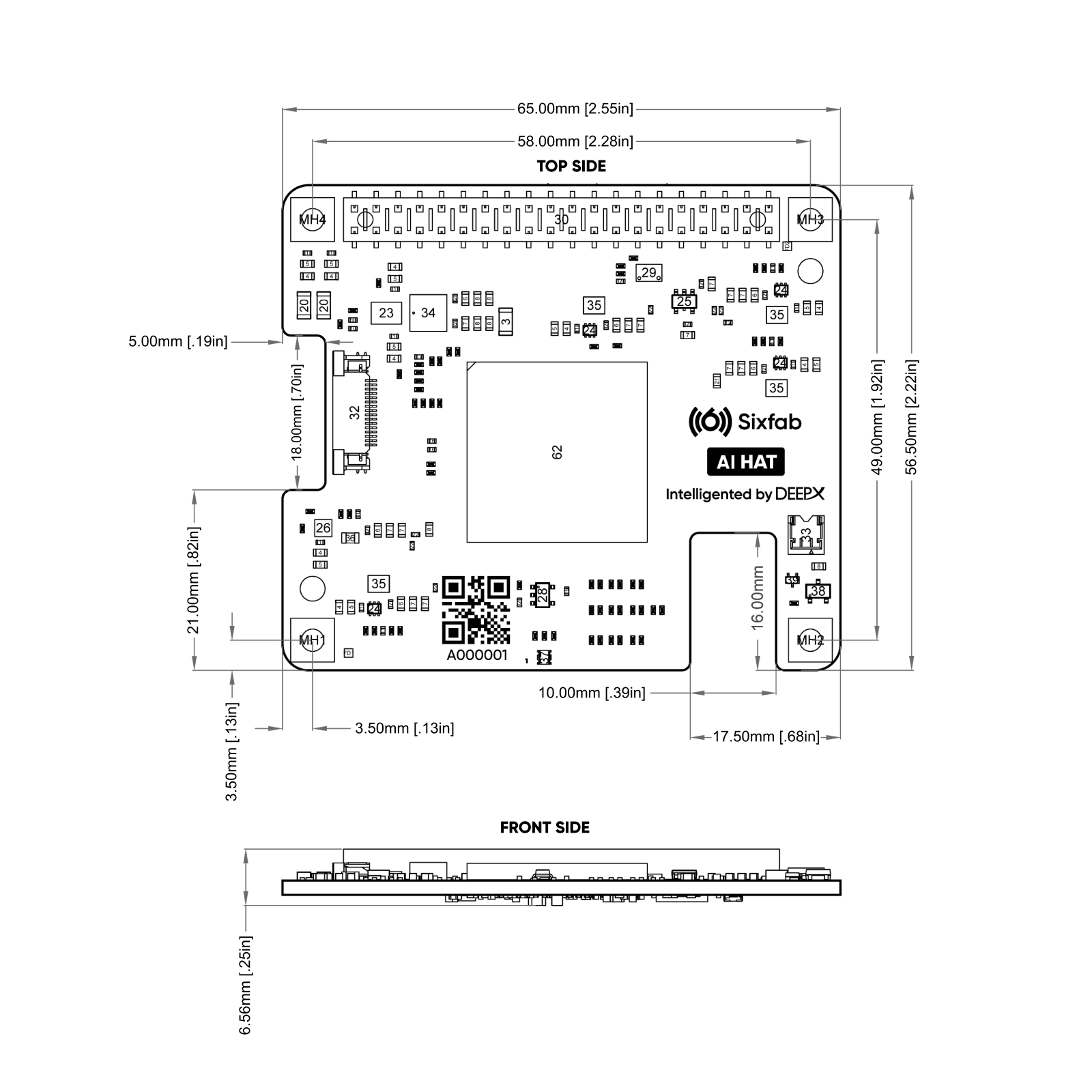
Compliance
Regulatory and safety certification status for the AI HAT+. Status reflects what has been confirmed by Sixfab R&D as of this revision.
Safety & handling
Safe installation and operation of the AI HAT+ relies on three things: powering down before any mechanical work, treating the board as an ESD-sensitive device during handling, and using a power supply rated for the combined Raspberry Pi 5 + AI HAT+ load.
Always power off the Raspberry Pi 5 completely and disconnect the USB-C cable before installing or removing the AI HAT+, mating or unmating the 16-pin FFC cable, or attaching a heatsink. Inserting or removing the board while powered can permanently damage both the AI HAT+ and the Raspberry Pi 5 through hot-insertion current spikes on the PCIe and power rails.
Mechanical installation
- Finger-tight standoffs only. Use the M2.5 standoffs and screws supplied with the Raspberry Pi 5 or the AI HAT+ kit. Hand-tighten them. Do not use power tools or apply torque beyond what is needed to remove play. The Raspberry Pi 5 PCB has no threaded mounting holes, so the threads live in the standoffs themselves; over-torquing can strip the standoff threads or crack and damage the plastic-headed screws.
- Seat the GPIO header fully and squarely. The 40-pin header carries 5 V power, ground, and the HAT+ ID bus. A partially seated header can cause intermittent power, failed boot, or EEPROM read errors that prevent the device tree overlay from loading.
- FFC cable orientation matters. The two ends of the supplied cable are not interchangeable. The end labelled
RPi5goes into the Raspberry Pi 5's external PCIe connector; the end labelledHATgoes into the AI HAT+ PCIe FFC connector. Match the contact-side arrow to the connector orientation. When the cable is seated correctly, the Sixfab logo printed on it faces outward, away from the boards. - No physical buttons. There are no reset, power, or user-programmable buttons on the board. Power is gated by the PCIe Power Enable (PWR_EN) signal driven by the Raspberry Pi 5.
- No external power input. Do not attempt to power the board from an external source. Power flows exclusively through the 40-pin GPIO header from the Raspberry Pi 5.
ESD precautions
Handle the board by its edges and avoid touching the onboard components, connector contacts, and header pins with bare hands. Observe normal anti-static precautions when unpacking and installing.
Thermal & operating environment
- Indoor commercial use. The AI HAT+ is a commercial-grade electronic device intended for indoor deployment. Outdoor use requires a sealed enclosure addressing moisture, temperature, and ventilation.
- Operate within the rated range. Ambient temperature 0 – 70 °C. NPU surface temperature stays within the burn-in target of 85 °C with a heatsink fitted under sustained 100% load at 25 °C ambient. Higher ambients or sealed enclosures may require active cooling. See Cooling.
- Do not run without thermal interface. Even at typical inference loads, the DEEPX NPU benefits from a thermal pad-coupled heatsink. Running bare can cause thermal throttling within minutes under continuous workload.
The minimum recommended PSU is the Raspberry Pi 27 W USB-C PD Supply (5 V / 5 A). Standard 5 V / 3 A (15 W) phone chargers will trigger under-voltage warnings, throttle the NPU, and may reboot the system during inference. A yellow lightning-bolt icon in the Raspberry Pi OS taskbar confirms insufficient power.
Updated 15 days ago