
Power & Mounting
Power & Mounting
Power input options, consumption profiles, and physical installation methods for the ALPON X4 industrial edge computer. This reference covers every supply interface, the device's protective Restricted Mode, and the approved mounting hardware for tabletop, wall, and DIN rail deployments.
The ALPON X4 accepts power from three independent inputs: USB Type-C PD (15V, 27W min), a screw terminal block (9–30V DC, 27W min), and optional PoE+ (IEEE 802.3at, up to 25W) on the ETH/G port. Typical consumption is 7–14W with a 27W maximum. The fanless aluminum enclosure supports tabletop, wall, and standard 35mm DIN rail mounting via 2× 4 mm mounting holes.
What power inputs does the ALPON X4 support?
The ALPON X4 provides three independent power interfaces. All three share a common power rail through hardware ideal diodes, meaning simultaneous connections are tolerated but the system always draws from the source with the highest voltage. For production deployments of this ai gateway, use only one input at a time to simplify fault isolation.
USB Type-C PD
15V / 27W min
Sink-only USB-PD port. Use the bundled 27W PD adapter for typical edge workloads.
Screw Terminal
9–30V DC / 27W min
Preferred input for industrial edge computing deployments. Reverse-polarity protected.
PoE+ (802.3at)
37–57V / 25W max
Single-cable install on PoE-variant SKUs. Active on ETH/G only.
USB Type-C PD input
The USB-C port is a sink-only USB-PD interface. It accepts power from a PD-capable adapter but does not provide USB data or power output during normal operation. The included 27W adapter is sized for every supported ALPON X4 workload, including full-load operation with USB peripherals attached.
| Recommended Adapter | 27W minimum at 15V. Use the bundled 27W USB-PD adapter for guaranteed compatibility. |
| Supported PD Profiles | 12V / ≥2.25A (recommended 12.0V / 3.75A) 15V / ≥1.8A (recommended 15.0V / 3.0A) |
| PD Controller | CYPD3177-24LQXQ |
| Mode | Sink only. No power output during normal operation. |
| Data Mode | USB data available only while SW2 = Burn (image flashing mode). |
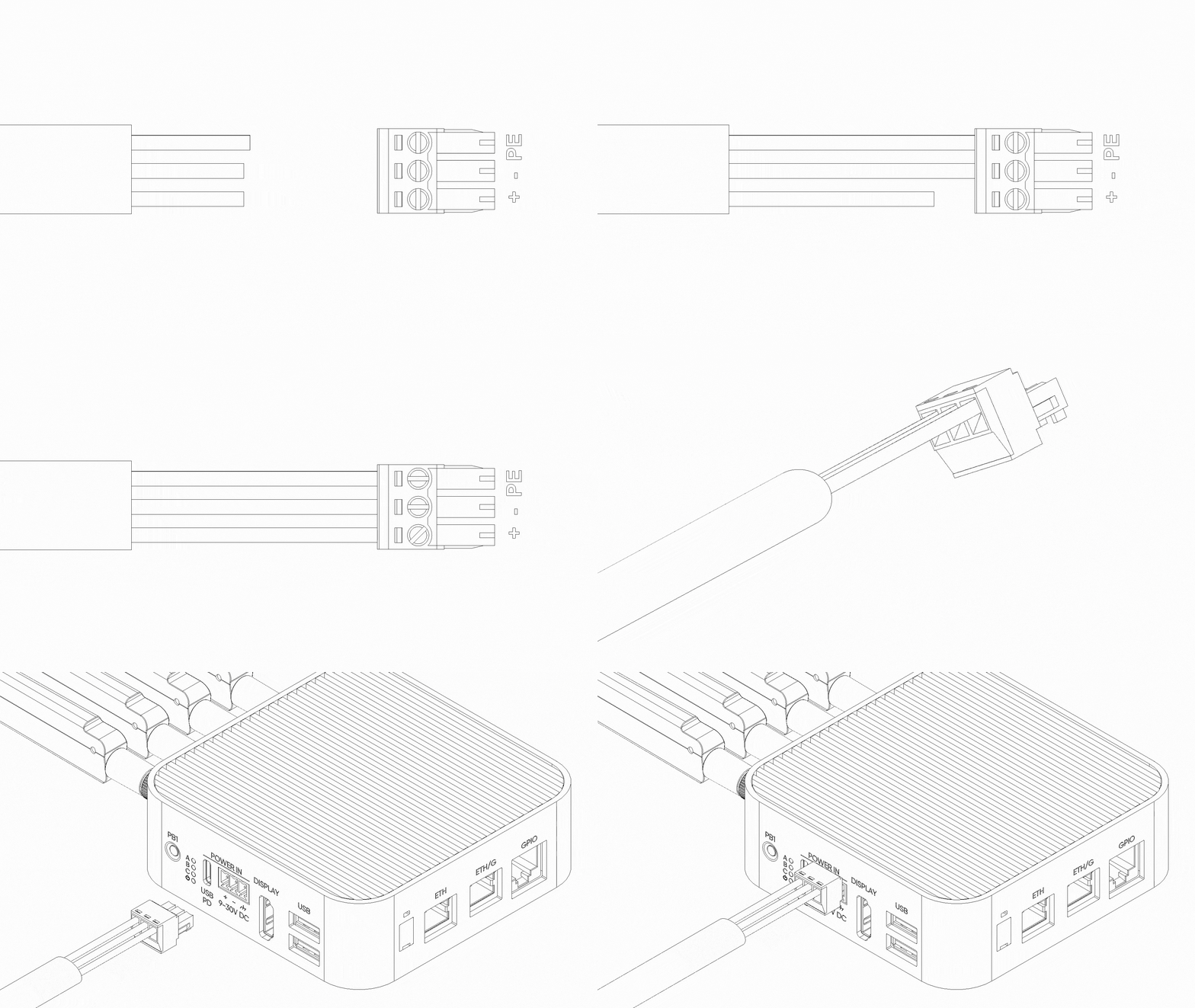
Screw terminal block (9–30V DC)
The 3-pin screw terminal is the recommended input for industrial edge computing deployments. It accepts a wide 9–30V DC range, includes hardware reverse-polarity protection, and provides a dedicated chassis ground pin for EMC-sensitive installations. Incorrectly wired + / – polarity will not damage the device, but the unit will not power on until corrected.
| Input Voltage Range | 9V – 30V DC |
| Minimum Power | 27W (30W at 12V or 24V) |
| Reverse Polarity Protection | Yes (hardware-level) |
| Connector Type | 3-pin removable screw terminal block |
| Pinout | Pin 1: Chassis Ground · Pin 2: Negative (–) · Pin 3: Positive (+) |
Power over Ethernet (PoE+)
PoE+ is available only on PoE-variant SKUs and cannot be retrofitted; the PoE module is installed at manufacture. When present, PoE+ is wired to the ETH/G port (Gigabit Ethernet). The ETH 100 Mbps port is data-only and cannot power the device.
| Standard | IEEE 802.3at · PoE+ Class 4 |
| Input Voltage Range | 37V – 57V (typical 48V) |
| Maximum Delivered Power | 25W |
| Supported Port | ETH/G only (PoE variant) |
| Injector Requirement | IEEE 802.3at / PoE+ Class 4 compliant PSE. Passive PoE injectors are not supported. |
What is Restricted Mode?
Restricted Mode is a protective state the ALPON X4 enters automatically when any power source drops below 12V (for example, a 5V supply applied to USB-C). It prevents brownout damage to the peripheral rails by powering down high-draw subsystems while keeping the CM4 compute module and network interfaces online.
In this mode the device remains addressable over LTE or Ethernet for remote diagnostics, but local I/O is unavailable until a compliant power source is restored.
- CM4 Compute Module
- LTE Modem
ETH/G(1 Gbps)ETH(100 Mbps)
- USB 2.0 Ports
- GPIO Add-on Port (5V rail)
- HDMI Display Output
- Programmable RGB LED
Power consumption
The ALPON X4 is optimized for low-power edge AI and IoT telemetry workloads. Consumption depends on active interfaces (cellular, Wi-Fi, Ethernet link rate), GPIO Add-on modules drawing from the 5V rail, and attached USB peripherals. Values below are approximate and measured at 12V DC input.
| Typical Consumption | 7W – 14W |
| Maximum Consumption | 27W |
| Idle (network standby) | ~5W |
| LTE active transmit | +2W to +3W |
| USB peripherals (combined) | Up to 5W (1A total at 5V) |
| GPIO Add-on 5V rail | Up to 5W (1A at 5V) |
How do I mount the ALPON X4?
The ALPON X4 enclosure includes 2× 4 mm mounting holes on its base for direct attachment to walls, panels, or DIN rail adapters. The fanless aluminum case doubles as a passive heatsink, so mounting orientation should preserve airflow across the top finned surface. Three mount kits are supported: wall, DIN rail, and a combined adapter.
Wall Mount
Bracket-based fixing to flat surfaces via 2× M4 screws. Suits desks, cabinets, and indoor walls.
DIN Rail Mount
Adapter snaps onto standard 35mm DIN rail. Preferred for control cabinets and panel enclosures.
Combined Mount
Wall bracket with an attachable DIN rail adapter. Switch between mounting styles without replacing hardware.
Wall mount installation
The wall mount kit ships with all fasteners required for drywall, plywood, or metal panel surfaces. Use the supplied wall plugs for masonry and the lock nuts for panel through-mounting.
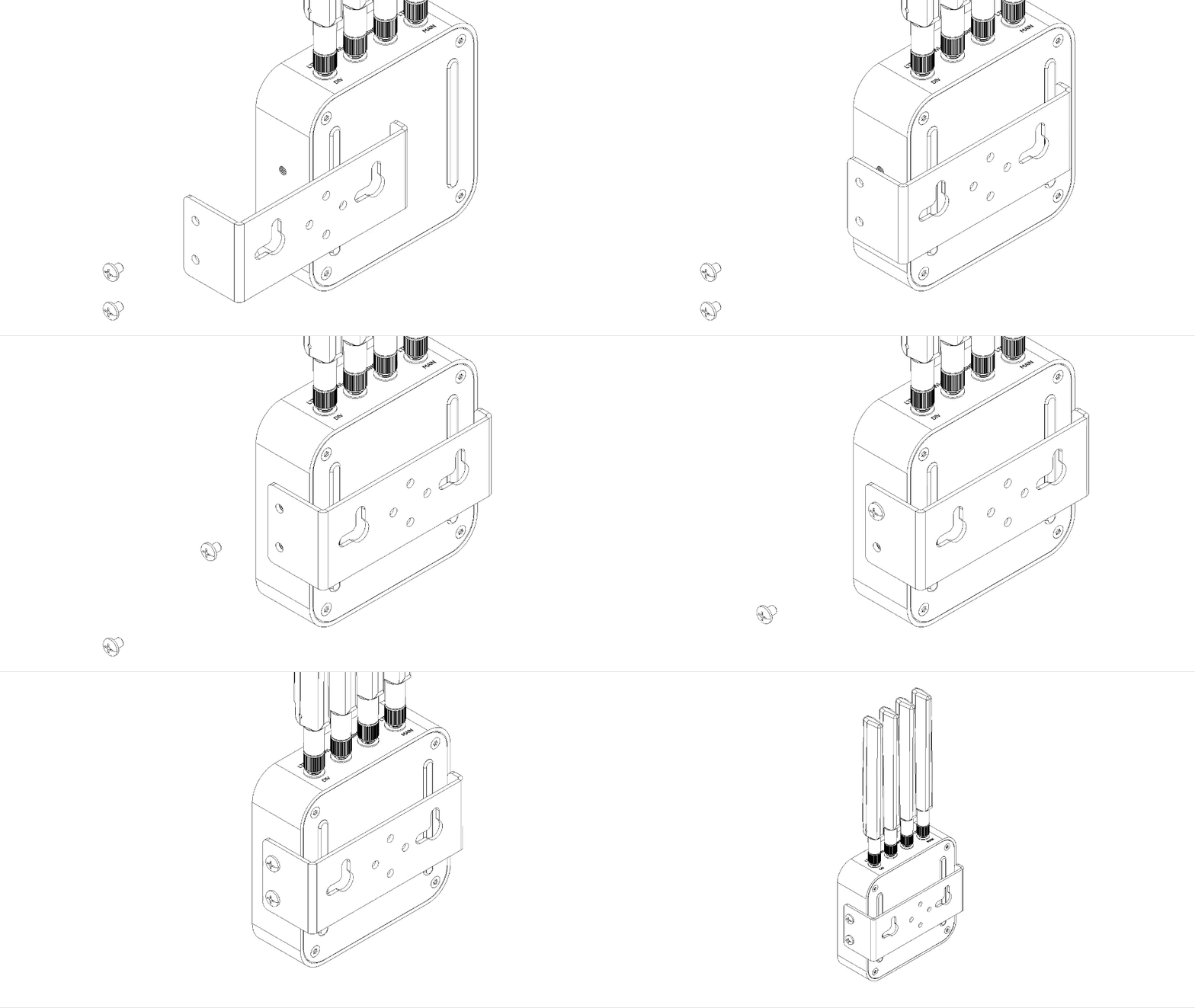
Position the bracket on the wall, mark the two screw hole locations with a pencil, and confirm the bracket is level.
Drill the marked holes to match the supplied 8 mm wall plugs. For metal panels, drill to the screw diameter and omit plugs.
Press the plugs flush with the wall surface before driving screws.
Align the bracket with the 2× 4 mm mounting holes on the base of the ALPON X4. Secure using the M4×6 mm Phillips pan-head screws.
Position the bracket over the wall plugs and drive the M5.5×45 mm sheet metal screws until the assembly is flush and stable.
DIN rail installation
The DIN rail adapter attaches directly to the base of the ALPON X4 and snaps onto any standard 35mm top-hat DIN rail (EN 60715). Use this method for control cabinets, industrial panels, or any rack where multiple ALPON X4 units need uniform spacing.
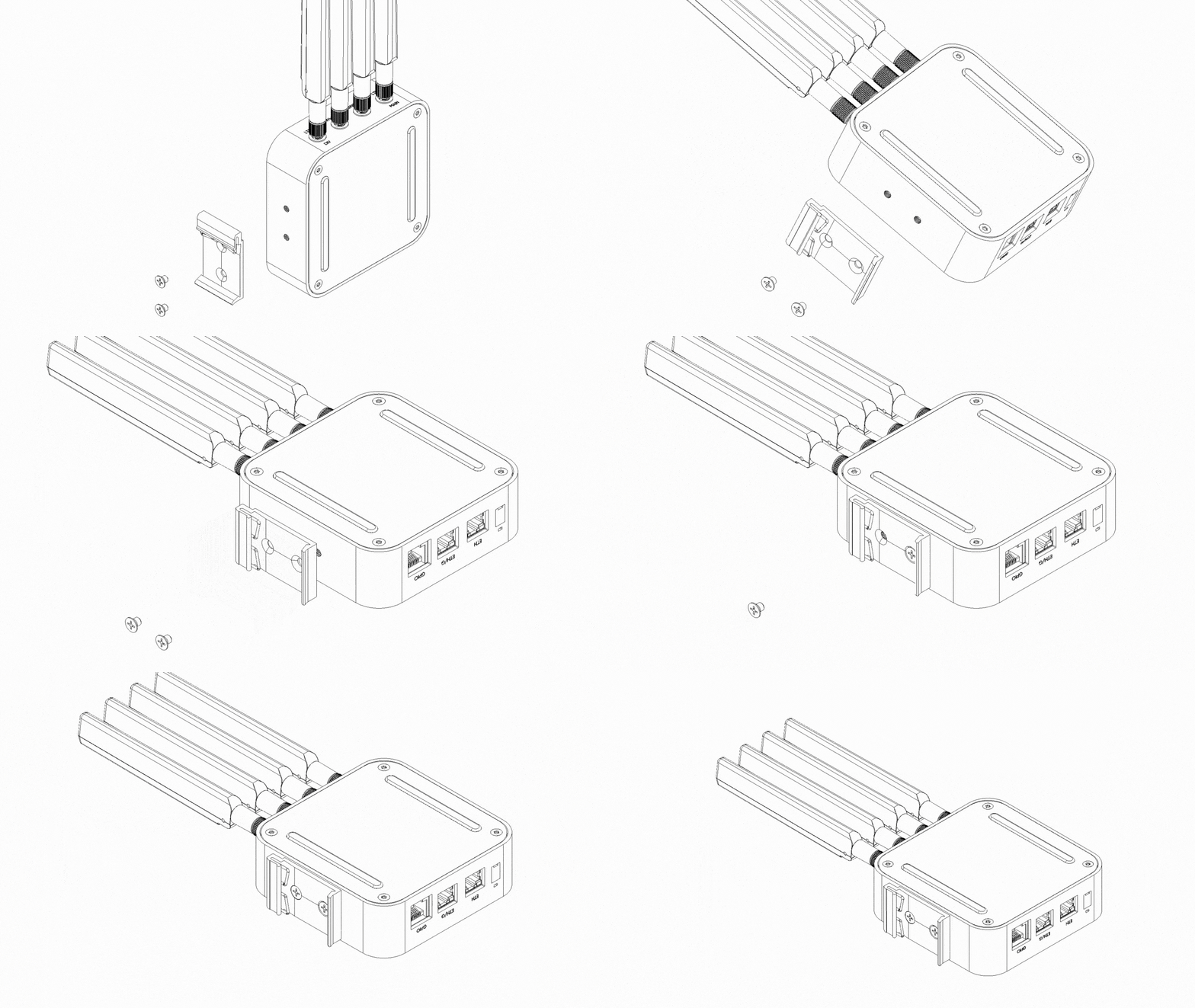
Place the DIN rail adapter against the base of the ALPON X4 so that its screw holes line up with the device's 2× 4 mm mounting holes.
Drive the two M4×6 mm Phillips pan-head screws to secure the adapter to the enclosure.
Hook the upper clip of the adapter over the top edge of the DIN rail, then press the lower section until it clicks into place.
Combined wall + DIN rail mount
The combined option is the wall mount bracket with the DIN rail adapter layered on top. This is useful when a deployment may migrate between surface-mounted and panel-mounted installations without replacing fasteners.
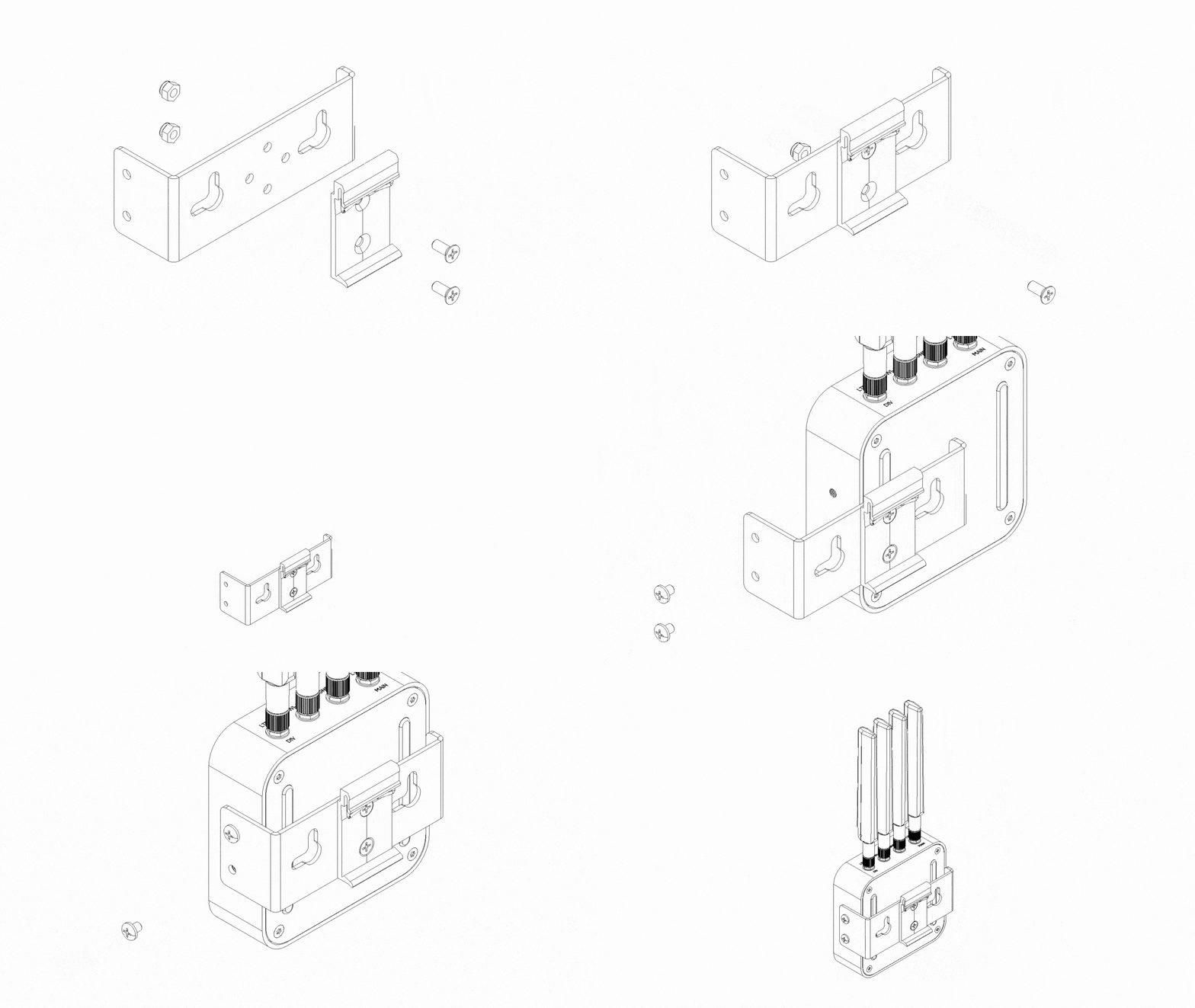
Follow the wall mount steps above to attach the bracket to the device.
Position the DIN rail adapter over the wall bracket and align its mounting holes.
Fasten the adapter to the wall bracket using the supplied screws.
Slide the complete assembly onto a DIN rail, or fix the wall bracket backplate directly to a flat surface.
Mechanical envelope
Key physical parameters relevant to mount planning and thermal design of the ALPON X4 edge ai computer.
Power troubleshooting
The device does not power on
- Confirm the supply voltage matches the input you're using: 12V or 15V PD profile for USB-C, 9–30V DC for the terminal block, or a compliant 802.3at PSE for PoE+.
- On the screw terminal, verify polarity. Pin 2 is negative (–) and Pin 3 is positive (+). Reverse polarity will not damage the device but prevents power-on.
- For PoE+, confirm the cable is plugged into
ETH/G. TheETH(100 Mbps) port does not accept PoE. - Check the power LED. If it flickers briefly then drops, the supply is current-limited below the 27W minimum.
The device boots but USB, GPIO, or HDMI are unavailable
- The device has entered Restricted Mode. Check the supply voltage at the active input. Any reading below 12V triggers protection.
- Replace the adapter with a PD-capable unit that negotiates at 15V, or switch to the terminal block with a 12V or 24V industrial supply.
- Reboot the device after restoring a compliant source.
The device resets under load
- Measure total draw when LTE, USB peripherals, and the GPIO 5V rail are all active. If consumption approaches 27W, swap cables and adapters for ones rated above the minimum.
- Check cable quality for USB-C. Non-compliant USB-C cables can drop voltage under sustained load even with a capable adapter.
- For PoE+, verify the run length. Cable losses on 100m runs can bring delivered power below the 25W port budget.
Next steps
Updated about 4 hours ago