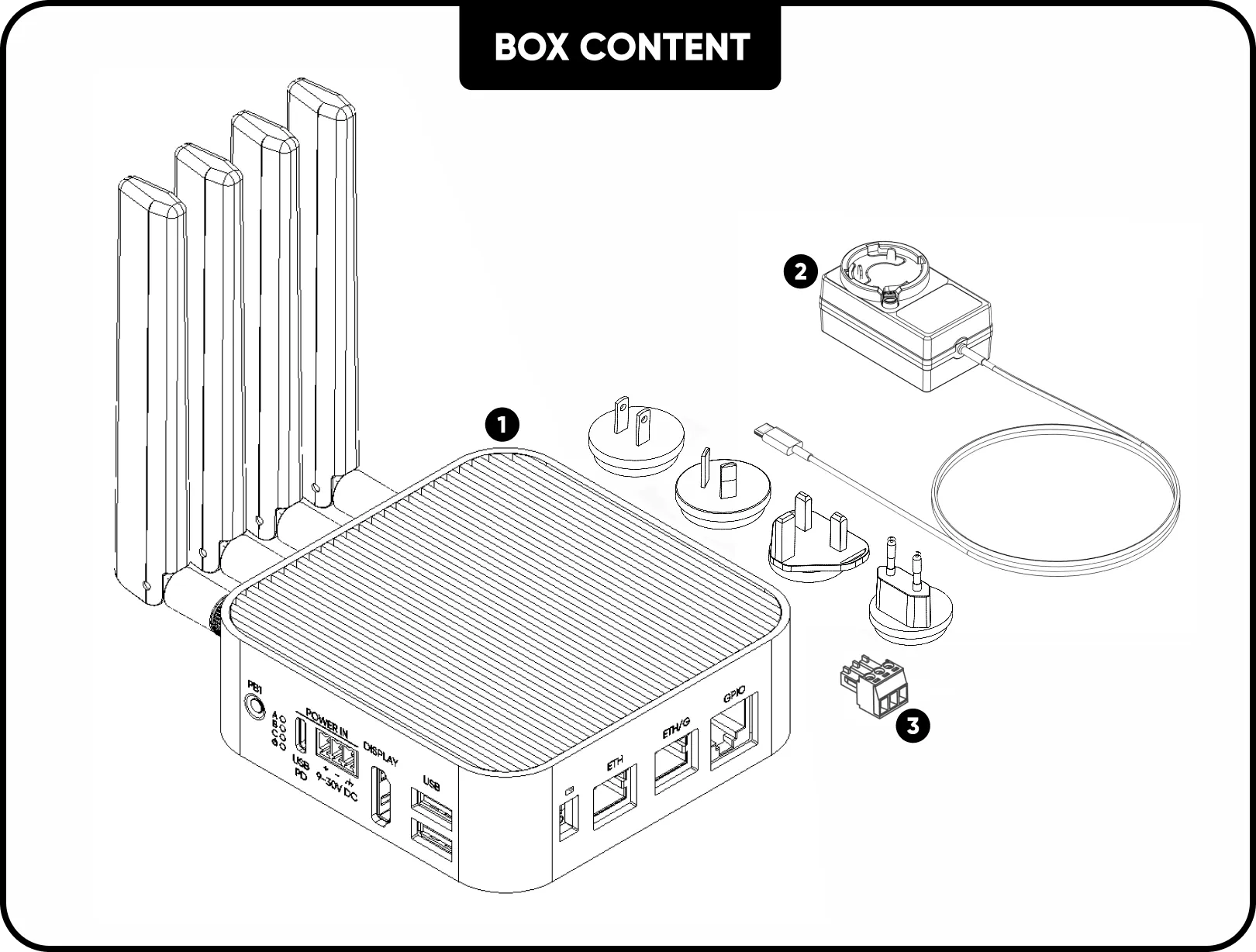
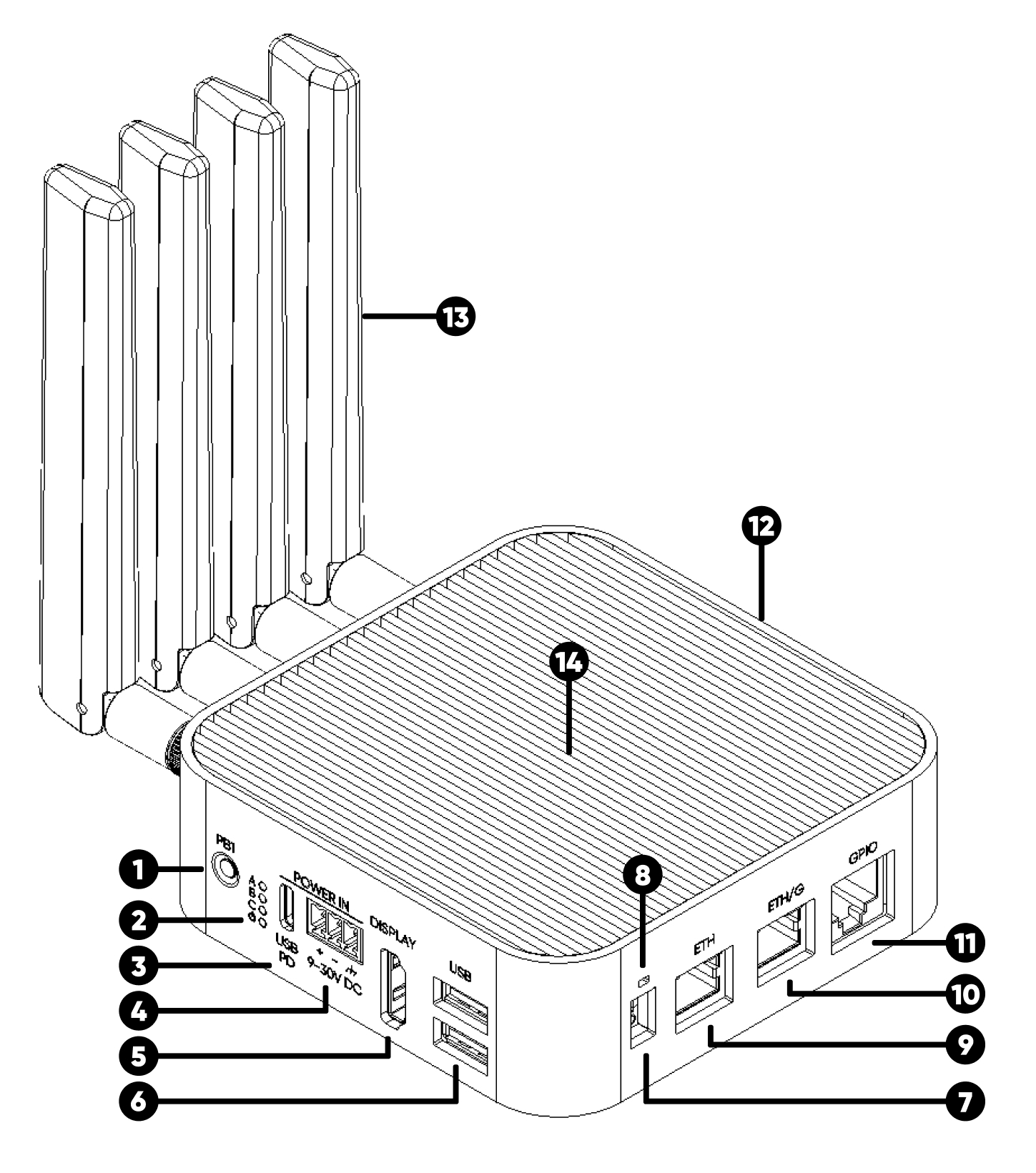
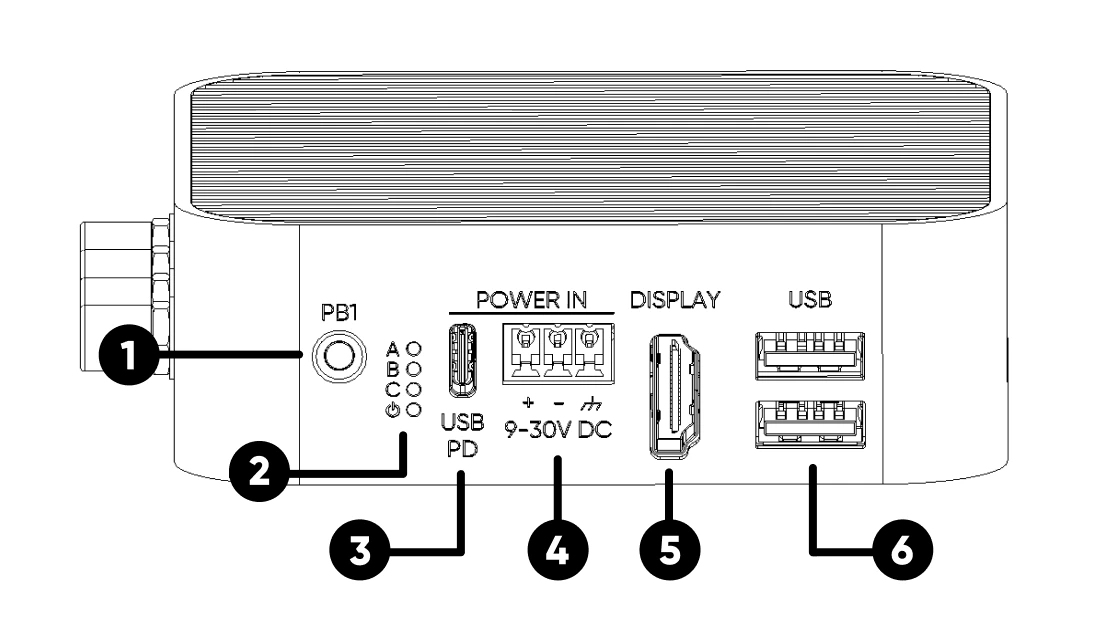
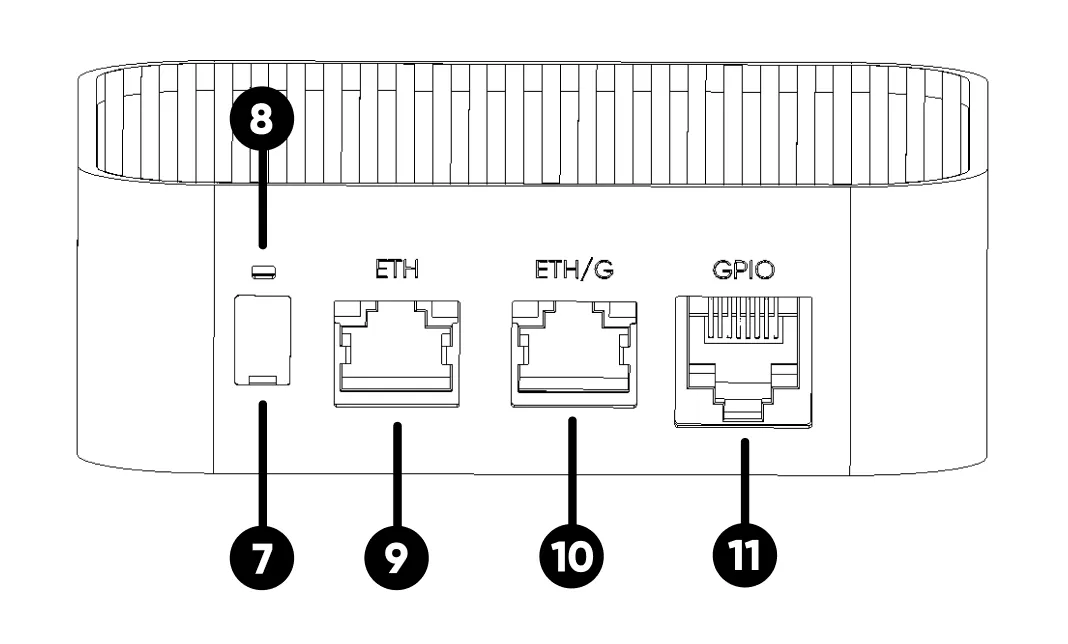
---
updatedAt: 2026-11-23T15:34:40.000Z
agentTools:
  projectIndex: https://docs.sixfab.com/llms.txt
---

# AWS IoT Core Getting Started Guide

Connect an ALPON X5 AI or ALPON X4 to AWS IoT Core: set up the device and your AWS account, provision certificates, build the arm64 demo container, deploy it through ALPON Cloud, and verify MQTT messages in the AWS console.

<HTMLBlock>{`
<style>
/* Theme guard: the docs container (.rm-ReadMe) decides light/dark once it carries
   data-color-mode; the html element is only the fallback before hydration. The
   :where(...) parts on the dark selectors below stop a light docs pane inside a
   non-light html element (ReadMe admin view) from picking up dark colors.
   They add no specificity. */
/* ══════════════════════════════════════════════════════════════════════════
   SIXFAB DOCS · ALPON TUTORIAL STYLESHEET (canonical, shared by every page
   under ALPON › Tutorials). Do not edit per page: change it here and re-stamp
   into all tutorials so the block stays byte-identical.
   Components: hero · meta · pill · aeo · toc · step-list · terminal · callout
   · spec-card · figure/lightbox · issue · stack · path · table · related guides.
   Page-specific components go AFTER the "END CANONICAL" marker.
   ══════════════════════════════════════════════════════════════════════════ */
/* ════════════════════════════════════════════════════════════════════════
   FONTS - Gilroy (5 weights) + JetBrains Mono (2 weights)
   Per design language §1.1 starter boilerplate.
═════════════════════════════════════════════════════════════════════════ */
@font-face { font-family:'Gilroy'; src:url('https://sixfab.com/wp-content/fonts/Gilroy-Regular.woff2')   format('woff2'); font-weight:400; font-display:swap; }
@font-face { font-family:'Gilroy'; src:url('https://sixfab.com/wp-content/fonts/Gilroy-Medium.woff2')    format('woff2'); font-weight:500; font-display:swap; }
@font-face { font-family:'Gilroy'; src:url('https://sixfab.com/wp-content/fonts/Gilroy-SemiBold.woff2')  format('woff2'); font-weight:600; font-display:swap; }
@font-face { font-family:'Gilroy'; src:url('https://sixfab.com/wp-content/fonts/Gilroy-Bold.woff2')      format('woff2'); font-weight:700; font-display:swap; }
@font-face { font-family:'Gilroy'; src:url('https://sixfab.com/wp-content/fonts/Gilroy-ExtraBold.woff2') format('woff2'); font-weight:800; font-display:swap; }
@font-face { font-family:'JetBrains Mono'; src:url('https://cdn.jsdelivr.net/gh/JetBrains/JetBrainsMono@2.304/fonts/webfonts/JetBrainsMono-Regular.woff2') format('woff2'); font-weight:400; font-style:normal; font-display:swap; }
@font-face { font-family:'JetBrains Mono'; src:url('https://cdn.jsdelivr.net/gh/JetBrains/JetBrainsMono@2.304/fonts/webfonts/JetBrainsMono-Medium.woff2') format('woff2'); font-weight:500; font-style:normal; font-display:swap; }

/* ════════════════════════════════════════════════════════════════════════
   DESIGN TOKENS - six-tier system, scoped to .sf-doc
═════════════════════════════════════════════════════════════════════════ */
.sf-doc {
  --primary:       #034860;
  --secondary:     #00E0B8;
  --tertiary:      #1B2D45;
  --neutral:       #E8F5F0;
  --white:         #FFFFFF;
  --light:         #F6F8F9;
  --line:          #DDE6EC;
  --slate-light:   #94A8B5;
  --slate:         #52667A;
  --deep-ink:      #10202E;
  --ai-iris:       #6B47F0;
  --ai-mist:       #F0EDFF;
  --alpon-purple:  #4F008E;
  --alpon-cyan:    #00A6C8;   /* ALPON Gradient end */
  --alpon-cyan-deep: #007A8F; /* cyan surface for white text (WCAG AA 5.0:1) */
  --success:       #00B894;
  --warning:       #F59E0B;
  --danger:        #DC2626;
  --info:          #429CBF;
  --success-text:  #047857;
  --warning-text:  #92400E;
  --danger-text:   #B91C1C;
  --info-text:     #0E4A66;
  --success-bg:    #E0F5EE;
  --warning-bg:    #FDF1DC;
  --danger-bg:     #FBE5E5;
  --info-bg:       #DCEFF7;
  --on-primary:    #FFFFFF;

  --xs:   4px;  --sm:   8px;  --md:  16px;  --lg:  24px;
  --xl:  32px;  --2xl: 48px;  --3xl: 64px;

  --r-sm: 4px; --r-md: 6px; --r-lg: 8px; --r-xl: 12px; --r-2xl: 16px; --r-full: 9999px;

  --shadow-sm: 0 1px 2px rgba(10,23,33,.04);
  --shadow-md: 0 4px 12px rgba(10,23,33,.06);
  --shadow-lg: 0 8px 24px rgba(10,23,33,.08);

  --font-sans: 'Gilroy', 'Inter', -apple-system, BlinkMacSystemFont, 'Segoe UI', sans-serif;
  --font-mono: 'JetBrains Mono', 'SF Mono', Menlo, Consolas, monospace;

  font-family: var(--font-sans);
  font-size: 1rem;
  line-height: 1.6;
  color: var(--deep-ink);
  -webkit-font-smoothing: antialiased;
}
.sf-doc * { box-sizing: border-box; }

/* ════════════════════════════════════════════════════════════════════════
   BASE TYPOGRAPHY
═════════════════════════════════════════════════════════════════════════ */
.sf-doc h1 {
  font-size: 3rem; font-weight: 800; letter-spacing: -0.03em;
  line-height: 1.08; color: var(--deep-ink); margin: 0 0 16px;
}
.sf-doc h2 {
  font-size: 1.5rem; font-weight: 700; letter-spacing: -0.02em;
  line-height: 1.2; color: var(--primary);
  margin: 56px 0 16px; padding-bottom: 10px;
  border-bottom: 1px solid var(--line);
}
.sf-doc h2:first-of-type { margin-top: 0; }
.sf-doc h3 {
  font-size: 1.125rem; font-weight: 700; letter-spacing: -0.015em;
  line-height: 1.3; color: var(--deep-ink); margin: 28px 0 10px;
}
.sf-doc h4 {
  font-size: 0.875rem; font-weight: 700; letter-spacing: 0.04em;
  text-transform: uppercase; color: var(--slate);
  margin: 18px 0 6px;
}
.sf-doc p {
  font-size: 1rem; font-weight: 400; line-height: 1.6;
  color: var(--deep-ink); margin: 0 0 14px;
}
.sf-doc ul, .sf-doc ol { padding-left: 24px; margin: 8px 0 16px; }
.sf-doc li { font-size: 1rem; line-height: 1.6; color: var(--deep-ink); margin-bottom: 6px; }
.sf-doc ul li::marker { color: var(--primary); }
.sf-doc a { color: var(--primary); text-decoration: none; }
.sf-doc a:hover { color: var(--deep-ink); text-decoration: underline; }
.sf-doc code {
  font-family: var(--font-mono); font-size: 0.875rem;
  background: var(--light); color: var(--primary);
  padding: 1px 5px; border-radius: var(--r-sm); border: 0;
}
.sf-doc strong { color: var(--deep-ink); font-weight: 700; }
.sf-doc hr { border: 0; height: 1px; background: var(--line); margin: 48px 0; }

/* ════════════════════════════════════════════════════════════════════════
   META BAR
═════════════════════════════════════════════════════════════════════════ */
.sf-doc .sf-meta {
  display: flex; align-items: center; flex-wrap: wrap; gap: 8px;
  font-family: var(--font-mono); font-size: 0.75rem;
  color: var(--slate); margin: 0 0 24px;
}
.sf-doc .sf-meta__badge {
  font-family: var(--font-sans); font-weight: 700; font-size: 0.75rem;
  padding: 3px 8px; border-radius: var(--r-sm);
  background: var(--light); color: var(--primary);
  border: 1px solid var(--line); letter-spacing: 0;
  text-decoration: none !important;
}
.sf-doc .sf-meta__badge:hover { background: var(--neutral); color: var(--primary); }
.sf-doc .sf-meta__badge--mint {
  background: var(--neutral); color: var(--primary); border-color: var(--neutral);
}
.sf-doc .sf-meta__sep { color: var(--line); }

/* ════════════════════════════════════════════════════════════════════════
   HERO - compact, default Tier 1 surface
═════════════════════════════════════════════════════════════════════════ */
.sf-doc .sf-hero {
  padding: var(--xl); margin: 0 0 24px;
  background: var(--light); border: 1px solid var(--line);
  border-radius: var(--r-2xl);
}
.sf-doc .sf-hero__copy { min-width: 0; }
.sf-doc .sf-hero p.sf-hero__title,
.sf-doc .sf-hero .sf-hero__title {
  font-family: var(--font-sans);
  font-size: 2.5rem; font-weight: 800; line-height: 1.08;
  letter-spacing: -0.03em; color: var(--deep-ink); margin: 0 0 14px;
}
.sf-doc .sf-hero p.sf-hero__lead,
.sf-doc .sf-hero .sf-hero__lead {
  font-size: 1.0625rem; line-height: 1.6;
  color: var(--deep-ink); margin: 0 0 18px;
  text-align: justify;
  hyphens: auto;
  -webkit-hyphens: auto;
}
.sf-doc .sf-hero__chips { display: flex; flex-wrap: wrap; gap: 6px; }

/* ════════════════════════════════════════════════════════════════════════
   PILLS
═════════════════════════════════════════════════════════════════════════ */
.sf-doc .sf-pill {
  display: inline-flex; align-items: center; gap: 4px;
  font-family: var(--font-sans); font-size: 0.75rem; font-weight: 600;
  padding: 4px 10px; border-radius: var(--r-sm);
  background: var(--light); color: var(--deep-ink);
  border: 1px solid var(--line); white-space: nowrap;
  vertical-align: middle; line-height: 1.4;
}
.sf-doc .sf-pill--alpon-x5 {
  background: var(--alpon-purple); color: #FFFFFF !important; border-color: var(--alpon-purple);
}
.sf-doc .sf-pill--alpon-x4 {
  background: var(--alpon-cyan-deep); color: #FFFFFF !important; border-color: var(--alpon-cyan-deep);
}
.sf-doc .sf-pill--success { background: var(--success-bg); color: var(--success-text); border-color: var(--success-bg); }
.sf-doc .sf-pill--info    { background: var(--info-bg);    color: var(--info-text);    border-color: var(--info-bg); }
.sf-doc .sf-pill--warning { background: var(--warning-bg); color: var(--warning-text); border-color: var(--warning-bg); }

/* ════════════════════════════════════════════════════════════════════════
   AEO ANSWER BLOCK - default Tier 1
═════════════════════════════════════════════════════════════════════════ */
.sf-doc .sf-aeo {
  position: relative;
  background: var(--light);
  border: 1px solid var(--line);
  border-left: 4px solid var(--primary);
  border-radius: var(--r-md);
  padding: var(--lg) var(--xl);
  margin: 0 0 var(--xl);
}
.sf-doc .sf-aeo__label {
  display: block; font-family: var(--font-sans);
  font-size: 1.375rem; font-weight: 700;
  line-height: 1.25; letter-spacing: -0.015em;
  text-transform: none; color: var(--primary);
  margin: 0 0 var(--sm);
}
.sf-doc .sf-aeo__text {
  font-size: 1rem;
  line-height: 1.6;
  color: var(--deep-ink);
  margin: 0;
  text-align: justify;
  hyphens: auto;
  -webkit-hyphens: auto;
}
.sf-doc .sf-aeo__text strong { color: var(--primary); font-weight: 600; }
.sf-doc .sf-aeo__text code { font-size: 0.8125rem; }

/* ════════════════════════════════════════════════════════════════════════
   IN THIS GUIDE - sf-toc
═════════════════════════════════════════════════════════════════════════ */
.sf-doc .sf-toc {
  display: flex; align-items: center; flex-wrap: wrap; gap: 6px;
  padding: var(--md) var(--lg);
  background: var(--light); border: 1px solid var(--line);
  border-radius: var(--r-lg); margin: 0 0 var(--xl);
}
.sf-doc .sf-toc__label {
  font-family: var(--font-mono); font-size: 0.6875rem; font-weight: 500;
  letter-spacing: 0.18em; text-transform: uppercase;
  color: var(--slate); margin-right: var(--sm);
}
.sf-doc .sf-toc__item {
  display: inline-flex; align-items: center; gap: 6px;
  padding: 6px 12px; background: var(--white);
  border: 1px solid var(--line); border-radius: var(--r-sm);
  font-size: 0.8125rem; font-weight: 600;
  color: var(--deep-ink) !important; text-decoration: none !important;
  transition: border-color .15s, box-shadow .15s; white-space: nowrap;
}
.sf-doc .sf-toc__item:hover,
.sf-doc .sf-toc__item:focus {
  background: var(--primary); color: var(--white) !important;
  border-color: var(--primary); text-decoration: none !important;
}
.sf-doc .sf-toc__item:hover .sf-toc__num,
.sf-doc .sf-toc__item:focus .sf-toc__num { color: var(--secondary); }
.sf-doc .sf-toc__num {
  font-family: var(--font-mono); font-size: 0.6875rem; font-weight: 500;
  color: var(--slate);
}

/* ════════════════════════════════════════════════════════════════════════
   ICONS
═════════════════════════════════════════════════════════════════════════ */
.sf-doc .sf-icon { width: 16px; height: 16px; flex-shrink: 0; vertical-align: -2px; }
.sf-doc .sf-icon--stroke { fill: none; stroke: currentColor; stroke-width: 1.75; stroke-linecap: round; stroke-linejoin: round; }

/* ════════════════════════════════════════════════════════════════════════
   SPEC CARDS - identical to alpon-x4-specifications.html tables
═════════════════════════════════════════════════════════════════════════ */
.sf-doc .sf-spec-grid {
  display: grid;
  grid-template-columns: repeat(auto-fill, minmax(320px, 1fr));
  gap: 16px; margin: 0 0 24px;
}
.sf-doc .sf-spec-card {
  background: var(--white); border: 1px solid var(--line);
  border-radius: var(--r-xl); padding: 20px 22px;
  display: flex; flex-direction: column;
  margin: 16px 0 24px; transition: border-color .15s;
}
.sf-doc .sf-spec-grid .sf-spec-card { margin: 0; }
.sf-doc .sf-spec-card:hover { border-color: var(--slate-light); }
.sf-doc .sf-spec-card__head {
  display: flex; align-items: center; gap: 10px;
  padding-bottom: 14px; border-bottom: 1px solid var(--line);
  margin-bottom: 14px;
}
.sf-doc .sf-spec-card__icon {
  width: 32px; height: 32px; border-radius: var(--r-md);
  background: var(--light); color: var(--primary);
  display: flex; align-items: center; justify-content: center; flex-shrink: 0;
}
.sf-doc .sf-spec-card__icon svg { width: 18px; height: 18px; }
.sf-doc .sf-spec-card__title {
  font-size: 1rem; font-weight: 700;
  color: var(--primary); letter-spacing: -0.01em;
}
.sf-doc .sf-spec-card__body { display: flex; flex-direction: column; }
.sf-doc .sf-spec-row {
  display: grid; grid-template-columns: minmax(160px, 30%) 1fr;
  gap: 24px; align-items: baseline;
  padding: 11px 0; border-bottom: 1px dashed var(--line);
}
.sf-doc .sf-spec-row:first-child { padding-top: 4px; }
.sf-doc .sf-spec-row:last-child { border-bottom: 0; padding-bottom: 4px; }
.sf-doc .sf-spec-row__key {
  font-size: 0.9375rem; font-weight: 700;
  color: var(--deep-ink); line-height: 1.5;
}
.sf-doc .sf-spec-row__val {
  font-size: 0.9375rem; font-weight: 500;
  color: var(--deep-ink); line-height: 1.55;
  text-align: left; min-width: 0;
}
.sf-doc .sf-spec-row__val code { font-size: 0.875rem; }
.sf-doc .sf-spec-row__val em { font-style: italic; color: var(--slate); font-weight: 500; }

/* ════════════════════════════════════════════════════════════════════════
   CALLOUT
═════════════════════════════════════════════════════════════════════════ */
.sf-doc .sf-callout {
  display: flex; flex-direction: column; gap: 6px;
  border-radius: var(--r-md); padding: 14px 18px;
  margin: 20px 0; border-left: 4px solid;
}
.sf-doc .sf-callout__header {
  display: flex; align-items: center; gap: 8px;
  font-size: 0.875rem; font-weight: 700; line-height: 1;
}
.sf-doc .sf-callout__header svg { width: 16px; height: 16px; flex-shrink: 0; }
.sf-doc .sf-callout__content { font-size: 0.9375rem; line-height: 1.6; color: var(--deep-ink); }
.sf-doc .sf-callout__content p { margin: 0 0 6px; font-size: 0.9375rem; color: inherit; }
.sf-doc .sf-callout__content p:last-child { margin-bottom: 0; }
.sf-doc .sf-callout__content code { background: rgba(0,0,0,0.06); border: 0; }
.sf-doc .sf-callout--info     { background: var(--info-bg);    border-left-color: var(--info); }
.sf-doc .sf-callout--info     .sf-callout__header { color: var(--info-text); }
.sf-doc .sf-callout--success  { background: var(--success-bg); border-left-color: var(--success); }
.sf-doc .sf-callout--success  .sf-callout__header { color: var(--success-text); }
.sf-doc .sf-callout--warning  { background: var(--warning-bg); border-left-color: var(--warning); }
.sf-doc .sf-callout--warning  .sf-callout__header { color: var(--warning-text); }
.sf-doc .sf-callout--danger   { background: var(--danger-bg);  border-left-color: var(--danger); }
.sf-doc .sf-callout--danger   .sf-callout__header { color: var(--danger-text); }

/* ════════════════════════════════════════════════════════════════════════
   STEP LIST
═════════════════════════════════════════════════════════════════════════ */
.sf-doc .sf-step-list {
  position: relative; padding: 0;
  margin: var(--lg) 0 var(--xl);
  list-style: none !important;
}
.sf-doc .sf-step-list::before {
  content: ''; position: absolute;
  left: 23px; top: 48px; bottom: 24px;
  width: 2px; background: var(--line); z-index: 0;
}
.sf-doc .sf-step {
  position: relative; z-index: 1;
  padding-bottom: var(--2xl); scroll-margin-top: 24px;
}
.sf-doc .sf-step:last-child { padding-bottom: 0; }
.sf-doc .sf-step__header {
  display: grid; grid-template-columns: 48px 1fr;
  align-items: center; gap: 0 22px;
  margin-bottom: var(--md);
}
.sf-doc .sf-step__num {
  width: 48px; height: 48px;
  border-radius: var(--r-full);
  background: var(--primary); color: var(--on-primary);
  font-family: var(--font-sans); font-size: 1.0625rem; font-weight: 800;
  display: flex; align-items: center; justify-content: center;
  box-shadow: 0 0 0 5px var(--white), 0 4px 10px rgba(10,23,33,.10);
  align-self: center; flex-shrink: 0;
}
.sf-doc .sf-step__title {
  font-family: var(--font-sans); font-size: 1.5rem; font-weight: 700;
  letter-spacing: -0.02em; color: var(--deep-ink);
  line-height: 1.15; margin: 0; padding: 0;
  align-self: center; display: flex; align-items: center;
  gap: 10px; flex-wrap: wrap;
}
.sf-doc .sf-step__title code { font-size: 1.125rem; }
.sf-doc .sf-step__body { padding-left: 70px; min-width: 0; }
.sf-doc .sf-step__body p { font-size: 1rem; line-height: 1.65; margin: 0 0 14px; }
.sf-doc .sf-step__body ul,
.sf-doc .sf-step__body ol { margin: 6px 0 14px; }
.sf-doc .sf-step__body ul li,
.sf-doc .sf-step__body ol li { font-size: 0.9375rem; margin-bottom: 4px; }

/* ════════════════════════════════════════════════════════════════════════
   TERMINAL
═════════════════════════════════════════════════════════════════════════ */
.sf-doc .sf-terminal {
  background: #0d1117 !important;
  border: 1px solid #30363d;
  border-radius: var(--r-lg);
  margin: 14px 0 18px;
  overflow: hidden; box-shadow: var(--shadow-md);
}
.sf-doc .sf-terminal__header {
  display: flex !important; align-items: center; gap: 6px;
  padding: 10px 14px; background: #161b22 !important;
  border-bottom: 1px solid #30363d;
}
.sf-doc .sf-terminal__dot {
  width: 11px; height: 11px;
  border-radius: var(--r-full); flex-shrink: 0;
}
.sf-doc .sf-terminal__title {
  margin-left: 8px; font-family: var(--font-mono) !important;
  font-size: 0.75rem !important; color: #8B949E !important; font-weight: 500;
}
.sf-doc .sf-terminal__body { padding: 14px 16px; overflow-x: auto; }
.sf-doc .sf-terminal__body pre {
  margin: 0 !important; padding: 0 !important;
  background: transparent !important; border: 0 !important;
  font-family: var(--font-mono) !important;
  font-size: 0.825rem !important; line-height: 1.65 !important;
  color: #e6edf3 !important; white-space: pre;
}
.sf-doc .t-dim   { color: #8B949E !important; }
.sf-doc .t-green { color: #56d364 !important; font-weight: 600; }
.sf-doc .t-blue  { color: #79c0ff !important; }
.sf-doc .t-yel   { color: #e3b341 !important; }
.sf-doc .t-pp    { color: #d2a8ff !important; }
.sf-doc .t-red   { color: #ff7b72 !important; }
.sf-doc .t-hl    { color: #56d364 !important; font-weight: 600; }

/* ════════════════════════════════════════════════════════════════════════
   COMPARISON GRID - Stripe-style two-column path picker
═════════════════════════════════════════════════════════════════════════ */
.sf-doc .sf-paths {
  display: grid; grid-template-columns: repeat(2, 1fr); gap: 16px;
  margin: 16px 0 32px;
}
.sf-doc .sf-path {
  background: var(--white); border: 1px solid var(--line);
  border-radius: var(--r-xl); padding: 22px 24px;
  display: flex; flex-direction: column;
  transition: border-color .15s, box-shadow .15s;
}
.sf-doc .sf-path:hover { border-color: var(--slate-light); box-shadow: var(--shadow-md); }
.sf-doc .sf-path__tag {
  font-family: var(--font-mono); font-size: 0.6875rem;
  font-weight: 500; letter-spacing: 0.16em;
  text-transform: uppercase; color: var(--slate);
  margin-bottom: 8px;
}
.sf-doc .sf-path__title {
  font-size: 1.125rem; font-weight: 700;
  color: var(--deep-ink); margin: 0 0 8px;
  letter-spacing: -0.01em;
}
.sf-doc .sf-path__desc {
  font-size: 0.9375rem; line-height: 1.55;
  color: var(--slate); margin: 0 0 14px;
}
.sf-doc .sf-path__list {
  list-style: none !important;
  padding: 0 !important;
  margin: 0 0 14px !important;
}
.sf-doc .sf-path__list li {
  font-size: 0.9375rem;
  color: var(--deep-ink);
  padding: 6px 0 6px 28px;
  position: relative;
  margin: 0;
  line-height: 1.5;
  list-style: none !important;
}
.sf-doc .sf-path__list li::marker { content: '' !important; }
.sf-doc .sf-path__list li::before {
  content: ''; position: absolute;
  left: 0; top: 10px;
  width: 16px; height: 16px;
  background: var(--neutral);
  border-radius: var(--r-full);
  background-image: url("data:image/svg+xml;utf8,<svg xmlns='http://www.w3.org/2000/svg' viewBox='0 0 24 24' fill='none' stroke='%23034860' stroke-width='3.5' stroke-linecap='round' stroke-linejoin='round'><polyline points='20 6 9 17 4 12'/></svg>");
  background-repeat: no-repeat;
  background-position: center;
  background-size: 11px;
  flex-shrink: 0;
}
.sf-doc .sf-path__foot {
  margin-top: auto; padding-top: 14px;
  border-top: 1px solid var(--line);
  font-family: var(--font-mono); font-size: 0.75rem;
  color: var(--slate);
}
.sf-doc .sf-path__foot strong { color: var(--primary); font-weight: 600; }

/* ════════════════════════════════════════════════════════════════════════
   DOCKERFILE STACK PICKER
═════════════════════════════════════════════════════════════════════════ */
.sf-doc .sf-stack-grid {
  display: grid;
  grid-template-columns: repeat(2, 1fr);
  gap: 14px; margin: 16px 0 24px;
}
.sf-doc .sf-stack {
  background: var(--white); border: 1px solid var(--line);
  border-radius: var(--r-lg); padding: 18px 20px;
  text-decoration: none !important;
  transition: border-color .15s, transform .15s, box-shadow .15s;
  display: flex; align-items: center; gap: 14px;
  color: var(--deep-ink) !important;
}
.sf-doc .sf-stack__badge {
  width: 44px; height: 44px;
  border-radius: var(--r-md);
  background: var(--neutral);
  color: var(--primary);
  display: flex; align-items: center; justify-content: center;
  font-family: var(--font-mono);
  font-size: 1rem; font-weight: 700;
  letter-spacing: -0.02em; flex-shrink: 0;
}
.sf-doc .sf-stack__copy { display: flex; flex-direction: column; gap: 2px; min-width: 0; }
.sf-doc .sf-stack:hover {
  border-color: var(--primary); transform: translateY(-2px);
  box-shadow: var(--shadow-md); text-decoration: none !important;
}
.sf-doc .sf-stack__lang {
  font-family: var(--font-sans); font-size: 0.9375rem;
  font-weight: 700; color: var(--deep-ink); letter-spacing: -0.01em;
}
.sf-doc .sf-stack__base {
  font-family: var(--font-mono); font-size: 0.75rem;
  color: var(--slate); font-weight: 500;
}

/* ════════════════════════════════════════════════════════════════════════
   FIGURE & LIGHTBOX
═════════════════════════════════════════════════════════════════════════ */
.sf-doc .sf-figure {
  margin: 16px 0; border-radius: var(--r-lg);
  overflow: hidden; border: 1px solid var(--line);
  background: var(--white);
}
.sf-doc .sf-figure a {
  display: block; cursor: zoom-in;
  text-decoration: none !important;
}
.sf-doc .sf-figure img {
  width: 100%; height: auto; display: block;
  transition: opacity .15s;
}
.sf-doc .sf-figure a:hover img { opacity: 0.94; }
.sf-doc .sf-figure figcaption {
  font-family: var(--font-sans);
  font-size: 0.8125rem; color: var(--slate);
  padding: 10px 14px; background: var(--light);
  border-top: 1px solid var(--line);
  line-height: 1.5; font-style: italic;
}
.sf-doc .sf-fig-anchor {
  display: block; position: relative;
  top: -80px; visibility: hidden;
}
.sf-doc .sf-lightbox {
  display: none; position: fixed; inset: 0;
  z-index: 9999; background: rgba(10,23,33,0.92);
  align-items: center; justify-content: center; padding: 24px;
}
.sf-doc .sf-lightbox:target { display: flex; }
.sf-doc .sf-lightbox__backdrop {
  position: absolute; inset: 0; cursor: zoom-out;
}
.sf-doc .sf-lightbox__close {
  position: absolute; top: 18px; right: 18px;
  width: 36px; height: 36px;
  background: rgba(255,255,255,0.12);
  color: #fff !important;
  border: 1px solid rgba(255,255,255,0.25);
  border-radius: var(--r-full);
  display: flex; align-items: center; justify-content: center;
  z-index: 2; text-decoration: none !important;
  transition: background .15s, transform .15s;
}
.sf-doc .sf-lightbox__close:hover {
  background: rgba(255,255,255,0.22); transform: rotate(90deg);
}
.sf-doc .sf-lightbox__close svg {
  width: 18px; height: 18px;
  stroke: #fff; stroke-width: 2.2; fill: none;
}
.sf-doc .sf-lightbox__inner {
  position: relative; z-index: 1;
  max-width: 1200px; width: 100%;
  display: flex; flex-direction: column; align-items: center;
}
.sf-doc .sf-lightbox__img-wrap {
  display: block; cursor: zoom-out;
  text-decoration: none !important; max-width: 100%;
}
.sf-doc .sf-lightbox__img-wrap img {
  display: block; max-width: 100%;
  max-height: 78vh; height: auto;
  border-radius: var(--r-md);
  border: 1px solid rgba(255,255,255,0.12);
}
.sf-doc .sf-lightbox__caption {
  margin-top: 14px;
  color: rgba(255,255,255,0.85);
  font-size: 0.875rem;
  font-family: var(--font-sans);
  text-align: center; max-width: 700px; line-height: 1.5;
}

/* ════════════════════════════════════════════════════════════════════════
   ISSUE / TROUBLESHOOTING - mirrors alpon-create-wifi-hotspot pattern
   summary + tag pill + Symptom/Cause/Fix body
═════════════════════════════════════════════════════════════════════════ */
.sf-doc .sf-issue {
  background: var(--white);
  border: 1px solid var(--line);
  border-radius: var(--r-lg);
  margin: 0 0 12px;
  overflow: hidden;
  transition: border-color .15s, box-shadow .15s;
}
.sf-doc .sf-issue:hover { border-color: var(--slate-light); }
.sf-doc .sf-issue[open] {
  border-color: var(--primary);
  box-shadow: var(--shadow-sm);
}
.sf-doc .sf-issue__summary {
  display: flex; align-items: center; gap: 12px;
  padding: 16px 20px;
  font-family: var(--font-sans);
  font-size: 1rem; font-weight: 700;
  color: var(--deep-ink);
  cursor: pointer; list-style: none;
}
.sf-doc .sf-issue__summary::-webkit-details-marker { display: none; }
.sf-doc .sf-issue__summary > span:nth-child(2) {
  flex: 1; line-height: 1.45; font-weight: 700;
}
.sf-doc .sf-issue__tag {
  font-family: var(--font-mono);
  font-size: 0.6875rem;
  font-weight: 500;
  letter-spacing: 0.14em;
  text-transform: uppercase;
  padding: 4px 9px;
  border-radius: var(--r-sm);
  background: var(--info-bg);
  color: var(--info-text);
  border: 1px solid var(--info-bg);
  flex-shrink: 0;
  white-space: nowrap;
}
.sf-doc .sf-issue__tag--hw {
  background: var(--danger-bg); color: var(--danger-text); border-color: var(--danger-bg);
}
.sf-doc .sf-issue__tag--sw {
  background: var(--ai-mist); color: var(--ai-iris); border-color: var(--ai-mist);
}
.sf-doc .sf-issue__tag--auth {
  background: var(--warning-bg); color: var(--warning-text); border-color: var(--warning-bg);
}
.sf-doc .sf-issue__tag--net {
  background: var(--info-bg); color: var(--info-text); border-color: var(--info-bg);
}
.sf-doc .sf-issue__tag--config {
  background: var(--neutral); color: var(--primary); border-color: var(--neutral);
}
.sf-doc .sf-issue__chev {
  width: 18px; height: 18px;
  color: var(--slate);
  flex-shrink: 0;
  transition: transform .2s;
}
.sf-doc .sf-issue[open] .sf-issue__chev {
  transform: rotate(180deg);
  color: var(--primary);
}
.sf-doc .sf-issue__body {
  padding: 4px 20px 20px;
  border-top: 1px solid var(--line);
}
.sf-doc .sf-issue__body h4 {
  font-family: var(--font-mono);
  font-size: 0.6875rem;
  font-weight: 500;
  letter-spacing: 0.18em;
  text-transform: uppercase;
  color: var(--slate);
  margin: 18px 0 8px;
}
.sf-doc .sf-issue__body h4:first-child { margin-top: 14px; }
.sf-doc .sf-issue__body p {
  font-size: 0.9375rem;
  line-height: 1.65;
  margin: 0 0 8px;
  color: var(--deep-ink);
}
.sf-doc .sf-issue__body p:last-child { margin-bottom: 0; }
.sf-doc .sf-issue__body code { font-size: 0.8125rem; }
.sf-doc .sf-issue__body .sf-terminal { margin: 10px 0 0; }

/* ════════════════════════════════════════════════════════════════════════
   DARK MODE
═════════════════════════════════════════════════════════════════════════ */
[data-color-mode="dark"]:where(.rm-ReadMe,:not(:has(.rm-ReadMe:is([data-color-mode="light"],[data-color-mode="system"])))) .sf-doc {
  --primary: #034860; --secondary: #00E0B8; --tertiary: #1B2D45;
  --neutral: #E8F5F0; --white: #FFFFFF; --light: #14222F;
  --line: #2A3A4D; --slate-light: #94A8B5; --slate: #B5C3CE;
  --deep-ink: #E8F5F0;
  --success-bg: #052E1B; --warning-bg: #2A1F05;
  --danger-bg: #2A0E0E; --info-bg: #0A2E3F;
  --success-text: #34D399; --warning-text: #FBBF24;
  --danger-text: #F87171; --info-text: #5CD3EE;
  --ai-iris: #B59CFF; --ai-mist: #1F1A33;
  color: var(--deep-ink);
}
[data-color-mode="dark"]:where(.rm-ReadMe,:not(:has(.rm-ReadMe:is([data-color-mode="light"],[data-color-mode="system"])))) .sf-doc h1,
[data-color-mode="dark"]:where(.rm-ReadMe,:not(:has(.rm-ReadMe:is([data-color-mode="light"],[data-color-mode="system"])))) .sf-doc h3,
[data-color-mode="dark"]:where(.rm-ReadMe,:not(:has(.rm-ReadMe:is([data-color-mode="light"],[data-color-mode="system"])))) .sf-doc h4,
[data-color-mode="dark"]:where(.rm-ReadMe,:not(:has(.rm-ReadMe:is([data-color-mode="light"],[data-color-mode="system"])))) .sf-doc strong { color: #FFFFFF; }
[data-color-mode="dark"]:where(.rm-ReadMe,:not(:has(.rm-ReadMe:is([data-color-mode="light"],[data-color-mode="system"])))) .sf-doc h2 { color: var(--secondary); border-color: var(--line); }
[data-color-mode="dark"]:where(.rm-ReadMe,:not(:has(.rm-ReadMe:is([data-color-mode="light"],[data-color-mode="system"])))) .sf-doc p,
[data-color-mode="dark"]:where(.rm-ReadMe,:not(:has(.rm-ReadMe:is([data-color-mode="light"],[data-color-mode="system"])))) .sf-doc li,
[data-color-mode="dark"]:where(.rm-ReadMe,:not(:has(.rm-ReadMe:is([data-color-mode="light"],[data-color-mode="system"])))) .sf-doc .sf-aeo__text,
[data-color-mode="dark"]:where(.rm-ReadMe,:not(:has(.rm-ReadMe:is([data-color-mode="light"],[data-color-mode="system"])))) .sf-doc .sf-callout__content { color: var(--neutral); }
html[data-color-mode="dark"]:where(.rm-ReadMe,:not(:has(.rm-ReadMe:is([data-color-mode="light"],[data-color-mode="system"])))) .sf-doc a { color: var(--secondary); }
[data-color-mode="dark"]:where(.rm-ReadMe,:not(:has(.rm-ReadMe:is([data-color-mode="light"],[data-color-mode="system"])))) .sf-doc code { background: rgba(255,255,255,0.06); color: var(--secondary); }
[data-color-mode="dark"]:where(.rm-ReadMe,:not(:has(.rm-ReadMe:is([data-color-mode="light"],[data-color-mode="system"])))) .sf-doc hr { background: var(--line); }
[data-color-mode="dark"]:where(.rm-ReadMe,:not(:has(.rm-ReadMe:is([data-color-mode="light"],[data-color-mode="system"])))) .sf-doc ul li::marker { color: var(--secondary); }
[data-color-mode="dark"]:where(.rm-ReadMe,:not(:has(.rm-ReadMe:is([data-color-mode="light"],[data-color-mode="system"])))) .sf-doc .sf-meta__badge { background: rgba(255,255,255,0.06); color: var(--secondary); border-color: var(--line); }
[data-color-mode="dark"]:where(.rm-ReadMe,:not(:has(.rm-ReadMe:is([data-color-mode="light"],[data-color-mode="system"])))) .sf-doc .sf-aeo { background: rgba(255,255,255,0.04); border-color: var(--line); border-left-color: var(--secondary); }
[data-color-mode="dark"]:where(.rm-ReadMe,:not(:has(.rm-ReadMe:is([data-color-mode="light"],[data-color-mode="system"])))) .sf-doc .sf-aeo__label { color: var(--secondary); }
[data-color-mode="dark"]:where(.rm-ReadMe,:not(:has(.rm-ReadMe:is([data-color-mode="light"],[data-color-mode="system"])))) .sf-doc .sf-aeo__text strong { color: var(--secondary); }
[data-color-mode="dark"]:where(.rm-ReadMe,:not(:has(.rm-ReadMe:is([data-color-mode="light"],[data-color-mode="system"])))) .sf-doc .sf-hero { background: rgba(255,255,255,0.04); border-color: var(--line); }
[data-color-mode="dark"]:where(.rm-ReadMe,:not(:has(.rm-ReadMe:is([data-color-mode="light"],[data-color-mode="system"])))) .sf-doc .sf-hero p.sf-hero__title,
[data-color-mode="dark"]:where(.rm-ReadMe,:not(:has(.rm-ReadMe:is([data-color-mode="light"],[data-color-mode="system"])))) .sf-doc .sf-hero .sf-hero__title { color: #FFFFFF; }
[data-color-mode="dark"]:where(.rm-ReadMe,:not(:has(.rm-ReadMe:is([data-color-mode="light"],[data-color-mode="system"])))) .sf-doc .sf-hero p.sf-hero__lead,
[data-color-mode="dark"]:where(.rm-ReadMe,:not(:has(.rm-ReadMe:is([data-color-mode="light"],[data-color-mode="system"])))) .sf-doc .sf-hero .sf-hero__lead { color: var(--neutral); }
[data-color-mode="dark"]:where(.rm-ReadMe,:not(:has(.rm-ReadMe:is([data-color-mode="light"],[data-color-mode="system"])))) .sf-doc .sf-toc { background: rgba(255,255,255,0.04); border-color: var(--line); }
[data-color-mode="dark"]:where(.rm-ReadMe,:not(:has(.rm-ReadMe:is([data-color-mode="light"],[data-color-mode="system"])))) .sf-doc .sf-toc__item { background: transparent; color: var(--neutral) !important; border-color: var(--line); }
[data-color-mode="dark"]:where(.rm-ReadMe,:not(:has(.rm-ReadMe:is([data-color-mode="light"],[data-color-mode="system"])))) .sf-doc .sf-toc__item:hover { background: var(--secondary); color: var(--tertiary) !important; border-color: var(--secondary); }
[data-color-mode="dark"]:where(.rm-ReadMe,:not(:has(.rm-ReadMe:is([data-color-mode="light"],[data-color-mode="system"])))) .sf-doc .sf-toc__item:hover .sf-toc__num { color: var(--tertiary); }
[data-color-mode="dark"]:where(.rm-ReadMe,:not(:has(.rm-ReadMe:is([data-color-mode="light"],[data-color-mode="system"])))) .sf-doc .sf-spec-card { background: rgba(255,255,255,0.04); border-color: var(--line); }
[data-color-mode="dark"]:where(.rm-ReadMe,:not(:has(.rm-ReadMe:is([data-color-mode="light"],[data-color-mode="system"])))) .sf-doc .sf-spec-card:hover { border-color: var(--secondary); }
[data-color-mode="dark"]:where(.rm-ReadMe,:not(:has(.rm-ReadMe:is([data-color-mode="light"],[data-color-mode="system"])))) .sf-doc .sf-spec-card__head { border-bottom-color: var(--line); }
[data-color-mode="dark"]:where(.rm-ReadMe,:not(:has(.rm-ReadMe:is([data-color-mode="light"],[data-color-mode="system"])))) .sf-doc .sf-spec-card__icon { background: rgba(0,224,184,0.10); color: var(--secondary); }
[data-color-mode="dark"]:where(.rm-ReadMe,:not(:has(.rm-ReadMe:is([data-color-mode="light"],[data-color-mode="system"])))) .sf-doc .sf-spec-card__title { color: var(--secondary); }
[data-color-mode="dark"]:where(.rm-ReadMe,:not(:has(.rm-ReadMe:is([data-color-mode="light"],[data-color-mode="system"])))) .sf-doc .sf-spec-row { border-bottom-color: var(--line); }
[data-color-mode="dark"]:where(.rm-ReadMe,:not(:has(.rm-ReadMe:is([data-color-mode="light"],[data-color-mode="system"])))) .sf-doc .sf-spec-row__key { color: #FFFFFF; }
[data-color-mode="dark"]:where(.rm-ReadMe,:not(:has(.rm-ReadMe:is([data-color-mode="light"],[data-color-mode="system"])))) .sf-doc .sf-spec-row__val { color: var(--neutral); }
[data-color-mode="dark"]:where(.rm-ReadMe,:not(:has(.rm-ReadMe:is([data-color-mode="light"],[data-color-mode="system"])))) .sf-doc .sf-spec-row__val code { background: rgba(255,255,255,0.06); color: var(--secondary); }
[data-color-mode="dark"]:where(.rm-ReadMe,:not(:has(.rm-ReadMe:is([data-color-mode="light"],[data-color-mode="system"])))) .sf-doc .sf-pill { background: rgba(255,255,255,0.06); color: var(--neutral); border-color: var(--line); }
[data-color-mode="dark"]:where(.rm-ReadMe,:not(:has(.rm-ReadMe:is([data-color-mode="light"],[data-color-mode="system"])))) .sf-doc .sf-path { background: rgba(255,255,255,0.04); border-color: var(--line); }
[data-color-mode="dark"]:where(.rm-ReadMe,:not(:has(.rm-ReadMe:is([data-color-mode="light"],[data-color-mode="system"])))) .sf-doc .sf-path__list li { color: var(--neutral); }
[data-color-mode="dark"]:where(.rm-ReadMe,:not(:has(.rm-ReadMe:is([data-color-mode="light"],[data-color-mode="system"])))) .sf-doc .sf-path__list li::before { background: rgba(0,224,184,0.14); background-image: url("data:image/svg+xml;utf8,<svg xmlns='http://www.w3.org/2000/svg' viewBox='0 0 24 24' fill='none' stroke='%2300E0B8' stroke-width='3' stroke-linecap='round' stroke-linejoin='round'><polyline points='20 6 9 17 4 12'/></svg>"); }
[data-color-mode="dark"]:where(.rm-ReadMe,:not(:has(.rm-ReadMe:is([data-color-mode="light"],[data-color-mode="system"])))) .sf-doc .sf-path__foot { border-top-color: var(--line); color: var(--slate); }
[data-color-mode="dark"]:where(.rm-ReadMe,:not(:has(.rm-ReadMe:is([data-color-mode="light"],[data-color-mode="system"])))) .sf-doc .sf-path__foot strong { color: var(--secondary); }
[data-color-mode="dark"]:where(.rm-ReadMe,:not(:has(.rm-ReadMe:is([data-color-mode="light"],[data-color-mode="system"])))) .sf-doc .sf-stack { background: rgba(255,255,255,0.04); border-color: var(--line); color: var(--neutral) !important; }
[data-color-mode="dark"]:where(.rm-ReadMe,:not(:has(.rm-ReadMe:is([data-color-mode="light"],[data-color-mode="system"])))) .sf-doc .sf-stack:hover { border-color: var(--secondary); }
[data-color-mode="dark"]:where(.rm-ReadMe,:not(:has(.rm-ReadMe:is([data-color-mode="light"],[data-color-mode="system"])))) .sf-doc .sf-stack__lang { color: #FFFFFF; }
[data-color-mode="dark"]:where(.rm-ReadMe,:not(:has(.rm-ReadMe:is([data-color-mode="light"],[data-color-mode="system"])))) .sf-doc .sf-stack__base { color: var(--slate); }
[data-color-mode="dark"]:where(.rm-ReadMe,:not(:has(.rm-ReadMe:is([data-color-mode="light"],[data-color-mode="system"])))) .sf-doc .sf-stack__badge { background: rgba(0,224,184,0.12); color: var(--secondary); }
[data-color-mode="dark"]:where(.rm-ReadMe,:not(:has(.rm-ReadMe:is([data-color-mode="light"],[data-color-mode="system"])))) .sf-doc .sf-issue { background: rgba(255,255,255,0.04); border-color: var(--line); }
[data-color-mode="dark"]:where(.rm-ReadMe,:not(:has(.rm-ReadMe:is([data-color-mode="light"],[data-color-mode="system"])))) .sf-doc .sf-issue:hover { border-color: var(--secondary); }
[data-color-mode="dark"]:where(.rm-ReadMe,:not(:has(.rm-ReadMe:is([data-color-mode="light"],[data-color-mode="system"])))) .sf-doc .sf-issue[open] { border-color: var(--secondary); }
[data-color-mode="dark"]:where(.rm-ReadMe,:not(:has(.rm-ReadMe:is([data-color-mode="light"],[data-color-mode="system"])))) .sf-doc .sf-issue__summary { color: #FFFFFF; }
[data-color-mode="dark"]:where(.rm-ReadMe,:not(:has(.rm-ReadMe:is([data-color-mode="light"],[data-color-mode="system"])))) .sf-doc .sf-issue__body { border-top-color: var(--line); }
[data-color-mode="dark"]:where(.rm-ReadMe,:not(:has(.rm-ReadMe:is([data-color-mode="light"],[data-color-mode="system"])))) .sf-doc .sf-issue__body p { color: var(--neutral); }
[data-color-mode="dark"]:where(.rm-ReadMe,:not(:has(.rm-ReadMe:is([data-color-mode="light"],[data-color-mode="system"])))) .sf-doc .sf-issue__body code { background: rgba(255,255,255,0.06); color: var(--secondary); }
[data-color-mode="dark"]:where(.rm-ReadMe,:not(:has(.rm-ReadMe:is([data-color-mode="light"],[data-color-mode="system"])))) .sf-doc .sf-issue__tag--sw { background: rgba(107,71,240,0.18); color: #B59CFF; border-color: rgba(107,71,240,0.30); }
[data-color-mode="dark"]:where(.rm-ReadMe,:not(:has(.rm-ReadMe:is([data-color-mode="light"],[data-color-mode="system"])))) .sf-doc .sf-issue__tag--config { background: rgba(0,224,184,0.12); color: var(--secondary); border-color: rgba(0,224,184,0.22); }
[data-color-mode="dark"]:where(.rm-ReadMe,:not(:has(.rm-ReadMe:is([data-color-mode="light"],[data-color-mode="system"])))) .sf-doc .sf-issue[open] .sf-issue__chev { color: var(--secondary); }
[data-color-mode="dark"]:where(.rm-ReadMe,:not(:has(.rm-ReadMe:is([data-color-mode="light"],[data-color-mode="system"])))) .sf-doc .sf-step__num { box-shadow: 0 0 0 5px var(--tertiary), 0 4px 10px rgba(0,0,0,.40); }

@media (prefers-color-scheme: dark) {
  :is(html:not([data-color-mode="light"]):where(:not(:has(.rm-ReadMe[data-color-mode="light"]))),:where(.rm-ReadMe:is([data-color-mode="system"],[data-color-mode="dark"]))) .sf-doc {
    --primary: #034860; --secondary: #00E0B8; --tertiary: #1B2D45;
    --neutral: #E8F5F0; --white: #FFFFFF; --light: #14222F;
    --line: #2A3A4D; --slate-light: #94A8B5; --slate: #B5C3CE;
    --deep-ink: #E8F5F0;
    --success-bg: #052E1B; --warning-bg: #2A1F05;
    --danger-bg: #2A0E0E; --info-bg: #0A2E3F;
    --success-text: #34D399; --warning-text: #FBBF24;
    --danger-text: #F87171; --info-text: #5CD3EE;
  --ai-iris: #B59CFF; --ai-mist: #1F1A33;
    color: var(--deep-ink);
  }
  :is(html:not([data-color-mode="light"]):where(:not(:has(.rm-ReadMe[data-color-mode="light"]))),:where(.rm-ReadMe:is([data-color-mode="system"],[data-color-mode="dark"]))) .sf-doc h1,
  :is(html:not([data-color-mode="light"]):where(:not(:has(.rm-ReadMe[data-color-mode="light"]))),:where(.rm-ReadMe:is([data-color-mode="system"],[data-color-mode="dark"]))) .sf-doc h3,
  :is(html:not([data-color-mode="light"]):where(:not(:has(.rm-ReadMe[data-color-mode="light"]))),:where(.rm-ReadMe:is([data-color-mode="system"],[data-color-mode="dark"]))) .sf-doc h4,
  :is(html:not([data-color-mode="light"]):where(:not(:has(.rm-ReadMe[data-color-mode="light"]))),:where(.rm-ReadMe:is([data-color-mode="system"],[data-color-mode="dark"]))) .sf-doc strong { color: #FFFFFF; }
  :is(html:not([data-color-mode="light"]):where(:not(:has(.rm-ReadMe[data-color-mode="light"]))),:where(.rm-ReadMe:is([data-color-mode="system"],[data-color-mode="dark"]))) .sf-doc h2 { color: var(--secondary); border-color: var(--line); }
  :is(html:not([data-color-mode="light"]):where(:not(:has(.rm-ReadMe[data-color-mode="light"]))),:where(.rm-ReadMe:is([data-color-mode="system"],[data-color-mode="dark"]))) .sf-doc p,
  :is(html:not([data-color-mode="light"]):where(:not(:has(.rm-ReadMe[data-color-mode="light"]))),:where(.rm-ReadMe:is([data-color-mode="system"],[data-color-mode="dark"]))) .sf-doc li,
  :is(html:not([data-color-mode="light"]):where(:not(:has(.rm-ReadMe[data-color-mode="light"]))),:where(.rm-ReadMe:is([data-color-mode="system"],[data-color-mode="dark"]))) .sf-doc .sf-aeo__text,
  :is(html:not([data-color-mode="light"]):where(:not(:has(.rm-ReadMe[data-color-mode="light"]))),:where(.rm-ReadMe:is([data-color-mode="system"],[data-color-mode="dark"]))) .sf-doc .sf-callout__content { color: var(--neutral); }
  :is(html:not([data-color-mode="light"]):where(:not(:has(.rm-ReadMe[data-color-mode="light"]))),:where(.rm-ReadMe:is([data-color-mode="system"],[data-color-mode="dark"]))) .sf-doc a { color: var(--secondary); }
  :is(html:not([data-color-mode="light"]):where(:not(:has(.rm-ReadMe[data-color-mode="light"]))),:where(.rm-ReadMe:is([data-color-mode="system"],[data-color-mode="dark"]))) .sf-doc code { background: rgba(255,255,255,0.06); color: var(--secondary); }
  :is(html:not([data-color-mode="light"]):where(:not(:has(.rm-ReadMe[data-color-mode="light"]))),:where(.rm-ReadMe:is([data-color-mode="system"],[data-color-mode="dark"]))) .sf-doc hr { background: var(--line); }
  :is(html:not([data-color-mode="light"]):where(:not(:has(.rm-ReadMe[data-color-mode="light"]))),:where(.rm-ReadMe:is([data-color-mode="system"],[data-color-mode="dark"]))) .sf-doc ul li::marker { color: var(--secondary); }
  :is(html:not([data-color-mode="light"]):where(:not(:has(.rm-ReadMe[data-color-mode="light"]))),:where(.rm-ReadMe:is([data-color-mode="system"],[data-color-mode="dark"]))) .sf-doc .sf-meta__badge { background: rgba(255,255,255,0.06); color: var(--secondary); border-color: var(--line); }
  :is(html:not([data-color-mode="light"]):where(:not(:has(.rm-ReadMe[data-color-mode="light"]))),:where(.rm-ReadMe:is([data-color-mode="system"],[data-color-mode="dark"]))) .sf-doc .sf-aeo { background: rgba(255,255,255,0.04); border-color: var(--line); border-left-color: var(--secondary); }
  :is(html:not([data-color-mode="light"]):where(:not(:has(.rm-ReadMe[data-color-mode="light"]))),:where(.rm-ReadMe:is([data-color-mode="system"],[data-color-mode="dark"]))) .sf-doc .sf-aeo__label { color: var(--secondary); }
  :is(html:not([data-color-mode="light"]):where(:not(:has(.rm-ReadMe[data-color-mode="light"]))),:where(.rm-ReadMe:is([data-color-mode="system"],[data-color-mode="dark"]))) .sf-doc .sf-aeo__text strong { color: var(--secondary); }
  :is(html:not([data-color-mode="light"]):where(:not(:has(.rm-ReadMe[data-color-mode="light"]))),:where(.rm-ReadMe:is([data-color-mode="system"],[data-color-mode="dark"]))) .sf-doc .sf-hero { background: rgba(255,255,255,0.04); border-color: var(--line); }
  :is(html:not([data-color-mode="light"]):where(:not(:has(.rm-ReadMe[data-color-mode="light"]))),:where(.rm-ReadMe:is([data-color-mode="system"],[data-color-mode="dark"]))) .sf-doc .sf-hero p.sf-hero__title,
  :is(html:not([data-color-mode="light"]):where(:not(:has(.rm-ReadMe[data-color-mode="light"]))),:where(.rm-ReadMe:is([data-color-mode="system"],[data-color-mode="dark"]))) .sf-doc .sf-hero .sf-hero__title { color: #FFFFFF; }
  :is(html:not([data-color-mode="light"]):where(:not(:has(.rm-ReadMe[data-color-mode="light"]))),:where(.rm-ReadMe:is([data-color-mode="system"],[data-color-mode="dark"]))) .sf-doc .sf-hero p.sf-hero__lead,
  :is(html:not([data-color-mode="light"]):where(:not(:has(.rm-ReadMe[data-color-mode="light"]))),:where(.rm-ReadMe:is([data-color-mode="system"],[data-color-mode="dark"]))) .sf-doc .sf-hero .sf-hero__lead { color: var(--neutral); }
  :is(html:not([data-color-mode="light"]):where(:not(:has(.rm-ReadMe[data-color-mode="light"]))),:where(.rm-ReadMe:is([data-color-mode="system"],[data-color-mode="dark"]))) .sf-doc .sf-toc { background: rgba(255,255,255,0.04); border-color: var(--line); }
  :is(html:not([data-color-mode="light"]):where(:not(:has(.rm-ReadMe[data-color-mode="light"]))),:where(.rm-ReadMe:is([data-color-mode="system"],[data-color-mode="dark"]))) .sf-doc .sf-toc__item { background: transparent; color: var(--neutral) !important; border-color: var(--line); }
  :is(html:not([data-color-mode="light"]):where(:not(:has(.rm-ReadMe[data-color-mode="light"]))),:where(.rm-ReadMe:is([data-color-mode="system"],[data-color-mode="dark"]))) .sf-doc .sf-toc__item:hover { background: var(--secondary); color: var(--tertiary) !important; border-color: var(--secondary); }
  :is(html:not([data-color-mode="light"]):where(:not(:has(.rm-ReadMe[data-color-mode="light"]))),:where(.rm-ReadMe:is([data-color-mode="system"],[data-color-mode="dark"]))) .sf-doc .sf-toc__item:hover .sf-toc__num { color: var(--tertiary); }
  :is(html:not([data-color-mode="light"]):where(:not(:has(.rm-ReadMe[data-color-mode="light"]))),:where(.rm-ReadMe:is([data-color-mode="system"],[data-color-mode="dark"]))) .sf-doc .sf-spec-card { background: rgba(255,255,255,0.04); border-color: var(--line); }
  :is(html:not([data-color-mode="light"]):where(:not(:has(.rm-ReadMe[data-color-mode="light"]))),:where(.rm-ReadMe:is([data-color-mode="system"],[data-color-mode="dark"]))) .sf-doc .sf-spec-card:hover { border-color: var(--secondary); }
  :is(html:not([data-color-mode="light"]):where(:not(:has(.rm-ReadMe[data-color-mode="light"]))),:where(.rm-ReadMe:is([data-color-mode="system"],[data-color-mode="dark"]))) .sf-doc .sf-spec-card__head { border-bottom-color: var(--line); }
  :is(html:not([data-color-mode="light"]):where(:not(:has(.rm-ReadMe[data-color-mode="light"]))),:where(.rm-ReadMe:is([data-color-mode="system"],[data-color-mode="dark"]))) .sf-doc .sf-spec-card__icon { background: rgba(0,224,184,0.10); color: var(--secondary); }
  :is(html:not([data-color-mode="light"]):where(:not(:has(.rm-ReadMe[data-color-mode="light"]))),:where(.rm-ReadMe:is([data-color-mode="system"],[data-color-mode="dark"]))) .sf-doc .sf-spec-card__title { color: var(--secondary); }
  :is(html:not([data-color-mode="light"]):where(:not(:has(.rm-ReadMe[data-color-mode="light"]))),:where(.rm-ReadMe:is([data-color-mode="system"],[data-color-mode="dark"]))) .sf-doc .sf-spec-row { border-bottom-color: var(--line); }
  :is(html:not([data-color-mode="light"]):where(:not(:has(.rm-ReadMe[data-color-mode="light"]))),:where(.rm-ReadMe:is([data-color-mode="system"],[data-color-mode="dark"]))) .sf-doc .sf-spec-row__key { color: #FFFFFF; }
  :is(html:not([data-color-mode="light"]):where(:not(:has(.rm-ReadMe[data-color-mode="light"]))),:where(.rm-ReadMe:is([data-color-mode="system"],[data-color-mode="dark"]))) .sf-doc .sf-spec-row__val { color: var(--neutral); }
  :is(html:not([data-color-mode="light"]):where(:not(:has(.rm-ReadMe[data-color-mode="light"]))),:where(.rm-ReadMe:is([data-color-mode="system"],[data-color-mode="dark"]))) .sf-doc .sf-spec-row__val code { background: rgba(255,255,255,0.06); color: var(--secondary); }
  :is(html:not([data-color-mode="light"]):where(:not(:has(.rm-ReadMe[data-color-mode="light"]))),:where(.rm-ReadMe:is([data-color-mode="system"],[data-color-mode="dark"]))) .sf-doc .sf-pill { background: rgba(255,255,255,0.06); color: var(--neutral); border-color: var(--line); }
  :is(html:not([data-color-mode="light"]):where(:not(:has(.rm-ReadMe[data-color-mode="light"]))),:where(.rm-ReadMe:is([data-color-mode="system"],[data-color-mode="dark"]))) .sf-doc .sf-path { background: rgba(255,255,255,0.04); border-color: var(--line); }
  :is(html:not([data-color-mode="light"]):where(:not(:has(.rm-ReadMe[data-color-mode="light"]))),:where(.rm-ReadMe:is([data-color-mode="system"],[data-color-mode="dark"]))) .sf-doc .sf-path__list li { color: var(--neutral); }
  :is(html:not([data-color-mode="light"]):where(:not(:has(.rm-ReadMe[data-color-mode="light"]))),:where(.rm-ReadMe:is([data-color-mode="system"],[data-color-mode="dark"]))) .sf-doc .sf-path__list li::before { background: rgba(0,224,184,0.14); background-image: url("data:image/svg+xml;utf8,<svg xmlns='http://www.w3.org/2000/svg' viewBox='0 0 24 24' fill='none' stroke='%2300E0B8' stroke-width='3' stroke-linecap='round' stroke-linejoin='round'><polyline points='20 6 9 17 4 12'/></svg>"); }
  :is(html:not([data-color-mode="light"]):where(:not(:has(.rm-ReadMe[data-color-mode="light"]))),:where(.rm-ReadMe:is([data-color-mode="system"],[data-color-mode="dark"]))) .sf-doc .sf-path__foot { border-top-color: var(--line); color: var(--slate); }
  :is(html:not([data-color-mode="light"]):where(:not(:has(.rm-ReadMe[data-color-mode="light"]))),:where(.rm-ReadMe:is([data-color-mode="system"],[data-color-mode="dark"]))) .sf-doc .sf-path__foot strong { color: var(--secondary); }
  :is(html:not([data-color-mode="light"]):where(:not(:has(.rm-ReadMe[data-color-mode="light"]))),:where(.rm-ReadMe:is([data-color-mode="system"],[data-color-mode="dark"]))) .sf-doc .sf-stack { background: rgba(255,255,255,0.04); border-color: var(--line); color: var(--neutral) !important; }
  :is(html:not([data-color-mode="light"]):where(:not(:has(.rm-ReadMe[data-color-mode="light"]))),:where(.rm-ReadMe:is([data-color-mode="system"],[data-color-mode="dark"]))) .sf-doc .sf-stack:hover { border-color: var(--secondary); }
  :is(html:not([data-color-mode="light"]):where(:not(:has(.rm-ReadMe[data-color-mode="light"]))),:where(.rm-ReadMe:is([data-color-mode="system"],[data-color-mode="dark"]))) .sf-doc .sf-stack__lang { color: #FFFFFF; }
  :is(html:not([data-color-mode="light"]):where(:not(:has(.rm-ReadMe[data-color-mode="light"]))),:where(.rm-ReadMe:is([data-color-mode="system"],[data-color-mode="dark"]))) .sf-doc .sf-stack__base { color: var(--slate); }
  :is(html:not([data-color-mode="light"]):where(:not(:has(.rm-ReadMe[data-color-mode="light"]))),:where(.rm-ReadMe:is([data-color-mode="system"],[data-color-mode="dark"]))) .sf-doc .sf-stack__badge { background: rgba(0,224,184,0.12); color: var(--secondary); }
  :is(html:not([data-color-mode="light"]):where(:not(:has(.rm-ReadMe[data-color-mode="light"]))),:where(.rm-ReadMe:is([data-color-mode="system"],[data-color-mode="dark"]))) .sf-doc .sf-issue { background: rgba(255,255,255,0.04); border-color: var(--line); }
  :is(html:not([data-color-mode="light"]):where(:not(:has(.rm-ReadMe[data-color-mode="light"]))),:where(.rm-ReadMe:is([data-color-mode="system"],[data-color-mode="dark"]))) .sf-doc .sf-issue:hover { border-color: var(--secondary); }
  :is(html:not([data-color-mode="light"]):where(:not(:has(.rm-ReadMe[data-color-mode="light"]))),:where(.rm-ReadMe:is([data-color-mode="system"],[data-color-mode="dark"]))) .sf-doc .sf-issue[open] { border-color: var(--secondary); }
  :is(html:not([data-color-mode="light"]):where(:not(:has(.rm-ReadMe[data-color-mode="light"]))),:where(.rm-ReadMe:is([data-color-mode="system"],[data-color-mode="dark"]))) .sf-doc .sf-issue__summary { color: #FFFFFF; }
  :is(html:not([data-color-mode="light"]):where(:not(:has(.rm-ReadMe[data-color-mode="light"]))),:where(.rm-ReadMe:is([data-color-mode="system"],[data-color-mode="dark"]))) .sf-doc .sf-issue__body { border-top-color: var(--line); }
  :is(html:not([data-color-mode="light"]):where(:not(:has(.rm-ReadMe[data-color-mode="light"]))),:where(.rm-ReadMe:is([data-color-mode="system"],[data-color-mode="dark"]))) .sf-doc .sf-issue__body p { color: var(--neutral); }
  :is(html:not([data-color-mode="light"]):where(:not(:has(.rm-ReadMe[data-color-mode="light"]))),:where(.rm-ReadMe:is([data-color-mode="system"],[data-color-mode="dark"]))) .sf-doc .sf-issue__body code { background: rgba(255,255,255,0.06); color: var(--secondary); }
  :is(html:not([data-color-mode="light"]):where(:not(:has(.rm-ReadMe[data-color-mode="light"]))),:where(.rm-ReadMe:is([data-color-mode="system"],[data-color-mode="dark"]))) .sf-doc .sf-issue__tag--sw { background: rgba(107,71,240,0.18); color: #B59CFF; border-color: rgba(107,71,240,0.30); }
  :is(html:not([data-color-mode="light"]):where(:not(:has(.rm-ReadMe[data-color-mode="light"]))),:where(.rm-ReadMe:is([data-color-mode="system"],[data-color-mode="dark"]))) .sf-doc .sf-issue__tag--config { background: rgba(0,224,184,0.12); color: var(--secondary); border-color: rgba(0,224,184,0.22); }
  :is(html:not([data-color-mode="light"]):where(:not(:has(.rm-ReadMe[data-color-mode="light"]))),:where(.rm-ReadMe:is([data-color-mode="system"],[data-color-mode="dark"]))) .sf-doc .sf-issue[open] .sf-issue__chev { color: var(--secondary); }
  :is(html:not([data-color-mode="light"]):where(:not(:has(.rm-ReadMe[data-color-mode="light"]))),:where(.rm-ReadMe:is([data-color-mode="system"],[data-color-mode="dark"]))) .sf-doc .sf-step__num { box-shadow: 0 0 0 5px var(--tertiary), 0 4px 10px rgba(0,0,0,.40); }
}

/* ════════════════════════════════════════════════════════════════════════
   RESPONSIVE
═════════════════════════════════════════════════════════════════════════ */
@media (max-width: 768px) {
  .sf-doc h1 { font-size: 2.25rem; }
  .sf-doc h2 { font-size: 1.25rem; margin-top: 48px; }
  .sf-doc .sf-hero { padding: var(--md); }
  .sf-doc .sf-hero p.sf-hero__title,
  .sf-doc .sf-hero .sf-hero__title { font-size: 1.75rem; }
  .sf-doc .sf-aeo { padding: var(--md) var(--lg); }
  .sf-doc .sf-aeo__label { font-size: 1.125rem; }
  .sf-doc .sf-toc { gap: 4px; padding: 10px; }
  .sf-doc .sf-spec-card { padding: 16px 18px; }
  .sf-doc .sf-spec-row { grid-template-columns: 1fr; gap: 4px; padding: 12px 0; }
  .sf-doc .sf-spec-row__key { font-size: 0.875rem; }
  .sf-doc .sf-spec-row__val { font-size: 0.9375rem; }
  .sf-doc .sf-paths { grid-template-columns: 1fr; }
  .sf-doc .sf-stack-grid { grid-template-columns: 1fr; }
  .sf-doc .sf-step-list::before { left: 19px; top: 40px; }
  .sf-doc .sf-step__header { grid-template-columns: 40px 1fr; gap: 0 16px; }
  .sf-doc .sf-step__num { width: 40px; height: 40px; font-size: 0.9375rem; }
  .sf-doc .sf-step__title { font-size: 1.25rem; line-height: 1.2; }
  .sf-doc .sf-step__body { padding-left: 56px; }
}
@media (max-width: 480px) {
  .sf-doc .sf-hero p.sf-hero__title,
  .sf-doc .sf-hero .sf-hero__title { font-size: 1.5rem; }
  .sf-doc .sf-step__body { padding-left: 0; }
}

/* ═══════════════════════════════════════════════════════════════
   TABLES · .sf-table inside .sf-table-wrap (core component)
   Real <table> markup needs the ReadMe reset at the end of this
   section: ReadMe ships table { display:block; width:max-content }.
   ═══════════════════════════════════════════════════════════════ */
.sf-doc .sf-table-wrap { display:block; width:100%; overflow-x:auto; border:1px solid var(--line); border-radius:var(--r-lg); background:var(--white); margin:16px 0 24px; }
.sf-doc .sf-table { width:100% !important; border-collapse:separate; border-spacing:0; font-size:0.9375rem; margin:0 !important; }
.sf-doc .sf-table thead th { padding:12px 16px; font-family:var(--font-sans); font-size:0.8125rem; font-weight:700; letter-spacing:0; text-transform:none; color:var(--slate); background:var(--light); text-align:left; border-bottom:1px solid var(--line); white-space:nowrap; }
.sf-doc .sf-table td { padding:12px 16px; border-bottom:1px solid var(--line); font-size:0.9375rem; color:var(--deep-ink); vertical-align:top; }
.sf-doc .sf-table tbody th, .sf-doc .sf-table th[scope="row"] { padding:12px 16px; border-bottom:1px solid var(--line); font-family:var(--font-sans); font-size:0.9375rem; font-weight:600; text-align:left; color:var(--primary); background:var(--light); width:32%; vertical-align:top; white-space:normal; }
.sf-doc .sf-table tr:last-child td, .sf-doc .sf-table tr:last-child th { border-bottom:0; }
.sf-doc .sf-table code { font-size:0.8125rem; }
.sf-doc .sf-table--data { table-layout:fixed !important; width:100% !important; min-width:100% !important; }
.sf-doc .sf-table--data thead th { white-space:normal !important; }
.sf-doc .sf-table--data td:nth-child(1), .sf-doc .sf-table--data th:nth-child(1) { width:22% !important; }
.sf-doc .sf-table--data td:nth-child(2), .sf-doc .sf-table--data th:nth-child(2) { width:39% !important; }
.sf-doc .sf-table--data td:nth-child(3), .sf-doc .sf-table--data th:nth-child(3) { width:39% !important; }
.sf-doc .sf-table--data tbody tr td:first-child { font-weight:600; color:var(--primary); }
.sf-doc .sf-table-wrap { display:block !important; width:100% !important; overflow-x:auto !important; }

[data-color-mode="dark"]:where(.rm-ReadMe,:not(:has(.rm-ReadMe:is([data-color-mode="light"],[data-color-mode="system"])))) .sf-doc .sf-table-wrap { background:rgba(255,255,255,0.04); border-color:var(--line); }
[data-color-mode="dark"]:where(.rm-ReadMe,:not(:has(.rm-ReadMe:is([data-color-mode="light"],[data-color-mode="system"])))) .sf-doc .sf-table thead th { background:rgba(255,255,255,0.06); color:var(--slate); border-bottom-color:var(--line); }
[data-color-mode="dark"]:where(.rm-ReadMe,:not(:has(.rm-ReadMe:is([data-color-mode="light"],[data-color-mode="system"])))) .sf-doc .sf-table td { color:var(--neutral); border-bottom-color:var(--line); }
[data-color-mode="dark"]:where(.rm-ReadMe,:not(:has(.rm-ReadMe:is([data-color-mode="light"],[data-color-mode="system"])))) .sf-doc .sf-table tbody th, [data-color-mode="dark"]:where(.rm-ReadMe,:not(:has(.rm-ReadMe:is([data-color-mode="light"],[data-color-mode="system"])))) .sf-doc .sf-table th[scope="row"] { background:rgba(255,255,255,0.06); color:var(--secondary); border-bottom-color:var(--line); }
[data-color-mode="dark"]:where(.rm-ReadMe,:not(:has(.rm-ReadMe:is([data-color-mode="light"],[data-color-mode="system"])))) .sf-doc .sf-table--data tbody tr td:first-child { color:var(--secondary); }
@media (prefers-color-scheme: dark) {
  :is(html:not([data-color-mode="light"]):where(:not(:has(.rm-ReadMe[data-color-mode="light"]))),:where(.rm-ReadMe:is([data-color-mode="system"],[data-color-mode="dark"]))) .sf-doc .sf-table-wrap { background:rgba(255,255,255,0.04); border-color:var(--line); }
  :is(html:not([data-color-mode="light"]):where(:not(:has(.rm-ReadMe[data-color-mode="light"]))),:where(.rm-ReadMe:is([data-color-mode="system"],[data-color-mode="dark"]))) .sf-doc .sf-table thead th { background:rgba(255,255,255,0.06); color:var(--slate); border-bottom-color:var(--line); }
  :is(html:not([data-color-mode="light"]):where(:not(:has(.rm-ReadMe[data-color-mode="light"]))),:where(.rm-ReadMe:is([data-color-mode="system"],[data-color-mode="dark"]))) .sf-doc .sf-table td { color:var(--neutral); border-bottom-color:var(--line); }
  :is(html:not([data-color-mode="light"]):where(:not(:has(.rm-ReadMe[data-color-mode="light"]))),:where(.rm-ReadMe:is([data-color-mode="system"],[data-color-mode="dark"]))) .sf-doc .sf-table tbody th, :is(html:not([data-color-mode="light"]):where(:not(:has(.rm-ReadMe[data-color-mode="light"]))),:where(.rm-ReadMe:is([data-color-mode="system"],[data-color-mode="dark"]))) .sf-doc .sf-table th[scope="row"] { background:rgba(255,255,255,0.06); color:var(--secondary); border-bottom-color:var(--line); }
  :is(html:not([data-color-mode="light"]):where(:not(:has(.rm-ReadMe[data-color-mode="light"]))),:where(.rm-ReadMe:is([data-color-mode="system"],[data-color-mode="dark"]))) .sf-doc .sf-table--data tbody tr td:first-child { color:var(--secondary); }
}
@media (max-width: 640px) {
  .sf-doc .sf-table td, .sf-doc .sf-table th { padding:9px 12px; font-size:0.8125rem; }
}

/* ReadMe table reset */
.markdown-body table { margin-bottom:0 !important; }
.sf-doc table.sf-table { display:table !important; width:100% !important; table-layout:auto !important; }
.sf-doc table.sf-table.sf-table--data { table-layout:fixed !important; }
/* Modifiers used by several tutorials but missing from the base lineage */
.sf-doc .sf-step__hint { font-size: 0.875rem; color: var(--slate); margin: 6px 0 0; }
.sf-doc .sf-terminal__dot--r { background: #ff5f56; }
.sf-doc .sf-terminal__dot--y { background: #ffbd2e; }
.sf-doc .sf-terminal__dot--g { background: #27c93f; }
.sf-doc .sf-terminal__lang { margin-left: auto; font-family: var(--font-mono) !important; font-size: 0.6875rem !important; color: #c9d1d9 !important; background: rgba(255,255,255,0.06); padding: 2px 8px; border-radius: var(--r-sm); font-weight: 600; letter-spacing: 0.05em; }
[data-color-mode="dark"]:where(.rm-ReadMe,:not(:has(.rm-ReadMe:is([data-color-mode="light"],[data-color-mode="system"])))) .sf-doc .sf-step__hint { color: var(--slate); }
@media (prefers-color-scheme: dark) {
  :is(html:not([data-color-mode="light"]):where(:not(:has(.rm-ReadMe[data-color-mode="light"]))),:where(.rm-ReadMe:is([data-color-mode="system"],[data-color-mode="dark"]))) .sf-doc .sf-step__hint { color: var(--slate); }
}
/* ════════════════════════════════════════════════════════════════════════
   RELATED GUIDES — shared discovery footer
═════════════════════════════════════════════════════════════════════════ */
.sf-doc .sf-related { position:relative; margin:56px 0 8px; padding:28px; border:1px solid var(--line); border-radius:var(--r-2xl); background:linear-gradient(135deg, rgba(3,72,96,.055) 0%, rgba(0,224,184,.075) 100%); overflow:hidden; }
.sf-doc .sf-related::before { content:''; position:absolute; width:220px; height:220px; right:-90px; top:-120px; border-radius:50%; background:radial-gradient(circle, rgba(0,224,184,.18) 0%, rgba(0,224,184,0) 70%); pointer-events:none; }
.sf-doc .sf-related__head { position:relative; display:grid; grid-template-columns:minmax(0, .8fr) minmax(260px, 1.2fr); gap:24px; align-items:end; margin-bottom:22px; }
.sf-doc .sf-related__eyebrow { display:block; margin-bottom:7px; font-family:var(--font-mono); font-size:.6875rem; font-weight:500; line-height:1.4; letter-spacing:.13em; text-transform:uppercase; color:var(--primary); }
.sf-doc .sf-related__title { margin:0; padding:0; border:0; font-size:1.625rem; line-height:1.15; color:var(--deep-ink); }
.sf-doc .sf-related__intro { margin:0; color:var(--slate); font-size:.9375rem; line-height:1.55; }
.sf-doc .sf-related__grid { position:relative; display:grid; grid-template-columns:repeat(3, minmax(0, 1fr)); gap:12px; }
.sf-doc .sf-related__card { position:relative; display:grid; grid-template-rows:auto auto auto 1fr auto; min-width:0; min-height:190px; padding:18px; background:var(--white); border:1px solid var(--line); border-radius:var(--r-xl); color:var(--deep-ink); text-decoration:none !important; box-shadow:var(--shadow-sm); overflow:hidden; transition:transform .2s ease, border-color .2s ease, box-shadow .2s ease; }
.sf-doc .sf-related__card::before { content:''; position:absolute; inset:0 0 auto; height:3px; background:linear-gradient(90deg, var(--primary), var(--secondary)); transform:scaleX(0); transform-origin:left; transition:transform .2s ease; }
.sf-doc .sf-related__card:hover { color:var(--deep-ink); border-color:rgba(3,72,96,.38); box-shadow:0 12px 28px rgba(3,72,96,.12); transform:translateY(-3px); }
.sf-doc .sf-related__card:hover::before { transform:scaleX(1); }
.sf-doc .sf-related__icon { display:flex; align-items:center; justify-content:center; width:38px; height:38px; margin-bottom:16px; border-radius:var(--r-lg); background:var(--neutral); color:var(--primary); }
.sf-doc .sf-related__icon svg { width:19px; height:19px; fill:none; stroke:currentColor; stroke-width:1.8; stroke-linecap:round; stroke-linejoin:round; }
.sf-doc .sf-related__kicker { margin-bottom:5px; font-family:var(--font-mono); font-size:.625rem; font-weight:500; line-height:1.4; letter-spacing:.1em; text-transform:uppercase; color:var(--slate); }
.sf-doc .sf-related__card-title { display:block; margin-bottom:7px; color:var(--deep-ink); font-family:var(--font-sans); font-size:1rem; font-weight:700; line-height:1.25; }
.sf-doc .sf-related__desc { color:var(--slate); font-size:.8125rem; line-height:1.5; }
.sf-doc .sf-related__action { display:flex; align-items:center; gap:6px; margin-top:16px; color:var(--primary); font-family:var(--font-sans); font-size:.75rem; font-weight:700; }
.sf-doc .sf-related__action svg { width:14px; height:14px; fill:none; stroke:currentColor; stroke-width:2; transition:transform .2s ease; }
.sf-doc .sf-related__card:hover .sf-related__action svg { transform:translateX(3px); }
.sf-doc .sf-related__grid--four { grid-template-columns:repeat(2, minmax(0, 1fr)); }
[data-color-mode="dark"]:where(.rm-ReadMe,:not(:has(.rm-ReadMe:is([data-color-mode="light"],[data-color-mode="system"])))) .sf-doc .sf-related { background:linear-gradient(135deg, rgba(0,224,184,.08) 0%, rgba(0,166,200,.045) 100%); border-color:var(--line); }
[data-color-mode="dark"]:where(.rm-ReadMe,:not(:has(.rm-ReadMe:is([data-color-mode="light"],[data-color-mode="system"])))) .sf-doc .sf-related__eyebrow, [data-color-mode="dark"]:where(.rm-ReadMe,:not(:has(.rm-ReadMe:is([data-color-mode="light"],[data-color-mode="system"])))) .sf-doc .sf-related__action { color:var(--secondary); }
[data-color-mode="dark"]:where(.rm-ReadMe,:not(:has(.rm-ReadMe:is([data-color-mode="light"],[data-color-mode="system"])))) .sf-doc .sf-related__card { background:rgba(255,255,255,.045); border-color:var(--line); box-shadow:none; }
[data-color-mode="dark"]:where(.rm-ReadMe,:not(:has(.rm-ReadMe:is([data-color-mode="light"],[data-color-mode="system"])))) .sf-doc .sf-related__card:hover { border-color:rgba(0,224,184,.5); box-shadow:0 12px 28px rgba(0,0,0,.28); }
[data-color-mode="dark"]:where(.rm-ReadMe,:not(:has(.rm-ReadMe:is([data-color-mode="light"],[data-color-mode="system"])))) .sf-doc .sf-related__icon { background:rgba(0,224,184,.1); color:var(--secondary); }
@media (prefers-color-scheme: dark) {
  :is(html:not([data-color-mode="light"]):where(:not(:has(.rm-ReadMe[data-color-mode="light"]))),:where(.rm-ReadMe:is([data-color-mode="system"],[data-color-mode="dark"]))) .sf-doc .sf-related { background:linear-gradient(135deg, rgba(0,224,184,.08) 0%, rgba(0,166,200,.045) 100%); border-color:var(--line); }
  :is(html:not([data-color-mode="light"]):where(:not(:has(.rm-ReadMe[data-color-mode="light"]))),:where(.rm-ReadMe:is([data-color-mode="system"],[data-color-mode="dark"]))) .sf-doc .sf-related__eyebrow, :is(html:not([data-color-mode="light"]):where(:not(:has(.rm-ReadMe[data-color-mode="light"]))),:where(.rm-ReadMe:is([data-color-mode="system"],[data-color-mode="dark"]))) .sf-doc .sf-related__action { color:var(--secondary); }
  :is(html:not([data-color-mode="light"]):where(:not(:has(.rm-ReadMe[data-color-mode="light"]))),:where(.rm-ReadMe:is([data-color-mode="system"],[data-color-mode="dark"]))) .sf-doc .sf-related__card { background:rgba(255,255,255,.045); border-color:var(--line); box-shadow:none; }
  :is(html:not([data-color-mode="light"]):where(:not(:has(.rm-ReadMe[data-color-mode="light"]))),:where(.rm-ReadMe:is([data-color-mode="system"],[data-color-mode="dark"]))) .sf-doc .sf-related__card:hover { border-color:rgba(0,224,184,.5); box-shadow:0 12px 28px rgba(0,0,0,.28); }
  :is(html:not([data-color-mode="light"]):where(:not(:has(.rm-ReadMe[data-color-mode="light"]))),:where(.rm-ReadMe:is([data-color-mode="system"],[data-color-mode="dark"]))) .sf-doc .sf-related__icon { background:rgba(0,224,184,.1); color:var(--secondary); }
}
@media (max-width: 820px) { .sf-doc .sf-related__grid { grid-template-columns:1fr 1fr; } }
@media (max-width: 640px) {
  .sf-doc .sf-related { margin-top:40px; padding:22px 18px; }
  .sf-doc .sf-related__head { grid-template-columns:1fr; gap:10px; }
  .sf-doc .sf-related__grid { grid-template-columns:1fr; }
  .sf-doc .sf-related__card { min-height:0; }
}
/* ══ END CANONICAL TUTORIAL STYLESHEET ══ */
</style>

<div class="sf-doc">

  
  <header class="sf-hero">
    <div class="sf-hero__copy">
      <p class="sf-hero__title">AWS IoT Core Getting Started on ALPON</p>
      <p class="sf-hero__lead">
        Bring your <strong>ALPON X5 AI</strong> or <strong>ALPON X4</strong> online with
        <strong>AWS IoT Core</strong>. This guide follows the AWS Partner Device Catalog getting-started format:
        it walks through the hardware, your AWS account and IoT resources, certificate provisioning, and then
        builds a small Python MQTT demo as an <code>arm64</code> container, deploys it through
        <strong>ALPON Cloud</strong>, and verifies the messages in the AWS IoT MQTT test client.
      </p>
      <div class="sf-hero__chips">
        <span class="sf-pill sf-pill--alpon-x5">ALPON X5 AI</span>
        <span class="sf-pill sf-pill--alpon-x4">ALPON X4</span>
        <span class="sf-pill">AWS IoT Core</span>
        <span class="sf-pill">MQTT</span>
      </div>
    </div>
  </header>


  <div class="sf-meta">
    <span class="sf-meta__badge">ALPON</span>
    <span class="sf-meta__sep">·</span>
    <span class="sf-meta__badge sf-meta__badge--mint">Tutorial</span>
    <span class="sf-meta__sep">·</span>
    <span>Cloud</span>
    <span class="sf-meta__sep">·</span>
    <span>AWS IoT Core</span>
  </div>


  <div class="sf-aeo">
    <span class="sf-aeo__label">How do I connect an ALPON to AWS IoT Core?</span>
    <p class="sf-aeo__text">
      Register and activate the device on <strong>ALPON Cloud</strong>, create a Thing and an IoT policy in the
      <strong>AWS IoT console</strong>, and copy the device certificate, private key, and Amazon Root CA to a
      directory on the <strong>ALPON X5 AI</strong> or <strong>ALPON X4</strong>. Build the demo container with
      <code>docker buildx build --platform=linux/arm64</code>, push it to your registry, and deploy it from the
      <strong>Applications</strong> tab with the <code>ENDPOINT</code>, <code>TOPIC</code>, and certificate
      environment variables plus a volume that mounts the certificate folder to <code>/certs</code>. Messages then
      appear in the AWS IoT <strong>MQTT test client</strong>.
    </p>
  </div>


  <nav class="sf-toc" aria-label="On this page">
    <span class="sf-toc__label">In this guide</span>
    <a class="sf-toc__item" href="#overview"><span class="sf-toc__num">01</span>Overview</a>
    <a class="sf-toc__item" href="#hardware"><span class="sf-toc__num">02</span>Hardware</a>
    <a class="sf-toc__item" href="#step-devenv"><span class="sf-toc__num">03</span>Development environment</a>
    <a class="sf-toc__item" href="#step-hardware-setup"><span class="sf-toc__num">04</span>Set up the device</a>
    <a class="sf-toc__item" href="#step-aws-account"><span class="sf-toc__num">05</span>AWS account &amp; permissions</a>
    <a class="sf-toc__item" href="#step-iot-resources"><span class="sf-toc__num">06</span>Create AWS IoT resources</a>
    <a class="sf-toc__item" href="#step-provision"><span class="sf-toc__num">07</span>Provision credentials</a>
    <a class="sf-toc__item" href="#step-build"><span class="sf-toc__num">08</span>Build the demo</a>
    <a class="sf-toc__item" href="#step-run"><span class="sf-toc__num">09</span>Run the demo</a>
    <a class="sf-toc__item" href="#step-verify"><span class="sf-toc__num">10</span>Verify in AWS IoT Core</a>
    <a class="sf-toc__item" href="#troubleshooting"><span class="sf-toc__num">11</span>Troubleshooting</a>
  </nav>


  <h2 id="overview">Overview</h2>

  <p>The <strong>ALPON X4</strong> is an industrial-grade edge computing device based on the Raspberry Pi
  platform, designed for reliable IoT deployments. Featuring LTE connectivity, eSIM support, and multi-level
  network redundancy, it ensures secure data transmission in challenging conditions. Its open architecture
  supports seamless application integration, while a cloud-based suite enables remote access, device monitoring,
  and fleet management. Ideal for industrial and IoT applications, the ALPON X4 meets diverse needs across
  various sectors.</p>

  <p>The hardware walkthrough in this guide describes the ALPON X4 kit. The AWS account, provisioning, build,
  deployment, and verification steps are the same on <strong>ALPON X5 AI</strong> and
  <strong>ALPON X4</strong>: both run <code>arm64</code> containers managed through ALPON Cloud.</p>

  <h4>Document information</h4>
  <div class="sf-spec-card">
    <div class="sf-spec-card__body">
      <div class="sf-spec-row">
        <span class="sf-spec-row__key">Version</span>
        <span class="sf-spec-row__val">0.1</span>
      </div>
      <div class="sf-spec-row">
        <span class="sf-spec-row__key">Date</span>
        <span class="sf-spec-row__val">2025-02-05</span>
      </div>
      <div class="sf-spec-row">
        <span class="sf-spec-row__key">Author</span>
        <span class="sf-spec-row__val">FAE</span>
      </div>
      <div class="sf-spec-row">
        <span class="sf-spec-row__key">Changes made</span>
        <span class="sf-spec-row__val">Document Created</span>
      </div>
      <div class="sf-spec-row">
        <span class="sf-spec-row__key">Approved by</span>
        <span class="sf-spec-row__val">Okan Saraçoğlu</span>
      </div>
      <div class="sf-spec-row">
        <span class="sf-spec-row__key">Status</span>
        <span class="sf-spec-row__val">Release</span>
      </div>
      <div class="sf-spec-row">
        <span class="sf-spec-row__key">Applicable operating systems</span>
        <span class="sf-spec-row__val">This guide is designed for <strong>Linux-based operating systems</strong>, specifically <strong>ALPON OS</strong> and <strong>Raspberry Pi OS</strong>. It may also work with other Linux distributions, but some dependencies and configurations may vary.</span>
      </div>
    </div>
  </div>

  <div class="sf-callout sf-callout--info">
    <div class="sf-callout__header">
      <svg class="sf-icon" width="16" height="16" viewBox="0 0 24 24" fill="currentColor" aria-hidden="true"><path d="M11 7h2v2h-2zm0 4h2v6h-2zm1-9C6.48 2 2 6.48 2 12s4.48 10 10 10 10-4.48 10-10S17.52 2 12 2zm0 18c-4.41 0-8-3.59-8-8s3.59-8 8-8 8 3.59 8 8-3.59 8-8 8z"/></svg>
      <span>Before you start</span>
    </div>
    <div class="sf-callout__content">
      <p>You need an ALPON X5 AI or ALPON X4 with its power adapter, an account on
      <a href="https://connect.sixfab.com" target="_blank" rel="noopener">ALPON Cloud</a>, an AWS account (created in
      step 3 if you do not have one), and a personal computer with Docker and <strong>Docker Buildx</strong>
      installed to build the demo image. New to container deployment? Start with
      <a href="https://docs.sixfab.com/docs/alpon-app-containerization-dockerfile-templates" target="_blank" rel="noopener">Containerize Apps for ALPON</a>.</p>
    </div>
  </div>


  <h2 id="hardware">Hardware</h2>

  <h4>Datasheet</h4>
  <p>The datasheet and all information about ALPON X4 can be found in the
  <a href="https://sixfab.com/wp-content/uploads/2024/12/Sixfab-ALPON-X4-Product-Sheet-v1.pdf" target="_blank" rel="noopener">Sixfab ALPON X4 Product Sheet</a>.</p>

  <h4>Standard kit contents</h4>
  <p>The standard ALPON X4 shipping kit includes the following hardware components:</p>
  <div class="sf-spec-card">
    <div class="sf-spec-card__body">
      <div class="sf-spec-row">
        <span class="sf-spec-row__key">Hardware provided</span>
        <span class="sf-spec-row__val">ALPON X4 Edge Computer</span>
      </div>
      <div class="sf-spec-row">
        <span class="sf-spec-row__key">Debug hardware</span>
        <span class="sf-spec-row__val">Not included.</span>
      </div>
      <div class="sf-spec-row">
        <span class="sf-spec-row__key">Cables provided</span>
        <span class="sf-spec-row__val">USB-PD Type-C Power Adapters with Universal Plugs</span>
      </div>
      <div class="sf-spec-row">
        <span class="sf-spec-row__key">Power source</span>
        <span class="sf-spec-row__val">Screw Terminal Male (for Terminal Power Option)</span>
      </div>
      <div class="sf-spec-row">
        <span class="sf-spec-row__key">User-provided items</span>
        <span class="sf-spec-row__val">None</span>
      </div>
    </div>
  </div>

  <h4>Third-party purchasable items</h4>
  <p>The following third-party products for ALPON X4 are available for purchase:</p>
  <div class="sf-table-wrap">
    <table class="sf-table">
      <thead>
        <tr><th scope="col">Accessory</th><th scope="col">Product page</th></tr>
      </thead>
      <tbody>
        <tr><td><strong>ALPON DIN Rail Mount Kit</strong></td><td><a href="https://sixfab.com/product/alpon-din-rail-mount-kit/" target="_blank" rel="noopener">sixfab.com/product/alpon-din-rail-mount-kit</a></td></tr>
        <tr><td><strong>ALPON Wall Mount Kit</strong></td><td><a href="https://sixfab.com/product/alpon-wall-mount-kit/" target="_blank" rel="noopener">sixfab.com/product/alpon-wall-mount-kit</a></td></tr>
        <tr><td><strong>ALPON Combo Antenna</strong></td><td><a href="https://sixfab.com/product/alpon-combo-antenna/" target="_blank" rel="noopener">sixfab.com/product/alpon-combo-antenna</a></td></tr>
        <tr><td><strong>ALPON GPIO Expansion with Cable</strong></td><td><a href="https://sixfab.com/product/alpon-gpio-expansion-with-cable/" target="_blank" rel="noopener">sixfab.com/product/alpon-gpio-expansion-with-cable</a></td></tr>
        <tr><td><strong>ALPON GPIO Expansion</strong></td><td><a href="https://sixfab.com/product/alpon-gpio-expansion/" target="_blank" rel="noopener">sixfab.com/product/alpon-gpio-expansion</a></td></tr>
        <tr><td><strong>ALPON Terminal DC Power Adapter</strong></td><td><a href="https://sixfab.com/product/alpon-terminal-dc-power-adapter/" target="_blank" rel="noopener">sixfab.com/product/alpon-terminal-dc-power-adapter</a></td></tr>
      </tbody>
    </table>
  </div>

  <h4>Additional hardware references</h4>
  <p>All additional hardware and software related documents are available in the
  <a href="https://docs.sixfab.com/page/alpon-x4-documentation" target="_blank" rel="noopener">ALPON X4 documentation</a>.</p>


  <ol class="sf-step-list">

    
    <li class="sf-step" id="step-devenv">
      <div class="sf-step__header">
        <div class="sf-step__num">1</div>
        <h3 class="sf-step__title">Set up your development environment</h3>
      </div>
      <div class="sf-step__body">
        <h4>Tools installations (IDEs, toolchains, SDKs)</h4>
        <p>ALPON X4 does not require any specific SDK, IDE, or toolchain for application development. It is
        designed to operate in a container-based environment, and while containerization is optional, we strongly
        recommend containerizing applications and deploying them through the
        <a href="https://connect.sixfab.com" target="_blank" rel="noopener">ALPON Cloud</a> platform for ease of
        deployment and management. However, applications can still be developed and run directly on the device
        without containers if preferred. The only critical requirement is that your application must be properly
        containerized for the ARM64 architecture and the container must run seamlessly on the target hardware,
        such as an ARM64-based development board or server.</p>

        <div class="sf-spec-card">
          <div class="sf-spec-card__body">
            <div class="sf-spec-row">
              <span class="sf-spec-row__key">IDE-based development · supported IDEs</span>
              <span class="sf-spec-row__val">Not applicable, as the device does not require a specific IDE for development.</span>
            </div>
            <div class="sf-spec-row">
              <span class="sf-spec-row__key">IDE-based development · IDE setup instructions</span>
              <span class="sf-spec-row__val">Not applicable.</span>
            </div>
            <div class="sf-spec-row">
              <span class="sf-spec-row__key">IDE-based development · SDK integration with IDE</span>
              <span class="sf-spec-row__val">Not applicable.</span>
            </div>
            <div class="sf-spec-row">
              <span class="sf-spec-row__key">CLI based (e.g. CMake)</span>
              <span class="sf-spec-row__val">Not applicable.</span>
            </div>
            <div class="sf-spec-row">
              <span class="sf-spec-row__key">Required toolchains</span>
              <span class="sf-spec-row__val">Not applicable. ALPON X4 does not require a specific toolchain for development.</span>
            </div>
            <div class="sf-spec-row">
              <span class="sf-spec-row__key">Specific compiler options</span>
              <span class="sf-spec-row__val">ALPON X4 has the <code>arm64</code> architecture. Applications must support arm64, and compilers must compile applications for the arm64 architecture.</span>
            </div>
          </div>
        </div>
      </div>
    </li>


    <li class="sf-step" id="step-hardware-setup">
      <div class="sf-step__header">
        <div class="sf-step__num">2</div>
        <h3 class="sf-step__title">Set up the device hardware</h3>
      </div>
      <div class="sf-step__body">
        <h4>Box content</h4>
        <ol>
          <li>ALPON X4 Micro Edge Computer</li>
          <li>USB Type-C Power Adapter (27W PD) with Plug Adapters (x4)</li>
          <li>Screw Terminal Block</li>
        </ol>

        <div class="sf-callout sf-callout--info">
          <div class="sf-callout__header">
            <svg class="sf-icon" width="16" height="16" viewBox="0 0 24 24" fill="currentColor" aria-hidden="true"><path d="M11 7h2v2h-2zm0 4h2v6h-2zm1-9C6.48 2 2 6.48 2 12s4.48 10 10 10 10-4.48 10-10S17.52 2 12 2zm0 18c-4.41 0-8-3.59-8-8s3.59-8 8-8 8 3.59 8 8-3.59 8-8 8z"/></svg>
            <span>Contents vary by variant</span>
          </div>
          <div class="sf-callout__content">
            <p>Please note that contents may vary by product variant, including differences in RAM, storage, PoE
            availability, and Wi-Fi features.</p>
          </div>
        </div>

        <span class="sf-fig-anchor" id="fig-box"></span>
        <figure class="sf-figure">
          <a href="#lb-box" aria-label="Open enlarged image">
            <img src="https://files.readme.io/12a6850321a37b99b77015fef6cb31bd9154f7ef2b0a7f90caf10a484f19b973-Sixfab_ALPON_X4_Box_Content.webp" alt="ALPON X4 box content: the edge computer, USB Type-C power adapter with plug adapters, and screw terminal block" loading="lazy">
          </a>
          <figcaption>ALPON X4 box content.</figcaption>
        </figure>

        <h4>Layout</h4>

        <span class="sf-fig-anchor" id="fig-layout-1"></span>
        <figure class="sf-figure">
          <a href="#lb-layout-1" aria-label="Open enlarged image">
            <img src="https://files.readme.io/ed0c1a91bfcc82eb11b2da0bd0588f5392818104100e7297b2b849622a71dfe2-Sixfab_ALPON_X4_Getting_Started_Layout_1.webp" alt="ALPON X4 front view with numbered callouts for the push button, LEDs, and power inputs" loading="lazy">
          </a>
          <figcaption>ALPON X4 layout — front view.</figcaption>
        </figure>

        <span class="sf-fig-anchor" id="fig-layout-2"></span>
        <figure class="sf-figure">
          <a href="#lb-layout-2" aria-label="Open enlarged image">
            <img src="https://files.readme.io/22a1c0439323f3ed46067db858ba3cd73dc801744ba2461fc6524bfdcb85db55-Sixfab_ALPON_X4_Getting_Started_Layout_2.webp" alt="ALPON X4 side view with numbered callouts for the HDMI port and USB 2.0 ports" loading="lazy">
          </a>
          <figcaption>ALPON X4 layout — display and USB side.</figcaption>
        </figure>

        <ol>
          <li>User Programmable Push Button (PB1)</li>
          <li>4x LED</li>
          <li>USB Type-C PD Power Input</li>
          <li>Screw Terminal Power Input (9-30V DC)</li>
          <li>Display (HDMI 2.0 port)</li>
          <li>2x USB 2.0 Port</li>
        </ol>

        <span class="sf-fig-anchor" id="fig-layout-3"></span>
        <figure class="sf-figure">
          <a href="#lb-layout-3" aria-label="Open enlarged image">
            <img src="https://files.readme.io/2b5bc174512b92f6f55daf54436d28da00cbe7760374866c695fb38927ca5024-Sixfab_ALPON_X4_Getting_Started_Layout_3.webp" alt="ALPON X4 rear view with numbered callouts for the switches, second push button, Ethernet ports, and GPIO port" loading="lazy">
          </a>
          <figcaption>ALPON X4 layout — Ethernet and GPIO side.</figcaption>
        </figure>

        <ol start="7">
          <li>Watchdog, Boot/Burn Switches</li>
          <li>User Programmable Push Button (PB2)</li>
          <li>100 Mbps Ethernet Port</li>
          <li>1 Gbps Ethernet Port*</li>
          <li>GPIO Port</li>
        </ol>

        <div class="sf-callout sf-callout--info">
          <div class="sf-callout__header">
            <svg class="sf-icon" width="16" height="16" viewBox="0 0 24 24" fill="currentColor" aria-hidden="true"><path d="M11 7h2v2h-2zm0 4h2v6h-2zm1-9C6.48 2 2 6.48 2 12s4.48 10 10 10 10-4.48 10-10S17.52 2 12 2zm0 18c-4.41 0-8-3.59-8-8s3.59-8 8-8 8 3.59 8 8-3.59 8-8 8z"/></svg>
            <span>* PoE-enabled variants</span>
          </div>
          <div class="sf-callout__content">
            <p>On PoE-enabled variants, PoE+ adds power on the same 1 Gbps ETH/G data port; it does not replace
            Ethernet data. The 100 Mbps ETH port is data-only.</p>
          </div>
        </div>

        <ol start="12">
          <li><strong>Mounting Hole</strong> — Our product features 2x 4mm mounting holes. For industrial
          applications, these can be used to attach the device to a DIN rail with the appropriate accessories. For
          other uses, such as wall mounting, the necessary accessories can be purchased, and these holes can be
          utilized for secure installation. For more details on mounting options, please refer to the
          <a href="https://docs.sixfab.com/docs/alpon-x4-edge-computer-power-mounting#mounting" target="_blank" rel="noopener">Accessories</a> page.</li>
        </ol>

        <span class="sf-fig-anchor" id="fig-layout-4"></span>
        <figure class="sf-figure">
          <a href="#lb-layout-4" aria-label="Open enlarged image">
            <img src="https://files.readme.io/2aa91cd14158a1a04979c54f1bf3a3f3e4fee20fda3c295fcfd5b3bfa06a3247-Sixfab_ALPON_X4_Getting_Started_Layout_4.webp" alt="ALPON X4 bottom view showing the two 4 mm mounting holes" loading="lazy">
          </a>
          <figcaption>ALPON X4 layout — mounting holes.</figcaption>
        </figure>

        <ol start="13">
          <li>Antennas</li>
        </ol>

        <span class="sf-fig-anchor" id="fig-layout-5"></span>
        <figure class="sf-figure">
          <a href="#lb-layout-5" aria-label="Open enlarged image">
            <img src="https://files.readme.io/bf113032873d5f1a9f71c43cb2a830fb72ecbec9e8277182fe3a35b442464be5-Sixfab_ALPON_X4_Getting_Started_Layout_5.webp" alt="ALPON X4 antenna connectors labelled G for GNSS, W for Wi-Fi, and L for LTE, with the passive cooling case" loading="lazy">
          </a>
          <figcaption>On the side of the antennas, <strong>G</strong> is for GNSS, <strong>W</strong> is for Wi-Fi, and <strong>L</strong> (x2) is for LTE.</figcaption>
        </figure>

        <ol start="14">
          <li>Passive Cooling Case</li>
        </ol>

        <h4>Device registration</h4>
        <p>Register the device by scanning the QR code on its bottom label or by entering the serial number
        manually in ALPON Cloud. Registration links the device to your account; activation is a separate step.</p>

        <p><strong>Scanning the QR code</strong></p>
        <ul>
          <li>Locate the QR code on the bottom of the ALPON X4 and scan it using your device's camera.</li>
          <li>After scanning, you will be automatically redirected to the ALPON Cloud website.</li>
          <li>Log in to <a href="https://connect.sixfab.com/" target="_blank" rel="noopener">ALPON Cloud</a>.</li>
          <li>After logging in, your device will be automatically registered to your account.</li>
        </ul>

        <p><strong>Manual registration (alternative)</strong></p>
        <ul>
          <li>Log in to <a href="https://connect.sixfab.com/" target="_blank" rel="noopener">ALPON Cloud</a>.</li>
          <li>Navigate to <strong>Assets → + Register Asset</strong>.</li>
        </ul>

        <span class="sf-fig-anchor" id="fig-register"></span>
        <figure class="sf-figure">
          <a href="#lb-register" aria-label="Open enlarged image">
            <img src="https://files.readme.io/1cdd730df274ddb3b23a50fcf007c00ae3404a74ee9cf7cbdce5d1ceac149ecc-Sixfab_ALPON_X4_Device_Registration_1.webp" alt="ALPON Cloud Assets page with the Register Asset button highlighted" loading="lazy">
          </a>
          <figcaption>Assets → + Register Asset in ALPON Cloud.</figcaption>
        </figure>

        <ul>
          <li>Enter your ALPON X4's serial number.</li>
        </ul>

        <span class="sf-fig-anchor" id="fig-serial"></span>
        <figure class="sf-figure">
          <a href="#lb-serial" aria-label="Open enlarged image">
            <img src="https://files.readme.io/4d80b7fb5274fbfa79387a6a5e0f42161ea27b76e2ba98762546eef4538a4461-Sixfab_ALPON_X4_Serial_Number_Device.webp" alt="Bottom label of the ALPON X4 showing the serial number and QR code" loading="lazy">
          </a>
          <figcaption>The serial number (S/N) is on the bottom of the device.</figcaption>
        </figure>

        <ul>
          <li>Complete the registration process by clicking the <strong>Register</strong> button.</li>
        </ul>

        <h4>Activating the asset</h4>
        <ul>
          <li>After registering the asset, navigate to the <strong>Assets</strong> section.</li>
          <li>Locate the registered device in the list.</li>
          <li>Click the <strong>Details</strong> button for that asset.</li>
          <li>Set the <strong>Active / Inactive</strong> toggle at the top right to <strong>Active</strong>.</li>
        </ul>

        <span class="sf-fig-anchor" id="fig-activate"></span>
        <figure class="sf-figure">
          <a href="#lb-activate" aria-label="Open enlarged image">
            <img src="https://files.readme.io/4f685b751c90fa8d6ddeac62b05a6c43449bb9fbe75399e43a7cc4d2aca9f4ba-Sixfab_ALPON_X4_Device_Registration_2.webp" alt="ALPON Cloud asset details page with the Active / Inactive toggle set to Active" loading="lazy">
          </a>
          <figcaption>Activating the asset from its Details page.</figcaption>
        </figure>

        <h4>Power connection</h4>
        <p>Connect the supported USB-C PD adapter (15 V, 1.8 A, 27 W). Boot and provisioning time depend on the
        network; use the Connection LED and ALPON Cloud status rather than a fixed timer.</p>

        <span class="sf-fig-anchor" id="fig-power"></span>
        <figure class="sf-figure">
          <a href="#lb-power" aria-label="Open enlarged image">
            <img src="https://files.readme.io/cda0df1dbb7fd2376f5cb8fef84127b7746c38dc25a676edab5b4f30b54d748b-Sixfab_ALPON_X4_Device_Registration_3.webp" alt="USB-C PD power adapter connected to the ALPON X4" loading="lazy">
          </a>
          <figcaption>Powering the ALPON X4 from the USB-C PD adapter.</figcaption>
        </figure>

        <p>For more information on the available power options for this device, please refer to the
        <a href="https://docs.sixfab.com/docs/alpon-x4-edge-computer-power-mounting" target="_blank" rel="noopener">Technical Details — Power</a> section.</p>

        <h4>Ready to use</h4>
        <p>The Connection LED is green when the device is connected to ALPON Cloud and off when disconnected. The
        Cellular LED reports modem state. See
        <a href="https://docs.sixfab.com/docs/alpon-x4-edge-computer-physical-layout-io#leds" target="_blank" rel="noopener">Physical Layout &amp; I/O</a>
        for the complete LED reference.</p>

        <span class="sf-fig-anchor" id="fig-ready"></span>
        <figure class="sf-figure">
          <a href="#lb-ready" aria-label="Open enlarged image">
            <img src="https://files.readme.io/485e32f956a854bb4aae3f294040f5565279ac82d5065042536bb3d5e26c9397-Sixfab_ALPON_X4_Device_Registration_4webp.webp" alt="ALPON X4 status LEDs with the Connection LED lit green" loading="lazy">
          </a>
          <figcaption>The Connection LED turns green once the device is online in ALPON Cloud.</figcaption>
        </figure>

        <h4>Device update</h4>
        <p>After successfully registering your device, it is recommended to check for updates to ensure optimal
        performance.</p>
        <ul>
          <li>Log in to your ALPON Cloud account and navigate to the <strong>Assets</strong> section.</li>
          <li>Select your device from the list and go to the <strong>Device</strong> tab.</li>
          <li>In the <strong>Device Maintenance</strong> section, click the <strong>Update Device</strong> button.</li>
        </ul>
        <p>Follow the prompts to install any updates to keep your device running with the latest features and
        improvements.</p>

        <h4>Application deployment on ALPON</h4>
        <p>For optimal performance and scalability, we strongly recommend encapsulating your applications within
        Docker containers and managing them via ALPON Cloud. This approach not only ensures the highest level of
        reliability but also facilitates seamless scaling. By using Docker containers, you isolate your application
        environment, streamline deployment processes, and enhance operational consistency across different
        devices.</p>
        <p>By adopting this method, you benefit from:</p>
        <ul>
          <li><strong>Enhanced reliability:</strong> Containerized applications are less likely to interfere with one another, which significantly reduces the risk of system-wide failures.</li>
          <li><strong>Scalability:</strong> Effortlessly scale your operations by managing multiple container instances across several devices without the need for extensive configuration adjustments.</li>
          <li><strong>Maintainability:</strong> Simplify updates and maintenance with minimal disruption to your existing operations, ensuring continuous service availability.</li>
        </ul>
        <p>We encourage you to leverage the ALPON platform’s capabilities to maximize the effectiveness and
        efficiency of your application deployments.</p>
        <p>After the device registration, to deploy and manage your own application, go to the
        <a href="https://docs.sixfab.com/docs/alpon-deploy-applications" target="_blank" rel="noopener">Deploy Applications</a>
        page for instructions. It covers setting up and running container-based applications on the ALPON. Sixfab
        Field Application Engineers are always open to help you with your software containerization. Please
        <a href="https://sixfab.com/contact/" target="_blank" rel="noopener">contact</a> our support team if you need
        assistance.</p>
      </div>
    </li>


    <li class="sf-step" id="step-aws-account">
      <div class="sf-step__header">
        <div class="sf-step__num">3</div>
        <h3 class="sf-step__title">Set up your AWS account and permissions</h3>
      </div>
      <div class="sf-step__body">
        <p>If you do not have an existing AWS account and user, refer to the online AWS documentation at
        <a href="https://docs.aws.amazon.com/iot/latest/developerguide/setting-up.html" target="_blank" rel="noopener">Set up your AWS Account</a>.
        To get started, follow the steps outlined in the sections below:</p>
        <ul>
          <li><a href="https://docs.aws.amazon.com/iot/latest/developerguide/setting-up.html#aws-registration" target="_blank" rel="noopener">Sign up for an AWS account</a></li>
          <li><a href="https://docs.aws.amazon.com/iot/latest/developerguide/setting-up.html#create-an-admin" target="_blank" rel="noopener">Create an administrative user</a></li>
          <li><a href="https://docs.aws.amazon.com/iot/latest/developerguide/setting-up.html#iot-console-signin" target="_blank" rel="noopener">Open the AWS IoT console</a></li>
        </ul>
        <p>Pay special attention to the Notes.</p>
      </div>
    </li>


    <li class="sf-step" id="step-iot-resources">
      <div class="sf-step__header">
        <div class="sf-step__num">4</div>
        <h3 class="sf-step__title">Create resources in AWS IoT</h3>
      </div>
      <div class="sf-step__body">
        <p>Refer to the online AWS documentation at
        <a href="https://docs.aws.amazon.com/iot/latest/developerguide/create-iot-resources.html" target="_blank" rel="noopener">Create AWS IoT Resources</a>.
        Follow the steps outlined in these sections to provision resources for your device:</p>
        <ul>
          <li><a href="https://docs.aws.amazon.com/iot/latest/developerguide/create-iot-resources.html#create-iot-policy" target="_blank" rel="noopener">Create an AWS IoT Policy</a></li>
          <li><a href="https://docs.aws.amazon.com/iot/latest/developerguide/create-iot-resources.html#create-aws-thing" target="_blank" rel="noopener">Create a thing object</a></li>
        </ul>
        <p>Pay special attention to the Notes.</p>
      </div>
    </li>


    <li class="sf-step" id="step-provision">
      <div class="sf-step__header">
        <div class="sf-step__num">5</div>
        <h3 class="sf-step__title">Provision the device with credentials</h3>
      </div>
      <div class="sf-step__body">
        <p>The device can be provisioned using multiple approaches. For AWS IoT Core integration, we recommend
        downloading only the necessary certificate files specific to AWS IoT Core. After downloading the files to
        the device, we will use them while deploying through ALPON Cloud. Therefore, make sure to save the full
        file paths for reference.</p>

        <div class="sf-callout sf-callout--info">
          <div class="sf-callout__header">
            <svg class="sf-icon" width="16" height="16" viewBox="0 0 24 24" fill="currentColor" aria-hidden="true"><path d="M11 7h2v2h-2zm0 4h2v6h-2zm1-9C6.48 2 2 6.48 2 12s4.48 10 10 10 10-4.48 10-10S17.52 2 12 2zm0 18c-4.41 0-8-3.59-8-8s3.59-8 8-8 8 3.59 8 8-3.59 8-8 8z"/></svg>
            <span>Getting a shell on the device</span>
          </div>
          <div class="sf-callout__content">
            <p>To connect to the device, use the <strong>Open Remote Terminal</strong> button on the relevant asset
            in ALPON Cloud to obtain an SSH terminal. You can then perform your operations directly from there.</p>
          </div>
        </div>

        <h4>Obtain AWS IoT Core certificates</h4>
        <ol>
          <li>Navigate to the AWS IoT Core Console.</li>
          <li>Create a new device (Thing) and generate certificates.</li>
          <li>Download the following files:
            <ul>
              <li>Device Certificate (<code>.pem.crt</code>)</li>
              <li>Private Key (<code>.pem.key</code>)</li>
              <li>Amazon Root CA Certificate</li>
            </ul>
          </li>
        </ol>

        <h4>Load certificates onto the device</h4>
        <ol>
          <li>Transfer the downloaded certificate and key files to the device.</li>
          <li>Create a directory and store the certificate files in it (e.g., <code>/etc/aws-iot/</code>).</li>
        </ol>
      </div>
    </li>


    <li class="sf-step" id="step-build">
      <div class="sf-step__header">
        <div class="sf-step__num">6</div>
        <h3 class="sf-step__title">Build the demo</h3>
      </div>
      <div class="sf-step__body">
        <p>This step builds a Docker container that enables the device to communicate with AWS IoT Core. It is run
        on a <strong>personal computer</strong>, not on the ALPON. <strong>Docker Buildx</strong> must be
        pre-installed on your personal computer.</p>

        <h4>Create the example Python file</h4>
        <p>Create an <code>example.py</code> file with the following content:</p>

        <div class="sf-terminal">
          <div class="sf-terminal__header">
            <span class="sf-terminal__dot sf-terminal__dot--r"></span>
            <span class="sf-terminal__dot sf-terminal__dot--y"></span>
            <span class="sf-terminal__dot sf-terminal__dot--g"></span>
            <span class="sf-terminal__title">example.py</span>
          </div>
          <div class="sf-terminal__body">
<pre>import sys
import os
import random
import time
import string
from awscrt import io, mqtt, auth, http
from awsiot import mqtt_connection_builder
import uuid

endpoint = os.environ.get("ENDPOINT", "")
cert_filepath = os.environ.get("CERT_FILENAME", "/certs/certificate.pem.crt")
key_filepath = os.environ.get("KEY_FILENAME", "/certs/private.pem.key")
ca_filepath = os.environ.get("CA_FILENAME", "/certs/AmazonRootCA1.pem")
client_id = os.environ.get("CLIENT_ID", "alponx4_thing")

mqtt_connection = mqtt_connection_builder.mtls_from_path(
    endpoint=endpoint,
    cert_filepath=cert_filepath,
    pri_key_filepath=key_filepath,
    ca_filepath=ca_filepath,
    client_id=client_id,
    clean_session=True,
    keep_alive_secs=60
)

print(f"Connecting to {endpoint} with client ID '{client_id}'...")
connect_future = mqtt_connection.connect()

try:
    connect_future.result(10)
    print("Connected!")
except Exception as e:
    print(f"Connection failed: {e}")
    sys.exit(1)

def generate_random_message():
    message = ''.join(random.choices(string.ascii_letters + string.digits, k=16))
    return '{"random_message":"' + message + '"}'

topic = os.environ.get("TOPIC", "demo/test")

try:
    while True:
        message = generate_random_message()
        print(f"Publishing message: {message}")

        publish_future = mqtt_connection.publish(
            topic=topic,
            payload=message,
            qos=mqtt.QoS.AT_LEAST_ONCE
        )
        time.sleep(5)
except KeyboardInterrupt:
    print("Terminating...")
except Exception as e:
    print(f"An error occurred: {e}")
finally:
    <span class="t-dim"># Disconnect</span>
    try:
        disconnect_future = mqtt_connection.disconnect()
        disconnect_future.result()
        print("Disconnected successfully.")
    except Exception as e:
        print(f"Disconnect error: {e}")</pre>
          </div>
        </div>

        <h4>Create the Dockerfile</h4>
        <p>Create a <code>Dockerfile</code> with the following content:</p>

        <div class="sf-terminal">
          <div class="sf-terminal__header">
            <span class="sf-terminal__dot sf-terminal__dot--r"></span>
            <span class="sf-terminal__dot sf-terminal__dot--y"></span>
            <span class="sf-terminal__dot sf-terminal__dot--g"></span>
            <span class="sf-terminal__title">Dockerfile</span>
          </div>
          <div class="sf-terminal__body">
<pre><span class="t-yel">FROM</span> alpine:latest

<span class="t-yel">RUN</span> apk update &amp;&amp; apk add python3 py3-pip wget

<span class="t-yel">WORKDIR</span> /app
<span class="t-yel">COPY</span> ./example.py /app
<span class="t-yel">RUN</span> python3 -m pip install awsiotsdk --break-system-packages
<span class="t-yel">CMD</span> python3 example.py</pre>
          </div>
        </div>

        <h4>Build the Docker image</h4>
        <ol>
          <li>Navigate to the directory containing the <code>Dockerfile</code> and <code>example.py</code> file, then build the image for <code>arm64</code>:</li>
        </ol>

        <div class="sf-terminal">
          <div class="sf-terminal__header">
            <span class="sf-terminal__dot sf-terminal__dot--r"></span>
            <span class="sf-terminal__dot sf-terminal__dot--y"></span>
            <span class="sf-terminal__dot sf-terminal__dot--g"></span>
            <span class="sf-terminal__title">bash · build the image</span>
          </div>
          <div class="sf-terminal__body">
<pre>cd <span class="t-yel">/path/to/folder</span>
docker buildx build --platform=linux/arm64 -t aws-iot-demo .</pre>
          </div>
        </div>

        <ol start="2">
          <li>In <a href="http://connect.sixfab.com/" target="_blank" rel="noopener">ALPON Cloud</a>, navigate to the <strong>Registry</strong> tab of your asset.</li>
          <li>Click <strong>+ Add Container</strong> and follow the prompts to add the image you just built to your registry.</li>
        </ol>
      </div>
    </li>


    <li class="sf-step" id="step-run">
      <div class="sf-step__header">
        <div class="sf-step__num">7</div>
        <h3 class="sf-step__title">Run the demo</h3>
      </div>
      <div class="sf-step__body">
        <h4>Access the device interface</h4>
        <ol>
          <li>Go to <a href="http://connect.sixfab.com/" target="_blank" rel="noopener">ALPON Cloud</a>.</li>
          <li>Navigate to the <strong>Applications</strong> tab of your asset and select <strong>Deploy App</strong>.</li>
        </ol>

        <h4>Deployment configuration</h4>
        <p>In the <strong>Deploy App</strong> window, configure the deployment as follows:</p>

        <div class="sf-spec-card">
          <div class="sf-spec-card__body">
            <div class="sf-spec-row">
              <span class="sf-spec-row__key"><code>Container Name</code></span>
              <span class="sf-spec-row__val"><code>awstest</code></span>
            </div>
            <div class="sf-spec-row">
              <span class="sf-spec-row__key"><code>Image</code></span>
              <span class="sf-spec-row__val">Select the image and tag of the AWS IoT test container you pushed to the registry.</span>
            </div>
            <div class="sf-spec-row">
              <span class="sf-spec-row__key"><code>Environments</code></span>
              <span class="sf-spec-row__val">Add the six variables in the table below. Replace the placeholder values with your own AWS IoT Core endpoint, topic, client ID, and certificate file names.</span>
            </div>
            <div class="sf-spec-row">
              <span class="sf-spec-row__key"><code>Volumes</code></span>
              <span class="sf-spec-row__val">Mount the certificate folder you created in step 5 to <code>/certs</code> (second table below).</span>
            </div>
          </div>
        </div>

        <div class="sf-table-wrap">
          <table class="sf-table">
            <thead>
              <tr><th scope="col">Key</th><th scope="col">Value</th></tr>
            </thead>
            <tbody>
              <tr><td><code>ENDPOINT</code></td><td><code>AWS_IOT_CORE_ENDPOINT</code></td></tr>
              <tr><td><code>TOPIC</code></td><td><code>ExampleTopicName</code></td></tr>
              <tr><td><code>CLIENT_ID</code></td><td><code>ALPONX4_Client</code></td></tr>
              <tr><td><code>CA_FILENAME</code></td><td><code>/certs/CACertFileName.pem</code></td></tr>
              <tr><td><code>CERT_FILENAME</code></td><td><code>/certs/CertFileName.pem.crt</code></td></tr>
              <tr><td><code>KEY_FILENAME</code></td><td><code>/certs/PrivateKeyFileName.pem.key</code></td></tr>
            </tbody>
          </table>
        </div>

        <div class="sf-table-wrap">
          <table class="sf-table">
            <thead>
              <tr><th scope="col">Read/Write</th><th scope="col">From</th><th scope="col">To</th></tr>
            </thead>
            <tbody>
              <tr><td>Read/Write</td><td><code>/path/to/your/cert/folder/on/alpon</code></td><td><code>/certs</code></td></tr>
            </tbody>
          </table>
        </div>

        <div class="sf-callout sf-callout--info">
          <div class="sf-callout__header">
            <svg class="sf-icon" width="16" height="16" viewBox="0 0 24 24" fill="currentColor" aria-hidden="true"><path d="M11 7h2v2h-2zm0 4h2v6h-2zm1-9C6.48 2 2 6.48 2 12s4.48 10 10 10 10-4.48 10-10S17.52 2 12 2zm0 18c-4.41 0-8-3.59-8-8s3.59-8 8-8 8 3.59 8 8-3.59 8-8 8z"/></svg>
            <span>Certificate paths are container paths</span>
          </div>
          <div class="sf-callout__content">
            <p><code>example.py</code> reads <code>CA_FILENAME</code>, <code>CERT_FILENAME</code>, and
            <code>KEY_FILENAME</code> as paths inside the container, so they must start with the volume target
            <code>/certs/</code>. If you leave them unset, the script falls back to
            <code>/certs/AmazonRootCA1.pem</code>, <code>/certs/certificate.pem.crt</code>, and
            <code>/certs/private.pem.key</code> — name your files accordingly or set the variables.</p>
          </div>
        </div>

        <p>Click <strong>Deploy</strong> to start the container on the device.</p>
      </div>
    </li>


    <li class="sf-step" id="step-verify">
      <div class="sf-step__header">
        <div class="sf-step__num">8</div>
        <h3 class="sf-step__title">Verify messages in AWS IoT Core</h3>
      </div>
      <div class="sf-step__body">
        <p>To verify that your demo works successfully by observing the MQTT messages received by AWS IoT Core,
        use the IoT Core MQTT test client:</p>
        <ol>
          <li><strong>Log in to the AWS Management Console</strong>
            <ul>
              <li>Go to the <a href="https://aws.amazon.com/console/" target="_blank" rel="noopener">AWS Management Console</a>.</li>
              <li>Navigate to <strong>IoT Core</strong>.</li>
            </ul>
          </li>
          <li><strong>Navigate to the MQTT test client</strong>
            <ul>
              <li>In the left-hand sidebar, under <strong>Test</strong>, click <strong>MQTT test client</strong>. This opens the MQTT test interface where you can send and receive MQTT messages.</li>
            </ul>
          </li>
          <li><strong>Get your MQTT client endpoint</strong>
            <ul>
              <li>In the MQTT test client tab, click <strong>Connection details</strong>.</li>
              <li>Copy the <strong>Endpoint</strong> (<code>xxxxxx.iot.&lt;region&gt;.amazonaws.com</code>). This is the value for the <code>ENDPOINT</code> environment variable.</li>
            </ul>
          </li>
          <li><strong>Subscribe to the topic</strong>
            <ul>
              <li>In the <strong>Topic</strong> field, type the topic name that your demo is using to publish messages (the <code>TOPIC</code> environment variable), for example <code>demo/topic</code>.</li>
              <li>Click <strong>Subscribe</strong>. This allows you to receive messages published to that topic.</li>
            </ul>
          </li>
          <li><strong>Observe the incoming MQTT messages</strong>
            <ul>
              <li>If your demo is successfully publishing messages to the topic, they appear in the <strong>Message log</strong> section after the test client receives them.</li>
              <li>Verify that the message format and content match the expected output of your demo.</li>
            </ul>
          </li>
          <li><strong>Verify the demo</strong>
            <ul>
              <li>If you see the messages in the MQTT test client, your demo is working: it is sending and receiving MQTT messages via AWS IoT Core.</li>
            </ul>
          </li>
        </ol>
      </div>
    </li>

  </ol>


  <div class="sf-callout sf-callout--success">
    <div class="sf-callout__header">
      <svg class="sf-icon" width="16" height="16" viewBox="0 0 24 24" fill="currentColor" aria-hidden="true"><path d="M12 2C6.48 2 2 6.48 2 12s4.48 10 10 10 10-4.48 10-10S17.52 2 12 2zm-2 15-5-5 1.41-1.41L10 14.17l7.59-7.59L19 8l-9 9z"/></svg>
      <span>Ready when…</span>
    </div>
    <div class="sf-callout__content">
      <ul>
        <li>The device shows as <strong>Active</strong> in ALPON Cloud with a green Connection LED.</li>
        <li>The <code>awstest</code> container is running in the Applications tab and its logs show <code>Connected!</code> followed by <code>Publishing message: …</code> lines.</li>
        <li>A new <code>{"random_message": "…"}</code> payload arrives every 5 seconds in the AWS IoT MQTT test client on your topic.</li>
      </ul>
      <p>The ALPON is now publishing to AWS IoT Core. Replace <code>example.py</code> with your own application logic
      and redeploy through ALPON Cloud.</p>
    </div>
  </div>


  <h2 id="troubleshooting">Troubleshooting</h2>

  <p>Common failure modes when connecting the demo container to AWS IoT Core, and how to resolve each.</p>

  <details class="sf-issue" id="issue-connect">
    <summary class="sf-issue__summary">
      <span class="sf-issue__tag sf-issue__tag--net">Connection</span>
      <span>Unable to connect to AWS IoT Core</span>
      <svg class="sf-issue__chev" viewBox="0 0 24 24" fill="none" stroke="currentColor" stroke-width="2.5" stroke-linecap="round" stroke-linejoin="round"><polyline points="6 9 12 15 18 9"/></svg>
    </summary>
    <div class="sf-issue__body">
      <h4>Issue</h4>
      <p>The MQTT client fails to connect to the AWS IoT Core endpoint.</p>
      <h4>Possible causes</h4>
      <ul>
        <li><strong>Incorrect endpoint:</strong> Ensure the endpoint in the script matches your AWS IoT Core custom endpoint (found in the AWS IoT console under <strong>Settings</strong>).</li>
        <li><strong>Network issues:</strong> The container might not be able to access the network. Check network connectivity through ALPON Cloud’s container shells.</li>
        <li><strong>AWS IoT Core authentication failure:</strong> Verify that the provided certificate, private key, and root CA are correct and valid.</li>
        <li><strong>Firewall/proxy:</strong> If you're behind a firewall or using a proxy, ensure that the necessary ports (like <code>8883</code> for secure MQTT) are open and accessible.</li>
      </ul>
      <h4>Solution</h4>
      <ul>
        <li>Double-check the endpoint and verify it in the AWS IoT console.</li>
        <li>Check the network configuration of your Docker container.</li>
        <li>Validate that your certificates are correctly mounted and readable inside the container.</li>
      </ul>
    </div>
  </details>

  <details class="sf-issue" id="issue-certs">
    <summary class="sf-issue__summary">
      <span class="sf-issue__tag sf-issue__tag--auth">Auth</span>
      <span>Certificate errors</span>
      <svg class="sf-issue__chev" viewBox="0 0 24 24" fill="none" stroke="currentColor" stroke-width="2.5" stroke-linecap="round" stroke-linejoin="round"><polyline points="6 9 12 15 18 9"/></svg>
    </summary>
    <div class="sf-issue__body">
      <h4>Issue</h4>
      <p>The MQTT client fails to load certificates or authentication fails.</p>
      <h4>Possible causes</h4>
      <ul>
        <li><strong>Incorrect certificate paths:</strong> Ensure the file paths in the environment variables are correct.</li>
        <li><strong>Wrong certificate format:</strong> Make sure the certificates are in PEM format and not corrupted.</li>
        <li><strong>Missing certificates:</strong> One or more of the required certificates (client certificate, private key, or root CA) might be missing.</li>
        <li><strong>Incorrect file permissions:</strong> The container might not have read access to the certificate files if permissions are set incorrectly.</li>
      </ul>
      <h4>Solution</h4>
      <ul>
        <li>Verify that the certificates exist in the specified locations inside the container. Use <code>ls</code> to check for the files.</li>
        <li>Ensure that the correct certificate format (PEM) is being used.</li>
        <li>Re-upload or regenerate certificates if they are missing or corrupted.</li>
        <li>Ensure the certificate files are readable by the user running the script inside the container:</li>
      </ul>
      <div class="sf-terminal">
        <div class="sf-terminal__header">
          <span class="sf-terminal__dot sf-terminal__dot--r"></span>
          <span class="sf-terminal__dot sf-terminal__dot--y"></span>
          <span class="sf-terminal__dot sf-terminal__dot--g"></span>
          <span class="sf-terminal__title">bash · fix certificate permissions</span>
        </div>
        <div class="sf-terminal__body">
<pre>chmod 644 <span class="t-yel">/path/to/certificate.pem.crt</span>
chmod 600 <span class="t-yel">/path/to/private.pem.key</span>
chmod 644 <span class="t-yel">/path/to/AmazonRootCA1.pem</span></pre>
        </div>
      </div>
    </div>
  </details>

  <details class="sf-issue" id="issue-no-messages">
    <summary class="sf-issue__summary">
      <span class="sf-issue__tag sf-issue__tag--sw">Software</span>
      <span>No messages being published</span>
      <svg class="sf-issue__chev" viewBox="0 0 24 24" fill="none" stroke="currentColor" stroke-width="2.5" stroke-linecap="round" stroke-linejoin="round"><polyline points="6 9 12 15 18 9"/></svg>
    </summary>
    <div class="sf-issue__body">
      <h4>Issue</h4>
      <p>The script runs, but no messages are being sent to the AWS IoT Core topic.</p>
      <h4>Possible causes</h4>
      <ul>
        <li><strong>Incorrect topic:</strong> Ensure the topic you're publishing to matches the one your device or application is listening to.</li>
        <li><strong>MQTT QoS issue:</strong> The Quality of Service (QoS) level set for publishing might be preventing messages from being acknowledged or delivered.</li>
        <li><strong>Publish function failing silently:</strong> The <code>publish()</code> method might not be working as expected.</li>
      </ul>
      <h4>Solution</h4>
      <ul>
        <li>Double-check the topic name in both the publisher and subscriber.</li>
        <li>Try changing the QoS level to <code>mqtt.QoS.AT_LEAST_ONCE</code> to ensure messages are reliably delivered.</li>
        <li>Add error handling or logging to verify that the <code>publish()</code> function completes successfully.</li>
      </ul>
    </div>
  </details>

  <details class="sf-issue" id="issue-internet">
    <summary class="sf-issue__summary">
      <span class="sf-issue__tag sf-issue__tag--net">Network</span>
      <span>Container not able to reach the internet</span>
      <svg class="sf-issue__chev" viewBox="0 0 24 24" fill="none" stroke="currentColor" stroke-width="2.5" stroke-linecap="round" stroke-linejoin="round"><polyline points="6 9 12 15 18 9"/></svg>
    </summary>
    <div class="sf-issue__body">
      <h4>Issue</h4>
      <p>The container is not able to reach external services like AWS IoT Core.</p>
      <h4>Possible causes</h4>
      <ul>
        <li><strong>DNS resolution issues:</strong> The container might not be able to resolve the AWS IoT endpoint domain name.</li>
      </ul>
      <h4>Solution</h4>
      <ul>
        <li>Test the container's internet access by trying to ping an external site (e.g., <code>ping google.com</code>) from within the container. To do this, access the container's shell through ALPON Cloud by navigating to the <strong>Applications</strong> tab of the relevant asset. From there, you can execute the necessary commands inside the container.</li>
        <li>Verify the DNS settings and ensure the container can resolve domain names correctly.</li>
      </ul>
    </div>
  </details>

  <p>You can find more information in the
  <a href="https://docs.aws.amazon.com/iot/latest/developerguide/iot_troubleshooting.html" target="_blank" rel="noopener">AWS IoT troubleshooting guide</a>.</p>


  <div class="sf-lightbox" id="lb-box" role="dialog" aria-label="Enlarged image: ALPON X4 box content">
    <a class="sf-lightbox__backdrop" href="#fig-box" aria-label="Close"></a>
    <a class="sf-lightbox__close" href="#fig-box" aria-label="Close enlarged image">
      <svg viewBox="0 0 24 24"><line x1="18" y1="6" x2="6" y2="18"/><line x1="6" y1="6" x2="18" y2="18"/></svg>
    </a>
    <div class="sf-lightbox__inner">
      <a class="sf-lightbox__img-wrap" href="#fig-box" aria-label="Close">
        <img src="https://files.readme.io/12a6850321a37b99b77015fef6cb31bd9154f7ef2b0a7f90caf10a484f19b973-Sixfab_ALPON_X4_Box_Content.webp" alt="ALPON X4 box content">
      </a>
      <div class="sf-lightbox__caption">ALPON X4 box content.</div>
    </div>
  </div>

  <div class="sf-lightbox" id="lb-layout-1" role="dialog" aria-label="Enlarged image: ALPON X4 layout front view">
    <a class="sf-lightbox__backdrop" href="#fig-layout-1" aria-label="Close"></a>
    <a class="sf-lightbox__close" href="#fig-layout-1" aria-label="Close enlarged image">
      <svg viewBox="0 0 24 24"><line x1="18" y1="6" x2="6" y2="18"/><line x1="6" y1="6" x2="18" y2="18"/></svg>
    </a>
    <div class="sf-lightbox__inner">
      <a class="sf-lightbox__img-wrap" href="#fig-layout-1" aria-label="Close">
        <img src="https://files.readme.io/ed0c1a91bfcc82eb11b2da0bd0588f5392818104100e7297b2b849622a71dfe2-Sixfab_ALPON_X4_Getting_Started_Layout_1.webp" alt="ALPON X4 layout front view">
      </a>
      <div class="sf-lightbox__caption">ALPON X4 layout — front view.</div>
    </div>
  </div>

  <div class="sf-lightbox" id="lb-layout-2" role="dialog" aria-label="Enlarged image: ALPON X4 layout display and USB side">
    <a class="sf-lightbox__backdrop" href="#fig-layout-2" aria-label="Close"></a>
    <a class="sf-lightbox__close" href="#fig-layout-2" aria-label="Close enlarged image">
      <svg viewBox="0 0 24 24"><line x1="18" y1="6" x2="6" y2="18"/><line x1="6" y1="6" x2="18" y2="18"/></svg>
    </a>
    <div class="sf-lightbox__inner">
      <a class="sf-lightbox__img-wrap" href="#fig-layout-2" aria-label="Close">
        <img src="https://files.readme.io/22a1c0439323f3ed46067db858ba3cd73dc801744ba2461fc6524bfdcb85db55-Sixfab_ALPON_X4_Getting_Started_Layout_2.webp" alt="ALPON X4 layout display and USB side">
      </a>
      <div class="sf-lightbox__caption">ALPON X4 layout — display and USB side.</div>
    </div>
  </div>

  <div class="sf-lightbox" id="lb-layout-3" role="dialog" aria-label="Enlarged image: ALPON X4 layout Ethernet and GPIO side">
    <a class="sf-lightbox__backdrop" href="#fig-layout-3" aria-label="Close"></a>
    <a class="sf-lightbox__close" href="#fig-layout-3" aria-label="Close enlarged image">
      <svg viewBox="0 0 24 24"><line x1="18" y1="6" x2="6" y2="18"/><line x1="6" y1="6" x2="18" y2="18"/></svg>
    </a>
    <div class="sf-lightbox__inner">
      <a class="sf-lightbox__img-wrap" href="#fig-layout-3" aria-label="Close">
        <img src="https://files.readme.io/2b5bc174512b92f6f55daf54436d28da00cbe7760374866c695fb38927ca5024-Sixfab_ALPON_X4_Getting_Started_Layout_3.webp" alt="ALPON X4 layout Ethernet and GPIO side">
      </a>
      <div class="sf-lightbox__caption">ALPON X4 layout — Ethernet and GPIO side.</div>
    </div>
  </div>

  <div class="sf-lightbox" id="lb-layout-4" role="dialog" aria-label="Enlarged image: ALPON X4 mounting holes">
    <a class="sf-lightbox__backdrop" href="#fig-layout-4" aria-label="Close"></a>
    <a class="sf-lightbox__close" href="#fig-layout-4" aria-label="Close enlarged image">
      <svg viewBox="0 0 24 24"><line x1="18" y1="6" x2="6" y2="18"/><line x1="6" y1="6" x2="18" y2="18"/></svg>
    </a>
    <div class="sf-lightbox__inner">
      <a class="sf-lightbox__img-wrap" href="#fig-layout-4" aria-label="Close">
        <img src="https://files.readme.io/2aa91cd14158a1a04979c54f1bf3a3f3e4fee20fda3c295fcfd5b3bfa06a3247-Sixfab_ALPON_X4_Getting_Started_Layout_4.webp" alt="ALPON X4 mounting holes">
      </a>
      <div class="sf-lightbox__caption">ALPON X4 layout — mounting holes.</div>
    </div>
  </div>

  <div class="sf-lightbox" id="lb-layout-5" role="dialog" aria-label="Enlarged image: ALPON X4 antennas and cooling case">
    <a class="sf-lightbox__backdrop" href="#fig-layout-5" aria-label="Close"></a>
    <a class="sf-lightbox__close" href="#fig-layout-5" aria-label="Close enlarged image">
      <svg viewBox="0 0 24 24"><line x1="18" y1="6" x2="6" y2="18"/><line x1="6" y1="6" x2="18" y2="18"/></svg>
    </a>
    <div class="sf-lightbox__inner">
      <a class="sf-lightbox__img-wrap" href="#fig-layout-5" aria-label="Close">
        <img src="https://files.readme.io/bf113032873d5f1a9f71c43cb2a830fb72ecbec9e8277182fe3a35b442464be5-Sixfab_ALPON_X4_Getting_Started_Layout_5.webp" alt="ALPON X4 antennas and cooling case">
      </a>
      <div class="sf-lightbox__caption">On the side of the antennas, G is for GNSS, W is for Wi-Fi, and L (x2) is for LTE.</div>
    </div>
  </div>

  <div class="sf-lightbox" id="lb-register" role="dialog" aria-label="Enlarged image: Register Asset in ALPON Cloud">
    <a class="sf-lightbox__backdrop" href="#fig-register" aria-label="Close"></a>
    <a class="sf-lightbox__close" href="#fig-register" aria-label="Close enlarged image">
      <svg viewBox="0 0 24 24"><line x1="18" y1="6" x2="6" y2="18"/><line x1="6" y1="6" x2="18" y2="18"/></svg>
    </a>
    <div class="sf-lightbox__inner">
      <a class="sf-lightbox__img-wrap" href="#fig-register" aria-label="Close">
        <img src="https://files.readme.io/1cdd730df274ddb3b23a50fcf007c00ae3404a74ee9cf7cbdce5d1ceac149ecc-Sixfab_ALPON_X4_Device_Registration_1.webp" alt="Register Asset in ALPON Cloud">
      </a>
      <div class="sf-lightbox__caption">Assets → + Register Asset in ALPON Cloud.</div>
    </div>
  </div>

  <div class="sf-lightbox" id="lb-serial" role="dialog" aria-label="Enlarged image: serial number on the device label">
    <a class="sf-lightbox__backdrop" href="#fig-serial" aria-label="Close"></a>
    <a class="sf-lightbox__close" href="#fig-serial" aria-label="Close enlarged image">
      <svg viewBox="0 0 24 24"><line x1="18" y1="6" x2="6" y2="18"/><line x1="6" y1="6" x2="18" y2="18"/></svg>
    </a>
    <div class="sf-lightbox__inner">
      <a class="sf-lightbox__img-wrap" href="#fig-serial" aria-label="Close">
        <img src="https://files.readme.io/4d80b7fb5274fbfa79387a6a5e0f42161ea27b76e2ba98762546eef4538a4461-Sixfab_ALPON_X4_Serial_Number_Device.webp" alt="Serial number on the device label">
      </a>
      <div class="sf-lightbox__caption">The serial number (S/N) is on the bottom of the device.</div>
    </div>
  </div>

  <div class="sf-lightbox" id="lb-activate" role="dialog" aria-label="Enlarged image: activating the asset">
    <a class="sf-lightbox__backdrop" href="#fig-activate" aria-label="Close"></a>
    <a class="sf-lightbox__close" href="#fig-activate" aria-label="Close enlarged image">
      <svg viewBox="0 0 24 24"><line x1="18" y1="6" x2="6" y2="18"/><line x1="6" y1="6" x2="18" y2="18"/></svg>
    </a>
    <div class="sf-lightbox__inner">
      <a class="sf-lightbox__img-wrap" href="#fig-activate" aria-label="Close">
        <img src="https://files.readme.io/4f685b751c90fa8d6ddeac62b05a6c43449bb9fbe75399e43a7cc4d2aca9f4ba-Sixfab_ALPON_X4_Device_Registration_2.webp" alt="Activating the asset in ALPON Cloud">
      </a>
      <div class="sf-lightbox__caption">Activating the asset from its Details page.</div>
    </div>
  </div>

  <div class="sf-lightbox" id="lb-power" role="dialog" aria-label="Enlarged image: power connection">
    <a class="sf-lightbox__backdrop" href="#fig-power" aria-label="Close"></a>
    <a class="sf-lightbox__close" href="#fig-power" aria-label="Close enlarged image">
      <svg viewBox="0 0 24 24"><line x1="18" y1="6" x2="6" y2="18"/><line x1="6" y1="6" x2="18" y2="18"/></svg>
    </a>
    <div class="sf-lightbox__inner">
      <a class="sf-lightbox__img-wrap" href="#fig-power" aria-label="Close">
        <img src="https://files.readme.io/cda0df1dbb7fd2376f5cb8fef84127b7746c38dc25a676edab5b4f30b54d748b-Sixfab_ALPON_X4_Device_Registration_3.webp" alt="USB-C PD power adapter connected to the ALPON X4">
      </a>
      <div class="sf-lightbox__caption">Powering the ALPON X4 from the USB-C PD adapter.</div>
    </div>
  </div>

  <div class="sf-lightbox" id="lb-ready" role="dialog" aria-label="Enlarged image: Connection LED">
    <a class="sf-lightbox__backdrop" href="#fig-ready" aria-label="Close"></a>
    <a class="sf-lightbox__close" href="#fig-ready" aria-label="Close enlarged image">
      <svg viewBox="0 0 24 24"><line x1="18" y1="6" x2="6" y2="18"/><line x1="6" y1="6" x2="18" y2="18"/></svg>
    </a>
    <div class="sf-lightbox__inner">
      <a class="sf-lightbox__img-wrap" href="#fig-ready" aria-label="Close">
        <img src="https://files.readme.io/485e32f956a854bb4aae3f294040f5565279ac82d5065042536bb3d5e26c9397-Sixfab_ALPON_X4_Device_Registration_4webp.webp" alt="ALPON X4 status LEDs with the Connection LED lit green">
      </a>
      <div class="sf-lightbox__caption">The Connection LED turns green once the device is online in ALPON Cloud.</div>
    </div>
  </div>

</div>
`}</HTMLBlock>

> **Production image policy:** Replace floating `:latest` references with a reviewed immutable tag or digest, then record the selected version for rollback.

<HTMLBlock>{`
<div class="sf-doc">
  <section class="sf-related" aria-labelledby="related-guides-heading">
    <div class="sf-related__head">
      <div>
        <span class="sf-related__eyebrow">Continue exploring</span>
        <h2 class="sf-related__title" id="related-guides-heading">Related guides</h2>
      </div>
      <p class="sf-related__intro">Build on this workflow with deployment, fleet-management, and hardware guidance for the ALPON platform.</p>
    </div>
    <div class="sf-related__grid">
      <a class="sf-related__card" href="/docs/alpon-deploy-applications">
        <span class="sf-related__icon" aria-hidden="true"><svg viewBox="0 0 24 24"><path d="M12 3v12"/><path d="m7 10 5 5 5-5"/><path d="M5 21h14"/></svg></span>
        <span class="sf-related__kicker">Workflow</span>
        <strong class="sf-related__card-title">Deploy Applications on ALPON</strong>
        <span class="sf-related__desc">Push an ARM64 image, configure its runtime, and launch it from ALPON Cloud.</span>
        <span class="sf-related__action">Open guide <svg viewBox="0 0 24 24" aria-hidden="true"><path d="M5 12h14"/><path d="m13 6 6 6-6 6"/></svg></span>
      </a>
      <a class="sf-related__card" href="/docs/alpon-cloud">
        <span class="sf-related__icon" aria-hidden="true"><svg viewBox="0 0 24 24"><rect x="3" y="4" width="18" height="16" rx="2"/><path d="M3 9h18"/><path d="M8 14h3"/></svg></span>
        <span class="sf-related__kicker">Platform</span>
        <strong class="sf-related__card-title">ALPON Cloud</strong>
        <span class="sf-related__desc">Manage devices, applications, connectivity, and remote operations from one workspace.</span>
        <span class="sf-related__action">Open guide <svg viewBox="0 0 24 24" aria-hidden="true"><path d="M5 12h14"/><path d="m13 6 6 6-6 6"/></svg></span>
      </a>
      <a class="sf-related__card" href="/docs/alpon-device-comparison">
        <span class="sf-related__icon" aria-hidden="true"><svg viewBox="0 0 24 24"><rect x="5" y="3" width="14" height="18" rx="2"/><path d="M9 7h6M9 11h6M9 15h3"/></svg></span>
        <span class="sf-related__kicker">Hardware</span>
        <strong class="sf-related__card-title">Compare ALPON devices</strong>
        <span class="sf-related__desc">Compare ALPON X4 and ALPON X5 AI capabilities for your edge workload.</span>
        <span class="sf-related__action">Open guide <svg viewBox="0 0 24 24" aria-hidden="true"><path d="M5 12h14"/><path d="m13 6 6 6-6 6"/></svg></span>
      </a>
    </div>
  </section>
</div>
`}</HTMLBlock>