---
updatedAt: 2026-09-18T07:52:21.000Z
agentTools:
  projectIndex: https://docs.sixfab.com/llms.txt
---

# IoT Cube Gateway Connection Guide

Connect ALPON X5 AI or ALPON X4 to the IoT Cube platform as a secure gateway: install the gateway agent with the generated licensing command, verify the connection, add a Modbus field device, bind it to an application object, deploy the configuration, and confirm live data is flowing.

<HTMLBlock>{`
<style>
/* ══════════════════════════════════════════════════════════════════════════
   SIXFAB DOCS · ALPON TUTORIAL STYLESHEET (canonical, shared by every page
   under ALPON › Tutorials). Do not edit per page: change it here and re-stamp
   into all tutorials so the block stays byte-identical.
   Components: hero · meta · pill · aeo · toc · step-list · terminal · callout
   · spec-card · figure/lightbox · issue · stack · path · table · related guides.
   Page-specific components go AFTER the "END CANONICAL" marker.
   ══════════════════════════════════════════════════════════════════════════ */
/* ════════════════════════════════════════════════════════════════════════
   FONTS - Gilroy (5 weights) + JetBrains Mono (2 weights)
   Per design language §1.1 starter boilerplate.
═════════════════════════════════════════════════════════════════════════ */
@font-face { font-family:'Gilroy'; src:url('https://sixfab.com/wp-content/fonts/Gilroy-Regular.woff2')   format('woff2'); font-weight:400; font-display:swap; }
@font-face { font-family:'Gilroy'; src:url('https://sixfab.com/wp-content/fonts/Gilroy-Medium.woff2')    format('woff2'); font-weight:500; font-display:swap; }
@font-face { font-family:'Gilroy'; src:url('https://sixfab.com/wp-content/fonts/Gilroy-SemiBold.woff2')  format('woff2'); font-weight:600; font-display:swap; }
@font-face { font-family:'Gilroy'; src:url('https://sixfab.com/wp-content/fonts/Gilroy-Bold.woff2')      format('woff2'); font-weight:700; font-display:swap; }
@font-face { font-family:'Gilroy'; src:url('https://sixfab.com/wp-content/fonts/Gilroy-ExtraBold.woff2') format('woff2'); font-weight:800; font-display:swap; }
@font-face { font-family:'JetBrains Mono'; src:url('https://cdn.jsdelivr.net/gh/JetBrains/JetBrainsMono@2.304/fonts/webfonts/JetBrainsMono-Regular.woff2') format('woff2'); font-weight:400; font-style:normal; font-display:swap; }
@font-face { font-family:'JetBrains Mono'; src:url('https://cdn.jsdelivr.net/gh/JetBrains/JetBrainsMono@2.304/fonts/webfonts/JetBrainsMono-Medium.woff2') format('woff2'); font-weight:500; font-style:normal; font-display:swap; }

/* ════════════════════════════════════════════════════════════════════════
   DESIGN TOKENS - six-tier system, scoped to .sf-doc
═════════════════════════════════════════════════════════════════════════ */
.sf-doc {
  --primary:       #034860;
  --secondary:     #00E0B8;
  --tertiary:      #1B2D45;
  --neutral:       #E8F5F0;
  --white:         #FFFFFF;
  --light:         #F6F8F9;
  --line:          #DDE6EC;
  --slate-light:   #94A8B5;
  --slate:         #52667A;
  --deep-ink:      #10202E;
  --ai-iris:       #6B47F0;
  --ai-mist:       #F0EDFF;
  --alpon-purple:  #4F008E;
  --alpon-cyan:    #00A6C8;   /* ALPON Gradient end */
  --alpon-cyan-deep: #007A8F; /* cyan surface for white text (WCAG AA 5.0:1) */
  --success:       #00B894;
  --warning:       #F59E0B;
  --danger:        #DC2626;
  --info:          #429CBF;
  --success-text:  #047857;
  --warning-text:  #92400E;
  --danger-text:   #B91C1C;
  --info-text:     #0E4A66;
  --success-bg:    #E0F5EE;
  --warning-bg:    #FDF1DC;
  --danger-bg:     #FBE5E5;
  --info-bg:       #DCEFF7;
  --on-primary:    #FFFFFF;

  --xs:   4px;  --sm:   8px;  --md:  16px;  --lg:  24px;
  --xl:  32px;  --2xl: 48px;  --3xl: 64px;

  --r-sm: 4px; --r-md: 6px; --r-lg: 8px; --r-xl: 12px; --r-2xl: 16px; --r-full: 9999px;

  --shadow-sm: 0 1px 2px rgba(10,23,33,.04);
  --shadow-md: 0 4px 12px rgba(10,23,33,.06);
  --shadow-lg: 0 8px 24px rgba(10,23,33,.08);

  --font-sans: 'Gilroy', 'Inter', -apple-system, BlinkMacSystemFont, 'Segoe UI', sans-serif;
  --font-mono: 'JetBrains Mono', 'SF Mono', Menlo, Consolas, monospace;

  font-family: var(--font-sans);
  font-size: 1rem;
  line-height: 1.6;
  color: var(--deep-ink);
  -webkit-font-smoothing: antialiased;
}
.sf-doc * { box-sizing: border-box; }

/* ════════════════════════════════════════════════════════════════════════
   BASE TYPOGRAPHY
═════════════════════════════════════════════════════════════════════════ */
.sf-doc h1 {
  font-size: 3rem; font-weight: 800; letter-spacing: -0.03em;
  line-height: 1.08; color: var(--deep-ink); margin: 0 0 16px;
}
.sf-doc h2 {
  font-size: 1.5rem; font-weight: 700; letter-spacing: -0.02em;
  line-height: 1.2; color: var(--primary);
  margin: 56px 0 16px; padding-bottom: 10px;
  border-bottom: 1px solid var(--line);
}
.sf-doc h2:first-of-type { margin-top: 0; }
.sf-doc h3 {
  font-size: 1.125rem; font-weight: 700; letter-spacing: -0.015em;
  line-height: 1.3; color: var(--deep-ink); margin: 28px 0 10px;
}
.sf-doc h4 {
  font-size: 0.875rem; font-weight: 700; letter-spacing: 0.04em;
  text-transform: uppercase; color: var(--slate);
  margin: 18px 0 6px;
}
.sf-doc p {
  font-size: 1rem; font-weight: 400; line-height: 1.6;
  color: var(--deep-ink); margin: 0 0 14px;
}
.sf-doc ul, .sf-doc ol { padding-left: 24px; margin: 8px 0 16px; }
.sf-doc li { font-size: 1rem; line-height: 1.6; color: var(--deep-ink); margin-bottom: 6px; }
.sf-doc ul li::marker { color: var(--primary); }
.sf-doc a { color: var(--primary); text-decoration: none; }
.sf-doc a:hover { color: var(--deep-ink); text-decoration: underline; }
.sf-doc code {
  font-family: var(--font-mono); font-size: 0.875rem;
  background: var(--light); color: var(--primary);
  padding: 1px 5px; border-radius: var(--r-sm); border: 0;
}
.sf-doc strong { color: var(--deep-ink); font-weight: 700; }
.sf-doc hr { border: 0; height: 1px; background: var(--line); margin: 48px 0; }

/* ════════════════════════════════════════════════════════════════════════
   META BAR
═════════════════════════════════════════════════════════════════════════ */
.sf-doc .sf-meta {
  display: flex; align-items: center; flex-wrap: wrap; gap: 8px;
  font-family: var(--font-mono); font-size: 0.75rem;
  color: var(--slate); margin: 0 0 24px;
}
.sf-doc .sf-meta__badge {
  font-family: var(--font-sans); font-weight: 700; font-size: 0.75rem;
  padding: 3px 8px; border-radius: var(--r-sm);
  background: var(--light); color: var(--primary);
  border: 1px solid var(--line); letter-spacing: 0;
  text-decoration: none !important;
}
.sf-doc .sf-meta__badge:hover { background: var(--neutral); color: var(--primary); }
.sf-doc .sf-meta__badge--mint {
  background: var(--neutral); color: var(--primary); border-color: var(--neutral);
}
.sf-doc .sf-meta__sep { color: var(--line); }

/* ════════════════════════════════════════════════════════════════════════
   HERO - compact, default Tier 1 surface
═════════════════════════════════════════════════════════════════════════ */
.sf-doc .sf-hero {
  padding: var(--xl); margin: 0 0 24px;
  background: var(--light); border: 1px solid var(--line);
  border-radius: var(--r-2xl);
}
.sf-doc .sf-hero__copy { min-width: 0; }
.sf-doc .sf-hero p.sf-hero__title,
.sf-doc .sf-hero .sf-hero__title {
  font-family: var(--font-sans);
  font-size: 2.5rem; font-weight: 800; line-height: 1.08;
  letter-spacing: -0.03em; color: var(--deep-ink); margin: 0 0 14px;
}
.sf-doc .sf-hero p.sf-hero__lead,
.sf-doc .sf-hero .sf-hero__lead {
  font-size: 1.0625rem; line-height: 1.6;
  color: var(--deep-ink); margin: 0 0 18px;
  text-align: justify;
  hyphens: auto;
  -webkit-hyphens: auto;
}
.sf-doc .sf-hero__chips { display: flex; flex-wrap: wrap; gap: 6px; }

/* ════════════════════════════════════════════════════════════════════════
   PILLS
═════════════════════════════════════════════════════════════════════════ */
.sf-doc .sf-pill {
  display: inline-flex; align-items: center; gap: 4px;
  font-family: var(--font-sans); font-size: 0.75rem; font-weight: 600;
  padding: 4px 10px; border-radius: var(--r-sm);
  background: var(--light); color: var(--deep-ink);
  border: 1px solid var(--line); white-space: nowrap;
  vertical-align: middle; line-height: 1.4;
}
.sf-doc .sf-pill--alpon-x5 {
  background: var(--alpon-purple); color: #FFFFFF !important; border-color: var(--alpon-purple);
}
.sf-doc .sf-pill--alpon-x4 {
  background: var(--alpon-cyan-deep); color: #FFFFFF !important; border-color: var(--alpon-cyan-deep);
}
.sf-doc .sf-pill--success { background: var(--success-bg); color: var(--success-text); border-color: var(--success-bg); }
.sf-doc .sf-pill--info    { background: var(--info-bg);    color: var(--info-text);    border-color: var(--info-bg); }
.sf-doc .sf-pill--warning { background: var(--warning-bg); color: var(--warning-text); border-color: var(--warning-bg); }

/* ════════════════════════════════════════════════════════════════════════
   AEO ANSWER BLOCK - default Tier 1
═════════════════════════════════════════════════════════════════════════ */
.sf-doc .sf-aeo {
  position: relative;
  background: var(--light);
  border: 1px solid var(--line);
  border-left: 4px solid var(--primary);
  border-radius: var(--r-md);
  padding: var(--lg) var(--xl);
  margin: 0 0 var(--xl);
}
.sf-doc .sf-aeo__label {
  display: block; font-family: var(--font-sans);
  font-size: 1.375rem; font-weight: 700;
  line-height: 1.25; letter-spacing: -0.015em;
  text-transform: none; color: var(--primary);
  margin: 0 0 var(--sm);
}
.sf-doc .sf-aeo__text {
  font-size: 1rem;
  line-height: 1.6;
  color: var(--deep-ink);
  margin: 0;
  text-align: justify;
  hyphens: auto;
  -webkit-hyphens: auto;
}
.sf-doc .sf-aeo__text strong { color: var(--primary); font-weight: 600; }
.sf-doc .sf-aeo__text code { font-size: 0.8125rem; }

/* ════════════════════════════════════════════════════════════════════════
   IN THIS GUIDE - sf-toc
═════════════════════════════════════════════════════════════════════════ */
.sf-doc .sf-toc {
  display: flex; align-items: center; flex-wrap: wrap; gap: 6px;
  padding: var(--md) var(--lg);
  background: var(--light); border: 1px solid var(--line);
  border-radius: var(--r-lg); margin: 0 0 var(--xl);
}
.sf-doc .sf-toc__label {
  font-family: var(--font-mono); font-size: 0.6875rem; font-weight: 500;
  letter-spacing: 0.18em; text-transform: uppercase;
  color: var(--slate); margin-right: var(--sm);
}
.sf-doc .sf-toc__item {
  display: inline-flex; align-items: center; gap: 6px;
  padding: 6px 12px; background: var(--white);
  border: 1px solid var(--line); border-radius: var(--r-sm);
  font-size: 0.8125rem; font-weight: 600;
  color: var(--deep-ink) !important; text-decoration: none !important;
  transition: border-color .15s, box-shadow .15s; white-space: nowrap;
}
.sf-doc .sf-toc__item:hover,
.sf-doc .sf-toc__item:focus {
  background: var(--primary); color: var(--white) !important;
  border-color: var(--primary); text-decoration: none !important;
}
.sf-doc .sf-toc__item:hover .sf-toc__num,
.sf-doc .sf-toc__item:focus .sf-toc__num { color: var(--secondary); }
.sf-doc .sf-toc__num {
  font-family: var(--font-mono); font-size: 0.6875rem; font-weight: 500;
  color: var(--slate);
}

/* ════════════════════════════════════════════════════════════════════════
   ICONS
═════════════════════════════════════════════════════════════════════════ */
.sf-doc .sf-icon { width: 16px; height: 16px; flex-shrink: 0; vertical-align: -2px; }
.sf-doc .sf-icon--stroke { fill: none; stroke: currentColor; stroke-width: 1.75; stroke-linecap: round; stroke-linejoin: round; }

/* ════════════════════════════════════════════════════════════════════════
   SPEC CARDS - identical to alpon-x4-specifications.html tables
═════════════════════════════════════════════════════════════════════════ */
.sf-doc .sf-spec-grid {
  display: grid;
  grid-template-columns: repeat(auto-fill, minmax(320px, 1fr));
  gap: 16px; margin: 0 0 24px;
}
.sf-doc .sf-spec-card {
  background: var(--white); border: 1px solid var(--line);
  border-radius: var(--r-xl); padding: 20px 22px;
  display: flex; flex-direction: column;
  margin: 16px 0 24px; transition: border-color .15s;
}
.sf-doc .sf-spec-grid .sf-spec-card { margin: 0; }
.sf-doc .sf-spec-card:hover { border-color: var(--slate-light); }
.sf-doc .sf-spec-card__head {
  display: flex; align-items: center; gap: 10px;
  padding-bottom: 14px; border-bottom: 1px solid var(--line);
  margin-bottom: 14px;
}
.sf-doc .sf-spec-card__icon {
  width: 32px; height: 32px; border-radius: var(--r-md);
  background: var(--light); color: var(--primary);
  display: flex; align-items: center; justify-content: center; flex-shrink: 0;
}
.sf-doc .sf-spec-card__icon svg { width: 18px; height: 18px; }
.sf-doc .sf-spec-card__title {
  font-size: 1rem; font-weight: 700;
  color: var(--primary); letter-spacing: -0.01em;
}
.sf-doc .sf-spec-card__body { display: flex; flex-direction: column; }
.sf-doc .sf-spec-row {
  display: grid; grid-template-columns: minmax(160px, 30%) 1fr;
  gap: 24px; align-items: baseline;
  padding: 11px 0; border-bottom: 1px dashed var(--line);
}
.sf-doc .sf-spec-row:first-child { padding-top: 4px; }
.sf-doc .sf-spec-row:last-child { border-bottom: 0; padding-bottom: 4px; }
.sf-doc .sf-spec-row__key {
  font-size: 0.9375rem; font-weight: 700;
  color: var(--deep-ink); line-height: 1.5;
}
.sf-doc .sf-spec-row__val {
  font-size: 0.9375rem; font-weight: 500;
  color: var(--deep-ink); line-height: 1.55;
  text-align: left; min-width: 0;
}
.sf-doc .sf-spec-row__val code { font-size: 0.875rem; }
.sf-doc .sf-spec-row__val em { font-style: italic; color: var(--slate); font-weight: 500; }

/* ════════════════════════════════════════════════════════════════════════
   CALLOUT
═════════════════════════════════════════════════════════════════════════ */
.sf-doc .sf-callout {
  display: flex; flex-direction: column; gap: 6px;
  border-radius: var(--r-md); padding: 14px 18px;
  margin: 20px 0; border-left: 4px solid;
}
.sf-doc .sf-callout__header {
  display: flex; align-items: center; gap: 8px;
  font-size: 0.875rem; font-weight: 700; line-height: 1;
}
.sf-doc .sf-callout__header svg { width: 16px; height: 16px; flex-shrink: 0; }
.sf-doc .sf-callout__content { font-size: 0.9375rem; line-height: 1.6; color: var(--deep-ink); }
.sf-doc .sf-callout__content p { margin: 0 0 6px; font-size: 0.9375rem; color: inherit; }
.sf-doc .sf-callout__content p:last-child { margin-bottom: 0; }
.sf-doc .sf-callout__content code { background: rgba(0,0,0,0.06); border: 0; }
.sf-doc .sf-callout--info     { background: var(--info-bg);    border-left-color: var(--info); }
.sf-doc .sf-callout--info     .sf-callout__header { color: var(--info-text); }
.sf-doc .sf-callout--success  { background: var(--success-bg); border-left-color: var(--success); }
.sf-doc .sf-callout--success  .sf-callout__header { color: var(--success-text); }
.sf-doc .sf-callout--warning  { background: var(--warning-bg); border-left-color: var(--warning); }
.sf-doc .sf-callout--warning  .sf-callout__header { color: var(--warning-text); }
.sf-doc .sf-callout--danger   { background: var(--danger-bg);  border-left-color: var(--danger); }
.sf-doc .sf-callout--danger   .sf-callout__header { color: var(--danger-text); }

/* ════════════════════════════════════════════════════════════════════════
   STEP LIST
═════════════════════════════════════════════════════════════════════════ */
.sf-doc .sf-step-list {
  position: relative; padding: 0;
  margin: var(--lg) 0 var(--xl);
  list-style: none !important;
}
.sf-doc .sf-step-list::before {
  content: ''; position: absolute;
  left: 23px; top: 48px; bottom: 24px;
  width: 2px; background: var(--line); z-index: 0;
}
.sf-doc .sf-step {
  position: relative; z-index: 1;
  padding-bottom: var(--2xl); scroll-margin-top: 24px;
}
.sf-doc .sf-step:last-child { padding-bottom: 0; }
.sf-doc .sf-step__header {
  display: grid; grid-template-columns: 48px 1fr;
  align-items: center; gap: 0 22px;
  margin-bottom: var(--md);
}
.sf-doc .sf-step__num {
  width: 48px; height: 48px;
  border-radius: var(--r-full);
  background: var(--primary); color: var(--on-primary);
  font-family: var(--font-sans); font-size: 1.0625rem; font-weight: 800;
  display: flex; align-items: center; justify-content: center;
  box-shadow: 0 0 0 5px var(--white), 0 4px 10px rgba(10,23,33,.10);
  align-self: center; flex-shrink: 0;
}
.sf-doc .sf-step__title {
  font-family: var(--font-sans); font-size: 1.5rem; font-weight: 700;
  letter-spacing: -0.02em; color: var(--deep-ink);
  line-height: 1.15; margin: 0; padding: 0;
  align-self: center; display: flex; align-items: center;
  gap: 10px; flex-wrap: wrap;
}
.sf-doc .sf-step__title code { font-size: 1.125rem; }
.sf-doc .sf-step__body { padding-left: 70px; min-width: 0; }
.sf-doc .sf-step__body p { font-size: 1rem; line-height: 1.65; margin: 0 0 14px; }
.sf-doc .sf-step__body ul,
.sf-doc .sf-step__body ol { margin: 6px 0 14px; }
.sf-doc .sf-step__body ul li,
.sf-doc .sf-step__body ol li { font-size: 0.9375rem; margin-bottom: 4px; }

/* ════════════════════════════════════════════════════════════════════════
   TERMINAL
═════════════════════════════════════════════════════════════════════════ */
.sf-doc .sf-terminal {
  background: #0d1117 !important;
  border: 1px solid #30363d;
  border-radius: var(--r-lg);
  margin: 14px 0 18px;
  overflow: hidden; box-shadow: var(--shadow-md);
}
.sf-doc .sf-terminal__header {
  display: flex !important; align-items: center; gap: 6px;
  padding: 10px 14px; background: #161b22 !important;
  border-bottom: 1px solid #30363d;
}
.sf-doc .sf-terminal__dot {
  width: 11px; height: 11px;
  border-radius: var(--r-full); flex-shrink: 0;
}
.sf-doc .sf-terminal__title {
  margin-left: 8px; font-family: var(--font-mono) !important;
  font-size: 0.75rem !important; color: #8B949E !important; font-weight: 500;
}
.sf-doc .sf-terminal__body { padding: 14px 16px; overflow-x: auto; }
.sf-doc .sf-terminal__body pre {
  margin: 0 !important; padding: 0 !important;
  background: transparent !important; border: 0 !important;
  font-family: var(--font-mono) !important;
  font-size: 0.825rem !important; line-height: 1.65 !important;
  color: #e6edf3 !important; white-space: pre;
}
.sf-doc .t-dim   { color: #8B949E !important; }
.sf-doc .t-green { color: #56d364 !important; font-weight: 600; }
.sf-doc .t-blue  { color: #79c0ff !important; }
.sf-doc .t-yel   { color: #e3b341 !important; }
.sf-doc .t-pp    { color: #d2a8ff !important; }
.sf-doc .t-red   { color: #ff7b72 !important; }
.sf-doc .t-hl    { color: #56d364 !important; font-weight: 600; }

/* ════════════════════════════════════════════════════════════════════════
   COMPARISON GRID - Stripe-style two-column path picker
═════════════════════════════════════════════════════════════════════════ */
.sf-doc .sf-paths {
  display: grid; grid-template-columns: repeat(2, 1fr); gap: 16px;
  margin: 16px 0 32px;
}
.sf-doc .sf-path {
  background: var(--white); border: 1px solid var(--line);
  border-radius: var(--r-xl); padding: 22px 24px;
  display: flex; flex-direction: column;
  transition: border-color .15s, box-shadow .15s;
}
.sf-doc .sf-path:hover { border-color: var(--slate-light); box-shadow: var(--shadow-md); }
.sf-doc .sf-path__tag {
  font-family: var(--font-mono); font-size: 0.6875rem;
  font-weight: 500; letter-spacing: 0.16em;
  text-transform: uppercase; color: var(--slate);
  margin-bottom: 8px;
}
.sf-doc .sf-path__title {
  font-size: 1.125rem; font-weight: 700;
  color: var(--deep-ink); margin: 0 0 8px;
  letter-spacing: -0.01em;
}
.sf-doc .sf-path__desc {
  font-size: 0.9375rem; line-height: 1.55;
  color: var(--slate); margin: 0 0 14px;
}
.sf-doc .sf-path__list {
  list-style: none !important;
  padding: 0 !important;
  margin: 0 0 14px !important;
}
.sf-doc .sf-path__list li {
  font-size: 0.9375rem;
  color: var(--deep-ink);
  padding: 6px 0 6px 28px;
  position: relative;
  margin: 0;
  line-height: 1.5;
  list-style: none !important;
}
.sf-doc .sf-path__list li::marker { content: '' !important; }
.sf-doc .sf-path__list li::before {
  content: ''; position: absolute;
  left: 0; top: 10px;
  width: 16px; height: 16px;
  background: var(--neutral);
  border-radius: var(--r-full);
  background-image: url("data:image/svg+xml;utf8,<svg xmlns='http://www.w3.org/2000/svg' viewBox='0 0 24 24' fill='none' stroke='%23034860' stroke-width='3.5' stroke-linecap='round' stroke-linejoin='round'><polyline points='20 6 9 17 4 12'/></svg>");
  background-repeat: no-repeat;
  background-position: center;
  background-size: 11px;
  flex-shrink: 0;
}
.sf-doc .sf-path__foot {
  margin-top: auto; padding-top: 14px;
  border-top: 1px solid var(--line);
  font-family: var(--font-mono); font-size: 0.75rem;
  color: var(--slate);
}
.sf-doc .sf-path__foot strong { color: var(--primary); font-weight: 600; }

/* ════════════════════════════════════════════════════════════════════════
   DOCKERFILE STACK PICKER
═════════════════════════════════════════════════════════════════════════ */
.sf-doc .sf-stack-grid {
  display: grid;
  grid-template-columns: repeat(2, 1fr);
  gap: 14px; margin: 16px 0 24px;
}
.sf-doc .sf-stack {
  background: var(--white); border: 1px solid var(--line);
  border-radius: var(--r-lg); padding: 18px 20px;
  text-decoration: none !important;
  transition: border-color .15s, transform .15s, box-shadow .15s;
  display: flex; align-items: center; gap: 14px;
  color: var(--deep-ink) !important;
}
.sf-doc .sf-stack__badge {
  width: 44px; height: 44px;
  border-radius: var(--r-md);
  background: var(--neutral);
  color: var(--primary);
  display: flex; align-items: center; justify-content: center;
  font-family: var(--font-mono);
  font-size: 1rem; font-weight: 700;
  letter-spacing: -0.02em; flex-shrink: 0;
}
.sf-doc .sf-stack__copy { display: flex; flex-direction: column; gap: 2px; min-width: 0; }
.sf-doc .sf-stack:hover {
  border-color: var(--primary); transform: translateY(-2px);
  box-shadow: var(--shadow-md); text-decoration: none !important;
}
.sf-doc .sf-stack__lang {
  font-family: var(--font-sans); font-size: 0.9375rem;
  font-weight: 700; color: var(--deep-ink); letter-spacing: -0.01em;
}
.sf-doc .sf-stack__base {
  font-family: var(--font-mono); font-size: 0.75rem;
  color: var(--slate); font-weight: 500;
}

/* ════════════════════════════════════════════════════════════════════════
   FIGURE & LIGHTBOX
═════════════════════════════════════════════════════════════════════════ */
.sf-doc .sf-figure {
  margin: 16px 0; border-radius: var(--r-lg);
  overflow: hidden; border: 1px solid var(--line);
  background: var(--white);
}
.sf-doc .sf-figure a {
  display: block; cursor: zoom-in;
  text-decoration: none !important;
}
.sf-doc .sf-figure img {
  width: 100%; height: auto; display: block;
  transition: opacity .15s;
}
.sf-doc .sf-figure a:hover img { opacity: 0.94; }
.sf-doc .sf-figure figcaption {
  font-family: var(--font-sans);
  font-size: 0.8125rem; color: var(--slate);
  padding: 10px 14px; background: var(--light);
  border-top: 1px solid var(--line);
  line-height: 1.5; font-style: italic;
}
.sf-doc .sf-fig-anchor {
  display: block; position: relative;
  top: -80px; visibility: hidden;
}
.sf-doc .sf-lightbox {
  display: none; position: fixed; inset: 0;
  z-index: 9999; background: rgba(10,23,33,0.92);
  align-items: center; justify-content: center; padding: 24px;
}
.sf-doc .sf-lightbox:target { display: flex; }
.sf-doc .sf-lightbox__backdrop {
  position: absolute; inset: 0; cursor: zoom-out;
}
.sf-doc .sf-lightbox__close {
  position: absolute; top: 18px; right: 18px;
  width: 36px; height: 36px;
  background: rgba(255,255,255,0.12);
  color: #fff !important;
  border: 1px solid rgba(255,255,255,0.25);
  border-radius: var(--r-full);
  display: flex; align-items: center; justify-content: center;
  z-index: 2; text-decoration: none !important;
  transition: background .15s, transform .15s;
}
.sf-doc .sf-lightbox__close:hover {
  background: rgba(255,255,255,0.22); transform: rotate(90deg);
}
.sf-doc .sf-lightbox__close svg {
  width: 18px; height: 18px;
  stroke: #fff; stroke-width: 2.2; fill: none;
}
.sf-doc .sf-lightbox__inner {
  position: relative; z-index: 1;
  max-width: 1200px; width: 100%;
  display: flex; flex-direction: column; align-items: center;
}
.sf-doc .sf-lightbox__img-wrap {
  display: block; cursor: zoom-out;
  text-decoration: none !important; max-width: 100%;
}
.sf-doc .sf-lightbox__img-wrap img {
  display: block; max-width: 100%;
  max-height: 78vh; height: auto;
  border-radius: var(--r-md);
  border: 1px solid rgba(255,255,255,0.12);
}
.sf-doc .sf-lightbox__caption {
  margin-top: 14px;
  color: rgba(255,255,255,0.85);
  font-size: 0.875rem;
  font-family: var(--font-sans);
  text-align: center; max-width: 700px; line-height: 1.5;
}

/* ════════════════════════════════════════════════════════════════════════
   ISSUE / TROUBLESHOOTING - mirrors alpon-create-wifi-hotspot pattern
   summary + tag pill + Symptom/Cause/Fix body
═════════════════════════════════════════════════════════════════════════ */
.sf-doc .sf-issue {
  background: var(--white);
  border: 1px solid var(--line);
  border-radius: var(--r-lg);
  margin: 0 0 12px;
  overflow: hidden;
  transition: border-color .15s, box-shadow .15s;
}
.sf-doc .sf-issue:hover { border-color: var(--slate-light); }
.sf-doc .sf-issue[open] {
  border-color: var(--primary);
  box-shadow: var(--shadow-sm);
}
.sf-doc .sf-issue__summary {
  display: flex; align-items: center; gap: 12px;
  padding: 16px 20px;
  font-family: var(--font-sans);
  font-size: 1rem; font-weight: 700;
  color: var(--deep-ink);
  cursor: pointer; list-style: none;
}
.sf-doc .sf-issue__summary::-webkit-details-marker { display: none; }
.sf-doc .sf-issue__summary > span:nth-child(2) {
  flex: 1; line-height: 1.45; font-weight: 700;
}
.sf-doc .sf-issue__tag {
  font-family: var(--font-mono);
  font-size: 0.6875rem;
  font-weight: 500;
  letter-spacing: 0.14em;
  text-transform: uppercase;
  padding: 4px 9px;
  border-radius: var(--r-sm);
  background: var(--info-bg);
  color: var(--info-text);
  border: 1px solid var(--info-bg);
  flex-shrink: 0;
  white-space: nowrap;
}
.sf-doc .sf-issue__tag--hw {
  background: var(--danger-bg); color: var(--danger-text); border-color: var(--danger-bg);
}
.sf-doc .sf-issue__tag--sw {
  background: var(--ai-mist); color: var(--ai-iris); border-color: var(--ai-mist);
}
.sf-doc .sf-issue__tag--auth {
  background: var(--warning-bg); color: var(--warning-text); border-color: var(--warning-bg);
}
.sf-doc .sf-issue__tag--net {
  background: var(--info-bg); color: var(--info-text); border-color: var(--info-bg);
}
.sf-doc .sf-issue__tag--config {
  background: var(--neutral); color: var(--primary); border-color: var(--neutral);
}
.sf-doc .sf-issue__chev {
  width: 18px; height: 18px;
  color: var(--slate);
  flex-shrink: 0;
  transition: transform .2s;
}
.sf-doc .sf-issue[open] .sf-issue__chev {
  transform: rotate(180deg);
  color: var(--primary);
}
.sf-doc .sf-issue__body {
  padding: 4px 20px 20px;
  border-top: 1px solid var(--line);
}
.sf-doc .sf-issue__body h4 {
  font-family: var(--font-mono);
  font-size: 0.6875rem;
  font-weight: 500;
  letter-spacing: 0.18em;
  text-transform: uppercase;
  color: var(--slate);
  margin: 18px 0 8px;
}
.sf-doc .sf-issue__body h4:first-child { margin-top: 14px; }
.sf-doc .sf-issue__body p {
  font-size: 0.9375rem;
  line-height: 1.65;
  margin: 0 0 8px;
  color: var(--deep-ink);
}
.sf-doc .sf-issue__body p:last-child { margin-bottom: 0; }
.sf-doc .sf-issue__body code { font-size: 0.8125rem; }
.sf-doc .sf-issue__body .sf-terminal { margin: 10px 0 0; }

/* ════════════════════════════════════════════════════════════════════════
   DARK MODE
═════════════════════════════════════════════════════════════════════════ */
[data-color-mode="dark"] .sf-doc {
  --primary: #034860; --secondary: #00E0B8; --tertiary: #1B2D45;
  --neutral: #E8F5F0; --white: #FFFFFF; --light: #14222F;
  --line: #2A3A4D; --slate-light: #94A8B5; --slate: #B5C3CE;
  --deep-ink: #E8F5F0;
  --success-bg: #052E1B; --warning-bg: #2A1F05;
  --danger-bg: #2A0E0E; --info-bg: #0A2E3F;
  --success-text: #34D399; --warning-text: #FBBF24;
  --danger-text: #F87171; --info-text: #5CD3EE;
  --ai-iris: #B59CFF; --ai-mist: #1F1A33;
  color: var(--deep-ink);
}
[data-color-mode="dark"] .sf-doc h1,
[data-color-mode="dark"] .sf-doc h3,
[data-color-mode="dark"] .sf-doc h4,
[data-color-mode="dark"] .sf-doc strong { color: #FFFFFF; }
[data-color-mode="dark"] .sf-doc h2 { color: var(--secondary); border-color: var(--line); }
[data-color-mode="dark"] .sf-doc p,
[data-color-mode="dark"] .sf-doc li,
[data-color-mode="dark"] .sf-doc .sf-aeo__text,
[data-color-mode="dark"] .sf-doc .sf-callout__content { color: var(--neutral); }
html[data-color-mode="dark"] .sf-doc a { color: var(--secondary); }
[data-color-mode="dark"] .sf-doc code { background: rgba(255,255,255,0.06); color: var(--secondary); }
[data-color-mode="dark"] .sf-doc hr { background: var(--line); }
[data-color-mode="dark"] .sf-doc ul li::marker { color: var(--secondary); }
[data-color-mode="dark"] .sf-doc .sf-meta__badge { background: rgba(255,255,255,0.06); color: var(--secondary); border-color: var(--line); }
[data-color-mode="dark"] .sf-doc .sf-aeo { background: rgba(255,255,255,0.04); border-color: var(--line); border-left-color: var(--secondary); }
[data-color-mode="dark"] .sf-doc .sf-aeo__label { color: var(--secondary); }
[data-color-mode="dark"] .sf-doc .sf-aeo__text strong { color: var(--secondary); }
[data-color-mode="dark"] .sf-doc .sf-hero { background: rgba(255,255,255,0.04); border-color: var(--line); }
[data-color-mode="dark"] .sf-doc .sf-hero p.sf-hero__title,
[data-color-mode="dark"] .sf-doc .sf-hero .sf-hero__title { color: #FFFFFF; }
[data-color-mode="dark"] .sf-doc .sf-hero p.sf-hero__lead,
[data-color-mode="dark"] .sf-doc .sf-hero .sf-hero__lead { color: var(--neutral); }
[data-color-mode="dark"] .sf-doc .sf-toc { background: rgba(255,255,255,0.04); border-color: var(--line); }
[data-color-mode="dark"] .sf-doc .sf-toc__item { background: transparent; color: var(--neutral) !important; border-color: var(--line); }
[data-color-mode="dark"] .sf-doc .sf-toc__item:hover { background: var(--secondary); color: var(--tertiary) !important; border-color: var(--secondary); }
[data-color-mode="dark"] .sf-doc .sf-toc__item:hover .sf-toc__num { color: var(--tertiary); }
[data-color-mode="dark"] .sf-doc .sf-spec-card { background: rgba(255,255,255,0.04); border-color: var(--line); }
[data-color-mode="dark"] .sf-doc .sf-spec-card:hover { border-color: var(--secondary); }
[data-color-mode="dark"] .sf-doc .sf-spec-card__head { border-bottom-color: var(--line); }
[data-color-mode="dark"] .sf-doc .sf-spec-card__icon { background: rgba(0,224,184,0.10); color: var(--secondary); }
[data-color-mode="dark"] .sf-doc .sf-spec-card__title { color: var(--secondary); }
[data-color-mode="dark"] .sf-doc .sf-spec-row { border-bottom-color: var(--line); }
[data-color-mode="dark"] .sf-doc .sf-spec-row__key { color: #FFFFFF; }
[data-color-mode="dark"] .sf-doc .sf-spec-row__val { color: var(--neutral); }
[data-color-mode="dark"] .sf-doc .sf-spec-row__val code { background: rgba(255,255,255,0.06); color: var(--secondary); }
[data-color-mode="dark"] .sf-doc .sf-pill { background: rgba(255,255,255,0.06); color: var(--neutral); border-color: var(--line); }
[data-color-mode="dark"] .sf-doc .sf-path { background: rgba(255,255,255,0.04); border-color: var(--line); }
[data-color-mode="dark"] .sf-doc .sf-path__list li { color: var(--neutral); }
[data-color-mode="dark"] .sf-doc .sf-path__list li::before { background: rgba(0,224,184,0.14); background-image: url("data:image/svg+xml;utf8,<svg xmlns='http://www.w3.org/2000/svg' viewBox='0 0 24 24' fill='none' stroke='%2300E0B8' stroke-width='3' stroke-linecap='round' stroke-linejoin='round'><polyline points='20 6 9 17 4 12'/></svg>"); }
[data-color-mode="dark"] .sf-doc .sf-path__foot { border-top-color: var(--line); color: var(--slate); }
[data-color-mode="dark"] .sf-doc .sf-path__foot strong { color: var(--secondary); }
[data-color-mode="dark"] .sf-doc .sf-stack { background: rgba(255,255,255,0.04); border-color: var(--line); color: var(--neutral) !important; }
[data-color-mode="dark"] .sf-doc .sf-stack:hover { border-color: var(--secondary); }
[data-color-mode="dark"] .sf-doc .sf-stack__lang { color: #FFFFFF; }
[data-color-mode="dark"] .sf-doc .sf-stack__base { color: var(--slate); }
[data-color-mode="dark"] .sf-doc .sf-stack__badge { background: rgba(0,224,184,0.12); color: var(--secondary); }
[data-color-mode="dark"] .sf-doc .sf-issue { background: rgba(255,255,255,0.04); border-color: var(--line); }
[data-color-mode="dark"] .sf-doc .sf-issue:hover { border-color: var(--secondary); }
[data-color-mode="dark"] .sf-doc .sf-issue[open] { border-color: var(--secondary); }
[data-color-mode="dark"] .sf-doc .sf-issue__summary { color: #FFFFFF; }
[data-color-mode="dark"] .sf-doc .sf-issue__body { border-top-color: var(--line); }
[data-color-mode="dark"] .sf-doc .sf-issue__body p { color: var(--neutral); }
[data-color-mode="dark"] .sf-doc .sf-issue__body code { background: rgba(255,255,255,0.06); color: var(--secondary); }
[data-color-mode="dark"] .sf-doc .sf-issue__tag--sw { background: rgba(107,71,240,0.18); color: #B59CFF; border-color: rgba(107,71,240,0.30); }
[data-color-mode="dark"] .sf-doc .sf-issue__tag--config { background: rgba(0,224,184,0.12); color: var(--secondary); border-color: rgba(0,224,184,0.22); }
[data-color-mode="dark"] .sf-doc .sf-issue[open] .sf-issue__chev { color: var(--secondary); }
[data-color-mode="dark"] .sf-doc .sf-step__num { box-shadow: 0 0 0 5px var(--tertiary), 0 4px 10px rgba(0,0,0,.40); }

@media (prefers-color-scheme: dark) {
  html:not([data-color-mode="light"]) .sf-doc {
    --primary: #034860; --secondary: #00E0B8; --tertiary: #1B2D45;
    --neutral: #E8F5F0; --white: #FFFFFF; --light: #14222F;
    --line: #2A3A4D; --slate-light: #94A8B5; --slate: #B5C3CE;
    --deep-ink: #E8F5F0;
    --success-bg: #052E1B; --warning-bg: #2A1F05;
    --danger-bg: #2A0E0E; --info-bg: #0A2E3F;
    --success-text: #34D399; --warning-text: #FBBF24;
    --danger-text: #F87171; --info-text: #5CD3EE;
  --ai-iris: #B59CFF; --ai-mist: #1F1A33;
    color: var(--deep-ink);
  }
  html:not([data-color-mode="light"]) .sf-doc h1,
  html:not([data-color-mode="light"]) .sf-doc h3,
  html:not([data-color-mode="light"]) .sf-doc h4,
  html:not([data-color-mode="light"]) .sf-doc strong { color: #FFFFFF; }
  html:not([data-color-mode="light"]) .sf-doc h2 { color: var(--secondary); border-color: var(--line); }
  html:not([data-color-mode="light"]) .sf-doc p,
  html:not([data-color-mode="light"]) .sf-doc li,
  html:not([data-color-mode="light"]) .sf-doc .sf-aeo__text,
  html:not([data-color-mode="light"]) .sf-doc .sf-callout__content { color: var(--neutral); }
  html:not([data-color-mode="light"]) .sf-doc a { color: var(--secondary); }
  html:not([data-color-mode="light"]) .sf-doc code { background: rgba(255,255,255,0.06); color: var(--secondary); }
  html:not([data-color-mode="light"]) .sf-doc hr { background: var(--line); }
  html:not([data-color-mode="light"]) .sf-doc ul li::marker { color: var(--secondary); }
  html:not([data-color-mode="light"]) .sf-doc .sf-meta__badge { background: rgba(255,255,255,0.06); color: var(--secondary); border-color: var(--line); }
  html:not([data-color-mode="light"]) .sf-doc .sf-aeo { background: rgba(255,255,255,0.04); border-color: var(--line); border-left-color: var(--secondary); }
  html:not([data-color-mode="light"]) .sf-doc .sf-aeo__label { color: var(--secondary); }
  html:not([data-color-mode="light"]) .sf-doc .sf-aeo__text strong { color: var(--secondary); }
  html:not([data-color-mode="light"]) .sf-doc .sf-hero { background: rgba(255,255,255,0.04); border-color: var(--line); }
  html:not([data-color-mode="light"]) .sf-doc .sf-hero p.sf-hero__title,
  html:not([data-color-mode="light"]) .sf-doc .sf-hero .sf-hero__title { color: #FFFFFF; }
  html:not([data-color-mode="light"]) .sf-doc .sf-hero p.sf-hero__lead,
  html:not([data-color-mode="light"]) .sf-doc .sf-hero .sf-hero__lead { color: var(--neutral); }
  html:not([data-color-mode="light"]) .sf-doc .sf-toc { background: rgba(255,255,255,0.04); border-color: var(--line); }
  html:not([data-color-mode="light"]) .sf-doc .sf-toc__item { background: transparent; color: var(--neutral) !important; border-color: var(--line); }
  html:not([data-color-mode="light"]) .sf-doc .sf-toc__item:hover { background: var(--secondary); color: var(--tertiary) !important; border-color: var(--secondary); }
  html:not([data-color-mode="light"]) .sf-doc .sf-toc__item:hover .sf-toc__num { color: var(--tertiary); }
  html:not([data-color-mode="light"]) .sf-doc .sf-spec-card { background: rgba(255,255,255,0.04); border-color: var(--line); }
  html:not([data-color-mode="light"]) .sf-doc .sf-spec-card:hover { border-color: var(--secondary); }
  html:not([data-color-mode="light"]) .sf-doc .sf-spec-card__head { border-bottom-color: var(--line); }
  html:not([data-color-mode="light"]) .sf-doc .sf-spec-card__icon { background: rgba(0,224,184,0.10); color: var(--secondary); }
  html:not([data-color-mode="light"]) .sf-doc .sf-spec-card__title { color: var(--secondary); }
  html:not([data-color-mode="light"]) .sf-doc .sf-spec-row { border-bottom-color: var(--line); }
  html:not([data-color-mode="light"]) .sf-doc .sf-spec-row__key { color: #FFFFFF; }
  html:not([data-color-mode="light"]) .sf-doc .sf-spec-row__val { color: var(--neutral); }
  html:not([data-color-mode="light"]) .sf-doc .sf-spec-row__val code { background: rgba(255,255,255,0.06); color: var(--secondary); }
  html:not([data-color-mode="light"]) .sf-doc .sf-pill { background: rgba(255,255,255,0.06); color: var(--neutral); border-color: var(--line); }
  html:not([data-color-mode="light"]) .sf-doc .sf-path { background: rgba(255,255,255,0.04); border-color: var(--line); }
  html:not([data-color-mode="light"]) .sf-doc .sf-path__list li { color: var(--neutral); }
  html:not([data-color-mode="light"]) .sf-doc .sf-path__list li::before { background: rgba(0,224,184,0.14); background-image: url("data:image/svg+xml;utf8,<svg xmlns='http://www.w3.org/2000/svg' viewBox='0 0 24 24' fill='none' stroke='%2300E0B8' stroke-width='3' stroke-linecap='round' stroke-linejoin='round'><polyline points='20 6 9 17 4 12'/></svg>"); }
  html:not([data-color-mode="light"]) .sf-doc .sf-path__foot { border-top-color: var(--line); color: var(--slate); }
  html:not([data-color-mode="light"]) .sf-doc .sf-path__foot strong { color: var(--secondary); }
  html:not([data-color-mode="light"]) .sf-doc .sf-stack { background: rgba(255,255,255,0.04); border-color: var(--line); color: var(--neutral) !important; }
  html:not([data-color-mode="light"]) .sf-doc .sf-stack:hover { border-color: var(--secondary); }
  html:not([data-color-mode="light"]) .sf-doc .sf-stack__lang { color: #FFFFFF; }
  html:not([data-color-mode="light"]) .sf-doc .sf-stack__base { color: var(--slate); }
  html:not([data-color-mode="light"]) .sf-doc .sf-stack__badge { background: rgba(0,224,184,0.12); color: var(--secondary); }
  html:not([data-color-mode="light"]) .sf-doc .sf-issue { background: rgba(255,255,255,0.04); border-color: var(--line); }
  html:not([data-color-mode="light"]) .sf-doc .sf-issue:hover { border-color: var(--secondary); }
  html:not([data-color-mode="light"]) .sf-doc .sf-issue[open] { border-color: var(--secondary); }
  html:not([data-color-mode="light"]) .sf-doc .sf-issue__summary { color: #FFFFFF; }
  html:not([data-color-mode="light"]) .sf-doc .sf-issue__body { border-top-color: var(--line); }
  html:not([data-color-mode="light"]) .sf-doc .sf-issue__body p { color: var(--neutral); }
  html:not([data-color-mode="light"]) .sf-doc .sf-issue__body code { background: rgba(255,255,255,0.06); color: var(--secondary); }
  html:not([data-color-mode="light"]) .sf-doc .sf-issue__tag--sw { background: rgba(107,71,240,0.18); color: #B59CFF; border-color: rgba(107,71,240,0.30); }
  html:not([data-color-mode="light"]) .sf-doc .sf-issue__tag--config { background: rgba(0,224,184,0.12); color: var(--secondary); border-color: rgba(0,224,184,0.22); }
  html:not([data-color-mode="light"]) .sf-doc .sf-issue[open] .sf-issue__chev { color: var(--secondary); }
  html:not([data-color-mode="light"]) .sf-doc .sf-step__num { box-shadow: 0 0 0 5px var(--tertiary), 0 4px 10px rgba(0,0,0,.40); }
}

/* ════════════════════════════════════════════════════════════════════════
   RESPONSIVE
═════════════════════════════════════════════════════════════════════════ */
@media (max-width: 768px) {
  .sf-doc h1 { font-size: 2.25rem; }
  .sf-doc h2 { font-size: 1.25rem; margin-top: 48px; }
  .sf-doc .sf-hero { padding: var(--md); }
  .sf-doc .sf-hero p.sf-hero__title,
  .sf-doc .sf-hero .sf-hero__title { font-size: 1.75rem; }
  .sf-doc .sf-aeo { padding: var(--md) var(--lg); }
  .sf-doc .sf-aeo__label { font-size: 1.125rem; }
  .sf-doc .sf-toc { gap: 4px; padding: 10px; }
  .sf-doc .sf-spec-card { padding: 16px 18px; }
  .sf-doc .sf-spec-row { grid-template-columns: 1fr; gap: 4px; padding: 12px 0; }
  .sf-doc .sf-spec-row__key { font-size: 0.875rem; }
  .sf-doc .sf-spec-row__val { font-size: 0.9375rem; }
  .sf-doc .sf-paths { grid-template-columns: 1fr; }
  .sf-doc .sf-stack-grid { grid-template-columns: 1fr; }
  .sf-doc .sf-step-list::before { left: 19px; top: 40px; }
  .sf-doc .sf-step__header { grid-template-columns: 40px 1fr; gap: 0 16px; }
  .sf-doc .sf-step__num { width: 40px; height: 40px; font-size: 0.9375rem; }
  .sf-doc .sf-step__title { font-size: 1.25rem; line-height: 1.2; }
  .sf-doc .sf-step__body { padding-left: 56px; }
}
@media (max-width: 480px) {
  .sf-doc .sf-hero p.sf-hero__title,
  .sf-doc .sf-hero .sf-hero__title { font-size: 1.5rem; }
  .sf-doc .sf-step__body { padding-left: 0; }
}

/* ═══════════════════════════════════════════════════════════════
   TABLES · .sf-table inside .sf-table-wrap (core component)
   Real <table> markup needs the ReadMe reset at the end of this
   section: ReadMe ships table { display:block; width:max-content }.
   ═══════════════════════════════════════════════════════════════ */
.sf-doc .sf-table-wrap { display:block; width:100%; overflow-x:auto; border:1px solid var(--line); border-radius:var(--r-lg); background:var(--white); margin:16px 0 24px; }
.sf-doc .sf-table { width:100% !important; border-collapse:separate; border-spacing:0; font-size:0.9375rem; margin:0 !important; }
.sf-doc .sf-table thead th { padding:12px 16px; font-family:var(--font-sans); font-size:0.8125rem; font-weight:700; letter-spacing:0; text-transform:none; color:var(--slate); background:var(--light); text-align:left; border-bottom:1px solid var(--line); white-space:nowrap; }
.sf-doc .sf-table td { padding:12px 16px; border-bottom:1px solid var(--line); font-size:0.9375rem; color:var(--deep-ink); vertical-align:top; }
.sf-doc .sf-table tbody th, .sf-doc .sf-table th[scope="row"] { padding:12px 16px; border-bottom:1px solid var(--line); font-family:var(--font-sans); font-size:0.9375rem; font-weight:600; text-align:left; color:var(--primary); background:var(--light); width:32%; vertical-align:top; white-space:normal; }
.sf-doc .sf-table tr:last-child td, .sf-doc .sf-table tr:last-child th { border-bottom:0; }
.sf-doc .sf-table code { font-size:0.8125rem; }
.sf-doc .sf-table--data { table-layout:fixed !important; width:100% !important; min-width:100% !important; }
.sf-doc .sf-table--data thead th { white-space:normal !important; }
.sf-doc .sf-table--data td:nth-child(1), .sf-doc .sf-table--data th:nth-child(1) { width:22% !important; }
.sf-doc .sf-table--data td:nth-child(2), .sf-doc .sf-table--data th:nth-child(2) { width:39% !important; }
.sf-doc .sf-table--data td:nth-child(3), .sf-doc .sf-table--data th:nth-child(3) { width:39% !important; }
.sf-doc .sf-table--data tbody tr td:first-child { font-weight:600; color:var(--primary); }
.sf-doc .sf-table-wrap { display:block !important; width:100% !important; overflow-x:auto !important; }

[data-color-mode="dark"] .sf-doc .sf-table-wrap { background:rgba(255,255,255,0.04); border-color:var(--line); }
[data-color-mode="dark"] .sf-doc .sf-table thead th { background:rgba(255,255,255,0.06); color:var(--slate); border-bottom-color:var(--line); }
[data-color-mode="dark"] .sf-doc .sf-table td { color:var(--neutral); border-bottom-color:var(--line); }
[data-color-mode="dark"] .sf-doc .sf-table tbody th, [data-color-mode="dark"] .sf-doc .sf-table th[scope="row"] { background:rgba(255,255,255,0.06); color:var(--secondary); border-bottom-color:var(--line); }
[data-color-mode="dark"] .sf-doc .sf-table--data tbody tr td:first-child { color:var(--secondary); }
@media (prefers-color-scheme: dark) {
  html:not([data-color-mode="light"]) .sf-doc .sf-table-wrap { background:rgba(255,255,255,0.04); border-color:var(--line); }
  html:not([data-color-mode="light"]) .sf-doc .sf-table thead th { background:rgba(255,255,255,0.06); color:var(--slate); border-bottom-color:var(--line); }
  html:not([data-color-mode="light"]) .sf-doc .sf-table td { color:var(--neutral); border-bottom-color:var(--line); }
  html:not([data-color-mode="light"]) .sf-doc .sf-table tbody th, html:not([data-color-mode="light"]) .sf-doc .sf-table th[scope="row"] { background:rgba(255,255,255,0.06); color:var(--secondary); border-bottom-color:var(--line); }
  html:not([data-color-mode="light"]) .sf-doc .sf-table--data tbody tr td:first-child { color:var(--secondary); }
}
@media (max-width: 640px) {
  .sf-doc .sf-table td, .sf-doc .sf-table th { padding:9px 12px; font-size:0.8125rem; }
}

/* ReadMe table reset */
.markdown-body table { margin-bottom:0 !important; }
.sf-doc table.sf-table { display:table !important; width:100% !important; table-layout:auto !important; }
.sf-doc table.sf-table.sf-table--data { table-layout:fixed !important; }
/* Modifiers used by several tutorials but missing from the base lineage */
.sf-doc .sf-step__hint { font-size: 0.875rem; color: var(--slate); margin: 6px 0 0; }
.sf-doc .sf-terminal__dot--r { background: #ff5f56; }
.sf-doc .sf-terminal__dot--y { background: #ffbd2e; }
.sf-doc .sf-terminal__dot--g { background: #27c93f; }
.sf-doc .sf-terminal__lang { margin-left: auto; font-family: var(--font-mono) !important; font-size: 0.6875rem !important; color: #c9d1d9 !important; background: rgba(255,255,255,0.06); padding: 2px 8px; border-radius: var(--r-sm); font-weight: 600; letter-spacing: 0.05em; }
[data-color-mode="dark"] .sf-doc .sf-step__hint { color: var(--slate); }
@media (prefers-color-scheme: dark) {
  html:not([data-color-mode="light"]) .sf-doc .sf-step__hint { color: var(--slate); }
}
/* ════════════════════════════════════════════════════════════════════════
   RELATED GUIDES — shared discovery footer
═════════════════════════════════════════════════════════════════════════ */
.sf-doc .sf-related { position:relative; margin:56px 0 8px; padding:28px; border:1px solid var(--line); border-radius:var(--r-2xl); background:linear-gradient(135deg, rgba(3,72,96,.055) 0%, rgba(0,224,184,.075) 100%); overflow:hidden; }
.sf-doc .sf-related::before { content:''; position:absolute; width:220px; height:220px; right:-90px; top:-120px; border-radius:50%; background:radial-gradient(circle, rgba(0,224,184,.18) 0%, rgba(0,224,184,0) 70%); pointer-events:none; }
.sf-doc .sf-related__head { position:relative; display:grid; grid-template-columns:minmax(0, .8fr) minmax(260px, 1.2fr); gap:24px; align-items:end; margin-bottom:22px; }
.sf-doc .sf-related__eyebrow { display:block; margin-bottom:7px; font-family:var(--font-mono); font-size:.6875rem; font-weight:500; line-height:1.4; letter-spacing:.13em; text-transform:uppercase; color:var(--primary); }
.sf-doc .sf-related__title { margin:0; padding:0; border:0; font-size:1.625rem; line-height:1.15; color:var(--deep-ink); }
.sf-doc .sf-related__intro { margin:0; color:var(--slate); font-size:.9375rem; line-height:1.55; }
.sf-doc .sf-related__grid { position:relative; display:grid; grid-template-columns:repeat(3, minmax(0, 1fr)); gap:12px; }
.sf-doc .sf-related__card { position:relative; display:grid; grid-template-rows:auto auto auto 1fr auto; min-width:0; min-height:190px; padding:18px; background:var(--white); border:1px solid var(--line); border-radius:var(--r-xl); color:var(--deep-ink); text-decoration:none !important; box-shadow:var(--shadow-sm); overflow:hidden; transition:transform .2s ease, border-color .2s ease, box-shadow .2s ease; }
.sf-doc .sf-related__card::before { content:''; position:absolute; inset:0 0 auto; height:3px; background:linear-gradient(90deg, var(--primary), var(--secondary)); transform:scaleX(0); transform-origin:left; transition:transform .2s ease; }
.sf-doc .sf-related__card:hover { color:var(--deep-ink); border-color:rgba(3,72,96,.38); box-shadow:0 12px 28px rgba(3,72,96,.12); transform:translateY(-3px); }
.sf-doc .sf-related__card:hover::before { transform:scaleX(1); }
.sf-doc .sf-related__icon { display:flex; align-items:center; justify-content:center; width:38px; height:38px; margin-bottom:16px; border-radius:var(--r-lg); background:var(--neutral); color:var(--primary); }
.sf-doc .sf-related__icon svg { width:19px; height:19px; fill:none; stroke:currentColor; stroke-width:1.8; stroke-linecap:round; stroke-linejoin:round; }
.sf-doc .sf-related__kicker { margin-bottom:5px; font-family:var(--font-mono); font-size:.625rem; font-weight:500; line-height:1.4; letter-spacing:.1em; text-transform:uppercase; color:var(--slate); }
.sf-doc .sf-related__card-title { display:block; margin-bottom:7px; color:var(--deep-ink); font-family:var(--font-sans); font-size:1rem; font-weight:700; line-height:1.25; }
.sf-doc .sf-related__desc { color:var(--slate); font-size:.8125rem; line-height:1.5; }
.sf-doc .sf-related__action { display:flex; align-items:center; gap:6px; margin-top:16px; color:var(--primary); font-family:var(--font-sans); font-size:.75rem; font-weight:700; }
.sf-doc .sf-related__action svg { width:14px; height:14px; fill:none; stroke:currentColor; stroke-width:2; transition:transform .2s ease; }
.sf-doc .sf-related__card:hover .sf-related__action svg { transform:translateX(3px); }
.sf-doc .sf-related__grid--four { grid-template-columns:repeat(2, minmax(0, 1fr)); }
[data-color-mode="dark"] .sf-doc .sf-related { background:linear-gradient(135deg, rgba(0,224,184,.08) 0%, rgba(0,166,200,.045) 100%); border-color:var(--line); }
[data-color-mode="dark"] .sf-doc .sf-related__eyebrow, [data-color-mode="dark"] .sf-doc .sf-related__action { color:var(--secondary); }
[data-color-mode="dark"] .sf-doc .sf-related__card { background:rgba(255,255,255,.045); border-color:var(--line); box-shadow:none; }
[data-color-mode="dark"] .sf-doc .sf-related__card:hover { border-color:rgba(0,224,184,.5); box-shadow:0 12px 28px rgba(0,0,0,.28); }
[data-color-mode="dark"] .sf-doc .sf-related__icon { background:rgba(0,224,184,.1); color:var(--secondary); }
@media (prefers-color-scheme: dark) {
  html:not([data-color-mode="light"]) .sf-doc .sf-related { background:linear-gradient(135deg, rgba(0,224,184,.08) 0%, rgba(0,166,200,.045) 100%); border-color:var(--line); }
  html:not([data-color-mode="light"]) .sf-doc .sf-related__eyebrow, html:not([data-color-mode="light"]) .sf-doc .sf-related__action { color:var(--secondary); }
  html:not([data-color-mode="light"]) .sf-doc .sf-related__card { background:rgba(255,255,255,.045); border-color:var(--line); box-shadow:none; }
  html:not([data-color-mode="light"]) .sf-doc .sf-related__card:hover { border-color:rgba(0,224,184,.5); box-shadow:0 12px 28px rgba(0,0,0,.28); }
  html:not([data-color-mode="light"]) .sf-doc .sf-related__icon { background:rgba(0,224,184,.1); color:var(--secondary); }
}
@media (max-width: 820px) { .sf-doc .sf-related__grid { grid-template-columns:1fr 1fr; } }
@media (max-width: 640px) {
  .sf-doc .sf-related { margin-top:40px; padding:22px 18px; }
  .sf-doc .sf-related__head { grid-template-columns:1fr; gap:10px; }
  .sf-doc .sf-related__grid { grid-template-columns:1fr; }
  .sf-doc .sf-related__card { min-height:0; }
}
/* ══ END CANONICAL TUTORIAL STYLESHEET ══ */
</style>

<div class="sf-doc">

  
  <header class="sf-hero">
    <div class="sf-hero__copy">
      <p class="sf-hero__title">Connect ALPON to IoT Cube as a Gateway</p>
      <p class="sf-hero__lead">
        Register your <strong>ALPON X5 AI</strong> or <strong>ALPON X4</strong> on the
        <strong>IoT Cube</strong> platform as a secure gateway that collects field data over protocols such as
        Modbus, BACnet, and LoRaWAN and forwards it to IoT Cube. This guide installs the gateway agent, licenses
        the device, sets up a Modbus field device with an application binding, and verifies live data flow.
      </p>
      <div class="sf-hero__chips">
        <span class="sf-pill sf-pill--alpon-x5">ALPON X5 AI</span>
        <span class="sf-pill sf-pill--alpon-x4">ALPON X4</span>
        <span class="sf-pill">IoT Cube</span>
        <span class="sf-pill">Modbus</span>
      </div>
    </div>
  </header>


  <div class="sf-meta">
    <span class="sf-meta__badge">ALPON</span>
    <span class="sf-meta__sep">·</span>
    <span class="sf-meta__badge sf-meta__badge--mint">Tutorial</span>
    <span class="sf-meta__sep">·</span>
    <span>Integrations</span>
    <span class="sf-meta__sep">·</span>
    <span>IoT Cube</span>
  </div>


  <div class="sf-aeo">
    <span class="sf-aeo__label">How do I connect ALPON to IoT Cube as a gateway?</span>
    <p class="sf-aeo__text">
      Generate the installation command with your <code>registrationCode</code> in the <strong>IoT Cube</strong>
      interface and run it on the <strong>ALPON X5 AI</strong> or <strong>ALPON X4</strong> over
      <strong>ALPON Cloud</strong> or SSH. The device requests a license, receives a serial number and label key,
      and switches to <strong>Connected</strong> in IoT Cube. Then add a field device (Modbus in this example),
      create an application binding with a real-time application object, click <strong>Deploy</strong>, and open
      the device graph to confirm live data is arriving.
    </p>
  </div>


  <nav class="sf-toc" aria-label="On this page">
    <span class="sf-toc__label">In this guide</span>
    <a class="sf-toc__item" href="#overview"><span class="sf-toc__num">01</span>Overview</a>
    <a class="sf-toc__item" href="#step-install-agent"><span class="sf-toc__num">02</span>Install the gateway agent</a>
    <a class="sf-toc__item" href="#step-license"><span class="sf-toc__num">03</span>License and serial number</a>
    <a class="sf-toc__item" href="#step-verify-connection"><span class="sf-toc__num">04</span>Verify gateway connection</a>
    <a class="sf-toc__item" href="#step-add-field-device"><span class="sf-toc__num">05</span>Add a field device</a>
    <a class="sf-toc__item" href="#step-connection-type"><span class="sf-toc__num">06</span>Choose connection type</a>
    <a class="sf-toc__item" href="#step-device-template"><span class="sf-toc__num">07</span>Create a device template</a>
    <a class="sf-toc__item" href="#step-communication"><span class="sf-toc__num">08</span>Configure communication settings</a>
    <a class="sf-toc__item" href="#step-application-binding"><span class="sf-toc__num">09</span>Create application binding</a>
    <a class="sf-toc__item" href="#step-data-mapping"><span class="sf-toc__num">10</span>Configure binding &amp; data mapping</a>
    <a class="sf-toc__item" href="#step-application-object"><span class="sf-toc__num">11</span>Create application object</a>
    <a class="sf-toc__item" href="#step-save-binding"><span class="sf-toc__num">12</span>Save binding settings</a>
    <a class="sf-toc__item" href="#step-deploy"><span class="sf-toc__num">13</span>Deploy configuration</a>
    <a class="sf-toc__item" href="#step-verify-data"><span class="sf-toc__num">14</span>Verify data flow</a>
  </nav>


  <h2 id="overview">Overview</h2>

  <p><strong>IoT Cube</strong> is an IoT management platform that provides centralized device management, data
  visualization, and automation capabilities. Using IoT Cube, field devices can be connected via protocols such as
  Modbus, BACnet, LoRaWAN, and more. This guide walks through setting up an <strong>ALPON X5 AI</strong> or
  <strong>ALPON X4</strong> as a secure and functional gateway that collects field data and transmits it to the
  IoT Cube system.</p>

  <p>The steps below are identical on ALPON X4 and ALPON X5 AI. For details about the platform, visit the
  <a href="https://iotcube.io" target="_blank" rel="noopener">IoT Cube website</a>.</p>

  <div class="sf-callout sf-callout--info">
    <div class="sf-callout__header">
      <svg class="sf-icon" width="16" height="16" viewBox="0 0 24 24" fill="currentColor" aria-hidden="true"><path d="M11 7h2v2h-2zm0 4h2v6h-2zm1-9C6.48 2 2 6.48 2 12s4.48 10 10 10 10-4.48 10-10S17.52 2 12 2zm0 18c-4.41 0-8-3.59-8-8s3.59-8 8-8 8 3.59 8 8-3.59 8-8 8z"/></svg>
      <span>Before you start</span>
    </div>
    <div class="sf-callout__content">
      <ul>
        <li><strong>ALPON device:</strong> an ALPON X5 AI or ALPON X4 with a clean production image installed.</li>
        <li><strong>ALPON Cloud access:</strong> required to open a remote terminal on the device from
        <a href="https://connect.sixfab.com" target="_blank" rel="noopener">ALPON Cloud</a> — or use SSH instead.</li>
        <li><strong>IoT Cube account:</strong> access to the IoT Cube interface to generate the installation command
        and configure devices.</li>
      </ul>
    </div>
  </div>


  <ol class="sf-step-list">

    
    <li class="sf-step" id="step-install-agent">
      <div class="sf-step__header">
        <div class="sf-step__num">1</div>
        <h3 class="sf-step__title">Install the gateway agent</h3>
      </div>
      <div class="sf-step__body">
        <p>Access your ALPON via ALPON Cloud or SSH. Then, on the IoT Cube interface, generate the installation
        command with the correct <code>registrationCode</code>. The screenshots below show how to obtain the
        required code.</p>
        <span class="sf-fig-anchor" id="fig-agent-1"></span>
        <figure class="sf-figure">
          <a href="#lb-agent-1" aria-label="Open enlarged image">
            <img src="https://files.readme.io/be33d09b10c56b4fd355c094c3e09d9248d156595fb5842e34eb215f74fed867-1.png" alt="IoT Cube interface showing where to start adding a new gateway" loading="lazy">
          </a>
          <figcaption>Start from the gateway section of the IoT Cube interface to add a new gateway.</figcaption>
        </figure>

        <span class="sf-fig-anchor" id="fig-agent-2"></span>
        <figure class="sf-figure">
          <a href="#lb-agent-2" aria-label="Open enlarged image">
            <img src="https://files.readme.io/90074a5e0658a93bbe3aa54d125c79f08259e9f6a14242b45673771648043ba8-2.png" alt="IoT Cube gateway registration dialog where the registration code is generated" loading="lazy">
          </a>
          <figcaption>IoT Cube generates a registration code for the new gateway.</figcaption>
        </figure>

        <span class="sf-fig-anchor" id="fig-agent-3"></span>
        <figure class="sf-figure">
          <a href="#lb-agent-3" aria-label="Open enlarged image">
            <img src="https://files.readme.io/5247dbefe2cae6ecc2eb08064aa09fa46cb8bda12852482a2de60766a03c0717-3.png" alt="IoT Cube showing the generated installation command containing the registration code" loading="lazy">
          </a>
          <figcaption>The installation command with the <code>registrationCode</code>, ready to copy to the device.</figcaption>
        </figure>

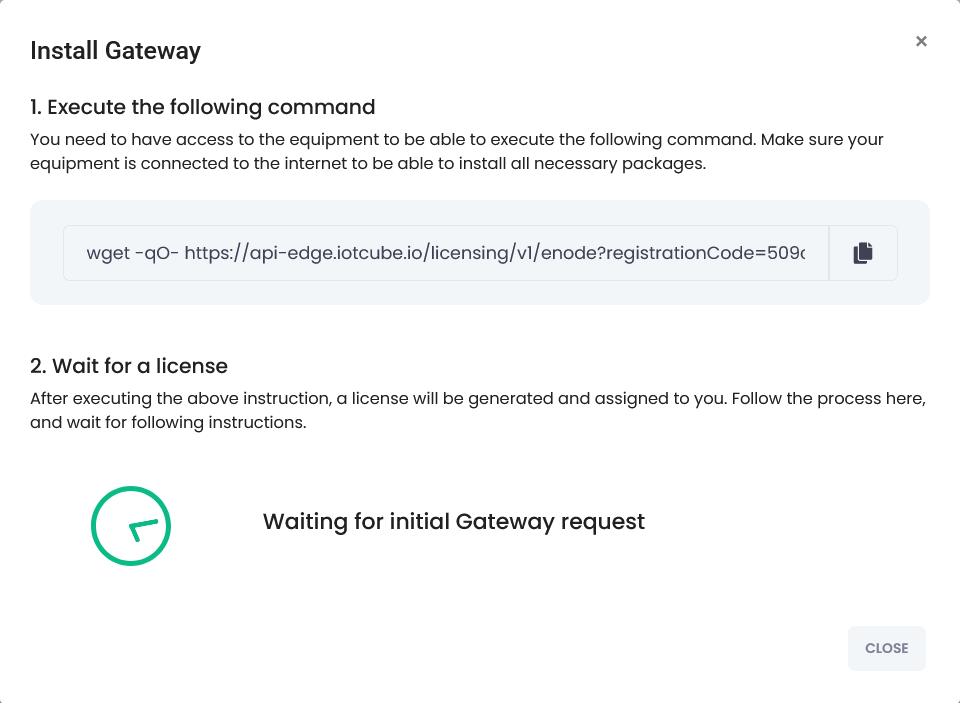
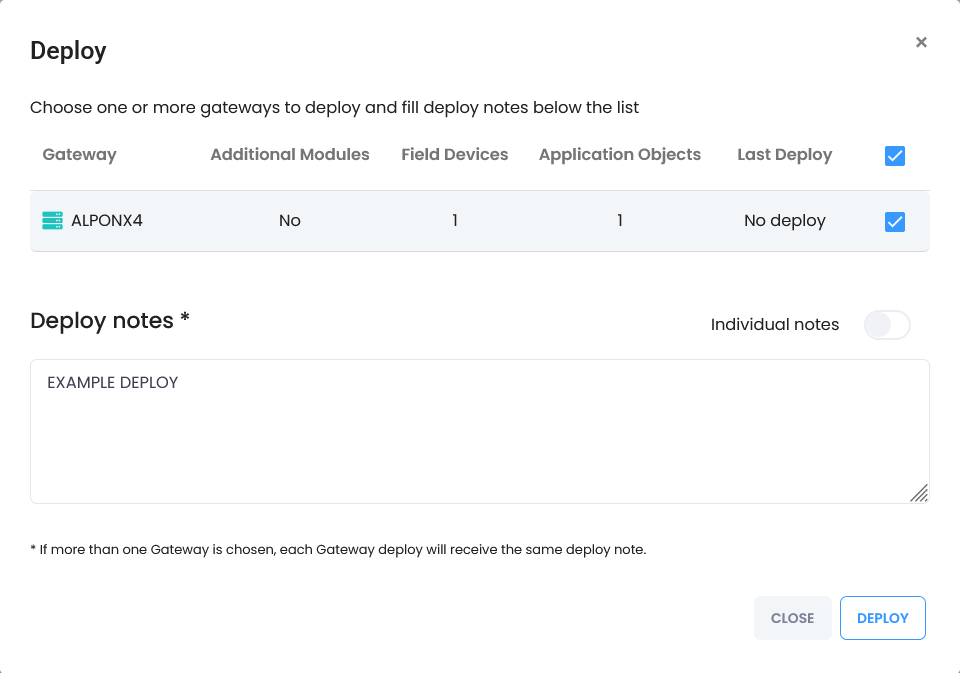
        <p>On your ALPON device, run the setup command automatically generated by the system to start the
        licensing process:</p>

        <div class="sf-terminal">
          <div class="sf-terminal__header">
            <span class="sf-terminal__dot sf-terminal__dot--r"></span>
            <span class="sf-terminal__dot sf-terminal__dot--y"></span>
            <span class="sf-terminal__dot sf-terminal__dot--g"></span>
            <span class="sf-terminal__title">bash · install the gateway agent</span>
          </div>
          <div class="sf-terminal__body">
<pre>wget -qO- https://api-edge.iotcube.io/licensing/v1/enode?registrationCode=<span class="t-yel">...</span></pre>
          </div>
        </div>

        <div class="sf-callout sf-callout--info">
          <div class="sf-callout__header">
            <svg class="sf-icon" width="16" height="16" viewBox="0 0 24 24" fill="currentColor" aria-hidden="true"><path d="M11 7h2v2h-2zm0 4h2v6h-2zm1-9C6.48 2 2 6.48 2 12s4.48 10 10 10 10-4.48 10-10S17.52 2 12 2zm0 18c-4.41 0-8-3.59-8-8s3.59-8 8-8 8 3.59 8 8-3.59 8-8 8z"/></svg>
            <span>Use the generated command</span>
          </div>
          <div class="sf-callout__content">
            <p>The full command and the correct <code>registrationCode</code> are generated automatically by IoT
            Cube — copy it exactly as shown in the interface rather than typing the placeholder above.</p>
          </div>
        </div>

        <p>After running this command, the device requests a license from the system.</p>
      </div>
    </li>


    <li class="sf-step" id="step-license">
      <div class="sf-step__header">
        <div class="sf-step__num">2</div>
        <h3 class="sf-step__title">License and serial number</h3>
      </div>
      <div class="sf-step__body">
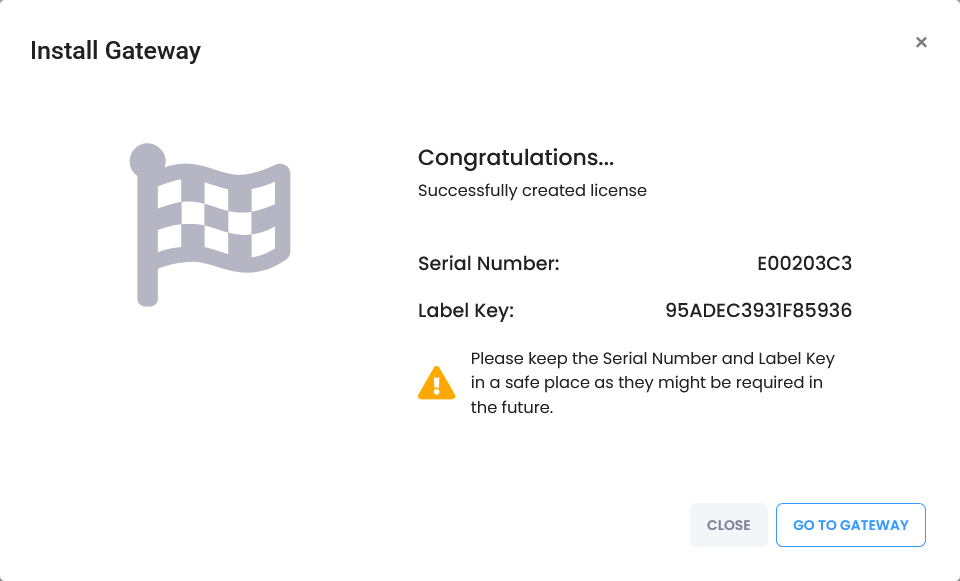
        <p>After successful licensing, the terminal prints the identity assigned to your gateway:</p>

        <div class="sf-spec-card">
          <div class="sf-spec-card__body">
            <div class="sf-spec-row">
              <span class="sf-spec-row__key"><code>Serial Number</code></span>
              <span class="sf-spec-row__val"><code>E00*****</code></span>
            </div>
            <div class="sf-spec-row">
              <span class="sf-spec-row__key"><code>Label Key</code></span>
              <span class="sf-spec-row__val"><code>95*********</code></span>
            </div>
          </div>
        </div>

        <p>Keep this information stored securely.</p>

        <span class="sf-fig-anchor" id="fig-license"></span>
        <figure class="sf-figure">
          <a href="#lb-license" aria-label="Open enlarged image">
            <img src="https://files.readme.io/b072cf06a91708678cff6e0849ddf0c8230a8879b20b459138414eb4164c5751-4.png" alt="Terminal output on the ALPON device showing the serial number and label key after licensing" loading="lazy">
          </a>
          <figcaption>Licensing output on the device with the serial number and label key.</figcaption>
        </figure>
      </div>
    </li>


    <li class="sf-step" id="step-verify-connection">
      <div class="sf-step__header">
        <div class="sf-step__num">3</div>
        <h3 class="sf-step__title">Verify gateway connection</h3>
      </div>
      <div class="sf-step__body">
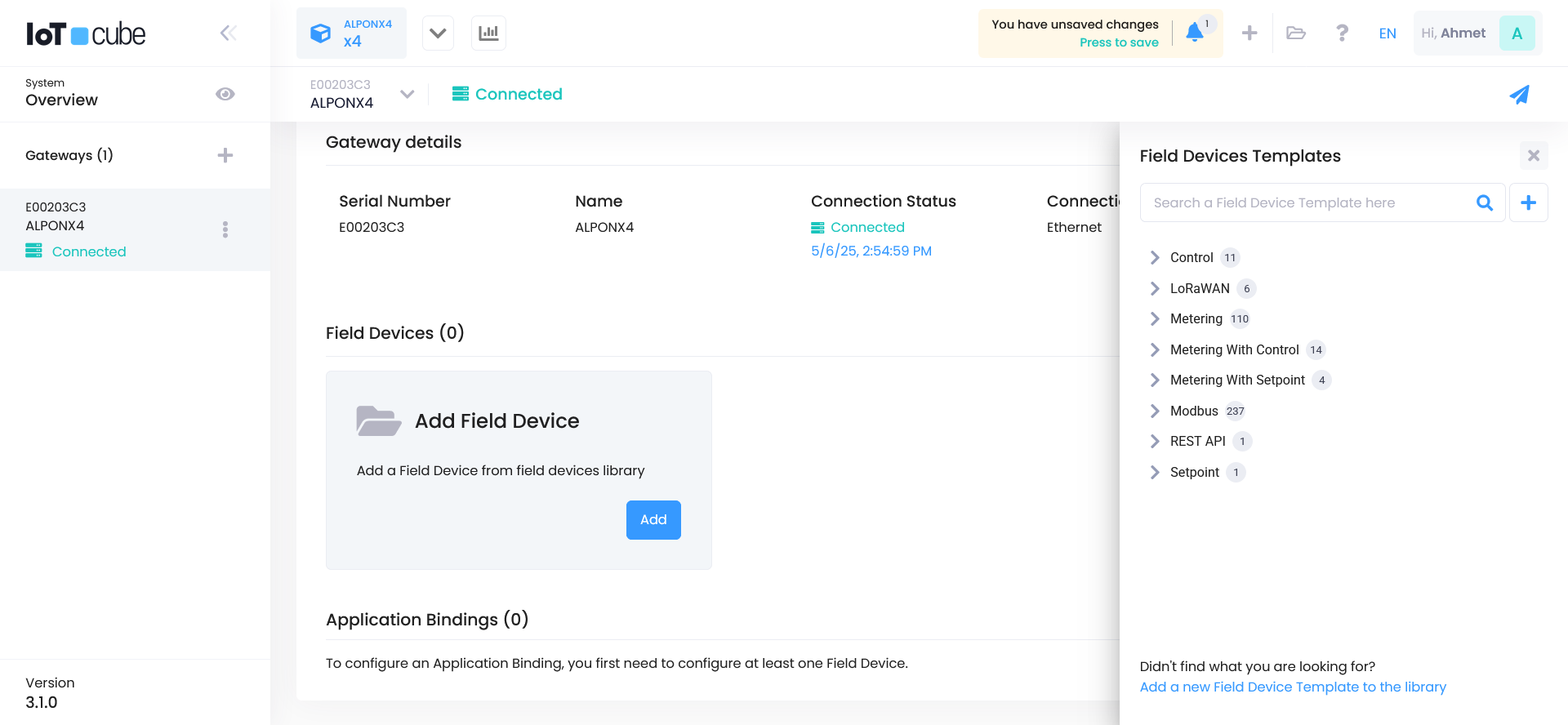
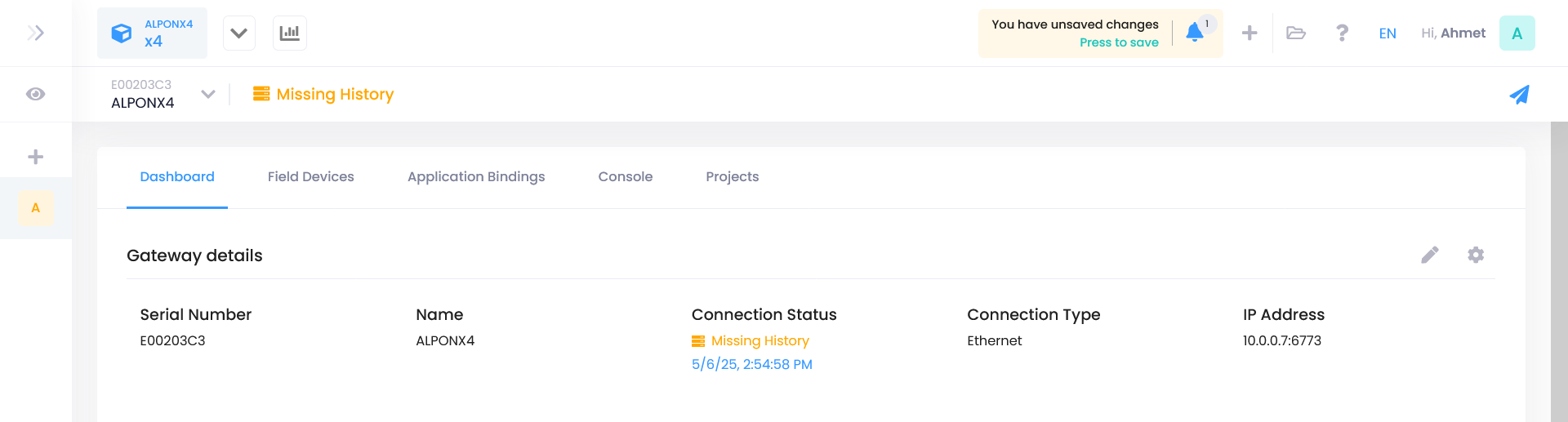
        <p>Once registered, the gateway status switches to <strong>Connected</strong> in IoT Cube.</p>

        <span class="sf-fig-anchor" id="fig-connected"></span>
        <figure class="sf-figure">
          <a href="#lb-connected" aria-label="Open enlarged image">
            <img src="https://files.readme.io/953514c3fda504dc302029b6b917270ef33b0c58ea4bfa94b87590a7ae3ccd1e-5.png" alt="IoT Cube gateway list showing the ALPON gateway with Connected status" loading="lazy">
          </a>
          <figcaption>The ALPON gateway listed as <strong>Connected</strong> in IoT Cube.</figcaption>
        </figure>
      </div>
    </li>


    <li class="sf-step" id="step-add-field-device">
      <div class="sf-step__header">
        <div class="sf-step__num">4</div>
        <h3 class="sf-step__title">Add a field device</h3>
      </div>
      <div class="sf-step__body">
        <ul>
          <li>Click the <strong>Add Field Device</strong> button.</li>
          <li>Click the <code>+</code> icon in the top right to manually create a device template.</li>
        </ul>
      </div>
    </li>


    <li class="sf-step" id="step-connection-type">
      <div class="sf-step__header">
        <div class="sf-step__num">5</div>
        <h3 class="sf-step__title">Choose connection type</h3>
      </div>
      <div class="sf-step__body">
        <span class="sf-fig-anchor" id="fig-connection-type"></span>
        <figure class="sf-figure">
          <a href="#lb-connection-type" aria-label="Open enlarged image">
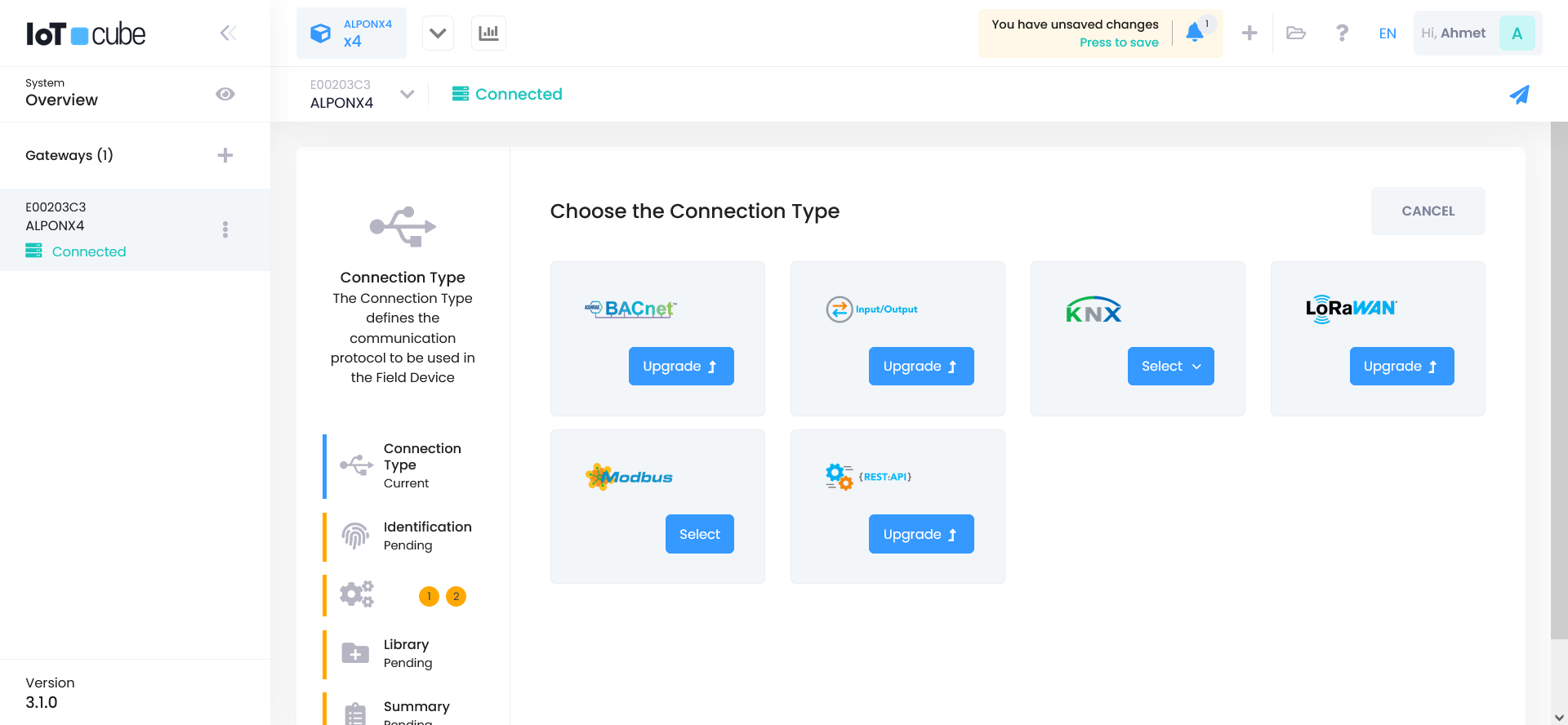
            <img src="https://files.readme.io/fdc097ceff0afc712c559c590b9514df8715f02b07916d7f0803036c5fd51c01-6.png" alt="IoT Cube connection type selection listing BACnet, Input/Output, KNX, LoRaWAN, Modbus, and REST API" loading="lazy">
          </a>
          <figcaption>Connection type selection for the new field device.</figcaption>
        </figure>

        <p>Select a protocol supported by the ALPON gateway, such as:</p>
        <ul>
          <li>BACnet</li>
          <li>Input/Output</li>
          <li>KNX</li>
          <li>LoRaWAN</li>
          <li><strong>Modbus</strong> (used in this example)</li>
          <li>REST API</li>
        </ul>
      </div>
    </li>


    <li class="sf-step" id="step-device-template">
      <div class="sf-step__header">
        <div class="sf-step__num">6</div>
        <h3 class="sf-step__title">Create a device template</h3>
      </div>
      <div class="sf-step__body">
        <span class="sf-fig-anchor" id="fig-template"></span>
        <figure class="sf-figure">
          <a href="#lb-template" aria-label="Open enlarged image">
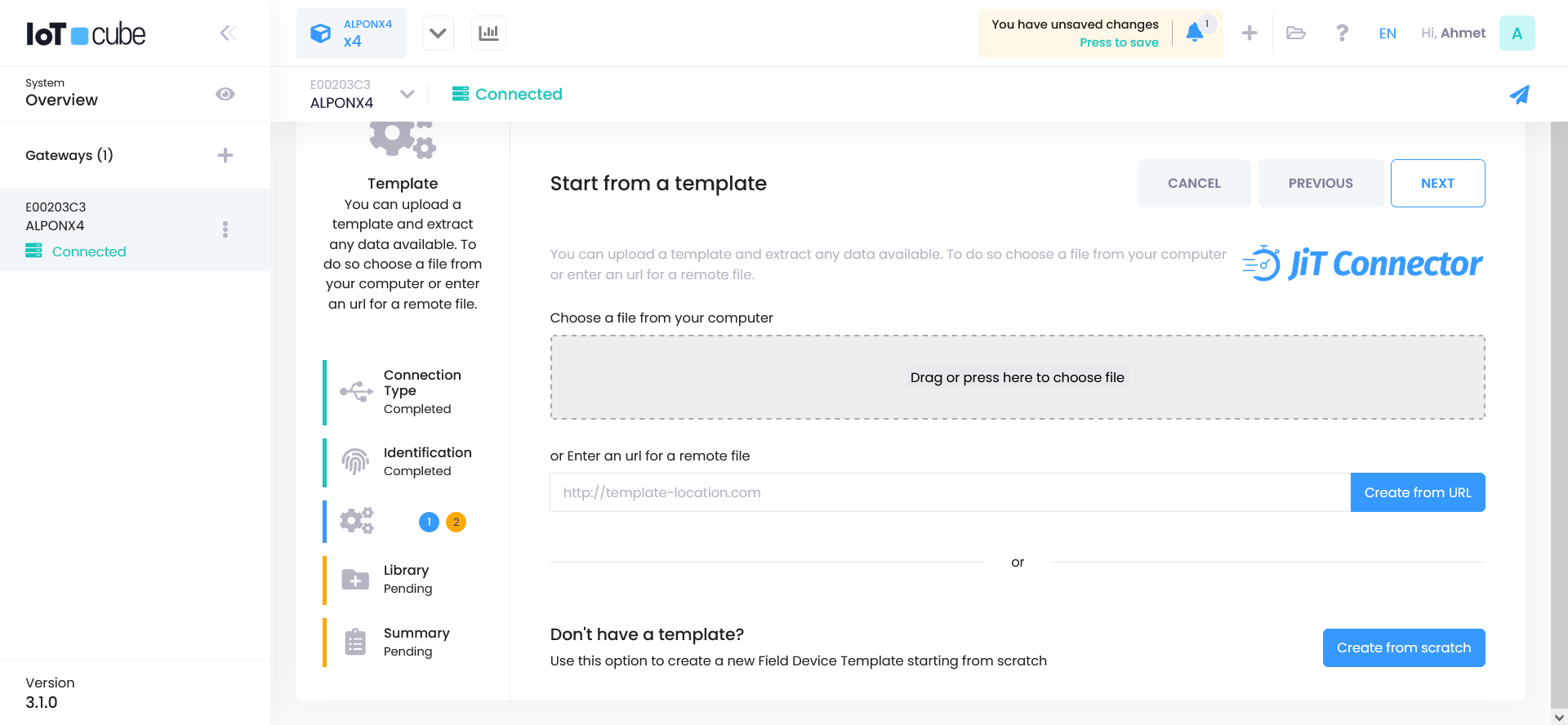
            <img src="https://files.readme.io/2fb28c8c5d83616f15cb2aba67ffa175e9bf0d10ca5bcc393f5eeee164f7fc03-7.png" alt="IoT Cube device template dialog with the Create from scratch option" loading="lazy">
          </a>
          <figcaption>Choose <strong>Create from scratch</strong> to build a new device template.</figcaption>
        </figure>

        <p>Click the <strong>Create from scratch</strong> option to build the template from the beginning.</p>
      </div>
    </li>


    <li class="sf-step" id="step-communication">
      <div class="sf-step__header">
        <div class="sf-step__num">7</div>
        <h3 class="sf-step__title">Configure communication settings</h3>
      </div>
      <div class="sf-step__body">
        <h4>Communication channel</h4>

        <span class="sf-fig-anchor" id="fig-comm-channel"></span>
        <figure class="sf-figure">
          <a href="#lb-comm-channel" aria-label="Open enlarged image">
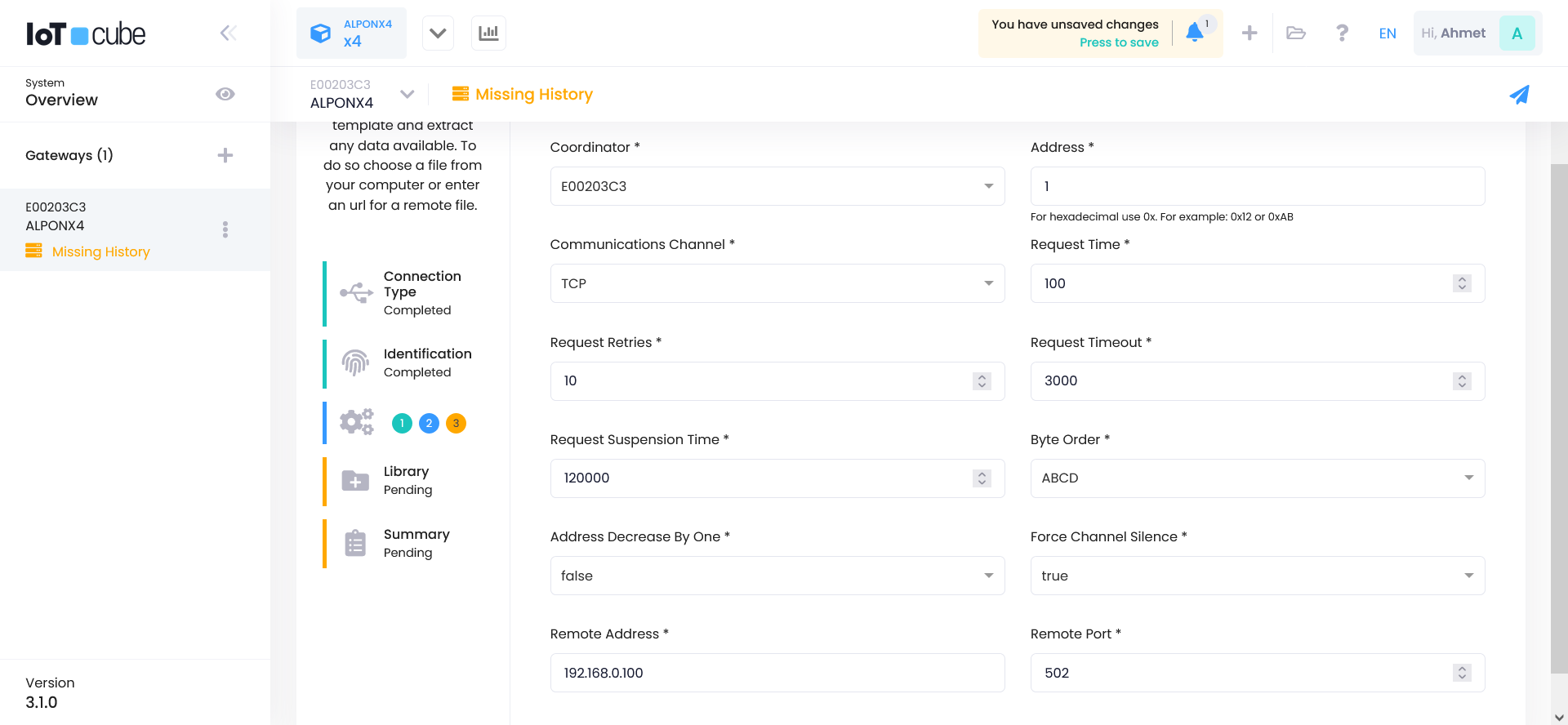
            <img src="https://files.readme.io/d895ca318eb3c4979b5039a45702f818939c3bca5d89051f13290ed381e5299a-8.png" alt="IoT Cube communication settings form with TCP selected as the communication channel" loading="lazy">
          </a>
          <figcaption>Communication settings for the Modbus template with <strong>TCP</strong> as the channel.</figcaption>
        </figure>

        <ul>
          <li><strong>Communication Channel:</strong> TCP</li>
          <li>Fill in the fields as shown.</li>
          <li>Click the <strong>Next</strong> button to proceed.</li>
        </ul>

        <h4>Register definition</h4>

        <span class="sf-fig-anchor" id="fig-comm-register"></span>
        <figure class="sf-figure">
          <a href="#lb-comm-register" aria-label="Open enlarged image">
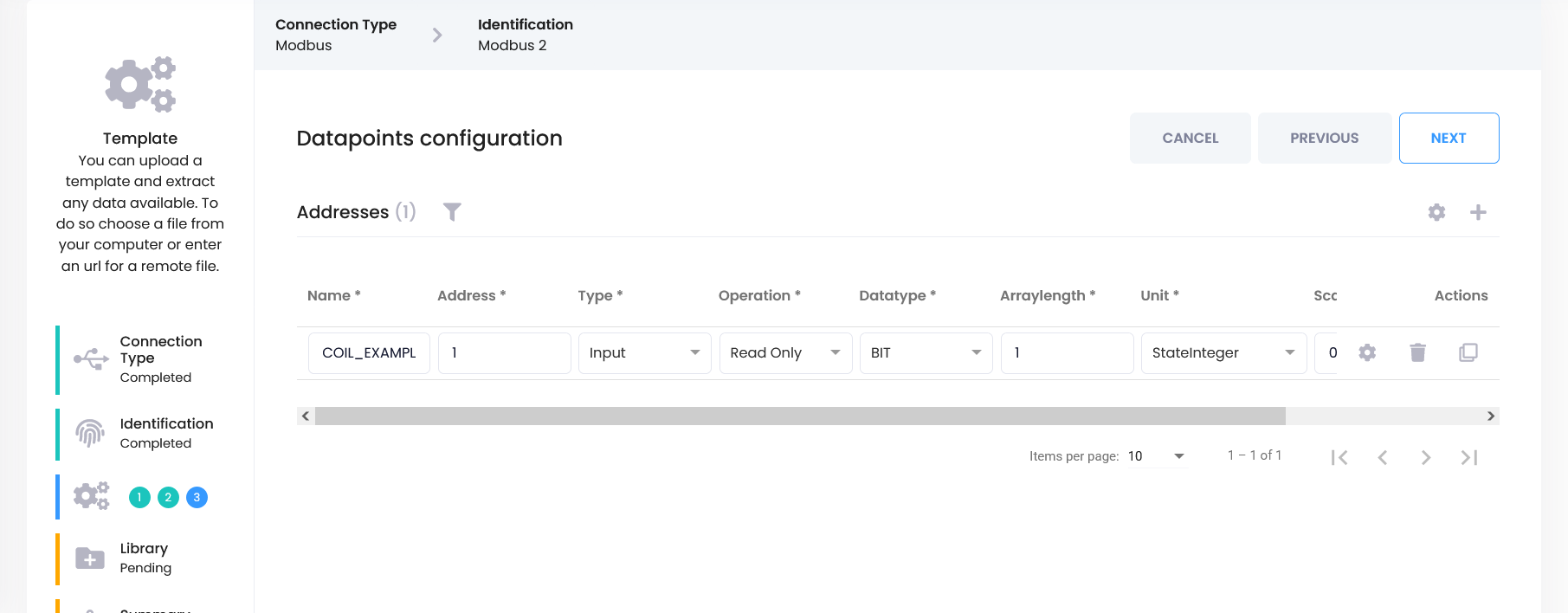
            <img src="https://files.readme.io/5cbd449078a440c5b935f790288ee0f8c2967421ed40710888eb8a56ecc4bac5-81.png" alt="IoT Cube register definition form with register type COIL, register address 1, and unit StateInteger" loading="lazy">
          </a>
          <figcaption>Register definition for the example coil.</figcaption>
        </figure>

        <div class="sf-spec-card">
          <div class="sf-spec-card__body">
            <div class="sf-spec-row">
              <span class="sf-spec-row__key"><code>Register Type</code></span>
              <span class="sf-spec-row__val">COIL</span>
            </div>
            <div class="sf-spec-row">
              <span class="sf-spec-row__key"><code>Register Address</code></span>
              <span class="sf-spec-row__val"><code>1</code></span>
            </div>
            <div class="sf-spec-row">
              <span class="sf-spec-row__key"><code>Unit</code></span>
              <span class="sf-spec-row__val">StateInteger</span>
            </div>
          </div>
        </div>

        <p>These fields may vary depending on your needs. After completing the settings, finish template creation
        with <strong>Next → Finish</strong>.</p>
      </div>
    </li>


    <li class="sf-step" id="step-application-binding">
      <div class="sf-step__header">
        <div class="sf-step__num">8</div>
        <h3 class="sf-step__title">Create application binding</h3>
      </div>
      <div class="sf-step__body">
        <p>Go to the <strong>Application Binding</strong> tab and click the <strong>Create</strong> button.</p>

        <span class="sf-fig-anchor" id="fig-binding-create"></span>
        <figure class="sf-figure">
          <a href="#lb-binding-create" aria-label="Open enlarged image">
            <img src="https://files.readme.io/486c761916808eef5f5291413f97277eef7da0598665ec4b2e38956c02078785-10.png" alt="IoT Cube Application Binding tab with the Create button" loading="lazy">
          </a>
          <figcaption>The <strong>Application Binding</strong> tab with the <strong>Create</strong> button.</figcaption>
        </figure>

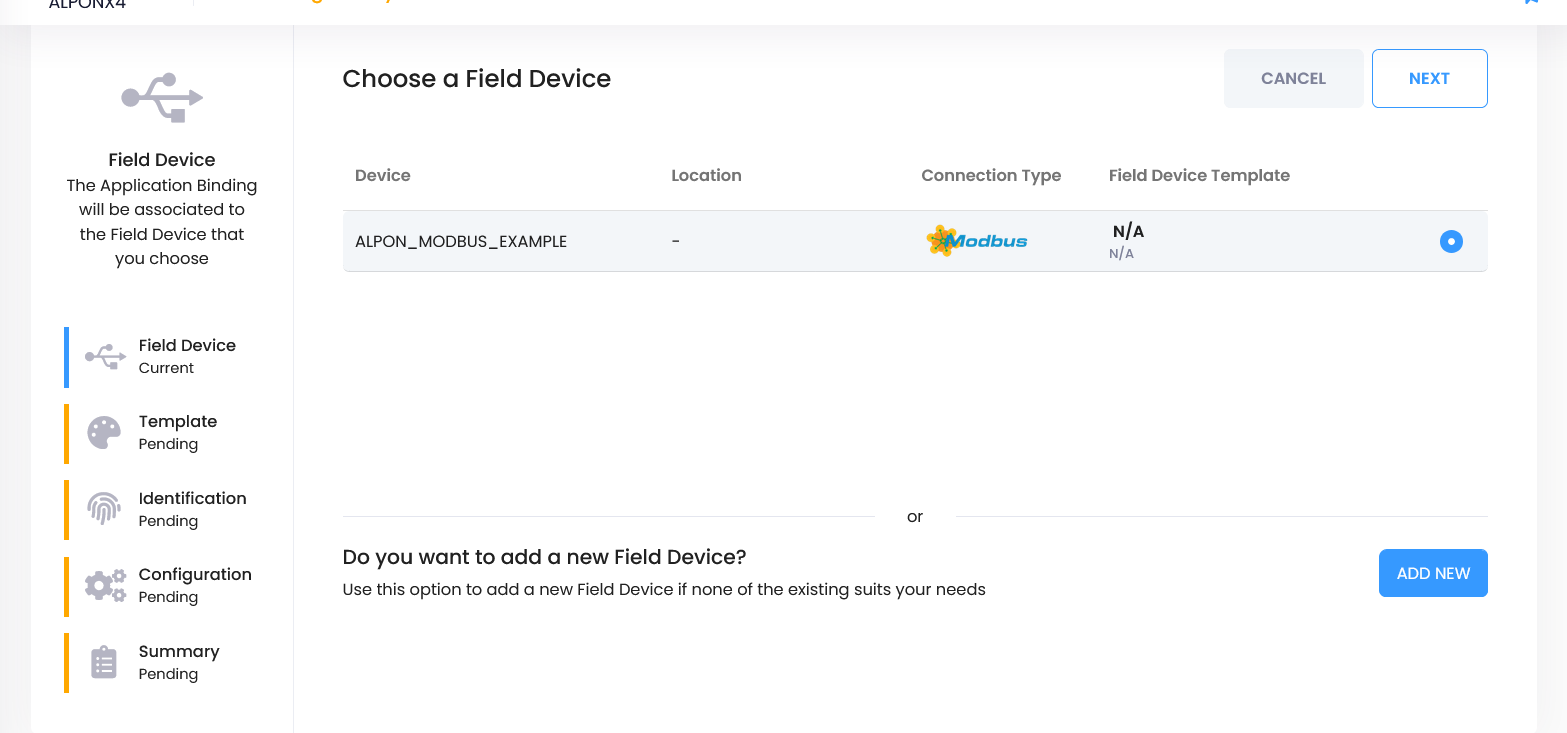
        <p>Select the <strong>Field Device</strong> you just created and proceed with <strong>Next</strong>.</p>

        <span class="sf-fig-anchor" id="fig-binding-device"></span>
        <figure class="sf-figure">
          <a href="#lb-binding-device" aria-label="Open enlarged image">
            <img src="https://files.readme.io/2cf599c80fa77fab101371b97868d353625050ceb920bcb017df6603809eaf3f-91.png" alt="IoT Cube application binding wizard with the new field device selected and the Add New button" loading="lazy">
          </a>
          <figcaption>Select the field device, then use <strong>Add New</strong> to create a binding template.</figcaption>
        </figure>

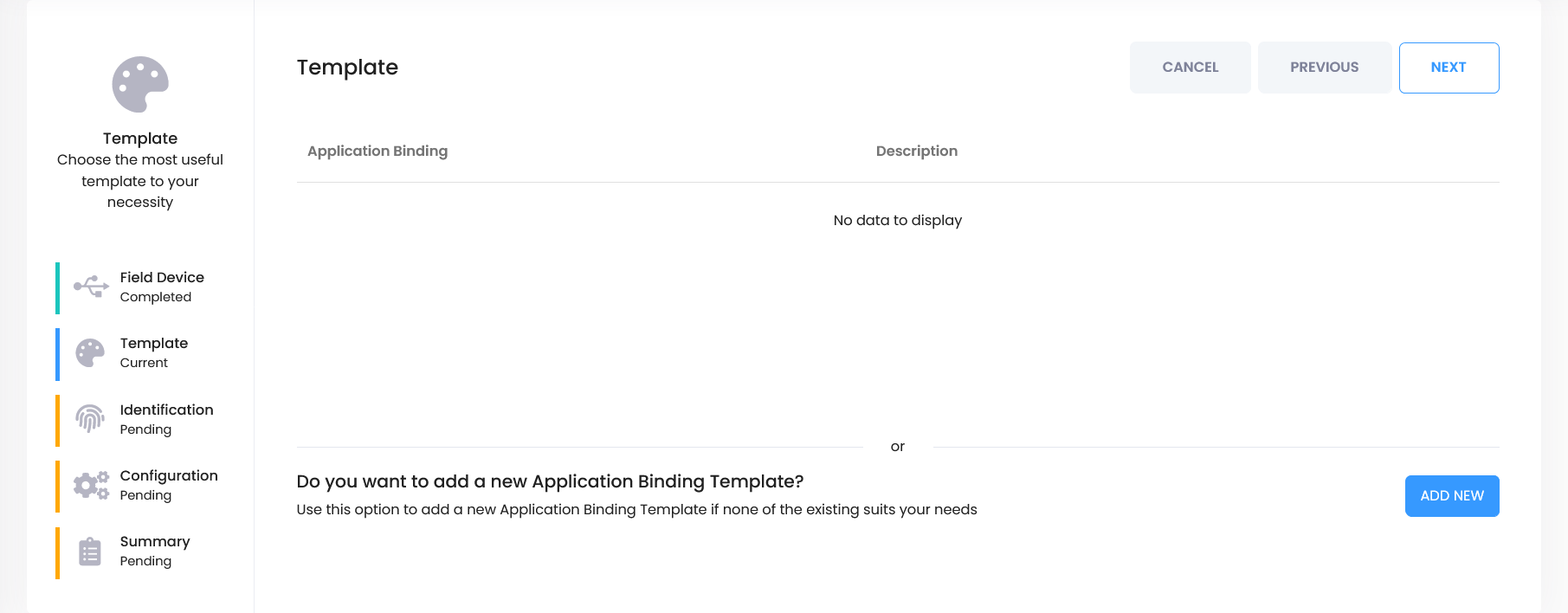
        <p>Click the <strong>Add New</strong> button to create a new binding template.</p>
      </div>
    </li>


    <li class="sf-step" id="step-data-mapping">
      <div class="sf-step__header">
        <div class="sf-step__num">9</div>
        <h3 class="sf-step__title">Configure binding &amp; data mapping</h3>
      </div>
      <div class="sf-step__body">
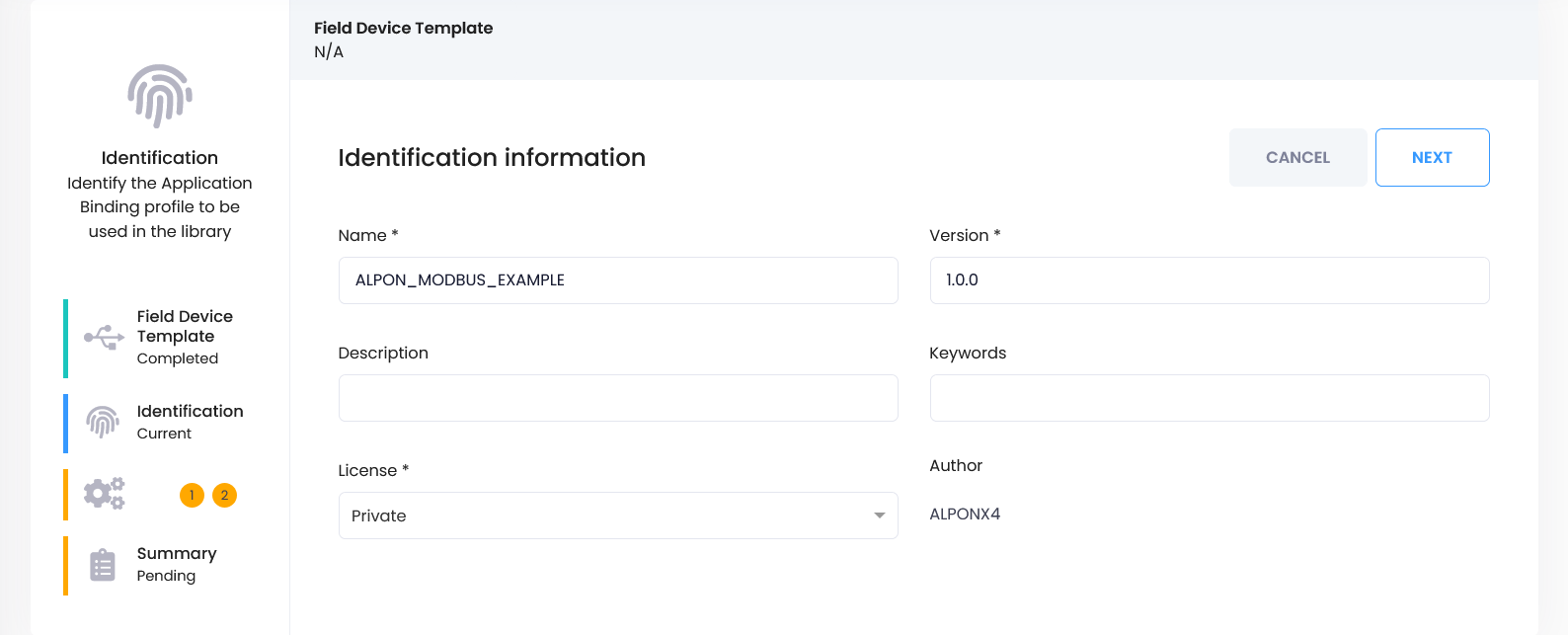
        <p>Fill in the form as shown below. Optionally, you can add a description and keywords.</p>

        <span class="sf-fig-anchor" id="fig-mapping-form"></span>
        <figure class="sf-figure">
          <a href="#lb-mapping-form" aria-label="Open enlarged image">
            <img src="https://files.readme.io/ea078a89f1bb6a7148e0e9028eb265a2b3472ecf2d3e9ce0285f2160ec976977-11.png" alt="IoT Cube binding template form with name, description, and keyword fields" loading="lazy">
          </a>
          <figcaption>The binding template form with the name and optional description and keywords.</figcaption>
        </figure>

        <p>Click <strong>Next</strong> to continue.</p>

        <span class="sf-fig-anchor" id="fig-mapping-field"></span>
        <figure class="sf-figure">
          <a href="#lb-mapping-field" aria-label="Open enlarged image">
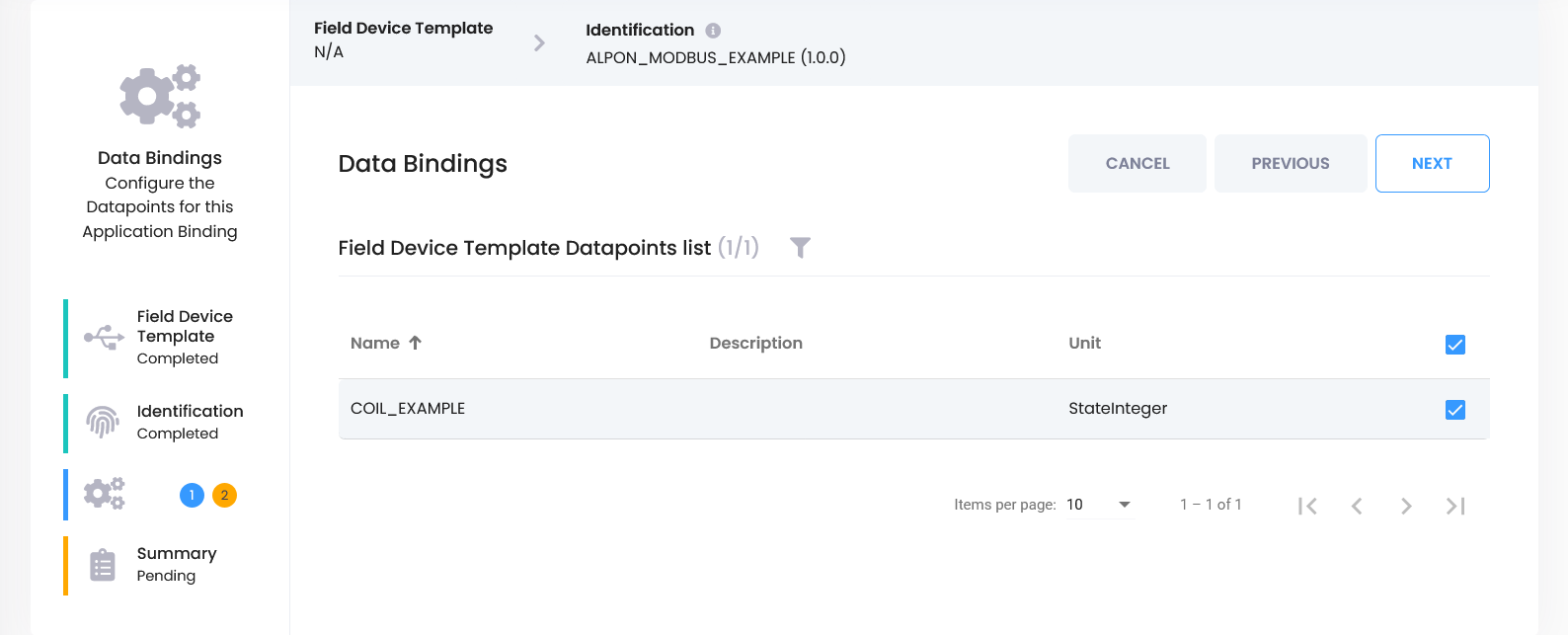
            <img src="https://files.readme.io/20f73de76b2bc81eefb1541fd4a5f677ef7ee19bf7846e87cad4efe3e32b4f2d-12.png" alt="IoT Cube data mapping screen with the COIL_EXAMPLE field selected" loading="lazy">
          </a>
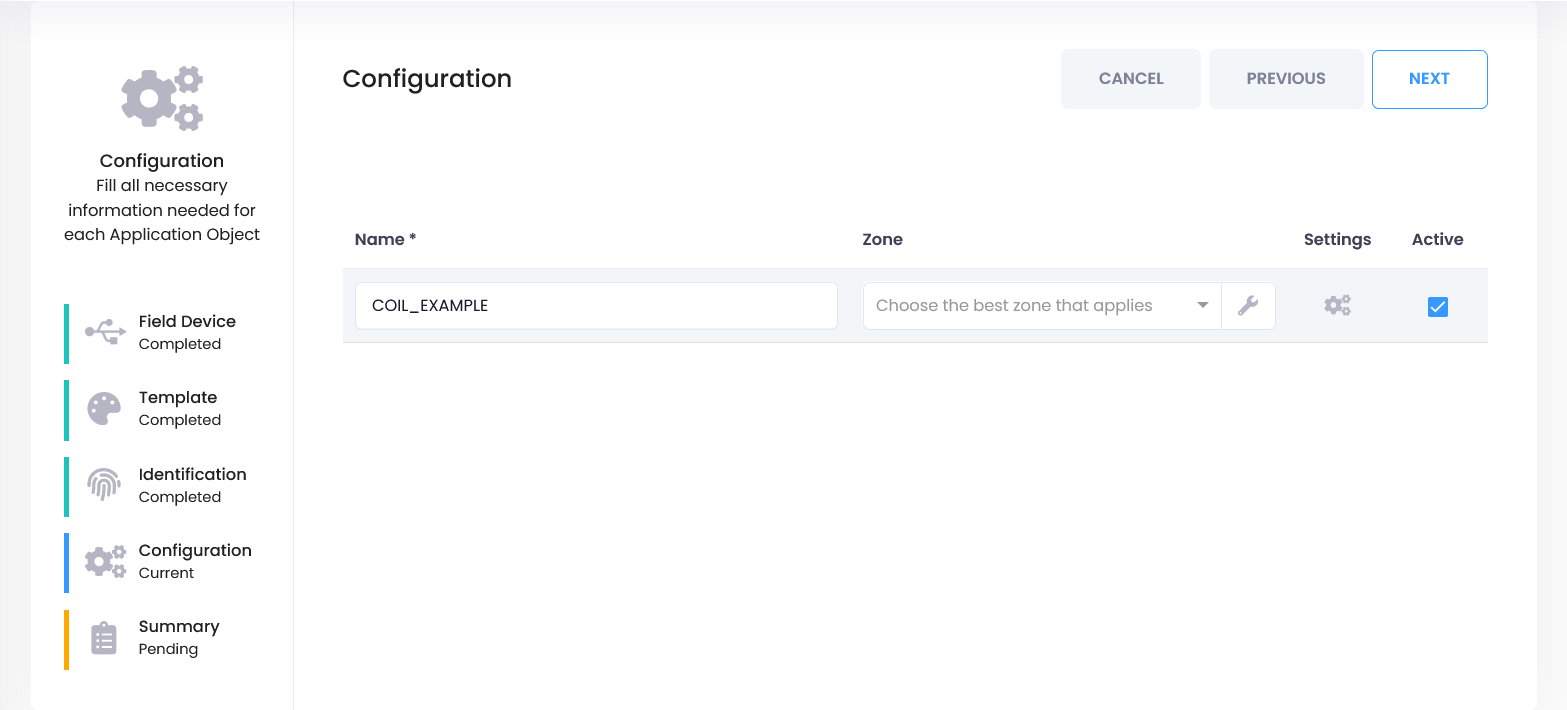
          <figcaption>Select the <code>COIL_EXAMPLE</code> field created earlier.</figcaption>
        </figure>

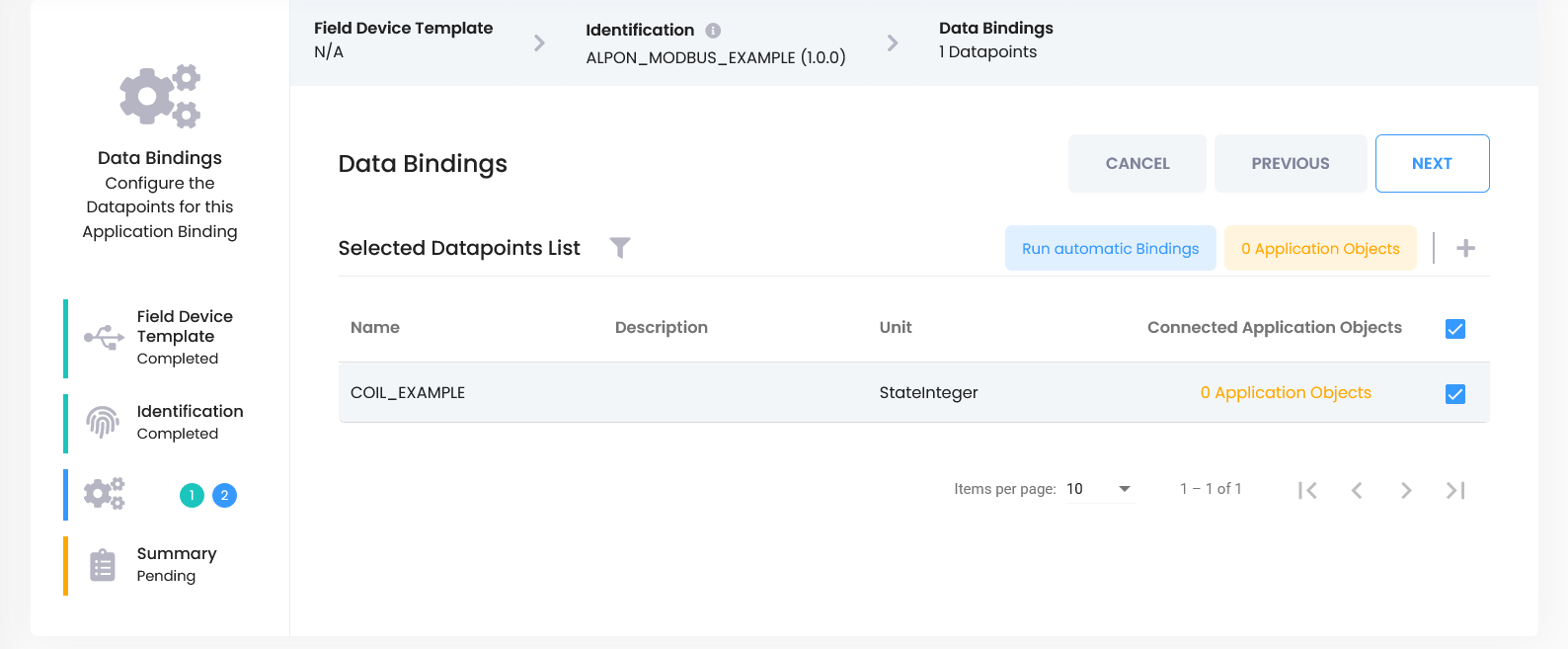
        <p>On the next screen, select the <code>COIL_EXAMPLE</code> field created earlier and click
        <strong>Next</strong> again.</p>
      </div>
    </li>


    <li class="sf-step" id="step-application-object">
      <div class="sf-step__header">
        <div class="sf-step__num">10</div>
        <h3 class="sf-step__title">Create application object</h3>
      </div>
      <div class="sf-step__body">
        <ul>
          <li>Select <code>COIL_EXAMPLE</code>.</li>
          <li>Click the <code>+</code> icon next to the <strong>0 Application Objects</strong> section.</li>
        </ul>

        <span class="sf-fig-anchor" id="fig-object-select"></span>
        <figure class="sf-figure">
          <a href="#lb-object-select" aria-label="Open enlarged image">
            <img src="https://files.readme.io/e2f53175a8bd14a2836df6cd8e6a0b039df8fe9da4816b2c42fb26f8b56ca12c-13.png" alt="IoT Cube binding screen with COIL_EXAMPLE selected" loading="lazy">
          </a>
          <figcaption><code>COIL_EXAMPLE</code> selected in the binding screen.</figcaption>
        </figure>

        <span class="sf-fig-anchor" id="fig-object-add"></span>
        <figure class="sf-figure">
          <a href="#lb-object-add" aria-label="Open enlarged image">
            <img src="https://files.readme.io/5d8a13a774b0feb3a706404b0f3c0e8de147cedd8a18d1d28110b9e8d59c5a7e-111.png" alt="IoT Cube binding screen with the plus icon next to 0 Application Objects" loading="lazy">
          </a>
          <figcaption>The <code>+</code> icon next to <strong>0 Application Objects</strong>.</figcaption>
        </figure>

        <p>In the new screen:</p>
        <ul>
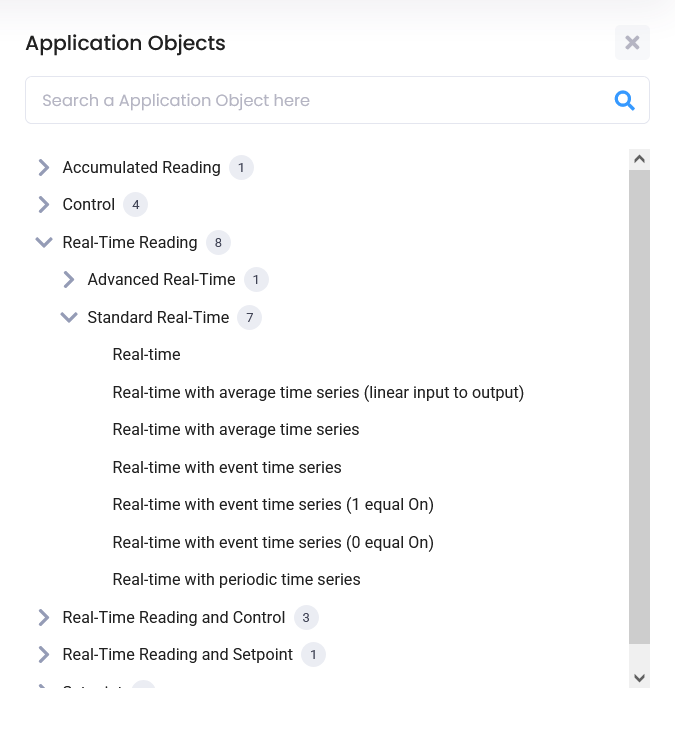
          <li>Follow the path <strong>Real-Time Reading → Standard Real-Time → Real-Time</strong>.</li>
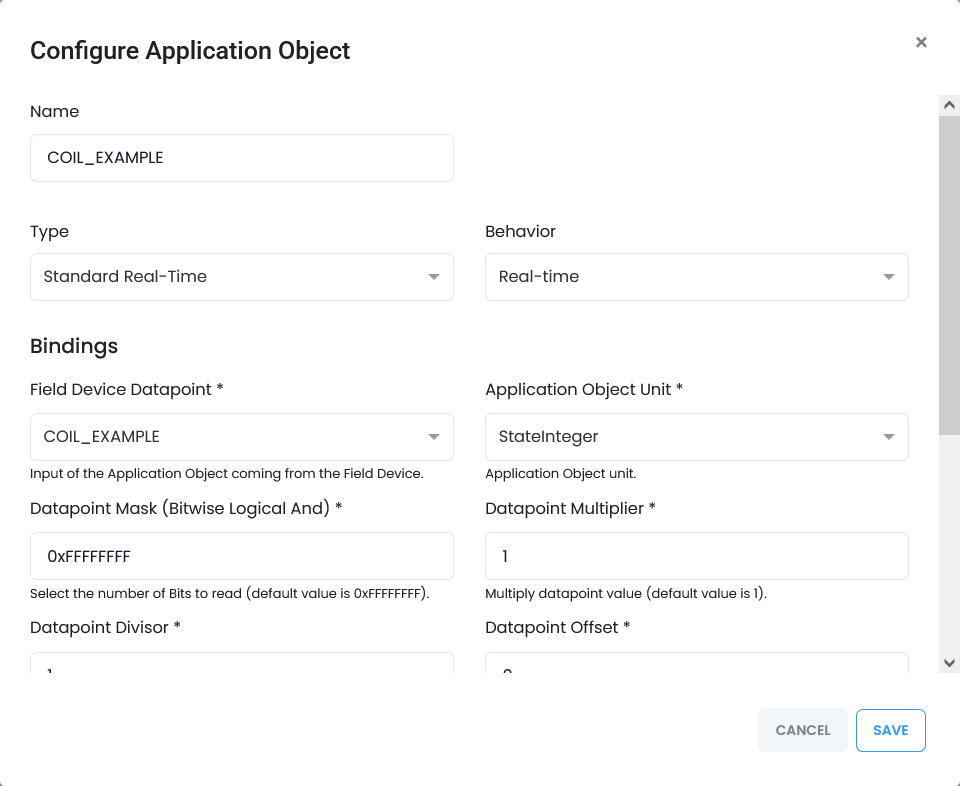
          <li>Without changing anything, click <strong>Next → Save</strong> to continue.</li>
        </ul>

        <span class="sf-fig-anchor" id="fig-object-realtime"></span>
        <figure class="sf-figure">
          <a href="#lb-object-realtime" aria-label="Open enlarged image">
            <img src="https://files.readme.io/c336b5f77eaeee5706889d9fa27263201f742222731c54dbc0c23d7d88a5df6b-14.png" alt="IoT Cube application object dialog with Real-Time Reading, Standard Real-Time, Real-Time selected" loading="lazy">
          </a>
          <figcaption>The application object dialog with <strong>Real-Time Reading → Standard Real-Time → Real-Time</strong> selected.</figcaption>
        </figure>

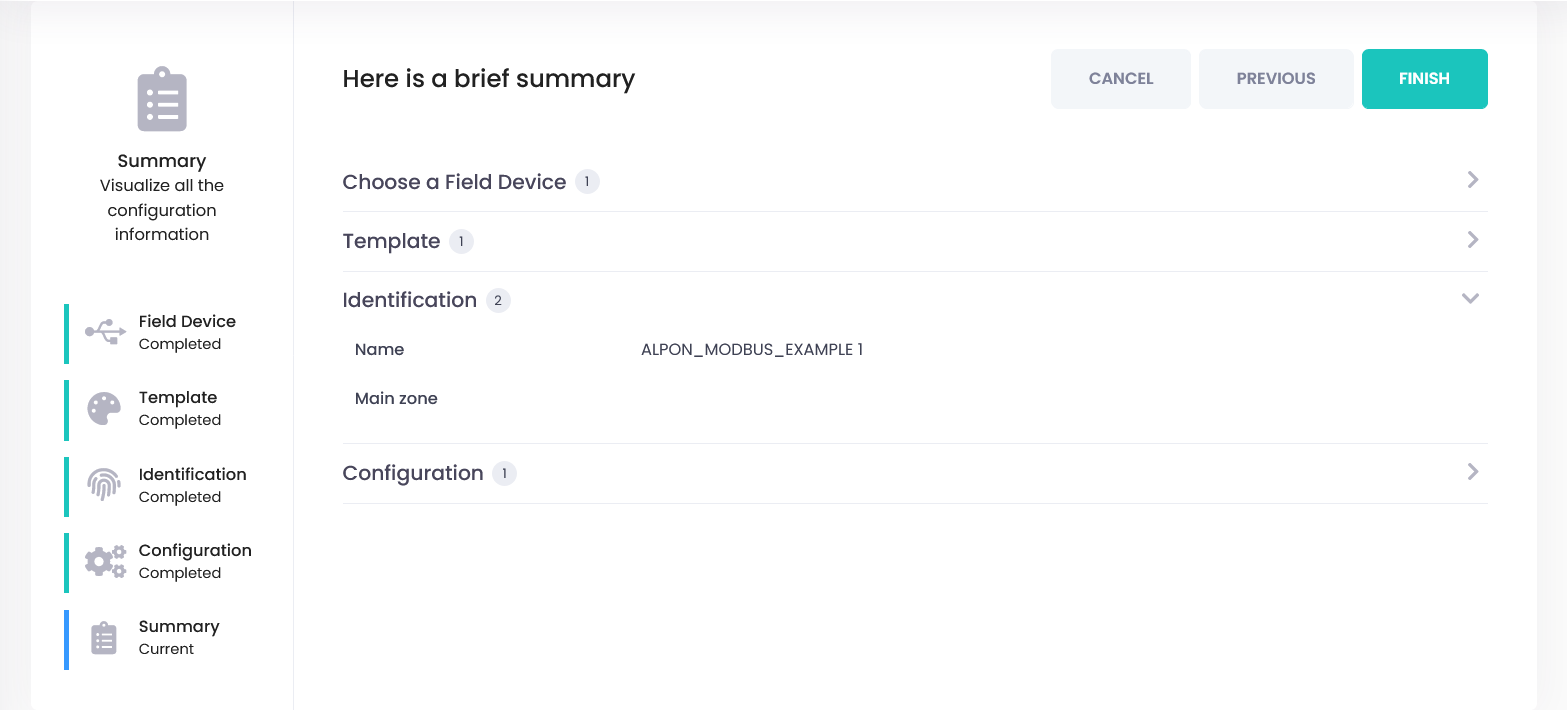
        <p>Once the form closes, complete the process with <strong>Next → Finish</strong>.</p>
      </div>
    </li>


    <li class="sf-step" id="step-save-binding">
      <div class="sf-step__header">
        <div class="sf-step__num">11</div>
        <h3 class="sf-step__title">Save binding settings</h3>
      </div>
      <div class="sf-step__body">
        <ul>
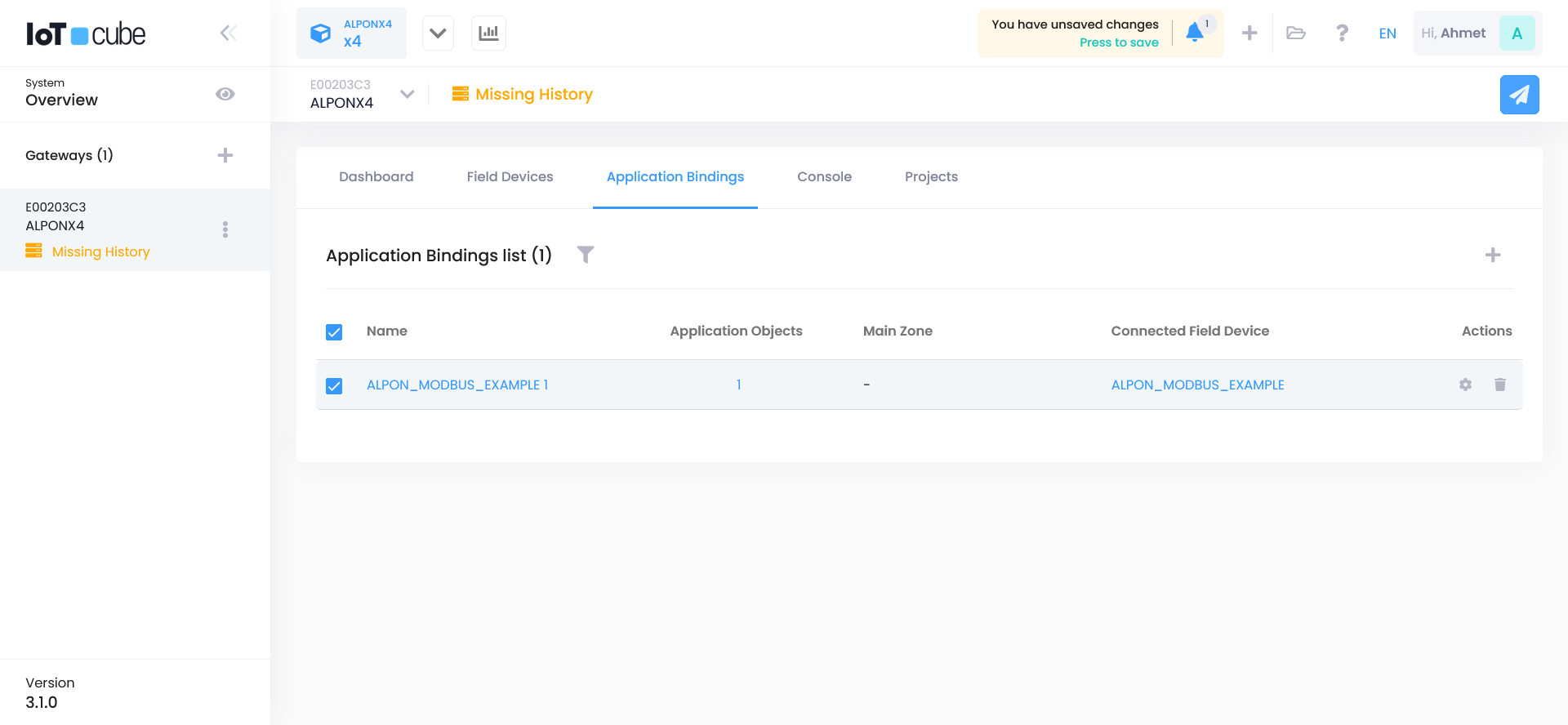
          <li>Select the Application Binding you created and proceed with <strong>Next</strong>.</li>
          <li>Complete the process without changing the other tabs.</li>
        </ul>

        <span class="sf-fig-anchor" id="fig-save-1"></span>
        <figure class="sf-figure">
          <a href="#lb-save-1" aria-label="Open enlarged image">
            <img src="https://files.readme.io/9fd2027efa45921c05d99a6a0c155f589cfe8cfb6a9644064317f5aeab8e7b5d-16.png" alt="IoT Cube wizard with the newly created application binding selected" loading="lazy">
          </a>
          <figcaption>Select the application binding you created.</figcaption>
        </figure>

        <span class="sf-fig-anchor" id="fig-save-2"></span>
        <figure class="sf-figure">
          <a href="#lb-save-2" aria-label="Open enlarged image">
            <img src="https://files.readme.io/c7f8c2cd03c2088d26b74a71354344af3fbb8bbcdaf6355bb296c36f25cf0054-17.png" alt="IoT Cube wizard tab left at its default settings before proceeding" loading="lazy">
          </a>
          <figcaption>Leave the remaining tabs unchanged and continue with <strong>Next</strong>.</figcaption>
        </figure>

        <span class="sf-fig-anchor" id="fig-save-3"></span>
        <figure class="sf-figure">
          <a href="#lb-save-3" aria-label="Open enlarged image">
            <img src="https://files.readme.io/898a74b73cb5ded14b4f7730dd94035c0e08ba11bf94ace6c78125b197f15368-18.png" alt="IoT Cube wizard showing a further tab with default settings" loading="lazy">
          </a>
          <figcaption>Continue through the wizard without changing the defaults.</figcaption>
        </figure>

        <span class="sf-fig-anchor" id="fig-save-4"></span>
        <figure class="sf-figure">
          <a href="#lb-save-4" aria-label="Open enlarged image">
            <img src="https://files.readme.io/8f89770093e7c74390cdae4d444999443504e588238b6798f591c670bf4fc3cb-19.png" alt="IoT Cube wizard final screen confirming the saved binding settings" loading="lazy">
          </a>
          <figcaption>The binding settings are saved on the final screen.</figcaption>
        </figure>
      </div>
    </li>


    <li class="sf-step" id="step-deploy">
      <div class="sf-step__header">
        <div class="sf-step__num">12</div>
        <h3 class="sf-step__title">Deploy configuration</h3>
      </div>
      <div class="sf-step__body">
        <p>After all steps are completed, you need to <strong>Deploy</strong> the configuration to apply it to the
        device. Click the blue airplane icon in the top right corner.</p>

        <span class="sf-fig-anchor" id="fig-deploy-icon"></span>
        <figure class="sf-figure">
          <a href="#lb-deploy-icon" aria-label="Open enlarged image">
            <img src="https://files.readme.io/37e7d226696d0abac8902c7f9876671e221b02e44c080f1123954dd48ab652c6-191.png" alt="IoT Cube interface with the blue airplane Deploy icon in the top right corner" loading="lazy">
          </a>
          <figcaption>The blue airplane icon in the top right starts the deployment.</figcaption>
        </figure>

        <p>In the popup window, click the <strong>Deploy</strong> button again.</p>

        <span class="sf-fig-anchor" id="fig-deploy-confirm"></span>
        <figure class="sf-figure">
          <a href="#lb-deploy-confirm" aria-label="Open enlarged image">
            <img src="https://files.readme.io/326d553a44820c4088054be2268a077662e256417ea95ce9c0cc95d40c0cabdd-20.png" alt="IoT Cube deploy confirmation popup with the Deploy button" loading="lazy">
          </a>
          <figcaption>Confirm the deployment in the popup window.</figcaption>
        </figure>
      </div>
    </li>


    <li class="sf-step" id="step-verify-data">
      <div class="sf-step__header">
        <div class="sf-step__num">13</div>
        <h3 class="sf-step__title">Verify data flow</h3>
      </div>
      <div class="sf-step__body">
        <p>After the deploy process is complete, check whether data is coming from the device:</p>
        <ul>
          <li>Click the graph icon next to your device name.</li>
          <li>Check if live data is flowing in.</li>
        </ul>

        <span class="sf-fig-anchor" id="fig-data-graph-icon"></span>
        <figure class="sf-figure">
          <a href="#lb-data-graph-icon" aria-label="Open enlarged image">
            <img src="https://files.readme.io/0c43452f3801bfcb7c96c806dd4b6243560e236c59f33ca94352d38838aded85-19.png" alt="IoT Cube device list with the graph icon next to the device name" loading="lazy">
          </a>
          <figcaption>The graph icon next to the device name opens the live data view.</figcaption>
        </figure>

        <span class="sf-fig-anchor" id="fig-data-live"></span>
        <figure class="sf-figure">
          <a href="#lb-data-live" aria-label="Open enlarged image">
            <img src="https://files.readme.io/3115ef052f39e12a1147721a180f72964bdb35ce2eea0388c6f1f124906dd82b-21.png" alt="IoT Cube live data graph showing values arriving from the Modbus coil" loading="lazy">
          </a>
          <figcaption>Live data from the field device arriving in IoT Cube.</figcaption>
        </figure>

        <p>If data is visible, your setup is complete.</p>
      </div>
    </li>

  </ol>


  <div class="sf-callout sf-callout--success">
    <div class="sf-callout__header">
      <svg class="sf-icon" width="16" height="16" viewBox="0 0 24 24" fill="currentColor" aria-hidden="true"><path d="M12 2C6.48 2 2 6.48 2 12s4.48 10 10 10 10-4.48 10-10S17.52 2 12 2zm-2 15-5-5 1.41-1.41L10 14.17l7.59-7.59L19 8l-9 9z"/></svg>
      <span>Ready when…</span>
    </div>
    <div class="sf-callout__content">
      <ul>
        <li>The licensing command printed a <strong>Serial Number</strong> and <strong>Label Key</strong> on the device.</li>
        <li>The gateway shows as <strong>Connected</strong> in IoT Cube.</li>
        <li>The configuration has been deployed and the graph icon next to the device shows live data flowing in.</li>
      </ul>
      <p>Your ALPON is now successfully connected as an IoT Cube gateway. You can continue adding devices,
      configuring bindings, and visualizing real-time data.</p>
    </div>
  </div>


  <div class="sf-lightbox" id="lb-agent-1" role="dialog" aria-label="Enlarged image: IoT Cube gateway section">
    <a class="sf-lightbox__backdrop" href="#fig-agent-1" aria-label="Close"></a>
    <a class="sf-lightbox__close" href="#fig-agent-1" aria-label="Close enlarged image">
      <svg viewBox="0 0 24 24"><line x1="18" y1="6" x2="6" y2="18"/><line x1="6" y1="6" x2="18" y2="18"/></svg>
    </a>
    <div class="sf-lightbox__inner">
      <a class="sf-lightbox__img-wrap" href="#fig-agent-1" aria-label="Close">
        <img src="https://files.readme.io/be33d09b10c56b4fd355c094c3e09d9248d156595fb5842e34eb215f74fed867-1.png" alt="IoT Cube gateway section">
      </a>
      <div class="sf-lightbox__caption">Start from the gateway section of the IoT Cube interface to add a new gateway.</div>
    </div>
  </div>

  <div class="sf-lightbox" id="lb-agent-2" role="dialog" aria-label="Enlarged image: IoT Cube gateway registration dialog">
    <a class="sf-lightbox__backdrop" href="#fig-agent-2" aria-label="Close"></a>
    <a class="sf-lightbox__close" href="#fig-agent-2" aria-label="Close enlarged image">
      <svg viewBox="0 0 24 24"><line x1="18" y1="6" x2="6" y2="18"/><line x1="6" y1="6" x2="18" y2="18"/></svg>
    </a>
    <div class="sf-lightbox__inner">
      <a class="sf-lightbox__img-wrap" href="#fig-agent-2" aria-label="Close">
        <img src="https://files.readme.io/90074a5e0658a93bbe3aa54d125c79f08259e9f6a14242b45673771648043ba8-2.png" alt="IoT Cube gateway registration dialog">
      </a>
      <div class="sf-lightbox__caption">IoT Cube generates a registration code for the new gateway.</div>
    </div>
  </div>

  <div class="sf-lightbox" id="lb-agent-3" role="dialog" aria-label="Enlarged image: generated installation command">
    <a class="sf-lightbox__backdrop" href="#fig-agent-3" aria-label="Close"></a>
    <a class="sf-lightbox__close" href="#fig-agent-3" aria-label="Close enlarged image">
      <svg viewBox="0 0 24 24"><line x1="18" y1="6" x2="6" y2="18"/><line x1="6" y1="6" x2="18" y2="18"/></svg>
    </a>
    <div class="sf-lightbox__inner">
      <a class="sf-lightbox__img-wrap" href="#fig-agent-3" aria-label="Close">
        <img src="https://files.readme.io/5247dbefe2cae6ecc2eb08064aa09fa46cb8bda12852482a2de60766a03c0717-3.png" alt="Generated installation command with registration code">
      </a>
      <div class="sf-lightbox__caption">The installation command with the registrationCode, ready to copy to the device.</div>
    </div>
  </div>

  <div class="sf-lightbox" id="lb-license" role="dialog" aria-label="Enlarged image: licensing output">
    <a class="sf-lightbox__backdrop" href="#fig-license" aria-label="Close"></a>
    <a class="sf-lightbox__close" href="#fig-license" aria-label="Close enlarged image">
      <svg viewBox="0 0 24 24"><line x1="18" y1="6" x2="6" y2="18"/><line x1="6" y1="6" x2="18" y2="18"/></svg>
    </a>
    <div class="sf-lightbox__inner">
      <a class="sf-lightbox__img-wrap" href="#fig-license" aria-label="Close">
        <img src="https://files.readme.io/b072cf06a91708678cff6e0849ddf0c8230a8879b20b459138414eb4164c5751-4.png" alt="Licensing output with serial number and label key">
      </a>
      <div class="sf-lightbox__caption">Licensing output on the device with the serial number and label key.</div>
    </div>
  </div>

  <div class="sf-lightbox" id="lb-connected" role="dialog" aria-label="Enlarged image: gateway Connected status">
    <a class="sf-lightbox__backdrop" href="#fig-connected" aria-label="Close"></a>
    <a class="sf-lightbox__close" href="#fig-connected" aria-label="Close enlarged image">
      <svg viewBox="0 0 24 24"><line x1="18" y1="6" x2="6" y2="18"/><line x1="6" y1="6" x2="18" y2="18"/></svg>
    </a>
    <div class="sf-lightbox__inner">
      <a class="sf-lightbox__img-wrap" href="#fig-connected" aria-label="Close">
        <img src="https://files.readme.io/953514c3fda504dc302029b6b917270ef33b0c58ea4bfa94b87590a7ae3ccd1e-5.png" alt="Gateway listed as Connected in IoT Cube">
      </a>
      <div class="sf-lightbox__caption">The ALPON gateway listed as Connected in IoT Cube.</div>
    </div>
  </div>

  <div class="sf-lightbox" id="lb-connection-type" role="dialog" aria-label="Enlarged image: connection type selection">
    <a class="sf-lightbox__backdrop" href="#fig-connection-type" aria-label="Close"></a>
    <a class="sf-lightbox__close" href="#fig-connection-type" aria-label="Close enlarged image">
      <svg viewBox="0 0 24 24"><line x1="18" y1="6" x2="6" y2="18"/><line x1="6" y1="6" x2="18" y2="18"/></svg>
    </a>
    <div class="sf-lightbox__inner">
      <a class="sf-lightbox__img-wrap" href="#fig-connection-type" aria-label="Close">
        <img src="https://files.readme.io/fdc097ceff0afc712c559c590b9514df8715f02b07916d7f0803036c5fd51c01-6.png" alt="Connection type selection">
      </a>
      <div class="sf-lightbox__caption">Connection type selection for the new field device.</div>
    </div>
  </div>

  <div class="sf-lightbox" id="lb-template" role="dialog" aria-label="Enlarged image: Create from scratch option">
    <a class="sf-lightbox__backdrop" href="#fig-template" aria-label="Close"></a>
    <a class="sf-lightbox__close" href="#fig-template" aria-label="Close enlarged image">
      <svg viewBox="0 0 24 24"><line x1="18" y1="6" x2="6" y2="18"/><line x1="6" y1="6" x2="18" y2="18"/></svg>
    </a>
    <div class="sf-lightbox__inner">
      <a class="sf-lightbox__img-wrap" href="#fig-template" aria-label="Close">
        <img src="https://files.readme.io/2fb28c8c5d83616f15cb2aba67ffa175e9bf0d10ca5bcc393f5eeee164f7fc03-7.png" alt="Device template dialog with Create from scratch">
      </a>
      <div class="sf-lightbox__caption">Choose Create from scratch to build a new device template.</div>
    </div>
  </div>

  <div class="sf-lightbox" id="lb-comm-channel" role="dialog" aria-label="Enlarged image: communication settings">
    <a class="sf-lightbox__backdrop" href="#fig-comm-channel" aria-label="Close"></a>
    <a class="sf-lightbox__close" href="#fig-comm-channel" aria-label="Close enlarged image">
      <svg viewBox="0 0 24 24"><line x1="18" y1="6" x2="6" y2="18"/><line x1="6" y1="6" x2="18" y2="18"/></svg>
    </a>
    <div class="sf-lightbox__inner">
      <a class="sf-lightbox__img-wrap" href="#fig-comm-channel" aria-label="Close">
        <img src="https://files.readme.io/d895ca318eb3c4979b5039a45702f818939c3bca5d89051f13290ed381e5299a-8.png" alt="Communication settings with TCP channel">
      </a>
      <div class="sf-lightbox__caption">Communication settings for the Modbus template with TCP as the channel.</div>
    </div>
  </div>

  <div class="sf-lightbox" id="lb-comm-register" role="dialog" aria-label="Enlarged image: register definition">
    <a class="sf-lightbox__backdrop" href="#fig-comm-register" aria-label="Close"></a>
    <a class="sf-lightbox__close" href="#fig-comm-register" aria-label="Close enlarged image">
      <svg viewBox="0 0 24 24"><line x1="18" y1="6" x2="6" y2="18"/><line x1="6" y1="6" x2="18" y2="18"/></svg>
    </a>
    <div class="sf-lightbox__inner">
      <a class="sf-lightbox__img-wrap" href="#fig-comm-register" aria-label="Close">
        <img src="https://files.readme.io/5cbd449078a440c5b935f790288ee0f8c2967421ed40710888eb8a56ecc4bac5-81.png" alt="Register definition form">
      </a>
      <div class="sf-lightbox__caption">Register definition for the example coil.</div>
    </div>
  </div>

  <div class="sf-lightbox" id="lb-binding-create" role="dialog" aria-label="Enlarged image: Application Binding tab">
    <a class="sf-lightbox__backdrop" href="#fig-binding-create" aria-label="Close"></a>
    <a class="sf-lightbox__close" href="#fig-binding-create" aria-label="Close enlarged image">
      <svg viewBox="0 0 24 24"><line x1="18" y1="6" x2="6" y2="18"/><line x1="6" y1="6" x2="18" y2="18"/></svg>
    </a>
    <div class="sf-lightbox__inner">
      <a class="sf-lightbox__img-wrap" href="#fig-binding-create" aria-label="Close">
        <img src="https://files.readme.io/486c761916808eef5f5291413f97277eef7da0598665ec4b2e38956c02078785-10.png" alt="Application Binding tab with Create button">
      </a>
      <div class="sf-lightbox__caption">The Application Binding tab with the Create button.</div>
    </div>
  </div>

  <div class="sf-lightbox" id="lb-binding-device" role="dialog" aria-label="Enlarged image: field device selection">
    <a class="sf-lightbox__backdrop" href="#fig-binding-device" aria-label="Close"></a>
    <a class="sf-lightbox__close" href="#fig-binding-device" aria-label="Close enlarged image">
      <svg viewBox="0 0 24 24"><line x1="18" y1="6" x2="6" y2="18"/><line x1="6" y1="6" x2="18" y2="18"/></svg>
    </a>
    <div class="sf-lightbox__inner">
      <a class="sf-lightbox__img-wrap" href="#fig-binding-device" aria-label="Close">
        <img src="https://files.readme.io/2cf599c80fa77fab101371b97868d353625050ceb920bcb017df6603809eaf3f-91.png" alt="Field device selected in the binding wizard">
      </a>
      <div class="sf-lightbox__caption">Select the field device, then use Add New to create a binding template.</div>
    </div>
  </div>

  <div class="sf-lightbox" id="lb-mapping-form" role="dialog" aria-label="Enlarged image: binding template form">
    <a class="sf-lightbox__backdrop" href="#fig-mapping-form" aria-label="Close"></a>
    <a class="sf-lightbox__close" href="#fig-mapping-form" aria-label="Close enlarged image">
      <svg viewBox="0 0 24 24"><line x1="18" y1="6" x2="6" y2="18"/><line x1="6" y1="6" x2="18" y2="18"/></svg>
    </a>
    <div class="sf-lightbox__inner">
      <a class="sf-lightbox__img-wrap" href="#fig-mapping-form" aria-label="Close">
        <img src="https://files.readme.io/ea078a89f1bb6a7148e0e9028eb265a2b3472ecf2d3e9ce0285f2160ec976977-11.png" alt="Binding template form">
      </a>
      <div class="sf-lightbox__caption">The binding template form with the name and optional description and keywords.</div>
    </div>
  </div>

  <div class="sf-lightbox" id="lb-mapping-field" role="dialog" aria-label="Enlarged image: COIL_EXAMPLE field selection">
    <a class="sf-lightbox__backdrop" href="#fig-mapping-field" aria-label="Close"></a>
    <a class="sf-lightbox__close" href="#fig-mapping-field" aria-label="Close enlarged image">
      <svg viewBox="0 0 24 24"><line x1="18" y1="6" x2="6" y2="18"/><line x1="6" y1="6" x2="18" y2="18"/></svg>
    </a>
    <div class="sf-lightbox__inner">
      <a class="sf-lightbox__img-wrap" href="#fig-mapping-field" aria-label="Close">
        <img src="https://files.readme.io/20f73de76b2bc81eefb1541fd4a5f677ef7ee19bf7846e87cad4efe3e32b4f2d-12.png" alt="Data mapping screen with COIL_EXAMPLE selected">
      </a>
      <div class="sf-lightbox__caption">Select the COIL_EXAMPLE field created earlier.</div>
    </div>
  </div>

  <div class="sf-lightbox" id="lb-object-select" role="dialog" aria-label="Enlarged image: COIL_EXAMPLE selected">
    <a class="sf-lightbox__backdrop" href="#fig-object-select" aria-label="Close"></a>
    <a class="sf-lightbox__close" href="#fig-object-select" aria-label="Close enlarged image">
      <svg viewBox="0 0 24 24"><line x1="18" y1="6" x2="6" y2="18"/><line x1="6" y1="6" x2="18" y2="18"/></svg>
    </a>
    <div class="sf-lightbox__inner">
      <a class="sf-lightbox__img-wrap" href="#fig-object-select" aria-label="Close">
        <img src="https://files.readme.io/e2f53175a8bd14a2836df6cd8e6a0b039df8fe9da4816b2c42fb26f8b56ca12c-13.png" alt="COIL_EXAMPLE selected in the binding screen">
      </a>
      <div class="sf-lightbox__caption">COIL_EXAMPLE selected in the binding screen.</div>
    </div>
  </div>

  <div class="sf-lightbox" id="lb-object-add" role="dialog" aria-label="Enlarged image: add application object">
    <a class="sf-lightbox__backdrop" href="#fig-object-add" aria-label="Close"></a>
    <a class="sf-lightbox__close" href="#fig-object-add" aria-label="Close enlarged image">
      <svg viewBox="0 0 24 24"><line x1="18" y1="6" x2="6" y2="18"/><line x1="6" y1="6" x2="18" y2="18"/></svg>
    </a>
    <div class="sf-lightbox__inner">
      <a class="sf-lightbox__img-wrap" href="#fig-object-add" aria-label="Close">
        <img src="https://files.readme.io/5d8a13a774b0feb3a706404b0f3c0e8de147cedd8a18d1d28110b9e8d59c5a7e-111.png" alt="Plus icon next to 0 Application Objects">
      </a>
      <div class="sf-lightbox__caption">The + icon next to 0 Application Objects.</div>
    </div>
  </div>

  <div class="sf-lightbox" id="lb-object-realtime" role="dialog" aria-label="Enlarged image: application object dialog">
    <a class="sf-lightbox__backdrop" href="#fig-object-realtime" aria-label="Close"></a>
    <a class="sf-lightbox__close" href="#fig-object-realtime" aria-label="Close enlarged image">
      <svg viewBox="0 0 24 24"><line x1="18" y1="6" x2="6" y2="18"/><line x1="6" y1="6" x2="18" y2="18"/></svg>
    </a>
    <div class="sf-lightbox__inner">
      <a class="sf-lightbox__img-wrap" href="#fig-object-realtime" aria-label="Close">
        <img src="https://files.readme.io/c336b5f77eaeee5706889d9fa27263201f742222731c54dbc0c23d7d88a5df6b-14.png" alt="Application object dialog with Real-Time selected">
      </a>
      <div class="sf-lightbox__caption">The application object dialog with Real-Time Reading → Standard Real-Time → Real-Time selected.</div>
    </div>
  </div>

  <div class="sf-lightbox" id="lb-save-1" role="dialog" aria-label="Enlarged image: application binding selected">
    <a class="sf-lightbox__backdrop" href="#fig-save-1" aria-label="Close"></a>
    <a class="sf-lightbox__close" href="#fig-save-1" aria-label="Close enlarged image">
      <svg viewBox="0 0 24 24"><line x1="18" y1="6" x2="6" y2="18"/><line x1="6" y1="6" x2="18" y2="18"/></svg>
    </a>
    <div class="sf-lightbox__inner">
      <a class="sf-lightbox__img-wrap" href="#fig-save-1" aria-label="Close">
        <img src="https://files.readme.io/9fd2027efa45921c05d99a6a0c155f589cfe8cfb6a9644064317f5aeab8e7b5d-16.png" alt="Application binding selected in the wizard">
      </a>
      <div class="sf-lightbox__caption">Select the application binding you created.</div>
    </div>
  </div>

  <div class="sf-lightbox" id="lb-save-2" role="dialog" aria-label="Enlarged image: wizard tab with defaults">
    <a class="sf-lightbox__backdrop" href="#fig-save-2" aria-label="Close"></a>
    <a class="sf-lightbox__close" href="#fig-save-2" aria-label="Close enlarged image">
      <svg viewBox="0 0 24 24"><line x1="18" y1="6" x2="6" y2="18"/><line x1="6" y1="6" x2="18" y2="18"/></svg>
    </a>
    <div class="sf-lightbox__inner">
      <a class="sf-lightbox__img-wrap" href="#fig-save-2" aria-label="Close">
        <img src="https://files.readme.io/c7f8c2cd03c2088d26b74a71354344af3fbb8bbcdaf6355bb296c36f25cf0054-17.png" alt="Wizard tab left at default settings">
      </a>
      <div class="sf-lightbox__caption">Leave the remaining tabs unchanged and continue with Next.</div>
    </div>
  </div>

  <div class="sf-lightbox" id="lb-save-3" role="dialog" aria-label="Enlarged image: further wizard tab">
    <a class="sf-lightbox__backdrop" href="#fig-save-3" aria-label="Close"></a>
    <a class="sf-lightbox__close" href="#fig-save-3" aria-label="Close enlarged image">
      <svg viewBox="0 0 24 24"><line x1="18" y1="6" x2="6" y2="18"/><line x1="6" y1="6" x2="18" y2="18"/></svg>
    </a>
    <div class="sf-lightbox__inner">
      <a class="sf-lightbox__img-wrap" href="#fig-save-3" aria-label="Close">
        <img src="https://files.readme.io/898a74b73cb5ded14b4f7730dd94035c0e08ba11bf94ace6c78125b197f15368-18.png" alt="Further wizard tab with default settings">
      </a>
      <div class="sf-lightbox__caption">Continue through the wizard without changing the defaults.</div>
    </div>
  </div>

  <div class="sf-lightbox" id="lb-save-4" role="dialog" aria-label="Enlarged image: binding settings saved">
    <a class="sf-lightbox__backdrop" href="#fig-save-4" aria-label="Close"></a>
    <a class="sf-lightbox__close" href="#fig-save-4" aria-label="Close enlarged image">
      <svg viewBox="0 0 24 24"><line x1="18" y1="6" x2="6" y2="18"/><line x1="6" y1="6" x2="18" y2="18"/></svg>
    </a>
    <div class="sf-lightbox__inner">
      <a class="sf-lightbox__img-wrap" href="#fig-save-4" aria-label="Close">
        <img src="https://files.readme.io/8f89770093e7c74390cdae4d444999443504e588238b6798f591c670bf4fc3cb-19.png" alt="Final wizard screen confirming saved binding settings">
      </a>
      <div class="sf-lightbox__caption">The binding settings are saved on the final screen.</div>
    </div>
  </div>

  <div class="sf-lightbox" id="lb-deploy-icon" role="dialog" aria-label="Enlarged image: Deploy icon">
    <a class="sf-lightbox__backdrop" href="#fig-deploy-icon" aria-label="Close"></a>
    <a class="sf-lightbox__close" href="#fig-deploy-icon" aria-label="Close enlarged image">
      <svg viewBox="0 0 24 24"><line x1="18" y1="6" x2="6" y2="18"/><line x1="6" y1="6" x2="18" y2="18"/></svg>
    </a>
    <div class="sf-lightbox__inner">
      <a class="sf-lightbox__img-wrap" href="#fig-deploy-icon" aria-label="Close">
        <img src="https://files.readme.io/37e7d226696d0abac8902c7f9876671e221b02e44c080f1123954dd48ab652c6-191.png" alt="Blue airplane Deploy icon in the top right corner">
      </a>
      <div class="sf-lightbox__caption">The blue airplane icon in the top right starts the deployment.</div>
    </div>
  </div>

  <div class="sf-lightbox" id="lb-deploy-confirm" role="dialog" aria-label="Enlarged image: deploy confirmation popup">
    <a class="sf-lightbox__backdrop" href="#fig-deploy-confirm" aria-label="Close"></a>
    <a class="sf-lightbox__close" href="#fig-deploy-confirm" aria-label="Close enlarged image">
      <svg viewBox="0 0 24 24"><line x1="18" y1="6" x2="6" y2="18"/><line x1="6" y1="6" x2="18" y2="18"/></svg>
    </a>
    <div class="sf-lightbox__inner">
      <a class="sf-lightbox__img-wrap" href="#fig-deploy-confirm" aria-label="Close">
        <img src="https://files.readme.io/326d553a44820c4088054be2268a077662e256417ea95ce9c0cc95d40c0cabdd-20.png" alt="Deploy confirmation popup">
      </a>
      <div class="sf-lightbox__caption">Confirm the deployment in the popup window.</div>
    </div>
  </div>

  <div class="sf-lightbox" id="lb-data-graph-icon" role="dialog" aria-label="Enlarged image: graph icon next to the device">
    <a class="sf-lightbox__backdrop" href="#fig-data-graph-icon" aria-label="Close"></a>
    <a class="sf-lightbox__close" href="#fig-data-graph-icon" aria-label="Close enlarged image">
      <svg viewBox="0 0 24 24"><line x1="18" y1="6" x2="6" y2="18"/><line x1="6" y1="6" x2="18" y2="18"/></svg>
    </a>
    <div class="sf-lightbox__inner">
      <a class="sf-lightbox__img-wrap" href="#fig-data-graph-icon" aria-label="Close">
        <img src="https://files.readme.io/0c43452f3801bfcb7c96c806dd4b6243560e236c59f33ca94352d38838aded85-19.png" alt="Graph icon next to the device name">
      </a>
      <div class="sf-lightbox__caption">The graph icon next to the device name opens the live data view.</div>
    </div>
  </div>

  <div class="sf-lightbox" id="lb-data-live" role="dialog" aria-label="Enlarged image: live data graph">
    <a class="sf-lightbox__backdrop" href="#fig-data-live" aria-label="Close"></a>
    <a class="sf-lightbox__close" href="#fig-data-live" aria-label="Close enlarged image">
      <svg viewBox="0 0 24 24"><line x1="18" y1="6" x2="6" y2="18"/><line x1="6" y1="6" x2="18" y2="18"/></svg>
    </a>
    <div class="sf-lightbox__inner">
      <a class="sf-lightbox__img-wrap" href="#fig-data-live" aria-label="Close">
        <img src="https://files.readme.io/3115ef052f39e12a1147721a180f72964bdb35ce2eea0388c6f1f124906dd82b-21.png" alt="Live data graph in IoT Cube">
      </a>
      <div class="sf-lightbox__caption">Live data from the field device arriving in IoT Cube.</div>
    </div>
  </div>

</div>
`}</HTMLBlock>

<HTMLBlock>{`
<div class="sf-doc">
  <section class="sf-related" aria-labelledby="related-guides-heading">
    <div class="sf-related__head">
      <div>
        <span class="sf-related__eyebrow">Continue exploring</span>
        <h2 class="sf-related__title" id="related-guides-heading">Related guides</h2>
      </div>
      <p class="sf-related__intro">Build on this workflow with deployment, fleet-management, and hardware guidance for the ALPON platform.</p>
    </div>
    <div class="sf-related__grid">
      <a class="sf-related__card" href="/docs/alpon-deploy-applications">
        <span class="sf-related__icon" aria-hidden="true"><svg viewBox="0 0 24 24"><path d="M12 3v12"/><path d="m7 10 5 5 5-5"/><path d="M5 21h14"/></svg></span>
        <span class="sf-related__kicker">Workflow</span>
        <strong class="sf-related__card-title">Deploy Applications on ALPON</strong>
        <span class="sf-related__desc">Push an ARM64 image, configure its runtime, and launch it from ALPON Cloud.</span>
        <span class="sf-related__action">Open guide <svg viewBox="0 0 24 24" aria-hidden="true"><path d="M5 12h14"/><path d="m13 6 6 6-6 6"/></svg></span>
      </a>
      <a class="sf-related__card" href="/docs/alpon-cloud">
        <span class="sf-related__icon" aria-hidden="true"><svg viewBox="0 0 24 24"><rect x="3" y="4" width="18" height="16" rx="2"/><path d="M3 9h18"/><path d="M8 14h3"/></svg></span>
        <span class="sf-related__kicker">Platform</span>
        <strong class="sf-related__card-title">ALPON Cloud</strong>
        <span class="sf-related__desc">Manage devices, applications, connectivity, and remote operations from one workspace.</span>
        <span class="sf-related__action">Open guide <svg viewBox="0 0 24 24" aria-hidden="true"><path d="M5 12h14"/><path d="m13 6 6 6-6 6"/></svg></span>
      </a>
      <a class="sf-related__card" href="/docs/alpon-device-comparison">
        <span class="sf-related__icon" aria-hidden="true"><svg viewBox="0 0 24 24"><rect x="5" y="3" width="14" height="18" rx="2"/><path d="M9 7h6M9 11h6M9 15h3"/></svg></span>
        <span class="sf-related__kicker">Hardware</span>
        <strong class="sf-related__card-title">Compare ALPON devices</strong>
        <span class="sf-related__desc">Compare ALPON X4 and ALPON X5 AI capabilities for your edge workload.</span>
        <span class="sf-related__action">Open guide <svg viewBox="0 0 24 24" aria-hidden="true"><path d="M5 12h14"/><path d="m13 6 6 6-6 6"/></svg></span>
      </a>
    </div>
  </section>
</div>
`}</HTMLBlock>